
SpringBoot + MySQL + MyBatis 整合 Redis 实现缓存操作
本地安装 Redis
Redis 安装:https://www.cnblogs.com/oukele/p/11373052.html
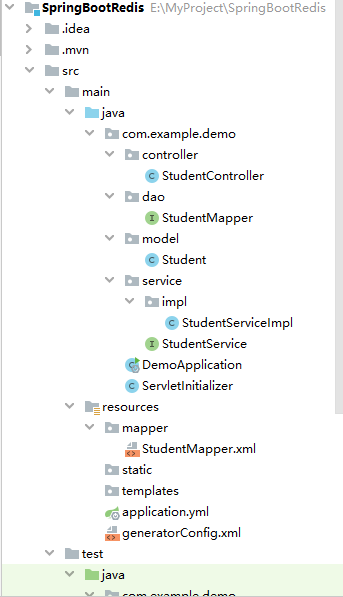
项目结构:
SpringBootRedis 工程项目结构如下:
controller - Controller 层
dao - 数据操作层
model - 实体层
service - 业务逻辑层
Application - 启动类
resources 资源文件夹
application.properties - 应用配置文件,应用启动会自动读取配置
generatorConfig.xml - mybatis 逆向生成配置(这里不是本文只要重点,所以不进行介绍)
mapper 文件夹
StudentMapper.xml - mybatis 关系映射 xml 文件
项目工程代码详情
pom.xml 配置
<?xml version="1.0" encoding="UTF-8"?>

<project xmlns="http://maven.apache.org/POM/4.0.0" xmlns:xsi="http://www.w3.org/2001/XMLSchema-instance"

         xsi:schemaLocation="http://maven.apache.org/POM/4.0.0 http://maven.apache.org/xsd/maven-4.0.0.xsd">

    <modelVersion>4.0.0</modelVersion>

    <parent>

        <groupId>org.springframework.boot</groupId>

        <artifactId>spring-boot-starter-parent</artifactId>

        <version>2.1.7.RELEASE</version>

        <relativePath/> <!-- lookup parent from repository -->

    </parent>

    <groupId>com.example</groupId>

    <artifactId>demo</artifactId>

    <version>0.0.1-SNAPSHOT</version>

    <packaging>war</packaging>

    <name>demo</name>

    <description>Demo project for Spring Boot</description>

    <properties>

        <java.version>1.8</java.version>

    </properties>

    <dependencies>

        <!--    web 依赖    -->

        <dependency>

            <groupId>org.springframework.boot</groupId>

            <artifactId>spring-boot-starter-web</artifactId>

        </dependency>

        <!--    tomcat插件    -->

        <dependency>

            <groupId>org.springframework.boot</groupId>

            <artifactId>spring-boot-starter-tomcat</artifactId>

            <scope>provided</scope>

        </dependency>

        <!--    Test 依赖    -->

        <dependency>

            <groupId>org.springframework.boot</groupId>

            <artifactId>spring-boot-starter-test</artifactId>

            <scope>test</scope>

        </dependency>

        <!-- mysql 依赖  -->

        <dependency>

            <groupId>mysql</groupId>

            <artifactId>mysql-connector-java</artifactId>

            <version>5.1.46</version>

        </dependency>

        <!--   redis 依赖     -->

        <dependency>

            <groupId>org.springframework.boot</groupId>

            <artifactId>spring-boot-starter-data-redis</artifactId>

            <version>2.1.6.RELEASE</version>

        </dependency>

        <!--   mybatis 依赖     -->

        <dependency>

            <groupId>org.mybatis.spring.boot</groupId>

            <artifactId>mybatis-spring-boot-starter</artifactId>

            <version>1.3.2</version>

        </dependency>

        <!-- Gson json 格式化 -->

        <dependency>

            <groupId>com.google.code.gson</groupId>

            <artifactId>gson</artifactId>

            <version>2.8.5</version>

        </dependency>

    </dependencies>

    <build>

        <plugins>

            <plugin>

                <groupId>org.springframework.boot</groupId>

                <artifactId>spring-boot-maven-plugin</artifactId>

            </plugin>

            <!-- mybatis.generator 插件  -->

            <plugin>

                <groupId>org.mybatis.generator</groupId>

                <artifactId>mybatis-generator-maven-plugin</artifactId>

                <version>1.3.7</version>

                <configuration>

                    <configurationFile>${basedir}/src/main/resources/generatorConfig.xml</configurationFile>

                    <overwrite>true</overwrite>

                </configuration>

                <!-- 数据库依赖  -->

                <dependencies>

                    <dependency>

                        <groupId>mysql</groupId>

                        <artifactId>mysql-connector-java</artifactId>

                        <version>8.0.15</version>

                    </dependency>

                </dependencies>

            </plugin>

        </plugins>

    </build>

</project>
application.properties 配置
spring:

  datasource:

    url: jdbc:mysql://localhost:3306/mydb?useSSL=true

    username: oukele

    password: oukele

    driver-class-name: com.mysql.jdbc.Driver

  # 配置 redis

  redis:

    # redis 数据库索引(默认为0)

    database: 0

    # redis 服务地址

    host: 127.0.0.1

    # redis 连接端口

    port: 6379

    # redis 服务器链接密码 (默认为空)

    password:

    # 连接超时时间 (毫秒)

    timeout: 5000

    # 配置 redis 连接池

    jedis:

      pool:

        # 连接池最大连接数 (使用负值表示没有限制)

        max-active: 8

        # 连接池最大阻塞等待时间(使用负值表示没有限制)

        max-wait: -1

        # 连接池的最大空闲连接

        max-idle: 8

        # 连接池中 最小空闲连接

        min-idle: 0

# 配置 mybatis

mybatis:

  # 设置 实体类所在的包名

  typeAliasesPackage: com.example.demo.model

  # mybatis xml 映射关系

  mapper-locations: classpath:mapper/*.xml
项目结构图
model 层 Student.java
package com.example.demo.model;

public class Student {

    private Integer id;

    private String numbercode;

    private String stuname;

    private String stusex;

    private Integer stuage;

    public Integer getId() {

        return id;

    }

    public void setId(Integer id) {

        this.id = id;

    }

    public String getNumbercode() {

        return numbercode;

    }

    public void setNumbercode(String numbercode) {

        this.numbercode = numbercode == null ? null : numbercode.trim();

    }

    public String getStuname() {

        return stuname;

    }

    public void setStuname(String stuname) {

        this.stuname = stuname == null ? null : stuname.trim();

    }

    public String getStusex() {

        return stusex;

    }

    public void setStusex(String stusex) {

        this.stusex = stusex == null ? null : stusex.trim();

    }

    public Integer getStuage() {

        return stuage;

    }

    public void setStuage(Integer stuage) {

        this.stuage = stuage;

    }

    @Override

    public String toString() {

        return "Student{" +

                "id=" + id +

                ", numbercode='" + numbercode + '\'' +

                ", stuname='" + stuname + '\'' +

                ", stusex='" + stusex + '\'' +

                ", stuage=" + stuage +

                '}';

    }

}
dao 层 StudentMapper.java (使用了 注解 + xml 形式 )
package com.example.demo.dao;

import com.example.demo.model.Student;

import org.apache.ibatis.annotations.Delete;

import org.apache.ibatis.annotations.Param;

import org.apache.ibatis.annotations.Select;

import org.springframework.stereotype.Repository;

import java.util.List;

@Repository

public interface StudentMapper {

    @Select("select * from student")

    List<Student> selectAll();

    @Select("select * from student where numbercode = #{numberCode}")

    Student getStudent(@Param("numberCode") String numberCode);

    @Delete("delete from student where numbercode = #{numberCode}")

    int delete(@Param("numberCode") String numberCode);

    int update(Student student);

    int insert(Student student);

}
service 层 StudentService.java
package com.example.demo.service;

import com.example.demo.model.Student;

import java.util.List;

public interface StudentService {

    List<Student> selectAll();

    Student getStudent(String numberCode);

    int delete(String numberCode);

    int update(Student student);

    int insert(Student student);

}
service imple (业务实现)层 StudentServiceImpl.java
package com.example.demo.service.impl;

import com.example.demo.dao.StudentMapper;

import com.example.demo.model.Student;

import com.example.demo.service.StudentService;

import com.google.gson.Gson;

import com.google.gson.reflect.TypeToken;

import org.springframework.beans.factory.annotation.Autowired;

import org.springframework.data.redis.core.RedisTemplate;

import org.springframework.data.redis.core.ValueOperations;

import org.springframework.stereotype.Service;

import java.lang.reflect.Type;

import java.util.List;

import java.util.concurrent.TimeUnit;

@Service

public class StudentServiceImpl implements StudentService {

    @Autowired

    private StudentMapper studentMapper;

    @Autowired

    private RedisTemplate redisTemplate;

    @Override

    public List<Student> selectAll() {

        String key = "student_list";

        Boolean hasKey = redisTemplate.hasKey(key);

        ValueOperations operations = redisTemplate.opsForValue();

        if (hasKey) {

            String redisList = (String) operations.get(key);

            Type type = new TypeToken<List<Student>>() {}.getType();

            List<Student> list =  new Gson().fromJson(redisList,type);

            System.out.println("StudentServiceImpl.selectAll() : 从缓存取得数据,条数:" + list.size());

            return list;

        }

        List<Student> list = studentMapper.selectAll();

        String toJson = new Gson().toJson(list);

        // 存在到缓存中

        operations.set(key, toJson, 10, TimeUnit.SECONDS);

        return list;

    }

    /**

     * 获取 一位 学生逻辑:

     * 如果缓存存在,从缓存中获取学生信息

     * 如果缓存不存在,从 DB 中获取学生信息,然后插入缓存

     */

    @Override

    public Student getStudent(String numberCode) {

        // 从缓存中 取出学生信息

        String key = "student_" + numberCode;

        Boolean hasKey = redisTemplate.hasKey(key);

        ValueOperations operations = redisTemplate.opsForValue();

        // 缓存存在

        if (hasKey) {

            String str = (String) operations.get(key);

            Student student = new Gson().fromJson(str, Student.class);

            System.out.println("StudentServiceImpl.getStudent() : 从缓存取得数据 >> " + student.toString());

            return student;

        }

        Student student = studentMapper.getStudent(numberCode);

        String str = new Gson().toJson(student);

        // 插入缓存中

        operations.set(key, str, 10, TimeUnit.SECONDS);

        System.out.println("StudentServiceImpl.getStudent() : 学生信息插入缓存 >> " + student.toString());

        return student;

    }

    @Override

    public int delete(String numberCode) {

        String key = "student_" + numberCode;

        Boolean hasKey = redisTemplate.hasKey(key);

        int delete = studentMapper.delete(numberCode);

        if( delete > 0){

            // 缓存存在,进行删除

            if (hasKey) {

                redisTemplate.delete(key);

                System.out.println("StudentServiceImpl.update() : 从缓存中删除编号学生 >> " + numberCode);

            }

        }

        return delete;

    }

    /**

     * 更新学生信息逻辑:

     * 如果缓存存在,删除

     * 如果缓存不存在,不操作

     */

    @Override

    public int update(Student student) {

        String key = "student_" + student.getNumbercode();

        Boolean hasKey = redisTemplate.hasKey(key);

        int update = studentMapper.update(student);

        if( update > 0 ){

            // 缓存存在,进行删除

            if (hasKey) {

                redisTemplate.delete(key);

                System.out.println("StudentServiceImpl.update() : 从缓存中删除学生 >> " + student.toString());

            }

        }

        return update;

    }

    @Override

    public int insert(Student student) {

        String key = "student_list";

        int insert = studentMapper.insert(student);

        if (insert > 0) {

            redisTemplate.delete(key);

        }

        return insert;

    }

}
controller 层 StudentController.java
package com.example.demo.controller;

import com.example.demo.model.Student;

import com.example.demo.service.StudentService;

import com.google.gson.Gson;

import org.apache.ibatis.annotations.Param;

import org.springframework.beans.factory.annotation.Autowired;

import org.springframework.web.bind.annotation.*;

import java.util.List;

@RestController

@RequestMapping(path = "/student")

public class StudentController {

    @Autowired

    private StudentService studentService;

    @GetMapping( path = "/getList")

    public List<Student> getList(){

        List<Student> students = studentService.selectAll();

        return students;

    }

    @GetMapping( path = "/getStudent")

    public String getList(@Param("numberCode") String numberCode){

        Student students = studentService.getStudent(numberCode);

        String str = new Gson().toJson(students);

        return str;

    }

    @PostMapping(path = "/insert")

    public String insert(@RequestBody Student student){

        int insert = studentService.insert(student);

        String msg = "";

        if( insert > 0 ){

            msg = "{\"msg\":\"新增成功\",\"flag\":true}";

        }else {

            msg = "{\"msg\":\"新增失败\",\"flag\":false}";

        }

        return msg;

    }

    @GetMapping(path = "/delete")

    public String delete(@Param("numberCode") String numberCode){

        int delete = studentService.delete(numberCode);

        String msg = "";

        if( delete > 0 ){

            msg = "{\"msg\":\"删除成功!!\",\"flag\":true}";

        }else {

            msg = "{\"msg\":\"删除失败!!\",\"flag\":false}";

        }

        return msg;

    }

    @PostMapping(path = "/update")

    public String update(@RequestBody Student student){

        int update = studentService.update(student);

        String msg = "";

        if( update > 0 ){

            msg = "{\"msg\":\"更新成功!!!\",\"flag\":true}";

        }else {

            msg = "{\"msg\":\"更新失败!!!\",\"flag\":false}";

        }

        return msg;

    }

}
完整项目地址:https://github.com/oukele/SpringBoot-MyBatis-MySQL-Redis
SpringBoot + MySQL + MyBatis 整合 Redis 实现缓存操作的更多相关文章
- mybatis整合redis二级缓存
mybatis默认开启了二级缓存功能,在mybatis主配置文件中,将cacheEnabled设置成false,则会关闭二级缓存功能 <settings> <!--二级缓存默认开启, ...
- Spring Boot 整合 Redis 实现缓存操作
摘要: 原创出处 www.bysocket.com 「泥瓦匠BYSocket 」欢迎转载,保留摘要,谢谢! 『 产品没有价值,开发团队再优秀也无济于事 – <启示录> 』 本文提纲 ...
- SpringBoot+Shiro+mybatis整合实战
SpringBoot+Shiro+mybatis整合 1. 使用Springboot版本2.0.4 与shiro的版本 引入springboot和shiro依赖 <?xml version=&q ...
- 30分钟带你了解Springboot与Mybatis整合最佳实践
前言:Springboot怎么使用想必也无需我多言,Mybitas作为实用性极强的ORM框架也深受广大开发人员喜爱,有关如何整合它们的文章在网络上随处可见.但是今天我会从实战的角度出发,谈谈我对二者结 ...
- springBoot+mysql+mybatis demo [基本配置] [遇到的问题]
springBoot+mysql+mybatis的基本配置: 多环境 application.properties spring.profiles.active=dev spring.applicat ...
- Spring-Boot项目中配置redis注解缓存
Spring-Boot项目中配置redis注解缓存 在pom中添加redis缓存支持依赖 <dependency> <groupId>org.springframework.b ...
- SpringBoot与Mybatis整合方式01(源码分析)
前言:入职新公司,SpringBoot和Mybatis都被封装了一次,光用而不知道原理实在受不了,于是开始恶补源码,由于刚开始比较浅,存属娱乐,大神勿喷. 就如网上的流传的SpringBoot与Myb ...
- 项目总结10:通过反射解决springboot环境下从redis取缓存进行转换时出现ClassCastException异常问题
通过反射解决springboot环境下从redis取缓存进行转换时出现ClassCastException异常问题 关键字 springboot热部署 ClassCastException异常 反射 ...
- springBoot整合redis(作缓存)
springBoot整合Redis 1,配置Redis配置类 package org.redislearn.configuration; import java.lang.reflect.Method ...
随机推荐
- python不定长参数 *argc,**kargcs(19)
在 python函数的声明和调用 中我们简单的了解了函数的相关使用,然而在函数传递参数的时候,我们埋下了一个坑,关于不定长参数的传递我们还没有讲,今天这篇文章主要就是讲解这个问题. 一.函数不定长参数 ...
- 系统获取 IP 工具类
系统获取 IP 工具类 import java.net.Inet4Address; import java.net.InetAddress; import java.net.NetworkInterf ...
- logback的xml配置文件模板(超详细)
<?xml version="1.0" encoding="UTF-8" ?> <!-- 在此未说明属性为非必须的,那就表示属性必须设置 -- ...
- python学习-25 函数递归
递归 例如: def abc(n): print(n) if int(n/2) == 0: return n return abc(int(n/2)) abc(10) 运行结果: 10 5 2 1 P ...
- PHP迭代生成器---yield
1.迭代生成器 生成器的核心是一个yield关键字,一个生成器函数看起来像一个普通的函数,不同的是:普通函数返回一个值,而一个生成器可以yield生成许多它所需要的值.生成器函数被调用时,返回的是一个 ...
- (二十)SpringBoot之集成mybatis:使用mybatis注解
一.使用mybatis注解的集成 1.1 引入maven依赖 <dependencies> <dependency> <groupId>org.springfram ...
- 【转载】springboot启动报错(Unable to start web server; nested exception is org.springframework.context.ApplicationContextException: Unable to start ServletWebServerApplicationContext due to missing ServletWe)
SpringBoot启动时的异常信息如下: 1 "C:\Program Files\Java\jdk1.8.0_161\bin\java" ......... com.fangxi ...
- MVC的12种ActionResult介绍以及应用示例【转】
一.介绍 1.ViewResult 表示一个视图结果,它根据视图模板产生应答内容.对应得Controller方法为View. 2.PartialViewResult 表示一个部分视图结果,与ViewR ...
- 【web】使用ionic搭建移动端项目 icon-radio 标签在ios下全部选中的问题
这块css 导致的问题 .disable-pointer-events { pointer-events: none; }
- siamese跟踪论文思考
转载自:https://zhuanlan.zhihu.com/p/34222060 通过作者在专栏里面放的几张响应图我们可以看到:SiamFC并不能区分不同的物体,图片上所有具有语义信息的物体都会得到 ...