
lua-resty-websocket安装和测试
作者:杨鑫奇
关注Openresty很久了,期待支持websocket终于出来了,看到Aapo Talvensaari同学写的文章https://medium.com/p/1778601c9e05,兴奋下也来测试下,之前用websocket做即时通讯,还是基于socket.io的例子,现在用nginx来做...初尝试下,竟然报错了,章哥的解答在这里:
https://github.com/agentzh/lua-resty-websocket/issues/2 ,现在配置成功了,将自己的配置过程写下来,希望对大家有所帮助.
主要原因是:
websocket依赖于 lua-nginx-module,得用最新版本的,下面是章哥给的配置.
我用最新的1.4.2.7编译并测试成功的了.
到自己的目录下:
下载最新版本的 openresty 和 lua-nginx-module 然后安装:
wget http://openresty.org/download/ngx_openresty-1.4.2.7.tar.gz
tar zxvf ngx_openresty-1.4.2.7.tar.gz
git clone https://github.com/chaoslawful/lua-nginx-module.git
cd lua-nginx-module
git checkout -b websocket origin/websocket
cd ../ngx_openresty-1.4.2.7/bundle
rm -Rf ngx_lua-0.8.9
ln -s ../../lua-nginx-module ngx_lua-0.8.9
cd ..
./configure -with-luajit -prefix=/usr/local
gmake && gmake install
安装完成后
cd ../
git clone https://github.com/agentzh/lua-resty-websocket.git
拷贝websocket到lualib目录下
cp -r lua-resty-websocket/lib/resty/websocket /usr/local/lualib/resty/
配置自己的nginx conf的内容
在nginx.conf中添加lualib的路径
lua_package_path "/usr/local/lualib/resty/websocket/?.lua;;";
我这里是独立开的yagamiko.conf,添加websocket:
在server段内,修改添加以下内容:
listen 80 default so_keepalive=2s:2s:8;
这个是Aapo Talvensaari同学写的测试代码:
location /1.0/websocket {

  lua_socket_log_errors off;

  lua_check_client_abort on;

  content_by_lua '

    local server = require "resty.websocket.server"

    local wb, err = server:new{

    timeout = ,  -- in milliseconds

    max_payload_len = ,

    }

    if not wb then

      ngx.log(ngx.ERR, "failed to new websocket: ", err)

      return ngx.exit()

    end

    while true do

      local data, typ, err = wb:recv_frame()

      if wb.fatal then

        ngx.log(ngx.ERR, "failed to receive frame: ", err)

        return ngx.exit()

      end

      if not data then

        local bytes, err = wb:send_ping()

        if not bytes then

          ngx.log(ngx.ERR, "failed to send ping: ", err)

          return ngx.exit()

        end

      elseif typ == "close" then break

      elseif typ == "ping" then

        local bytes, err = wb:send_pong()

        if not bytes then

          ngx.log(ngx.ERR, "failed to send pong: ", err)

          return ngx.exit()

        end

      elseif typ == "pong" then

        ngx.log(ngx.INFO, "client ponged")

      elseif typ == "text" then

        local bytes, err = wb:send_text(data)

        if not bytes then

          ngx.log(ngx.ERR, "failed to send text: ", err)

          return ngx.exit()

        end

      end

    end

    wb:send_close()

  ';

}
然后重新启动nginx就可以了...
使用 这个哥们提到的测试html,就可以了 https://medium.com/p/1778601c9e05
<html>

<head>

<script>

var ws = null;

function connect() {

  if (ws !== null) return log('already connected');

  ws = new WebSocket('ws://ko.local.freeflare.com/1.0/websocket');

  ws.onopen = function () {

    log('connected');

  };

  ws.onerror = function (error) {

    log(error);

  };

  ws.onmessage = function (e) {

    log('recv: ' + e.data);

  };

  ws.onclose = function () {

    log('disconnected');

    ws = null;

  };

  return false;

}

function disconnect() {

  if (ws === null) return log('already disconnected');

  ws.close();

  return false;

}

function send() {

  if (ws === null) return log('please connect first');

  var text = document.getElementById('text').value;

  document.getElementById('text').value = "";

  log('send: ' + text);

  ws.send(text);

  return false;

}

function log(text) {

  var li = document.createElement('li');

  li.appendChild(document.createTextNode(text));

  document.getElementById('log').appendChild(li);

  return false;

}

</script>

</head>

<body>

  <form onsubmit="return send();">

    <button type="button" onclick="return connect();">

      Connect

    </button>

    <button type="button" onclick="return disconnect();">

      Disconnect

    </button>

    <input id="text" type="text">

    <button type="submit">Send</button>

  </form>

  <ol id="log"></ol>

</body>

</html>
测试....这里注意在同一个域名下就好了....
测试成功了....
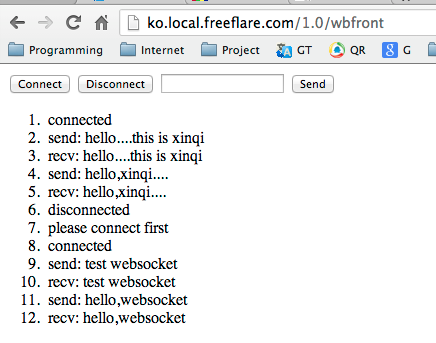
接下来尝试将之前写的即时聊天的逻辑移植过来.....
章哥太给力了,Openresty 很赞啊....
lua-resty-websocket安装和测试的更多相关文章
- LUA+resty 搭建验证码服务器
使用Lua和OpenResty搭建验证码服务器 雨客 2016-04-08 16:38:11 浏览2525 评论0 云数据库Redis版 摘要: Lua下有个Lua-GD图形库,通过简单的Lua语句就 ...
- Win7搭建nginx+php+mysql开发环境以及websocket聊天实例测试
Win7搭建nginx+php+mysql开发环境以及websocket聊天实例测试一.下载相关安装包 1.下载nginx最新版本(nginx1.3.13版之后才支持websocket协议) 下载地址 ...
- Windows下Node.js+Express+WebSocket 安装配置
Linux参考: Linux安装Node.js 使用Express搭建Web服务器 Node.js是一个Javascript运行环境(runtime).实际上它是对Google V8引擎进行了封装.V ...
- Sysbench 1.0.17安装与测试
Sysbench安装与测试 1.安装: cd /usr/local/src wget https://codeload.github.com/akopytov/sysbench/tar.gz/1.0. ...
- C++调用Lua编程环境搭建及测试代码示例
C++调用Lua编程环境搭建及测试代码示例 摘要:测试环境是VS2005+LuaForWindows_v5.1.4-45.exe+WIN7 1.安装lua开发环境LuaForWindows_v5.1. ...
- my SQL下载安装,环境配置,以及密码忘记的解决,以及navicat for mysql下载,安装,测试连接
一.下载 在百度上搜索"mysql-5.6.24-winx64下载" 二.安装 选择安装路径,我的路径“C:\Soft\mysql-5.6.24-winx64” 三.环境配置 计算 ...
- OpenCV2+入门系列(一):OpenCV2.4.9的安装与测试
这里假设看到这篇文章的人都已经对OpenCV以及机器视觉等最基础的概念有了一定的认识,因此本文不会对OpenCV做任何的介绍,而是直接介绍OpenCV2.4.9的安装与测试.此外本文只是简单的介绍如何 ...
- 决战大数据之三-Apache ZooKeeper Standalone及复制模式安装及测试
决战大数据之三-Apache ZooKeeper Standalone及复制模式安装及测试 [TOC] Apache ZooKeeper 单机模式安装 创建hadoop用户&赋予sudo权限, ...
- coreseek实战(一):windows下coreseek的安装与测试
coreseek实战(一):windows下coreseek的安装与测试 网上关于 coreseek 在 windows 下安装与使用的教程有很多,官方也有详细的教程,这里我也只是按着官方提供的教程详 ...
随机推荐
- iOS-应用闪退总结
一.之前上架的 App 在 iOS 9 会闪退问题(iOS系统版本更新,未配置新版本导致闪退问题) 最新更新:(2015.10.02) 开发环境: Delphi 10 Seattle OS X El ...
- SQL Server中In-Flight日志究竟是多少
在SQL Server中,利用日志的WAL来保证关系数据库的持久性,但由于硬盘的特性,不可能使得每生成一条日志,就直接向磁盘写一次,因此日志会被缓存起来,到一定数据量才会写入磁盘.这部分已经生 ...
- ActionScript 3.0入门:Hello World、文件读写、数据存储(SharedObject)、与JS互调
近期项目中可能要用到Flash存取数据,并与JS互调,所以就看了一下ActionScript 3.0,现把学习结果分享一下,希望对新手有帮助. 目录 ActionScript 3.0简介 Hello ...
- 谈谈基于OAuth 2.0的第三方认证 [上篇]
对于目前大部分Web应用来说,用户认证基本上都由应用自身来完成.具体来说,Web应用利用自身存储的用户凭证(基本上是用户名/密码)与用户提供的凭证进行比较进而确认其真实身份.但是这种由Web应用全权负 ...
- 关于Android多项目依赖在Eclipse中无法关联源代码的问题解决
被Eclipse中Android依赖项目无法关联源代码的问题困扰了许久,网上搜索了一下,终于得到解决,大大提高了开发效率. 问题描述: 项目有A,B两个Android Project组成, B是And ...
- Rust初步(三):使用atom搭配racer进行rust编程
在rust.cc社区中有一个关于rust编辑器的讨论(话说很多人要学一个新语言,都会立即考虑编辑器的问题,包括我在内),主要关注的是,智能提示(这个真的太重要了).大家讨论下来有几个选择 1. ecl ...
- Lua 学习笔记(十一)元表与元方法
在Lua中的每个值都有一套预定义的操作集合.例如可以将数字相加,可以连接字符串,还可以在table中插入一对key-value等.但是我们无法将两个table相加,无法对函数作比较,也无法调用一个字符 ...
- Color Transfer between Images code实现
上计算机视觉课老师布置的作业实现论文:Color Transfer between Images 基本思路是: 1.给定srcImg和targetImg 2.将RGB空间转为Lab空间 3.根据论文中 ...
- 相克军_Oracle体系_随堂笔记002-基础
1.常见的Oracle生产库环境: 图2-1可以说是标准的生产库环境,处处体现了冗余,有效防止了单点故障.这就是HA(高可用) 而且冗在某种条件下还可以去掉,平常实现同时运行提供服务,如果一台坏掉,另 ...
- 原创:从零开始,微信小程序新手入门宝典《一》
为了方便大家了解并入门微信小程序,我将一些可能会需要的知识,列在这里,让大家方便的从零开始学习:一:微信小程序的特点张小龙:张小龙全面阐述小程序,推荐通读此文: 小程序是一种不需要下载.安装即可使用的 ...