
Linux6上安装MySQL
MySQL安装包下载:https://www.mysql.com/downloads/
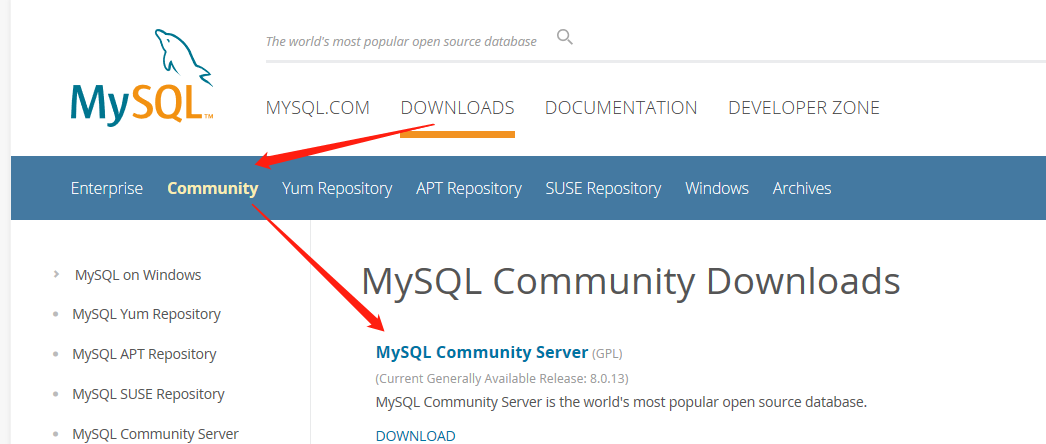
然后选择:
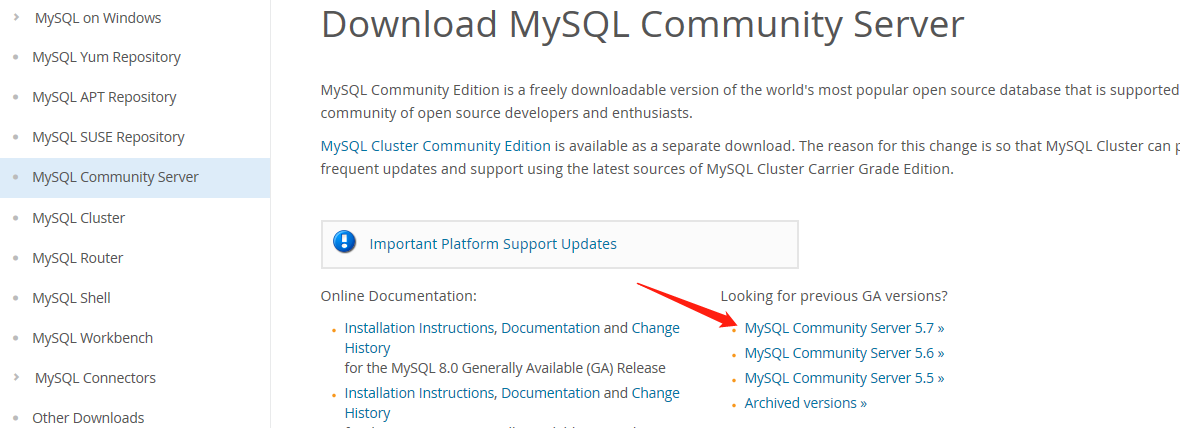
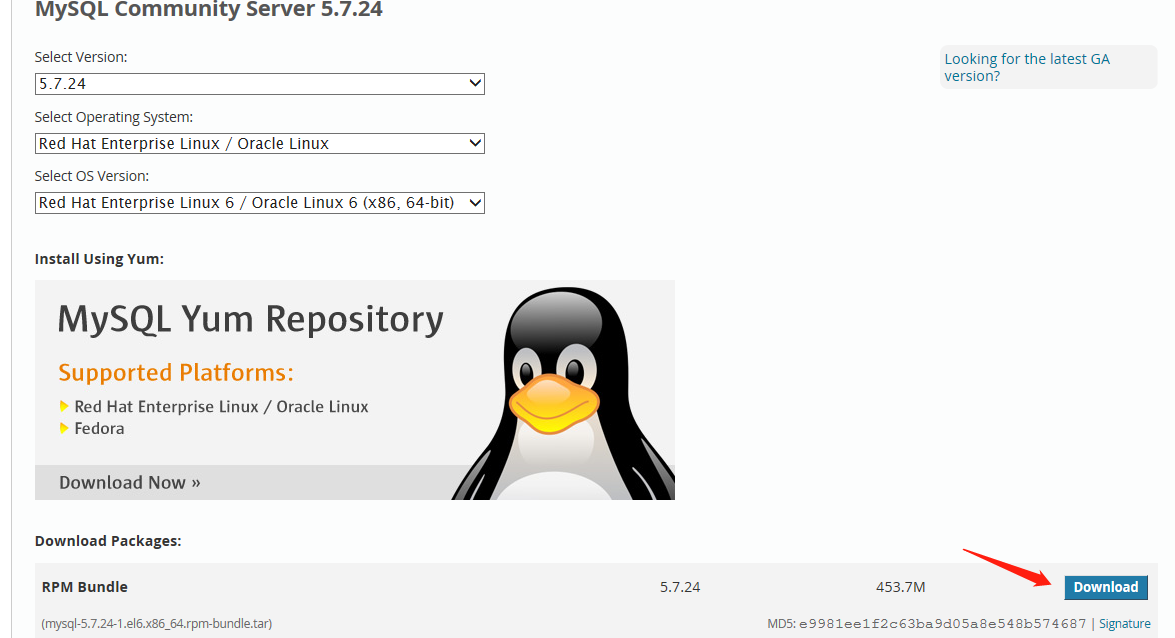
把下载好的安装包传到服务器上的指定目录,然后解压:
[root@master mysql]# tar -xvf mysql-5.7.24-1.el6.x86_64.rpm-bundle.tar
mysql-community-test-5.7.24-1.el6.x86_64.rpm
mysql-community-client-5.7.24-1.el6.x86_64.rpm
mysql-community-libs-compat-5.7.24-1.el6.x86_64.rpm
mysql-community-libs-5.7.24-1.el6.x86_64.rpm
mysql-community-server-5.7.24-1.el6.x86_64.rpm
mysql-community-devel-5.7.24-1.el6.x86_64.rpm
mysql-community-embedded-5.7.24-1.el6.x86_64.rpm
mysql-community-embedded-devel-5.7.24-1.el6.x86_64.rpm
mysql-community-common-5.7.24-1.el6.x86_64.rpm
查询有没有安装MySQL:
rpm -qa | grep mysql
如果安装,则卸载:
rpm -e --nodeps mysql-libs-5.1.71-1.el6.x86_64
安装下面的顺序进行安装:
rpm -ivh mysql-community-common-5.7.24-1.el6.x86_64.rpm
rpm -ivh mysql-community-libs-5.7.24-1.el6.x86_64.rpm
rpm -ivh mysql-community-libs-compat-5.7.24-1.el6.x86_64.rpm
rpm -ivh mysql-community-client-5.7.24-1.el6.x86_64.rpm
rpm -ivh mysql-community-server-5.7.24-1.el6.x86_64.rpm
然后启动:
service mysqld start
查看报错日志:
grep 'temporary password' /var/log/mysqld.log
2019-01-04T18:41:22.901300Z 1 [Note] A temporary password is generated for root@localhost: wsOk8mlgky*.
mysql -uroot -p
Enter password:
ERROR 2002 (HY000): Can't connect to local MySQL server through socket '/var/lib/mysql/mysql.sock' (2)
ps -A | grep -i mysql
查看状态:
/etc/rc.d/init.d/mysqld status
mysqld is stopped
重启:
service mysqld start
Starting mysqld: [ OK ]
再次查看:
/etc/rc.d/init.d/mysqld status
mysqld (pid 2748) is running...
进入MySQL:
mysql -u root -p
Enter password:
ERROR 1045 (28000): Access denied for user 'root'@'localhost' (using password: YES)
报错:
修改:vim /etc/my.cnf
添加:
[mysqld]
skip-grant-tables
重新启动:/etc/init.d/mysqld restart
Stopping mysqld: [ OK ]
/usr/bin/mysqld_safe: line 517: cd: /root/mysql/mysql5.7: Not a directory
Starting mysqld: [ OK ]
[root@master mysql5.7]# mysql
Welcome to the MySQL monitor. Commands end with ; or \g.
Your MySQL connection id is 4
Server version: 5.7.24 MySQL Community Server (GPL)
Copyright (c) 2000, 2018, Oracle and/or its affiliates. All rights reserved.
Oracle is a registered trademark of Oracle Corporation and/or its
affiliates. Other names may be trademarks of their respective
owners.
Type 'help;' or '\h' for help. Type '\c' to clear the current input statement.
mysql>
mysql> update user set authentication_string=password("mysql") where User='root'; --更新一下密码
Query OK, 1 row affected, 1 warning (0.00 sec)
Rows matched: 1 Changed: 1 Warnings: 1
mysql> flush privileges;
Query OK, 0 rows affected (0.00 sec)
mysql> quit
Bye
重新启动:
[root@master mysql5.7]# /etc/init.d/mysqld restart
Stopping mysqld: [ OK ]
/usr/bin/mysqld_safe: line 517: cd: /root/mysql/mysql5.7: Not a directory
Starting mysqld: [ OK ]
[root@master mysql5.7]# mysql -u root -p
Enter password:
Type 'help;' or '\h' for help. Type '\c' to clear the current input statement.
mysql>
可以看到中间有个报错:
/usr/bin/mysqld_safe: line 517: cd: /root/mysql/mysql5.7: Not a directory
解决办法:
chmod -R 755 /root
[root@master /]# /etc/init.d/mysqld restart
Stopping mysqld: [ OK ]
Starting mysqld: [ OK ]
完美解决。
mysql> use mysql;
ERROR 1820 (HY000): You must reset your password using ALTER USER statement before executing this statement.
mysql> alter user 'root'@'localhost' identified by 'mysql';
Query OK, 0 rows affected (0.00 sec)
mysql> show databases;
+--------------------+
| Database |
+--------------------+
| information_schema |
| mysql |
| performance_schema |
| sys |
+--------------------+
4 rows in set (0.00 sec)
mysql>
至此,MySQL安装成功。
Linux6上安装MySQL的更多相关文章
- Ubuntu上安装MySql过程,以及遇到的一些问题
今天在Ubuntu服务器上安装MySql的时候遇到了一些问题,记录下来,以防以后忘记. 安装环境:Ubuntu14.04 安装命令: //安装Mysal服务端//会提示输入root密码 sudo ap ...
- ubuntu上安装mysql 编译安装
为什么要折腾?首先说明的是ubuntu上安装mysql等软件是非常容易简单的,其简单的程度盖过windows上的安装,一句sudo apt-get install就可以搞定.如果想用最简便的方法安装m ...
- 在linux(CentOS-6.7_x86_64)上安装mysql成功记录
查看linux服务器的yum源设置: [root@hadoop03 yum.repos.d]# cd /etc/yum.repos.d [root@hadoop03 yum.repos.d]# ll ...
- 阿里云服务器上安装mysql的心路历程(博友们进来看看哦)
在阿里云花了100买了一台云服务器,配置如下: CPU: 1核 内存: 512MB 数据盘: 0G 带宽: 1Mbps 阿里云服务器安装mysql搞得我想吐血,搞了一个多星期,现在才搞好,而且,还有许 ...
- 在OSX狮子(Lion)上安装MYSQL(Install MySQL on Mac OSX)
这篇文章简述了在Mac OSX狮子(Lion)上安装MySQL Community Server最新版本v10.6.7的过程. MySQL是最流行的开源数据库管理系统.首先,从MySQL的下载页面上下 ...
- 在Windows上安装MySQL(免安装ZIP版)
在 Windows 上安装MySQL(免安装ZIP版) 因为一些原因,重新安装了MySQL数据库,重装时习惯性使用最新版下载 此过程中发现MySQL 5.7.12 和MySQL 5.6的安装有些区别: ...
- 记录CentOS 7.4 上安装MySQL&MariaDB&Redis&Mongodb
记录CentOS 7.4 上安装MySQL&MariaDB&Redis&Mongodb 前段时间我个人Google服务器意外不能用,并且我犯了一件很低级的错误,直接在gcp讲服 ...
- 在Linux机器上安装MySQL
在Linux机器上安装MySQL,仔细认真些就没有问题. CentOS 7下MySQL 5.7安装.配置与应用_数据库技术_Linux公社-Linux系统门户网站 搞不定的话,直接删掉这个MySQL, ...
- Ubuntu 12.04上安装MySQL并运行
Ubuntu 12.04上安装MySQL并运行 作者:凯鲁嘎吉 - 博客园 http://www.cnblogs.com/kailugaji/ 安装MySQL数据库 sudo apt-get upda ...
随机推荐
- 网络通信框架之volley
介绍 我们平时在开发Android应用的时候不可避免地都需要用到网络技术,而多数情况下应用程序都会使用HTTP协议来发送和接收网络数据.Android系统中主要提供了两种方式来进行HTTP通信,Htt ...
- 编写javad代码实现使用Scanner从键盘读取一行输入,去掉其中重复字符, 打印出不同的那些字符
package com.loaderman.test; import java.util.HashSet; import java.util.Scanner; public class Test2 { ...
- openLdap安装教程
环境 操作系统:centOS 7.0 OpenLDAP:2.4.X 安装 从yum源安装 yum install openldap openldap-servers openldap-clients ...
- 【转载】如何在 Kaggle 首战中进入前 10%
本文转载自如何在 Kaggle 首战中进入前 10% 转载仅出于个人学习收藏,侵删 Introduction 本文采用署名 - 非商业性使用 - 禁止演绎 3.0 中国大陆许可协议进行许可.著作权由章 ...
- Python:Base3(函数,切片,迭代,列表生成式)
1.Python之调用函数: Python内置了很多有用的函数,我们可以直接调用. 要调用一个函数,需要知道函数的名称和参数,比如求绝对值的函数 abs,它接收一个参数. 可以直接从Python的官方 ...
- ios 后台进程弹窗
// http://iphonedevwiki.net/index.php/CFUserNotification // https://kunnan.github.io/2018/05/14/com. ...
- 【HANA系列】SAP HANA SQL截取字符串
公众号:SAP Technical 本文作者:matinal 原文出处:http://www.cnblogs.com/SAPmatinal/ 原文链接:[HANA系列]SAP HANA SQL截取字符 ...
- 注入之Mysql-Getshell思路
- Oracle 行列转换公式
1.行转列 SELECT STU_NAME,TERM,ZHANBI,COURSE_MARK FROM (SELECT '罗飞' STU_NAME, '2001-2002' TERM, ' 微积分, ' ...
- Angular build编译内存溢出"JavaScript heap out of memory"的解决办法
关于最近使用angular build编译打包的时候,遇到内存溢出的突发情况,做一个简单记录 编译报错如下↓↓↓ 报错信息很直观地指出是内存溢出了.是什么导致了内存溢出呢?其根本原因在于 nodejs ...