
使用idea进行activiti工作流开发入门学习
1、安装插件
在idea里面,activiti的插件叫actiBPM,在插件库里面把它安装好,重启idea就行了。
2、新建一个maven项目,并更改pom.xml。pom中依赖如下:
<?xml version="1.0" encoding="UTF-8"?>

<project xmlns="http://maven.apache.org/POM/4.0.0"

         xmlns:xsi="http://www.w3.org/2001/XMLSchema-instance"

         xsi:schemaLocation="http://maven.apache.org/POM/4.0.0 http://maven.apache.org/xsd/maven-4.0.0.xsd">

    <modelVersion>4.0.0</modelVersion>

    <groupId>helloActiviti</groupId>

    <artifactId>helloActiviti</artifactId>

    <version>1.0-SNAPSHOT</version>

    <dependencies>

        <dependency>

            <groupId>org.activiti</groupId>

            <artifactId>activiti-spring</artifactId>

            <version>5.18.0</version>

        </dependency>

        <!--JUnit测试-->

        <dependency>

            <groupId>junit</groupId>

            <artifactId>junit</artifactId>

            <version>4.12</version>

        </dependency>

        <!--activiti-->

        <dependency>

            <groupId>org.activiti</groupId>

            <artifactId>activiti-engine</artifactId>

            <version>5.18.0</version>

            <exclusions>

                <exclusion>

                    <artifactId>slf4j-api</artifactId>

                    <groupId>org.slf4j</groupId>

                </exclusion>

                <exclusion>

                    <artifactId>spring-beans</artifactId>

                    <groupId>org.springframework</groupId>

                </exclusion>

                <exclusion>

                    <artifactId>jackson-core-asl</artifactId>

                    <groupId>org.codehaus.jackson</groupId>

                </exclusion>

                <exclusion>

                    <artifactId>commons-lang3</artifactId>

                    <groupId>org.apache.commons</groupId>

                </exclusion>

                <exclusion>

                    <artifactId>commons-lang3</artifactId>

                    <groupId>org.apache.commons</groupId>

                </exclusion>

            </exclusions>

        </dependency>

        <!--MySQL 驱动包,如果是其他库的话需要换驱动包-->

        <dependency>

            <groupId>mysql</groupId>

            <artifactId>mysql-connector-java</artifactId>

            <version>5.1.35</version>

        </dependency>

    </dependencies>

</project>
3、在src/main/resources下面新建一个BPMN文件
新建之后页面会变成如下图所示这样,中间是画布,右边是一些元素,左边是每个元素的一些详细信息,直接拖拽右边的元素就可以画流程了。
通过拖拽,完成简单的流程(这里只用到了StartEvent、UserTask、EndEvent),连接线需要悬停在对应元素上通过拖拽中心点来产生。
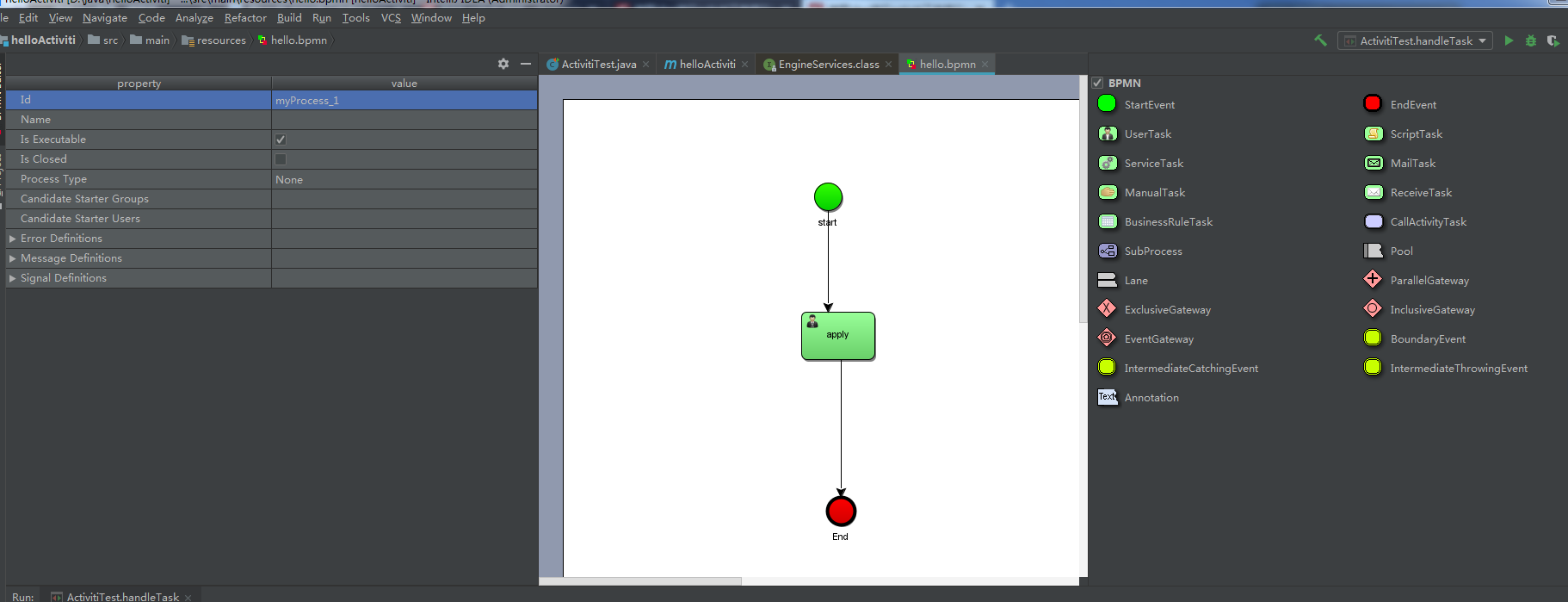
画完流程图之后要更改对应元素的name和assignee,我这里画的一个很简单的流程图,只用到了startEvent、endEvent和userTask。
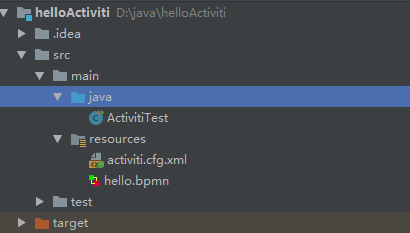
接下来,创建一个Activiti类,在这里我直接和Test一起做了。同时,写好activiti的配置文件activiti.cfg.xml(PS:在写数据库连接的时候,要先创建对应的数据库和用户,数据库最好是新的,因为activiti会创建出24张它自己的表)。
目录结构:
activiti.cfg.xml
<?xml version="1.0" encoding="UTF-8"?>
<beans xmlns="http://www.springframework.org/schema/beans"
xmlns:xsi="http://www.w3.org/2001/XMLSchema-instance"
xsi:schemaLocation="http://www.springframework.org/schema/beans http://www.springframework.org/schema/beans/spring-beans.xsd"> <bean id="processEngineConfiguration" class="org.activiti.engine.impl.cfg.StandaloneProcessEngineConfiguration">
<property name="jdbcDriver" value="com.mysql.jdbc.Driver"></property>
<property name="jdbcUrl" value="jdbc:mysql://localhost:3306/activiti?useUnicode=true&characterEncoding=utf8"></property>
<property name="jdbcUsername" value="root"></property>
<property name="jdbcPassword" value="root"></property>
<property name="databaseSchemaUpdate" value="true"></property>
</bean> </beans>
测试类:
import org.activiti.engine.*;

import org.activiti.engine.repository.DeploymentBuilder;

import org.junit.Test;

import org.activiti.engine.task.Task;

import java.util.List;

public class ActivitiTest {

    /**

     * 会默认按照Resources目录下的activiti.cfg.xml创建流程引擎

     */

    ProcessEngine processEngine = ProcessEngines.getDefaultProcessEngine();

    @Test

    public void test() { //以下两种方式选择一种创建引擎方式:1.配置写在程序里 2.读对应的配置文件

        //

        testCreateProcessEngine();

        //

        testCreateProcessEngineByCfgXml();

        deployProcess();

        startProcess();

        queryTask();

//handleTask();

    }

    /**

     * 测试activiti环境

     */

    @Test

    public void testCreateProcessEngine() {

        ProcessEngineConfiguration cfg = ProcessEngineConfiguration.createStandaloneProcessEngineConfiguration();

        cfg.setJdbcDriver("com.mysql.jdbc.Driver");

        cfg.setJdbcUrl("jdbc:mysql://127.0.0.1:3306/activiti");

        cfg.setJdbcUsername("root");

        cfg.setJdbcPassword("root"); //配置建表策略

        cfg.setDatabaseSchemaUpdate(ProcessEngineConfiguration.DB_SCHEMA_UPDATE_TRUE);

        ProcessEngine engine = cfg.buildProcessEngine();

    }

    /**

     * 根据配置文件activiti.cfg.xml创建ProcessEngine

     */

    @Test

    public void testCreateProcessEngineByCfgXml() {

        ProcessEngineConfiguration cfg = ProcessEngineConfiguration.createProcessEngineConfigurationFromResource("activiti.cfg.xml");

        ProcessEngine engine = cfg.buildProcessEngine();

    }

    /**

     * 发布流程

     * RepositoryService

     */

    @Test

    public void deployProcess() {

        RepositoryService repositoryService = processEngine.getRepositoryService();

        DeploymentBuilder builder = repositoryService.createDeployment();

        builder.addClasspathResource("hello.bpmn");

        builder.deploy();

    }

    /**

     * 启动流程

     * <p>

     * RuntimeService

     */

    @Test

    public void startProcess() {

        RuntimeService runtimeService = processEngine.getRuntimeService();

//可根据id、key、message启动流程

        runtimeService.startProcessInstanceByKey("myProcess_1");

    }

    /**

     * 查看任务

     * TaskService

     */

    @Test

    public void queryTask() {

        TaskService taskService = processEngine.getTaskService(); //根据assignee(代理人)查询任务

        String assignee = "emp";

        List<Task> tasks = taskService.createTaskQuery().taskAssignee(assignee).list();

        int size = tasks.size();

        for (int i = 0; i < size; i++) {

            Task task = tasks.get(i);

        }

        for (Task task : tasks) {

            System.out.println("taskId:" + task.getId() + ",taskName:" + task.getName() + ",assignee:" + task.getAssignee() + ",createTime:" + task.getCreateTime());

        }

    }

    /**

     * 办理任务

     */

    @Test

    public void handleTask() {

        TaskService taskService = processEngine.getTaskService(); //根据上一步生成的taskId执行任务

        String taskId = "2504";

        taskService.complete(taskId);

    }

}
启动流程之后就会有相应的任务产生,存在act_ru_task表中,可以查看任务节点
使用idea进行activiti工作流开发入门学习的更多相关文章
- 【转载】salesforce 零基础开发入门学习(六)简单的数据增删改查页面的构建
salesforce 零基础开发入门学习(六)简单的数据增删改查页面的构建 VisualForce封装了很多的标签用来进行页面设计,本篇主要讲述简单的页面增删改查.使用的内容和设计到前台页面使用的 ...
- 【转载】salesforce 零基础开发入门学习(五)异步进程介绍与数据批处理Batchable
salesforce 零基础开发入门学习(五)异步进程介绍与数据批处理Batchable 本篇知识参考:https://developer.salesforce.com/trailhead/for ...
- 【转载】salesforce 零基础开发入门学习(四)多表关联下的SOQL以及表字段Data type详解
salesforce 零基础开发入门学习(四)多表关联下的SOQL以及表字段Data type详解 建立好的数据表在数据库中查看有很多方式,本人目前采用以下两种方式查看数据表. 1.采用schem ...
- 【转载】salesforce 零基础开发入门学习(三)sObject简单介绍以及简单DML操作(SOQL)
salesforce 零基础开发入门学习(三)sObject简单介绍以及简单DML操作(SOQL) salesforce中对于数据库操作和JAVA等语言对于数据库操作是有一定区别的.salesfo ...
- 【转载】salesforce 零基础开发入门学习(二)变量基础知识,集合,表达式,流程控制语句
salesforce 零基础开发入门学习(二)变量基础知识,集合,表达式,流程控制语句 salesforce如果简单的说可以大概分成两个部分:Apex,VisualForce Page. 其中Apex ...
- 【转载】salesforce 零基础开发入门学习(一)Salesforce功能介绍,IDE配置以及资源下载
salesforce 零基础开发入门学习(一)Salesforce功能介绍,IDE配置以及资源下载 目前国内已经有很多公司做salesforce,但是国内相关的资料确是少之又少.上个月末跳槽去了新 ...
- Web开发入门学习笔记
公司web项目终于要启动了,本以为django学习可以在实战中进行,结果最终使用了Drupal框架,好吧,那我们就PHP走起,买了本<细说PHP>,先跟着过一遍Web开发入门. HTTP协 ...
- salesforce 零基础开发入门学习(三)sObject简单介绍以及简单DML操作(SOQL)
salesforce中对于数据库操作和JAVA等语言对于数据库操作是有一定区别的.salesforce中的数据库使用的是Force.com 平台的数据库,数据表一行数据可以理解成一个sObject变量 ...
- salesforce 零基础开发入门学习(一)Salesforce功能介绍,IDE配置以及资源下载
目前国内已经有很多公司做salesforce,但是国内相关的资料确是少之又少.上个月末跳槽去了新公司,主要做的就是salesforce,不过当时想要看一些相关资料确实比较难.为了避免想要零基础学习的人 ...
随机推荐
- Java程序猿跳槽应该学哪些方面的技术
互联网产品.大型企业级项目常会用到的: 并发处理技术 具体到Java上通常是涉及java.util.concurrent.并发锁机制.NIO等方面,当然最近比较火爆的Netty框架也可以作为高并发处理 ...
- 面试想拿20K,HR说你只值10K,这个时候你该怎样回答或者反驳
正确的做法是: 不动声色,继续跟HR谈下去.把面试流程走完,并且争取拿到这个10K的offer. 这里有一个小技巧: 如果拿到offer,礼貌地跟HR表示感谢,不过不要马上入职.可以找个由头,比方说自 ...
- docker安装与常规使用 && dockerfile编写springbootdemo镜像
dockerfile教程参考 https://blog.csdn.net/qq_33256688/article/details/80319673 docker 创建容器命令: docker ru ...
- eclipse开发scrapy爬虫工程,附爬虫临门级教程
写在前面 自学爬虫入门之后感觉应该将自己的学习过程整理一下,也为了留个纪念吧. scrapy环境的配置还请自行百度,其实也不难(仅针对windows系统,centos配置了两天,直到现在都没整明白) ...
- C#中两个List<TModel>中根据指定条件--判断并获取不同数据的数据集合2
方式一:Linq List<Test> list = new List<Test>(); list.Add(new Test { score = 10, name = &quo ...
- LightOJ - 1151 Snakes and Ladders
LightOJ - 1151 思路: 将期望dp[x]看成自变量,那么递推式就可以看成方程组,用高斯消元求方程组的解就能求解出期望值 高斯消元求解的过程也是期望逆推的过程,注意边界情况的常数项,是6/ ...
- 访问php界面访问不到,会下载文件
背景 某台服务器上有java跟php俩套环境,之前php默认用nginx80端口访问php项目.java项目上线后,80端口被占用,导致php项目页访问报错:404 报错 404, 原因一: ...
- Lucene简单了解和使用
一,Lucene简介 1 . Lucene 是什么? Lucene 是一个开放源代码的全文检索引擎工具包,但它不是一个完整的全文检索引擎,而是一个全文检索引擎的架构,提供了完整的查询引擎和索引引擎, ...
- bloomberg bulkfile 在oracle的存储
文章导航 bloomberg bulkfile 解析 bloomberg bulkfile 在oracle的存储 一 表名和字段名称的命名规则 1.1. 表名以文件名称直接命名,将文件名中的" ...
- vue3.0+typeScript项目
https://segmentfault.com/a/1190000018720570#articleHeader15 https://segmentfault.com/a/1190000016423 ...