
JavaWeb_(SpringMVC框架)测试SpringMVC&Spring&MyBatis三大整合
搭建 SpringMVC&Spring&MyBatis三大整合 传送门
1、准备 测试搭建S pringMVC&Spring&MyBatis三大整合 用例
a)准备 – 测试数据:
i.Bean -> 根据个人喜好;
ii.数据库表 -> 根据个人喜好;
b)导入 – 测试数据 -> 学习项目 -> 后台页面
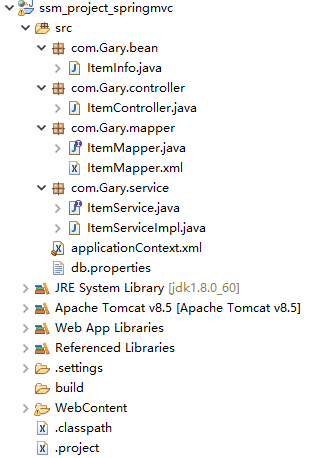
在ssm_springmvc数据库中创建一张item_info的表
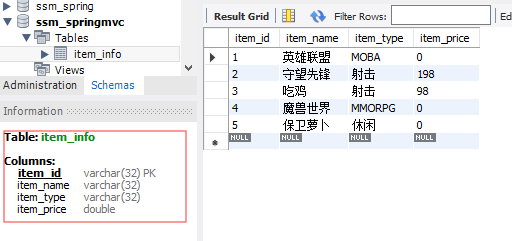
将这些数据显示在item_list.jsp上
                                        <thead>

                                            <tr>

                                                <!--描述:商品数据标签-->

                                                <th>ID</th>

                                                <th>游戏名称</th>

                                                <th>类型</th>

                                                <th>原价</th>

                                            </tr>

                                        </thead>

                                        <tbody>

                                               <c:forEach items="${itemList }" var="item">

                                                <tr>

                                                    <td>${item.item_id }</td>

                                                    <td>${item.item_name }</td>

                                                    <td>${item.item_type }</td>

                                                    <td>${item.item_price }</td>

                                                    <td data-value="1">

                                                        <a herf="#" id="edit_btn" class="btn btn-xs btn-info" data-toggle="modal" data-target="#editLayer" onclick="editGoods('${item.item_id}')">修改</a>

                                                        <a herf="#"  id="del_btn" class="btn btn-xs btn-danger" onclick="deleteGoods('${item.item_id}')">删除</a>

                                                    </td>

                                                   </tr>

                                            </c:forEach>

                                        </tbody>
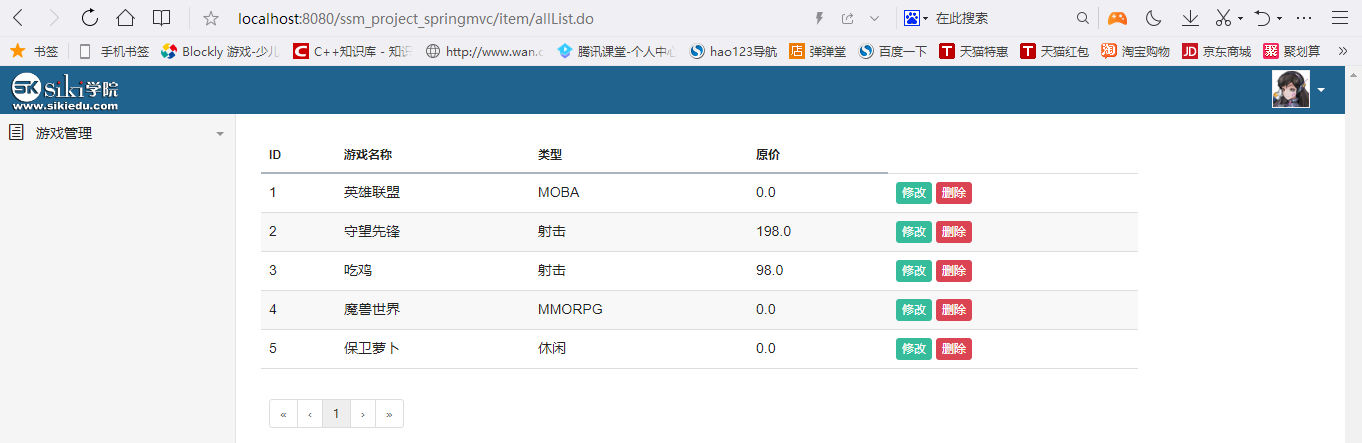
package com.Gary.bean;

public class ItemInfo {

    //id

    private String item_id;

    //name

    private String item_name;

    //type

    private String item_type;

    //price

    private Double item_price;

    public String getItem_id() {

        return item_id;

    }

    public void setItem_id(String item_id) {

        this.item_id = item_id;

    }

    public String getItem_name() {

        return item_name;

    }

    public void setItem_name(String item_name) {

        this.item_name = item_name;

    }

    public String getItem_type() {

        return item_type;

    }

    public void setItem_type(String item_type) {

        this.item_type = item_type;

    }

    public Double getItem_price() {

        return item_price;

    }

    public void setItem_price(Double item_price) {

        this.item_price = item_price;

    }

    @Override

    public String toString() {

        return "ItemInfo [item_id=" + item_id + ", item_name=" + item_name + ", item_type=" + item_type

                + ", item_price=" + item_price + "]";

    }

}
ItemInfo.java
package com.Gary.controller;

import java.util.List;

import org.springframework.beans.factory.annotation.Autowired;

import org.springframework.stereotype.Controller;

import org.springframework.web.bind.annotation.RequestMapping;

import org.springframework.web.servlet.ModelAndView;

import com.Gary.bean.ItemInfo;

import com.Gary.service.ItemService;

//游戏信息管理

@Controller

@RequestMapping("/item/")

public class ItemController {

    @Autowired

    private ItemService itemService;

    @RequestMapping("allList.do")

    public ModelAndView list() {

        ModelAndView mav = new ModelAndView();

        List<ItemInfo> itemList = itemService.selectAll();

        //查询 将结果赋值给mav

        mav.addObject("itemList",itemList);

        //设置试图名称

        mav.setViewName("item_list");

        return mav;

    }

}
ItemController.java
package com.Gary.mapper;

import java.util.List;

import com.Gary.bean.ItemInfo;

public interface ItemMapper {

    //查询全部

    public List<ItemInfo> selectAll();

}
ItemMapper.java
<?xml version="1.0" encoding="UTF-8" ?>

<!DOCTYPE mapper

  PUBLIC "-//mybatis.org//DTD Mapper 3.0//EN"

  "http://mybatis.org/dtd/mybatis-3-mapper.dtd">

  <mapper namespace="com.Gary.mapper.ItemMapper">

      <select id="selectAll" resultType="ItemInfo">

          SELECT * FROM item_info

      </select>

     </mapper>
ItemMapper.xml
package com.Gary.service;

import java.util.List;

import com.Gary.bean.ItemInfo;

public interface ItemService {

    //查询全部

        public List<ItemInfo> selectAll();

}
ItemService.java
package com.Gary.service;

import java.util.List;

import org.springframework.beans.factory.annotation.Autowired;

import org.springframework.stereotype.Service;

import com.Gary.bean.ItemInfo;

import com.Gary.mapper.ItemMapper;

@Service

public class ItemServiceImpl implements ItemService{

    @Autowired

    private ItemMapper itemMapper;

    @Override

    public List<ItemInfo> selectAll() {

        return itemMapper.selectAll();

    }

}
ItemServiceImpl.java
<?xml version="1.0" encoding="UTF-8"?>

<beans xmlns="http://www.springframework.org/schema/beans"

    xmlns:xsi="http://www.w3.org/2001/XMLSchema-instance"

    xmlns:context="http://www.springframework.org/schema/context"

    xmlns:aop="http://www.springframework.org/schema/aop"

    xmlns:mvc="http://www.springframework.org/schema/mvc"

    xmlns:tx="http://www.springframework.org/schema/tx"

    xsi:schemaLocation="http://www.springframework.org/schema/mvc http://www.springframework.org/schema/mvc/spring-mvc-4.3.xsd

        http://www.springframework.org/schema/beans http://www.springframework.org/schema/beans/spring-beans-4.3.xsd

        http://www.springframework.org/schema/context http://www.springframework.org/schema/context/spring-context-4.3.xsd

        http://www.springframework.org/schema/aop http://www.springframework.org/schema/aop/spring-aop-4.3.xsd

        http://www.springframework.org/schema/tx http://www.springframework.org/schema/tx/spring-tx-4.3.xsd">

        <!-- 读取配置文件 数据库 -->

        <context:property-placeholder location="classpath:db.properties"/>

        <!-- 配置数据源 -->

        <bean name="dataSource" class="com.mchange.v2.c3p0.ComboPooledDataSource">

            <property name="driverClass" value="${jdbc.driverClass}"/>

            <property name="jdbcUrl" value="${jdbc.jdbcUrl}"/>

            <property name="user" value="${jdbc.user}"/>

            <property name="password" value="${jdbc.password}"/>

        </bean>

        <!-- 开启注解扫描 -->

        <context:component-scan base-package="com.Gary"></context:component-scan>

        <!-- 事务核心管理器 -->

        <bean name="transactionManager" class="org.springframework.jdbc.datasource.DataSourceTransactionManager">

            <property name="dataSource" ref="dataSource"/>

        </bean>

        <!-- 开启注解事务 -->

        <tx:annotation-driven/>

        <!-- 配置视图解析器 -->

        <bean class="org.springframework.web.servlet.view.InternalResourceViewResolver">

            <property name="prefix" value="/WEB-INF/jsp/"/>

            <property name="suffix" value=".jsp"/>

        </bean>

        <!-- 配置mybatis -->

        <bean name="sqlSessionFactory" class="org.mybatis.spring.SqlSessionFactoryBean">

            <property name="dataSource" ref="dataSource"/>

            <property name="typeAliasesPackage" value="com.Gary.bean"/>

        </bean>

        <!-- mapper工厂 -->

        <bean class="org.mybatis.spring.mapper.MapperScannerConfigurer">

            <property name="basePackage" value="com.Gary.mapper"/>

        </bean>

</beans>
applicationContext.xml
jdbc.driverClass=com.mysql.jdbc.Driver

jdbc.jdbcUrl=jdbc:mysql://localhost:3306/ssm_springmvc

jdbc.user=root

jdbc.password=123456
db.properties
<%@ page language="java" contentType="text/html; charset=UTF-8" pageEncoding="UTF-8"%>
<%@ taglib uri="http://java.sun.com/jsp/jstl/core" prefix="c"%>
<!DOCTYPE html PUBLIC "-//W3C//DTD HTML 4.01 Transitional//EN" "http://www.w3.org/TR/html4/loose.dtd">
<html>
<head>
<meta charset="UTF-8">
<title>游戏管理后台</title>
<meta name="viewport" content="initial-scale=1.0,maximum-scale=1.0,user-scalable=no">
<meta http-equiv="X-UA-Compatible" content="IE=edge">
<!-- bootstrap framework -->
<link href="${pageContext.request.contextPath }/css/bootstrap.min.css" rel="stylesheet" media="screen">
<!-- main stylesheet -->
<link href="${pageContext.request.contextPath }/css/main.min.css" rel="stylesheet" media="screen" id="mainCss">
<!-- elegant icons -->
<link href="${pageContext.request.contextPath }/css/style.css" rel="stylesheet" media="screen">
<!-- datepicker -->
<link href="${pageContext.request.contextPath }/css/datepicker3.css" rel="stylesheet" media="screen">
<!-- jBox -->
<link href="${pageContext.request.contextPath }/css/jbox.css" rel="stylesheet" media="screen">
<link href="${pageContext.request.contextPath }/css/noticeborder.css" rel="stylesheet" media="screen"> </head>
<body class="side_menu_active side_menu_expanded">
<div id="page_wrapper"> <!-- header -->
<header id="main_header">
<div class="container-fluid">
<!--logo-->
<div class="brand_section">
<a href="#"><img src="${pageContext.request.contextPath }/picture/logo01.png" alt="site_logo" width="108" height="40" style="margin-top: 5px"></a>
</div>
<div class="header_user_actions dropdown">
<div data-toggle="dropdown" class="dropdown-toggle user_dropdown">
<div class="user_avatar">
<img src="${pageContext.request.contextPath }/picture/head01.png" width="38" height="38">
</div>
<span class="caret"></span>
</div>
<ul class="dropdown-menu dropdown-menu-right">
<li><a href="#">个人中心</a></li>
<li><a href="#">注销</a></li>
</ul>
</div>
</div>
</header> <!-- main content -->
<div id="main_wrapper">
<div class="container-fluid">
<div class="row">
<div class="col-md-12">
<div class="row">
<div class="col-md-10">
<table class="table table-yuk2 toggle-arrow-tiny" id="footable_demo" data-filter="#textFilter" data-page-size="5">
<thead>
<tr>
<!--描述:商品数据标签-->
<th>ID</th>
<th>游戏名称</th>
<th>类型</th>
<th>原价</th>
</tr>
</thead>
<tbody>
<c:forEach items="${itemList }" var="item">
<tr>
<td>${item.item_id }</td>
<td>${item.item_name }</td>
<td>${item.item_type }</td>
<td>${item.item_price }</td> <td data-value="1">
<a herf="#" id="edit_btn" class="btn btn-xs btn-info" data-toggle="modal" data-target="#editLayer" onclick="editGoods('${item.item_id}')">修改</a>
<a herf="#" id="del_btn" class="btn btn-xs btn-danger" onclick="deleteGoods('${item.item_id}')">删除</a>
</td>
</tr>
</c:forEach>
</tbody>
<tfoot class="hide-if-no-paging">
<tr>
<td colspan="5">
<ul class="pagination pagination-sm"></ul>
</td>
</tr>
</tfoot>
</table>
</div>
</div>
</div>
</div>
</div>
</div> <!-- edit layer -->
<div class="modal fade" id="editLayer">
<div class="modal-dialog modal-content">
<div class="modal-content">
<div class="modal-header">
<button type="button" class="close" data-dismiss="modal"><span aria-hidden="true">×</span><span class="sr-only">Close</span></button>
<h4 class="modal-title">修改游戏信息</h4>
</div>
<div class="modal-body">
<!--游戏修改详情弹出层表单-->
<form class="form-horizontal" id="edit_item_form">
<!-- 游戏id隐藏域 -->
<input type="hidden" id="edit_item_id" name="item_id"/>
<!-- 游戏名称 -->
<div class="form-group">
<label for="edit_item_name" class="col-sm-2 control-label">游戏名称</label>
<div class="col-sm-10">
<input type="text" class="form-control" id="edit_item_name" placeholder="游戏名称" name="item_name">
</div>
</div>
<!-- 游戏类型 -->
<div class="form-group">
<label for="edit_item_price" class="col-sm-2 control-label">类型</label>
<div class="col-sm-10">
<input type="text" class="form-control" id="edit_item_price" placeholder="类型" name="item_price">
</div>
</div>
<!-- 游戏原价 -->
<div class="form-group">
<label for="edit_item_price" class="col-sm-2 control-label">原价</label>
<div class="col-sm-10">
<input type="text" class="form-control" id="edit_item_price" placeholder="原价" name="item_price">
</div>
</div>
</form>
</div>
<div class="modal-footer">
<button type="button" class="btn btn-default btn-sm" data-dismiss="modal">取消</button>
<button type="button" class="btn btn-primary btn-sm" onclick="updateItem()">确认修改</button>
</div>
</div>
</div>
</div> <!-- add layer -->
<div class="modal fade" id="addLayer">
<div class="modal-dialog modal-content">
<div class="modal-content">
<div class="modal-header">
<button type="button" class="close" data-dismiss="modal"><span aria-hidden="true">×</span><span class="sr-only">Close</span></button>
<h4 class="modal-title">新增游戏</h4>
</div>
<div class="modal-body">
<!--添加游戏弹出层表单-->
<form class="form-horizontal" id="add_item_form">
<!-- 游戏id隐藏域 -->
<input type="hidden" id="add_item_id" name="item_id"/>
<!-- 游戏名称 -->
<div class="form-group">
<label for="add_item_name" class="col-sm-2 control-label">游戏名称</label>
<div class="col-sm-10">
<input type="text" class="form-control" id="add_item_name" placeholder="游戏名称" name="item_name">
</div>
</div>
<!-- 游戏类型 -->
<div class="form-group">
<label for="add_item_price" class="col-sm-2 control-label">类型</label>
<div class="col-sm-10">
<input type="text" class="form-control" id="add_item_price" placeholder="类型" name="item_price">
</div>
</div>
<!-- 游戏原价 -->
<div class="form-group">
<label for="add_item_price" class="col-sm-2 control-label">原价</label>
<div class="col-sm-10">
<input type="text" class="form-control" id="add_item_price" placeholder="原价" name="item_price">
</div>
</div>
</form>
</div>
<div class="modal-footer">
<button type="button" class="btn btn-default btn-sm" data-dismiss="modal">取消</button>
<button type="button" class="btn btn-primary btn-sm" onclick="addItem()">确认修改</button>
</div>
</div>
</div>
</div> <!-- main menu -->
<nav id="main_menu">
<div class="menu_wrapper">
<ul>
<li class="first_level">
<a href="javascript:void(0)">
<span class="icon_document_alt first_level_icon"></span>
<span class="menu-title">游戏管理</span>
</a>
<ul>
<li class="submenu-title">游戏管理</li>
<!-- <li><a href="#" data-toggle="modal" data-target="#addLayer">商品添加</a></li> -->
<li><a href="${pageContext.request.contextPath }/item/myitemlist.do">游戏列表</a></li>
</ul>
</li>
</ul>
</div>
<div class="menu_toggle">
<span class="icon_menu_toggle">
<i class="arrow_carrot-2left toggle_left"></i>
<i class="arrow_carrot-2right toggle_right" style="display:none"></i>
</span>
</div>
</nav>
</div> <!-- jQuery -->
<script src="${pageContext.request.contextPath }/js/jquery.min.js"></script>
<!-- jQuery Cookie -->
<script src="${pageContext.request.contextPath }/js/jquerycookie.min.js"></script>
<!-- Bootstrap Framework -->
<script src="${pageContext.request.contextPath }/js/bootstrap.min.js"></script>
<!-- retina images -->
<script src="${pageContext.request.contextPath }/js/retina.min.js"></script>
<!-- switchery -->
<script src="${pageContext.request.contextPath }/js/switchery.min.js"></script>
<!-- typeahead -->
<script src="${pageContext.request.contextPath }/js/typeahead.bundle.min.js"></script>
<!-- fastclick -->
<script src="${pageContext.request.contextPath }/js/fastclick.min.js"></script>
<!-- match height -->
<script src="${pageContext.request.contextPath }/js/jquery.matchheight-min.js"></script>
<!-- scrollbar -->
<script src="${pageContext.request.contextPath }/js/jquery.mcustomscrollbar.concat.min.js"></script>
<!-- moment.js (date library) -->
<script src="${pageContext.request.contextPath }/js/moment-with-langs.min.js"></script>
<!-- Yukon Admin functions -->
<script src="${pageContext.request.contextPath }/js/yukon_all.min.js"></script>
<!-- page specific plugins -->
<!-- footable -->
<script src="${pageContext.request.contextPath }/js/footable.min.js"></script>
<script src="${pageContext.request.contextPath }/js/footable.paginate.min.js"></script>
<script src="${pageContext.request.contextPath }/js/footable.filter.min.js"></script>
<!-- datepicker -->
<script src="${pageContext.request.contextPath }/js/bootstrap-datepicker.js"></script>
<!-- jBox -->
<script src="${pageContext.request.contextPath }/js/jbox.min.js"></script> <script type="text/javascript">
$(function() {
//footable
yukon_footable.goodslist();
//datepicker
yukon_datepicker.p_forms_extended();
}) //修改弹框回显
function toEdit(id) {
$.ajax({
type:"post",
url:"${pageContext.request.contextPath }/item/toEdit",
data:{"id":id},
success:function(data) {
$("#edit_item_name").val(data.item_name);
$("#edit_item_type").val(data.item_type);
$("#edit_item_price").val(data.item_price);
},
dataType:"json"
});
}
//确认修改
function updateItem() {
$.post(
"${pageContext.request.contextPath }/item/update.do",
$("#edit_item_form").serialize(),
function(data){
alert("游戏信息更新成功!");
window.location.reload();
});
} //确认删除
function deleteItem(id) {
if(confirm('确实要删除该游戏吗?')) {
$.post(
"${pageContext.request.contextPath }/item/delete.do",
{"id":id},
function(data){
window.location.reload();
});
}
} //添加游戏
function addItem() {
$.post(
"${pageContext.request.contextPath }/item/save.do",
$("#add_item_form").serialize(),
function(data){
alert("游戏添加成功!");
window.location.reload();
});
}
</script>
</body>
</html>
item_list.jsp
JavaWeb_(SpringMVC框架)测试SpringMVC&Spring&MyBatis三大整合的更多相关文章
- SSM(SpringMVC+Spring+MyBatis)三大框架使用Maven快速搭建整合(实现数据库数据到页面进行展示)
本文介绍使用SpringMVC+Spring+MyBatis三大框架使用Maven快速搭建一个demo,实现数据从数据库中查询返回到页面进行展示的过程. 技术选型:SpringMVC+Spring+M ...
- SpringMvc+Spring+Mybatis+Maven整合
一.建立数据库表,使用generator自动生成相关代码: /* SQLyog Ultimate v11.24 (32 bit) MySQL - 5.1.62-community : Database ...
- 【整理】JavaEE基本框架(Struts2+Spring+MyBatis三层,Struts MVC)之间的关系
#[整理]JavaEE基本框架(Struts2+Spring+MyBatis三层,Struts MVC)之间的关系 之间的关系
郭晨 软件151 1531610114 [整理]JavaEE基本框架(Struts2+Spring+MyBatis三层,Struts MVC)之间的关系 visio文件下载 概述 一个JavaEE的项 ...
- idea+springmvc+spring+mybatis+maven整合返回json数据webapi
首先看一张目录结构图: : 创建步骤: 1.创建maven webapp工程, 创建完后的目录结构为: 2.添加项目依赖(添加jar包) 需要的jar包: spring-webmvc, spring ...
- 1.springMVC+spring+Mybatis的整合思路
SSM整合的过程:就是把一些东西交给spring管理,也就是添加配置文件的一个过程.那么有哪些东西我们要交给spring管理呢?大概有以下几个: 1.数据源(可配置数据库连接池) 2.SqlSessi ...
- Struts2框架07 Struts2 + Spring + Mybatis 整合
1 导包 <project xmlns="http://maven.apache.org/POM/4.0.0" xmlns:xsi="http://www.w3.o ...
- SpringMVC框架02——SpringMVC的Controller详解
1.基于注解的控制器 1.1.@Controller 注解类型 在SpringMVC中使用org.springframework.stereotype.Controller注解类型声明某类的实例是一个 ...
- SSM(Spring MVC +Spring+Mybatis)整合——maven工程
所谓的SSM 其实就是Spring MVC下整合mybatis. 具体的定义网络上都有,很详细. 这里只说项目的搭建步骤. 第一步 新建maven工程 工程目录如下: 配置pom.xml文件,引入所需 ...
随机推荐
- mysql 树结构递归处理
日常开发中我们经常会遇到树形结构数据处理,一般表结构通常会常用id,pid这种设计方案. 之前用oracle.sqlServer数据库,用相应的语法即可获取树形结构数据(oracel:connect ...
- WebSocket协议探究(一)
一 复习和目标 1 复习 上一节使用wireshark抓包分析了WebSocket流量 包含连接的建立:HTTP协议升级WebSocket协议 使用建立完成的WebSocket协议发送数据 2 目标 ...
- g++ 生成C++ .so库文件,并调用示例
Tags: g++ C++ so library 在Linux系统下用g++命令编译C++程序.也可以生成so,a链接库 示例一 编译时链接so库 Test.h 文件内容 Main.cpp ...
- Servlet实现图片读取显示
1.导入jar包:commons-io-1.4.jar 2.index.jsp: <%@ page language="java" import="java.uti ...
- 解决window 12 service 不能调用excel ,报"System.Runtime.InteropServices.COMException (0x800A03EC)
Step1: 运行comexp.msc -32 注意因为excel 是32 位的,所以这里用的32位的操作, 如用64位的操作命令:dcomcnfg.exe,将找不到excel com 进入compo ...
- 利用PL/SQL从Oracle数据库导出和导入数据
转自:https://www.jb51.net/article/109768.htm 本文实例为大家分享了使用PL/SQL从Oracle数据库导出和导入数据的方法,供大家参考,具体内容如下 1.导出数 ...
- 机器学习(十)—聚类算法(KNN、Kmeans、密度聚类、层次聚类)
聚类算法 任务:将数据集中的样本划分成若干个通常不相交的子集,对特征空间的一种划分. 性能度量:类内相似度高,类间相似度低.两大类:1.有参考标签,外部指标:2.无参照,内部指标. 距离计算:非负性, ...
- Derby 数据库基本操作 命令
0. 命令行 登录/退出 登录 java org.apache.derby.tools.ij ..\dirs>java org.apache.derby.tools.ij ij 版本 10.3 ...
- 下载uhd_images_downloader出现报错
下载uhd_images_downloader出现报错 [INFO] Images destination: /usr/local/share/uhd/images [INFO] No invento ...
- adb连接各模拟器端口
天天模拟器 adb connect 127.0.0.1:6555 网易MuMu adb connect 127.0.0.1:5555