
Lazy的SDL教程 翻译----Lesson 22 Timing
原文:http://lazyfoo.net/tutorials/SDL/22_timing/index.php
Timing
计时
Last Updated 3/10/14
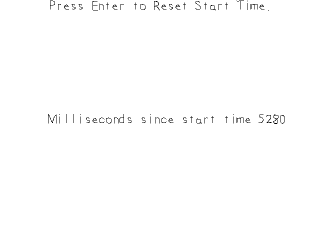
Another important part of any sort of gaming API is the ability to handle time. In this tutorial we'll make a timer we can restart.
对于任何游戏API,另一个重要的部分是能够处理时间参量。在这个教程中,我们将写一个能够重启的定时器。
//Using SDL, SDL_image, SDL_ttf, standard IO, strings, and string streams

#include <SDL.h>

#include <SDL_image.h>

#include <SDL_ttf.h>

#include <stdio.h>

#include <string>

#include <sstream>
For this tutorial we'll be using string streams and have to include the sstream header which should come standard with your C++ compiler.
在这个教程中,将使用到string streams,并且include了stream头文件,你的c++编译器应该有这个头文件。
bool loadMedia()

{

    //Loading success flag

    bool success = true;

    //Open the font

    gFont = TTF_OpenFont( "22_timing/lazy.ttf", 28 );

    if( gFont == NULL )

    {

        printf( "Failed to load lazy font! SDL_ttf Error: %s\n", TTF_GetError() );

        success = false;

    }

    else

    {

        //Set text color as black

        SDL_Color textColor = { 0, 0, 0, 255 };

        //Load prompt texture

        if( !gPromptTextTexture.loadFromRenderedText( "Press Enter to Reset Start Time.", textColor ) )

        {

            printf( "Unable to render prompt texture!\n" );

            success = false;

        }

    }

    return success;

}
As mentioned in the, you want to minimize the amount of times you render text. We'll have a texture to prompt input and a texture to display the current time in milliseconds. The time texture changes every frame so we have to render that every frame, but the prompt texture doesn't change so we can render it once in the file loading function.
正如font rendering tutorial中所提到的,减少文字渲染所需的时间。我们用一个texture来展示输入信息和一个texture来显示时间(ms)。time texture在每一帧中都变化,所以不得不渲染每一帧。但是prompt texture 并不变,所以只用在加载文件的函数中渲染一次就可以。
 //Main loop flag

            bool quit = false;

            //Event handler

            SDL_Event e;

            //Set text color as black

            SDL_Color textColor = { 0, 0, 0, 255 };

            //Current time start time

            Uint32 startTime = 0;

            //In memory text stream

            std::stringstream timeText;
Before we enter the main loop we want to declare some variables. The two we want to pay attention to is the startTime variable (which is an Unsigned integer that's32bits) and the timeText variable which is a string stream.
在进入主循环之前,我们想声明一些变量。得加以注意的两个变量是startTime--这是一个无符号32为整型和timeText--这是一个string stream。
For those of you who have never used string streams, just know that they function like iostreams only instead of reading or writing to the console, they allow you to read and write to a string in memory. It'll be easier to see when we see them used further on in the program.
如果你以前没用过string stream,那只要知道它们就像iostream一样,除了向终端读写,它们允许你向内存读写string。当我们在接下来的程序中看到时,很容易弄明白这个。
There's a function called SDL_GetTicks which returns the time since the program started in milliseconds. For this demo, we'll be having a timer that restarts every time we press the return key.
SDL_GetTicks 将返回从程序开始至此的时间(ms)。在这个示例中,我们写了一个Timer(计时器),每当我们按下返回键时,计时器将重启。
Remember how we initialized the start time to 0 at the start of the program? This means the timer's time is just the current time since the program started returned by SDL_GetTicks. If we were to restart the timer when SDL_GetTicks was at 5000 milliseconds (5 seconds), then at 10,000 milliseconds the current time - the start time would be 10000 minus 5000 would be 5000 milliseconds. So even though the timer contained by SDL_GetTicks hasn't restarted, we can have a timer keep track of a relative start time and reset its start time.
还记得在程序一开始时我们是怎样初始化start time 为 0 的吗?这说明计时器的值为从SDL_GetTicks被调用的时刻到当前的时刻 这一区间。比如,当SDL_GetTicks 在5000ms时,重启计时器。然后等到10000ms时(当前时刻),那么start time的值将是10000-5000=5000ms。
Lazy的SDL教程 翻译----Lesson 22 Timing的更多相关文章
- SDL2.0教程翻译·目录
原文地址:SDL 2.0 Tutorial Index Welcome! 下面的教程旨在为你提供一个SDL2.0以及c++中游戏设计和相关概念的介绍.在本教程中,我们假定你对C++有一定程度上的知识, ...
- Deep Learning 教程翻译
Deep Learning 教程翻译 非常激动地宣告,Stanford 教授 Andrew Ng 的 Deep Learning 教程,于今日,2013年4月8日,全部翻译成中文.这是中国屌丝军团,从 ...
- SDL教程第一和第二个视频的笔记
观看正月点灯笼的SDL教程,地址http://www.tudou.com/listplay/9eG9tkk91oQ.html #include <stdio.h> #include < ...
- lesson 22 by heart
lesson 22 by heart on end = continuously 连续不断地 know/learn sth by heart 记忆sth falter: speak hesitantl ...
- 网页3D引擎“Babylon.JS”入门教程翻译总结
使用三个月的业余时间把官方教程的入门部分译为中文并上传到github,在下一步编程前做一个总结. 历程: 最早接触游戏编程是在大三下学期,用汇编语言和实验室里的单片机.触摸屏.电机(提供声效)编的打地 ...
- 《Entity Framework 6 Recipes》中文翻译系列 (22) -----第五章 加载实体和导航属性之延迟加载
翻译的初衷以及为什么选择<Entity Framework 6 Recipes>来学习,请看本系列开篇 第五章 加载实体和导航属性 实体框架提供了非常棒的建模环境,它允许开发人员可视化地使 ...
- 【RL-TCPnet网络教程】第22章 RL-TCPnet之网络协议IP
第22章 RL-TCPnet之网络协议IP 本章节为大家讲解IP(Internet Protocol,网络协议),通过前面章节对TCP和UDP的学习,需要大家对IP也有个基础的认识. (本章 ...
- Dapper简易教程(翻译自Github上StackExchange/Dapper)
本文源自:https://github.com/cnxy/Dapper-zh-cn 本博客作者与Github上作者(cnxy)实为同一个作者.由于笔者翻译水平有限,文本中错误难免,欢迎指正! 本文翻译 ...
- Entity Framework教程翻译 ---- 系列教程
Entity Framework教程(第二版) (翻译)Entity Framework技巧系列之十四 - Tip 56 (翻译)Entity Framework技巧系列之十三 - Tip 51 - ...
随机推荐
- Mybatis源码学习之parsing包(解析器)(二)
简述 大家都知道mybatis中,无论是配置文件mybatis-config.xml,还是SQL语句,都是写在XML文件中的,那么mybatis是如何解析这些XML文件呢?这就是本文将要学习的就是,m ...
- Java基础__Java中自定义集合类
Java基础__Java中集合类 传送门 自定义MyArrayList集合实现:增加数据.取数据.查看集合中数据个数方法 package com.Gary; public class MyArrayL ...
- CF1204C
CF1204C-Anna, Svyatoslav and Maps 题意: 题目传送门 不想说了,阅读题. 解法: 先用floyd跑出各顶点间的最短路.把p(1)加入答案,然后沿着题目给的路径序列遍历 ...
- HTTP之Cookie和Session
1. Cookie 1.1 为什么需要 Cookie? HTTP 协议是一种无状态的协议,也就是说,当前的 HTTP 请求与以前的 HTTP 请求没有任何联系.显然,这种无状态的情形在某些时候将让用户 ...
- Centos镜像下载地址
https://blog.csdn.net/weixin_42430824/article/details/81019039
- postgresql数据库的 to_date 和 to_timestamp 将 字符串转换为时间格式
数据库中:字符串 转换为 时间格式 二者区别: to_data 转换为 普通的时间格式 to_timestamp 转换可为 时间戳格式出错场景: 比较同一天 日期大小的时候,很容易出错 ...
- ffmpeg编码h264设置规格
ffmpeg -i demo.ts -profile:v baseline -vcodec h264 -acodec aac -f flv demo.flv
- scikit-learn:CountVectorizer提取tf都做了什么
from: https://blog.csdn.net/mmc2015/article/details/46866537 http://scikit-learn.org/stable/modules/ ...
- js五彩小球
<!doctype html> <html lang="en"> <head> <meta charset="UTF-8&quo ...
- Mybati example generatorConfig.xml 配置详解
<?xml version="1.0" encoding="UTF-8"?> <!DOCTYPE generatorConfiguration ...