
Netty怎么切换三种I/O模式和源码解释
参考文献:极客时间傅健老师的《Netty源码剖析与实战》Talk is cheap.show me the code!
三种I/O模式
BIO:Block I/O,即同步并阻塞的IO;BIO就是传统的java.io包下的代码实现
NIO:New IO(non-blocking IO):同步非阻塞的IO,jdk1.4及以上版本提供
AIO:Async IO: 异步非阻塞IO,jdk1.7
阻塞和非阻塞
阻塞:没有数据传输过来时,读会阻塞直到有数据;缓冲区满时,写操作也会阻塞。
非阻塞: 非阻塞遇到这些情况都是直接返回。
同步和异步
同步:数据就绪后需要自己去读是同步。
异步:数据就绪后直接读好再回调给程序是异步。
Netty对三种IO的支持
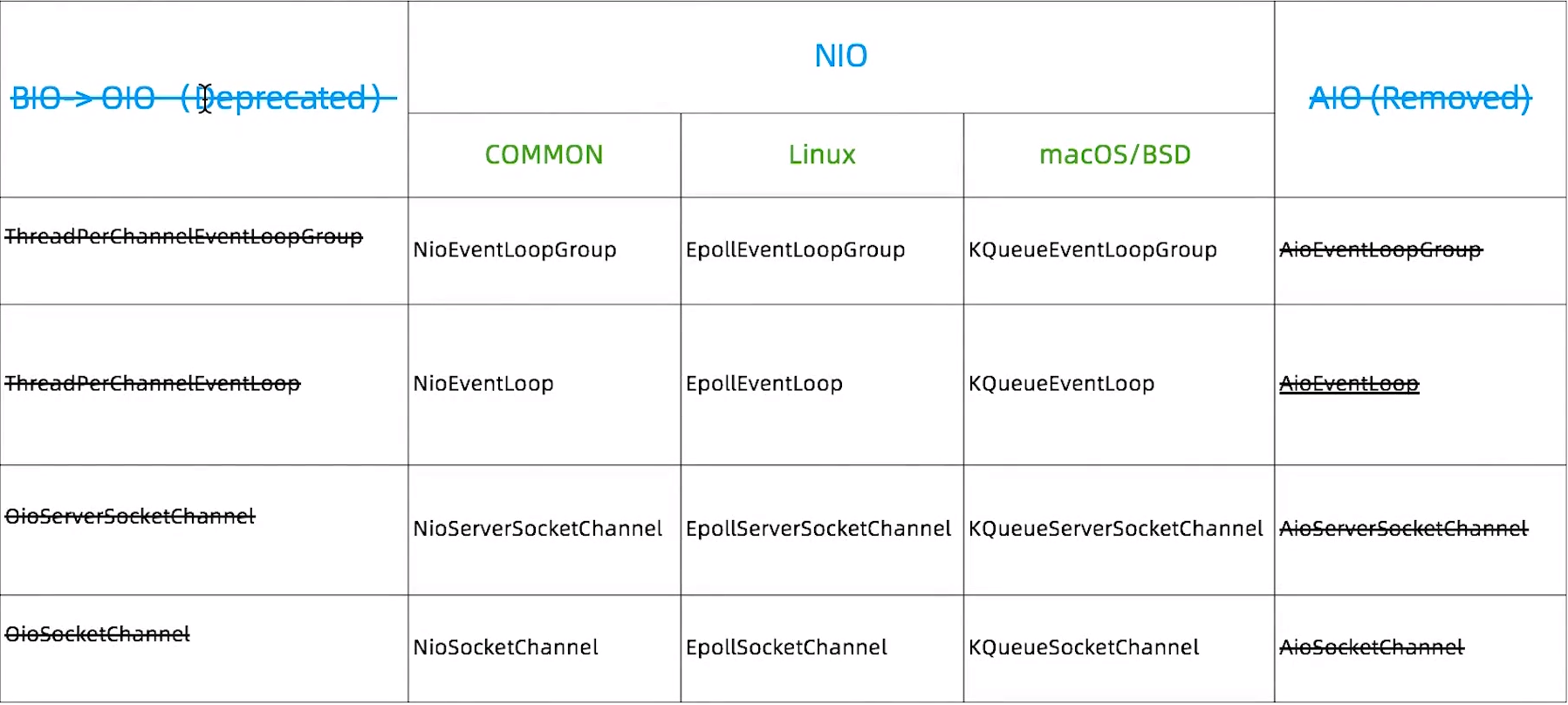
首先Netty是都支持三种IO模式的,准确的来说是曾经都支持过,因为BIO的被Netty给过期了,AIO被Netty给删除了,具体原因这就不多赘述;知道BIO在Netty被称为OIO,NIO在多平台下都有对应的支持,有人会问为啥有common的支持了还有Linux等其他的意义吗,这好比全栈和后端前端之分一样,一个通用一个专用的区别。
Netty切换IO模式
如上图所示,对应的实现类都差不多,甚至可以看出都是头不一样,如果NIO的通用是NioEventLoopGroup,而OIO的实现则是OioEventLoopGroup,先看之前的一个demo
public class MyServer {

    public static void main(String[] args) throws Exception {

        EventLoopGroup bossGroup = new NioEventLoopGroup();

        EventLoopGroup workerGroup = new NioEventLoopGroup();

        try {

            ServerBootstrap sb = new ServerBootstrap();

            sb.group(bossGroup, workerGroup).channel(NioServerSocketChannel.class)

                    .handler(new LoggingHandler(LogLevel.INFO)).childHandler(new ChannelInitializer<SocketChannel>() {

                @Override

                public void initChannel(SocketChannel ch) throws Exception {

                    ChannelPipeline p = ch.pipeline();

                    p.addLast(new LoggingHandler(LogLevel.INFO));

                    p.addLast(new MyServerHandler());

                }

            });

            ChannelFuture f = sb.bind(8090).sync();

            f.channel().closeFuture().sync();

        } finally {

            bossGroup.shutdownGracefully();

            workerGroup.shutdownGracefully();

        }

    }

}
图上标粗的就是切换的模式的关键点。现在看看切换成OIO的代码
public class MyServer {

    public static void main(String[] args) throws Exception {

        EventLoopGroup bossGroup = new OioEventLoopGroup();

        EventLoopGroup workerGroup = new OioEventLoopGroup();

        try {

            ServerBootstrap sb = new ServerBootstrap();

            sb.group(bossGroup, workerGroup).channel(OioServerSocketChannel.class)

                    .handler(new LoggingHandler(LogLevel.INFO)).childHandler(new ChannelInitializer<SocketChannel>() {

                @Override

                public void initChannel(SocketChannel ch) throws Exception {

                    ChannelPipeline p = ch.pipeline();

                    p.addLast(new LoggingHandler(LogLevel.INFO));

                    p.addLast(new MyServerHandler());

                }

            });

            ChannelFuture f = sb.bind(8090).sync();

            f.channel().closeFuture().sync();

        } finally {

            bossGroup.shutdownGracefully();

            workerGroup.shutdownGracefully();

        }

    }

}
上面代码改动也就是标粗的那些。运行起来是完全没问题的。
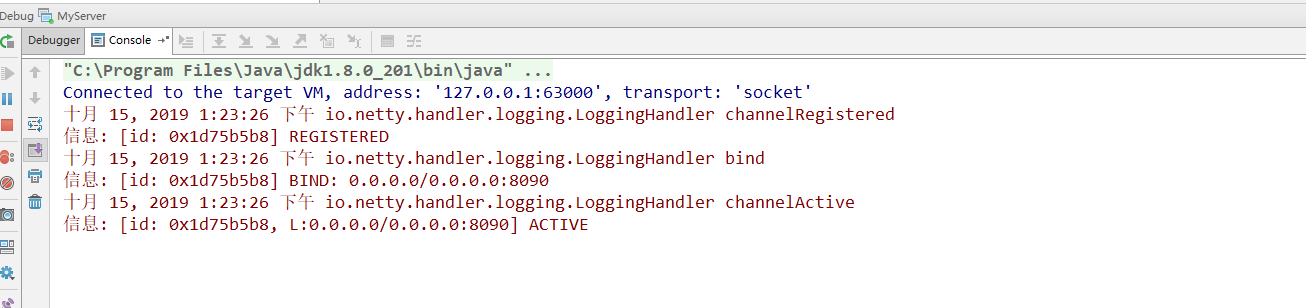
那么具体是怎么做的呢,我们看看源码就知道了;
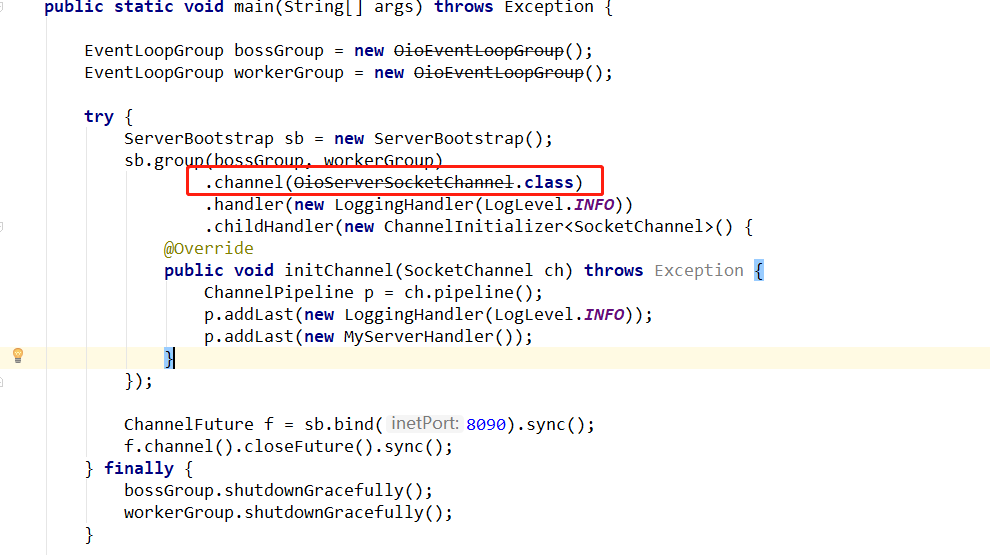
点进channel()方法里,核心步骤在此:
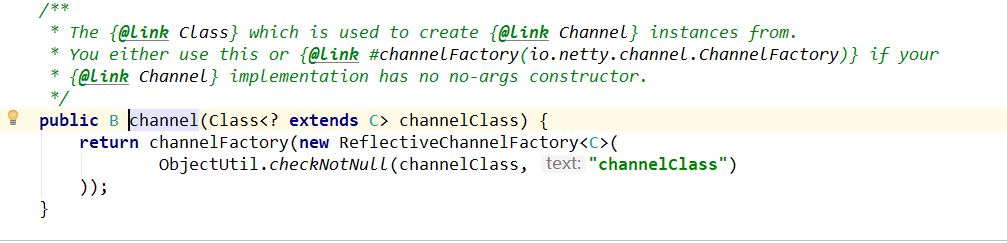
不难发现传入的是OioServerSocketChannel.class,由channelFactory工厂创建返回,进入ReflectiveChannelFactory();

上图的代码中有“this.constructor = clazz.getConstructor();”获取无参构造;

可以看出“return constructor.newInstance();”返回泛型“T” 就是要使用的IO模式。
总结来说:Netty实现IO模式的切换就是泛型+反射+工厂实现的。
除此之外,还有一点,"EventLoopGroup bossGroup = new NioEventLoopGroup();";实际上,它就相当于一个死循环,在“NioEventLoop.java”中,有个run(),如下图源码,可以看出它是个死循环(for (;;) {}),现在可以简单的理解它就是循环监听、处理事件的。
@Override

    protected void run() {

        for (;;) {

            try {

                try {

                    switch (selectStrategy.calculateStrategy(selectNowSupplier, hasTasks())) {

                    case SelectStrategy.CONTINUE:

                        continue;

                    case SelectStrategy.BUSY_WAIT:

                        // fall-through to SELECT since the busy-wait is not supported with NIO

                    case SelectStrategy.SELECT:

                        select(wakenUp.getAndSet(false));

                        // 'wakenUp.compareAndSet(false, true)' is always evaluated

                        // before calling 'selector.wakeup()' to reduce the wake-up

                        // overhead. (Selector.wakeup() is an expensive operation.)

                        //

                        // However, there is a race condition in this approach.

                        // The race condition is triggered when 'wakenUp' is set to

                        // true too early.

                        //

                        // 'wakenUp' is set to true too early if:

                        // 1) Selector is waken up between 'wakenUp.set(false)' and

                        //    'selector.select(...)'. (BAD)

                        // 2) Selector is waken up between 'selector.select(...)' and

                        //    'if (wakenUp.get()) { ... }'. (OK)

                        //

                        // In the first case, 'wakenUp' is set to true and the

                        // following 'selector.select(...)' will wake up immediately.

                        // Until 'wakenUp' is set to false again in the next round,

                        // 'wakenUp.compareAndSet(false, true)' will fail, and therefore

                        // any attempt to wake up the Selector will fail, too, causing

                        // the following 'selector.select(...)' call to block

                        // unnecessarily.

                        //

                        // To fix this problem, we wake up the selector again if wakenUp

                        // is true immediately after selector.select(...).

                        // It is inefficient in that it wakes up the selector for both

                        // the first case (BAD - wake-up required) and the second case

                        // (OK - no wake-up required).

                        if (wakenUp.get()) {

                            selector.wakeup();

                        }

                        // fall through

                    default:

                    }

                } catch (IOException e) {

                    // If we receive an IOException here its because the Selector is messed up. Let's rebuild

                    // the selector and retry. https://github.com/netty/netty/issues/8566

                    rebuildSelector0();

                    handleLoopException(e);

                    continue;

                }

                cancelledKeys = 0;

                needsToSelectAgain = false;

                final int ioRatio = this.ioRatio;

                if (ioRatio == 100) {

                    try {

                        processSelectedKeys();

                    } finally {

                        // Ensure we always run tasks.

                        runAllTasks();

                    }

                } else {

                    final long ioStartTime = System.nanoTime();

                    try {

                        processSelectedKeys();

                    } finally {

                        // Ensure we always run tasks.

                        final long ioTime = System.nanoTime() - ioStartTime;

                        runAllTasks(ioTime * (100 - ioRatio) / ioRatio);

                    }

                }

            } catch (Throwable t) {

                handleLoopException(t);

            }

            // Always handle shutdown even if the loop processing threw an exception.

            try {

                if (isShuttingDown()) {

                    closeAll();

                    if (confirmShutdown()) {

                        return;

                    }

                }

            } catch (Throwable t) {

                handleLoopException(t);

            }

        }

    }
我只想做的更好,仅此而已
Netty怎么切换三种I/O模式和源码解释的更多相关文章
- Netty中的三种Reactor(反应堆)
目录: Reactor(反应堆)和Proactor(前摄器) <I/O模型之三:两种高性能 I/O 设计模式 Reactor 和 Proactor> <[转]第8章 前摄器(Proa ...
- Redis三种集群模式介绍
三种集群模式 redis有三种集群模式,其中主从是最常见的模式. Sentinel 哨兵模式是为了弥补主从复制集群中主机宕机后,主备切换的复杂性而演变出来的.哨兵顾名思义,就是用来监控的,主要作用就是 ...
- 简单区分VMware的三种网络连接模式(bridged、NAT、host-only)
艺搜简介 VMware在安装时默认安装了两块虚拟网卡,VMnet1和VMnet8,另外还有VMnet0.这些虚拟网卡的配置都是由Vmware虚拟机自动生成的,一般来说不需要用户自行设置. Vmware ...
- VMware虚拟系统 bridged、NAT、host-only三种网络连接模式
目录 前言 bridged(桥接模式) NAT(网络地址转换模式) host-only(仅主机模式) 总结 前言 如果你想利用VMWare安装虚拟机,或想创建一个与网内其他机器相隔离的虚拟系统,进行特 ...
- vmware为我们提供了三种网络工作模式,它们分别是:Bridged(桥接模式)、NAT(网络地址转换模式)、Host-Only(仅主机模式)。
原文来自http://note.youdao.com/share/web/file.html?id=236896997b6ffbaa8e0d92eacd13abbf&type=note 我怕链 ...
- VMware下三种网络连接模式
VMware下三种网络连接模式 Bridged(桥接模式) 在桥接模式下,VMware虚拟出来的操作系统就像是局域网中的一独立的主机,它可以访问该类网段内任何一台机器. 桥接网络环境下需要做到: 手动 ...
- VMWare中三种网络连接模式的区别
VMWare中有桥接.NAT.host-only三种网络连接模式,在搭建伪分布式集群时,需要对集群的网络连接进行配置,而这一操作的前提是理解这三种网络模式的区别. 参考以下两篇文章可以更好的理解: V ...
- android Service Activity三种交互方式(付源码)(转)
android Service Activity三种交互方式(付源码) Android应用服务器OSBeanthread android Service Binder交互通信实例 最下边有源代码: ...
- Go语言备忘录:net/http包的使用模式和源码解析
本文是晚辈对net/http包的一点浅显的理解,文中如有错误的地方请前辈们指出,以免误导! 转摘本文也请注明出处:Go语言备忘录:net/http包的使用模式和源码解析,多谢! 目录: 一.http ...
随机推荐
- .net core Redis库 CSRedis
由于servicestack.redis收费,基于有人说StackExchange.Redis 使用会出现一些问题比如会超时, 找到了CSRedis这个库,很强大很实用.另外有兴趣的朋友还可以试试另一 ...
- Sublime Text 3中配置Python3的开发环境
在Tools-->Build System-->New Build System 之后弹出如下界面: 将其内容修改为 代码: { "cmd": ["D:/so ...
- nginx优化后的主配置文件
user web web; #nginx的程序账户和程序组 worker_processes auto; #worker进程数 auto设为默认 error_log /app/logs/nginx/w ...
- LC 974. Subarray Sums Divisible by K
Given an array A of integers, return the number of (contiguous, non-empty) subarrays that have a sum ...
- eclipse下生成Java类图和时序图,生成UML图
1.安装和使用AmaterasUML 安装AmaterasUML前,需要先安装GEF采用eclipse在线安装方式安装就好.eclipse在线安装GEF的地址:http://download.ecli ...
- linux简单命令8---软件包安装
1:使用yum安装,它不能包查询和包校验.它安装的是RPM格式文件.没有yum文件 ---------------------------------------------------------- ...
- delphi设置鼠标图形
//Screen.Cursor := crHourGlass;//忙 //Screen.Cursor := crDefault;//不忙时
- Apache 流框架Flink简介
1.Flink架构及特性分析 Flink是个相当早的项目,开始于2008年,但只在最近才得到注意.Flink是原生的流处理系统,提供high level的API.Flink也提供 API来像Spark ...
- React Native实战一
效果图如下所示: 展示列表页面,点击跳转至详情页面: /** * Sample React Native App * https://github.com/facebook/react-nat ...
- vue cli 3.0设置指定端口号运行
在项目根目录创建vue.config.js文件 module.exports = { devServer: { port: 3000, // 端口 }, // lintOnSave: false // ...