
etcd安装和简单使用
etcd作为一个高可用强一致性的服务发现存储仓库,在Kubernetes等开源项目中用的很多,这里简单记录下安装和常用命令以及api
安装
安装包可以从 https://github.com/etcd-io/etcd/releases 选择对应的版本和架构,下载后解压即可,里面有安装包和相关文档,安装和使用其实都可以看这些文档。
为了方便管理弄成了服务,加了一个etcd.service文件
[Unit]

Description=Etcd Server

After=network.target

After=network-online.target

Wants=network-online.target

[Service]

Type=notify

WorkingDirectory=/var/lib/etcd/

EnvironmentFile=-/etc/etcd/etcd.conf

User=etcd

# set GOMAXPROCS to number of processors

ExecStart=/bin/bash -c "GOMAXPROCS=$(nproc) /usr/bin/etcd --name=\"${ETCD_NAME}\" --data-dir=\"${ETCD_DATA_DIR}\" --listen-client-urls=\"${ETCD_LISTEN_CLIENT_URLS}\" --listen-peer-urls=\"${ETCD_LISTEN_PEER_URLS}\" --advertise-client-urls=\"${ETCD_ADVERTISE_CLIENT_URLS}\" --initial-advertise-peer-urls=\"${ETCD_INITIAL_ADVERTISE_PEER_URLS}\" --initial-cluster=\"${ETCD_INITIAL_CLUSTER}\" --initial-cluster-state=\"${ETCD_INITIAL_CLUSTER_STATE}\""

Restart=on-failure

LimitNOFILE=

[Install]

WantedBy=multi-user.target
etcd.conf配置文件类似下面这样,每个节点只要修改name和ip就可以,其他的不用动,ETCD_INITIAL_CLUSTER_TOKEN同一各集群值一样,不同集群不能重复。
## 配置文件每个节点只要修改name和ip地址即可

#[Member]

ETCD_NAME=node1

ETCD_DATA_DIR=/var/lib/etcd/data

ETCD_LISTEN_PEER_URLS=http://0.0.0.0:2380

ETCD_LISTEN_CLIENT_URLS=http://0.0.0.0:2379

#[cluster]

ETCD_INITIAL_ADVERTISE_PEER_URLS=http://192.168.19.136:2380

ETCD_ADVERTISE_CLIENT_URLS=http://192.168.19.136:2379

ETCD_INITIAL_CLUSTER=node1=http://192.168.19.136:2380,node2=http://192.168.19.137:2380,node3=http://192.168.19.138:2380

ETCD_INITIAL_CLUSTER_STATE=new

#创建集群的 token,这个值每个集群保持唯一

ETCD_INITIAL_CLUSTER_TOKEN=etcd-1
安装方式都差不多,放个例子,都差不多,配置文件那部分自己根据实际情况处理就行了。
## 创建用户和用户组

groupadd etcd;

useradd -c "Etcd user" -g etcd -s /sbin/nologin -r etcd;

service firewalld stop;

## 创建安装文件夹

mkdir -p /usr/bin/etcd3.3.13/;

mkdir -p /etc/etcd/;

mkdir -p /var/lib/etcd/data;

## 将文件etcd.service、etcd、etcdctl、etcd.conf上传到/usr/bin/etcd3.3.13/

chmod +x /usr/bin/etcd3.3.13/*;

mv /usr/bin/etcd3.3.13/etcd.service /usr/lib/systemd/system/;

mv /usr/bin/etcd3.3.13/etcd /usr/bin/;

mv /usr/bin/etcd3.3.13/etcdctl /usr/bin/;

## 每个节点配置文件ip地址不一样

mv /usr/bin/etcd3.3.13/etcd1.conf /etc/etcd/etcd.conf;

mv /usr/bin/etcd3.3.13/etcd2.conf /etc/etcd/etcd.conf;

mv /usr/bin/etcd3.3.13/etcd3.conf /etc/etcd/etcd.conf;

echo 'export ETCDCTL_API=3' >> /etc/profile

source /etc/profile

chown etcd:etcd -R /var/lib/etcd/data /etc/etcd*;

systemctl enable etcd.service;

systemctl start etcd.service;
后台命令
etcd命令可以通过etcdctl来执行,具体命令可以查看官方文档,或者 etcdctl -h 来查看。
[root@nmgecqud-etcd-pufthgqf ~]# etcdctl -h

NAME:

    etcdctl - A simple command line client for etcd3.

USAGE:

    etcdctl

VERSION:

    3.3.

API VERSION:

    3.3

COMMANDS:

    get            Gets the key or a range of keys

    put            Puts the given key into the store

    del            Removes the specified key or range of keys [key, range_end)

    txn            Txn processes all the requests in one transaction

    compaction        Compacts the event history in etcd

    alarm disarm        Disarms all alarms

    alarm list        Lists all alarms

    defrag            Defragments the storage of the etcd members with given endpoints

    endpoint health        Checks the healthiness of endpoints specified in `--endpoints` flag

    endpoint status        Prints out the status of endpoints specified in `--endpoints` flag

    endpoint hashkv        Prints the KV history hash for each endpoint in --endpoints

    move-leader        Transfers leadership to another etcd cluster member.

    watch            Watches events stream on keys or prefixes

    version            Prints the version of etcdctl

    lease grant        Creates leases

    lease revoke        Revokes leases

    lease timetolive    Get lease information

    lease list        List all active leases

    lease keep-alive    Keeps leases alive (renew)

    member add        Adds a member into the cluster

    member remove        Removes a member from the cluster

    member update        Updates a member in the cluster

    member list        Lists all members in the cluster

    snapshot save        Stores an etcd node backend snapshot to a given file

    snapshot restore    Restores an etcd member snapshot to an etcd directory

    snapshot status        Gets backend snapshot status of a given file

    make-mirror        Makes a mirror at the destination etcd cluster

    migrate            Migrates keys in a v2 store to a mvcc store

    lock            Acquires a named lock

    elect            Observes and participates in leader election

    auth enable        Enables authentication

    auth disable        Disables authentication

    user add        Adds a new user

    user delete        Deletes a user

    user get        Gets detailed information of a user

    user list        Lists all users

    user passwd        Changes password of user

    user grant-role        Grants a role to a user

    user revoke-role    Revokes a role from a user

    role add        Adds a new role

    role delete        Deletes a role

    role get        Gets detailed information of a role

    role list        Lists all roles

    role grant-permission    Grants a key to a role

    role revoke-permission    Revokes a key from a role

    check perf        Check the performance of the etcd cluster

    help            Help about any command

OPTIONS:

      --cacert=""                verify certificates of TLS-enabled secure servers using this CA bundle

      --cert=""                    identify secure client using this TLS certificate file

      --command-timeout=5s            timeout for short running command (excluding dial timeout)

      --debug[=false]                enable client-side debug logging

      --dial-timeout=2s                dial timeout for client connections

  -d, --discovery-srv=""            domain name to query for SRV records describing cluster endpoints

      --endpoints=[127.0.0.1:]        gRPC endpoints

      --hex[=false]                print byte strings as hex encoded strings

      --insecure-discovery[=true]        accept insecure SRV records describing cluster endpoints

      --insecure-skip-tls-verify[=false]    skip server certificate verification

      --insecure-transport[=true]        disable transport security for client connections

      --keepalive-time=2s            keepalive time for client connections

      --keepalive-timeout=6s            keepalive timeout for client connections

      --key=""                    identify secure client using this TLS key file

      --user=""                    username[:password] for authentication (prompt if password is not supplied)

  -w, --write-out="simple"            set the output format (fields, json, protobuf, simple, table)
上面讲全部命令列出来了,下面简单列几个测试集群是否可用的命令
查看版本
[root@nmgecqud-etcd-pufthgqf ~]# etcdctl version

etcdctl version: 3.3.

API version: 3.3
查看集群状态和节点
[root@nmgecqud-etcd-pufthgqf ~]# etcdctl member list

1804fe6aa6e0806f, started, nmgecqud-etcd-iqqn6mxj, http://10.110.30.213:2380, http://10.110.30.213:2379

5dfebcf67955db33, started, nmgecqud-etcd-u1qyxszm, http://10.110.30.210:2380, http://10.110.30.210:2379

745835aca4e59e07, started, nmgecqud-etcd-pufthgqf, http://10.110.30.212:2380, http://10.110.30.212:2379
插入一条数据
[root@nmgecqud-etcd-pufthgqf ~]# etcdctl put foo bar
OK
根据key查询数据
[root@nmgecqud-etcd-pufthgqf ~]# etcdctl get foo
foo
bar
删除一条数据
[root@nmgecqud-etcd-pufthgqf ~]# etcdctl del foo1
1
查询全部的key
[root@wwjaen60-etcd-sefgxiui opt]# etcdctl --prefix --keys-only=true get ""

/test/zyh

/zyh/fooa

foo

fooa
也支持通过restAPI来操作,可以测试从集群外访问是否正常,例如下面几个
查看版本get:http://10.110.30.183:2379/version
插入一个键值对put: http://10.110.30.183:2379/v2/keys/foo?value=bar
查询一个键get: http://10.110.30.179:2379/v2/keys/foo
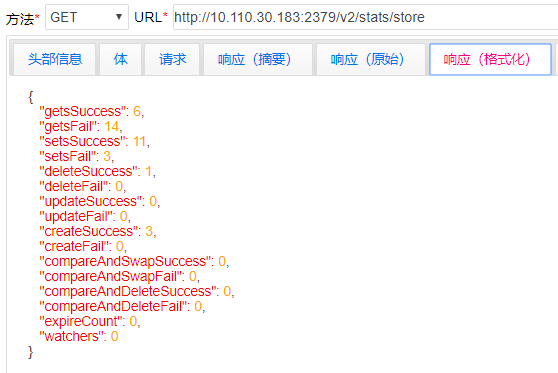
查看集群的状态get:http://10.110.30.183:2379/v2/stats/store
查看全部键值get:http://10.110.30.183:2379/v2/keys


etcd安装和简单使用的更多相关文章
- etcd安装和所遇到的坑
首先参照 https://www.cnblogs.com/lyzw/p/6016789.html来安装 虚拟机:VMware® Workstation 12 Pro 系统:CentOS Linux r ...
- Etcd安装和使用
Etcd安装和使用 一.安装 1.1 二进制安装 从这里下载: etcd-v3.2.11-linux-amd64.tar.gz 下载包后解压即可运行: # 解压 tar zxvf etcd-v3.2. ...
- S1_搭建分布式OpenStack集群_03 Mysql、MQ、Memcached、ETCD安装配置
一.安装mysql(contorller)controller ~]# yum -y install mariadb mariadb-server python2-PyMySQL 配置my.cnf文件 ...
- ETCD快速入门-02 ETCD安装
2.ETCD安装 etcd 安装可以通过源码构建也可以使用官方构建的二进制文件进行安装.我们以二进制文件为例,系统为CentOS 7.9,操作步骤如下所示: 2.1 Linux ETCD_VE ...
- (转)python requests的安装与简单运用
requests是python的一个HTTP客户端库,跟urllib,urllib2类似,那为什么要用requests而不用urllib2呢?官方文档中是这样说明的: python的标准库urllib ...
- MongoDB在Windows下安装、Shell客户端的使用、Bson扩充的数据类型、MongoVUE可视化工具安装和简单使用、Robomongo可视化工具(2)
一.Windows 下载安装 1.去http://www.mongodb.org/downloads下载,mongodb默认安装在C:\Program Files\MongoDB目录下,到F:\Off ...
- python requests的安装与简单运用
requests是python的一个HTTP客户端库,跟urllib,urllib2类似,那为什么要用requests而不用urllib2呢?官方文档中是这样说明的: python的标准库urllib ...
- memcache的windows下的安装和简单使用
原文:memcache的windows下的安装和简单使用 memcache是为了解决网站访问量大,数据库压力倍增的解决方案之一,由于其简单实用,很多站点现在都在使用memcache,但是memcach ...
- 【RabbitMQ】RabbitMQ在Windows的安装和简单的使用
版本说明 使用当前版本:3.5.4 安装与启动 在官网上下载其Server二进制安装包,在Windows上的安装时简单的,与一般软件没什么区别. 安装前会提示你,还需要安装Erlang,并打开下载页面 ...
随机推荐
- Android view的一些认识
转载:9102年末,我对Android view的13条认识: (顺手留下GitHub链接,需要获取相关面试等内容的可以自己去找)https://github.com/xiangjiana/Andro ...
- EasyNetQ使用(五)【基于主题的路由,控制队列名称】
RabbitMQ有一个很酷的功能,基于主题的路由,这个功能允许订阅者基于多个条件去过滤消息.一个主题是由点号分隔的单词列表,随消息一同发布.例如:“stock.usd.nyse” 或 “book.uk ...
- Flutter Widget框架概述
Flutter Widget采用现代响应式框架构建,这是从 React 中获得的灵感,中心思想是用widget构建你的UI. Widget描述了他们的视图在给定其当前配置和状态时应该看起来像什么.当w ...
- leetcode mysql
给定一个 salary 表,如下所示,有 m = 男性 和 f = 女性 的值.交换所有的 f 和 m 值(例如,将所有 f 值更改为 m,反之亦然).要求只使用一个更新(Update)语句,并且没有 ...
- Thingsboard源码编译,小白新坑随笔
在Thingsboard源码编译过程中,遇见的问题总结: 1.Thingsboard Server UI 模块编译,无法执行“npm install ”:出现错误信息:Failed to execut ...
- 【转载】恢复误删文件--DOS命令应用实例(一)
<电脑爱好者>报转载第一辑第二篇之恢复误删文件--DOS命令应用实例(一) 恢复误删文件--DOS命令应用实例(一) 上期我们讲述了 ...
- js 获取xxxx-xx-xx时间格式
function getdate() { var now = new Date(), y = now.getFullYear(), m = now.getMonth() + 1, d = now.ge ...
- HIVE外部表 分区表
HIVE外部表 分区表 外部表 创建hive表,经过检查发现TBLS表中,hive表的类型为MANAGED_TABLE. 在真实开发中,很可能在hdfs中已经有了数据,希望通过hi ...
- 洛谷 题解 P2119【魔法阵】
很好的一道数学推导题 45分做法 \(O(N^4)\) 暴力枚举四个材料 55分做法 从第一个约束条件可得到所有可行答案都是单调递增的,所以可以排序一遍,减少枚举量,可以拿到55分 100分做法 首先 ...
- 基于grpc的流式方式实现双向通讯(python)
grpc介绍 grpc是谷歌开源的一套基于rpc实现的通讯框架(官网有更完整的定义).在搞懂grpc之前,首先要弄懂rpc是什么.下面是自己理解的rpc定义,若有不对,望指出: rpc官方称为 远程过 ...