
python之命令行可以做的事儿
前言
说起python,大家都知道可以做很多有趣的事儿。知乎、CSDN上很多大牛做过很多或高大上或实用的事儿。参见这篇文章Python趣味代码整合之提升学生编程兴趣,
另外,我发现命令行也可以做很多事。以下是我的一些想法,欢迎大家补充!
环境配置与模块安装
- 运行环境:Python3.6+cmd命令行
- 依赖模块:requests,bs4,numpy,PIL,webbrowser,subprocess
模块具体安装方法参见网上教程
实现功能
- 查询天气
早上起来,想看今天的天气,打开电脑,百度搜索地点,简直太麻烦。不妨命令行输入指令快速获取。(请忽略手机查看等其他更快捷方式,虽然相比较而言前者有些不足,但,存在即有意义,命令行也可以做很多事。)
import requests

from bs4 import BeautifulSoup

#获取www.tianqi.com的天气,参数:地名拼音

def data_of_tianqi(addr):

    response = requests.get("https://www.tianqi.com/"+addr+"/")

    soup = BeautifulSoup(response.text, 'html.parser')

    tag_dd = soup.find_all(name='dd')

    tag_span = soup.find_all(name='span')[0]

    temp = str(soup.find_all(name='b')[0])[3:-4]#温度

    city_html = BeautifulSoup(str(tag_dd[0]), 'html.parser')

    city = str(city_html.find_all(name='h2'))[5:-6]#城市

    if str(tag_dd[1])[41:43]=='</':

        time=str(tag_dd[1])[17:41]

    else:

        time=str(tag_dd[1])[17:43]

    weather_and_temp = str(tag_span)[9:-7].split('</b>')

    weather = weather_and_temp[0]#天气

    temp = str(soup.find_all(name='b')[0])[3:-4]#实时温度

    temp_from_to = weather_and_temp[1]#温度范围

    shidu = str(tag_dd[3]).replace("</b>","").replace("</dd>","").split("<b>")[1]#湿度

    fengxaing = str(tag_dd[3]).replace("</b>","").replace("</dd>","").split("<b>")[2]#风向

    ziwaixian = str(tag_dd[3]).replace("</b>","").replace("</dd>","").split("<b>")[3]#紫外线

    other_info = str(tag_dd[4])[57:-12].replace('</h5><h6>','<br/>').replace('</h6><span>','<br/>').split('<br/>')#空气质量、PM、日出、日落

    print('城市:'+city)

    print('时间:'+time)

    print('天气:'+weather)

    print('实时温度:'+temp+'  '+'温度范围:'+temp_from_to)

    print(shidu+'  '+fengxaing+'  '+ziwaixian)

    print(other_info[0]+'  '+other_info[1])

    print(other_info[2]+'  '+other_info[3])
代码参考了一些网上资料(表示感谢),再做了相应修改,展示更美观一些。
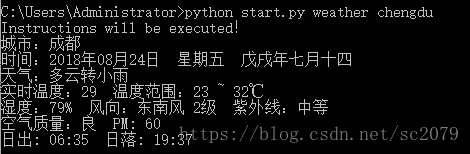
在命令行输入python start.py weather chengdu,便得到的成都天气信息:
- .浏览器操作
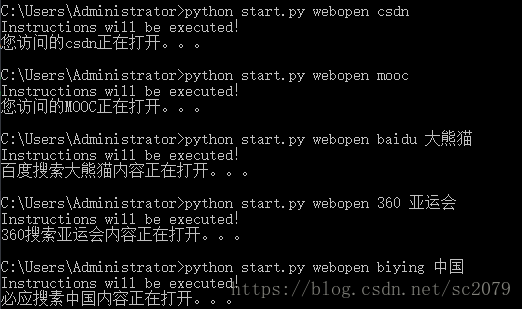
想在命令行百度搜索、360搜索、必应搜索?想快速打开指定网页?没关系,这些都可以实现!
# -*- coding: utf-8 -*-

"""

Created on Tue Aug  7 11:06:53 2018

快速搜索(百度、360、必应)&快速打开常用网站

csdn 百度 MOOC  新华社

@author: Administrator

"""

import webbrowser

def search(word):

    if word[0]=='baidu':

        print('百度搜索'+word[1]+'内容正在打开。。。')

        webbrowser.open('https://www.baidu.com/s?wd='+word[1])

    if word[0]=='360':

        print('360搜索'+word[1]+'内容正在打开。。。')

        webbrowser.open('https://www.so.com/s?q='+word[1])

    if word[0]=='biying':

        print('必应搜索'+word[1]+'内容正在打开。。。')

        webbrowser.open('http://global.bing.com/search?q='+word[1])

def webopen(word):

    name=['csdn','百度','MOOC','新华社']

    words=['csdn','baidu','mooc','xhs']

    if type(word)==list:

        search(word)

    elif word not in words:

        print('访问失败!')

    else:

        for i in range(len(words)):

            if word==words[i]:

                print('您访问的'+name[i]+'正在打开。。。')

                break

        if i==0:

            webbrowser.open('https://download.csdn.net/my')

        elif i==1:

            webbrowser.open('https://www.baidu.com/')

        elif i==2:

            webbrowser.open('http://www.icourse163.org/home.htm?userId=7816710#/home/course')

        elif i==3:

            webbrowser.open('http://www.xinhuanet.com/english/home.htm')
由于一些隐私原因,我删除了部分我常去的一些网站,你当然也可以按照格式添加属于你的网站访问快捷方式。
- 启动应用程序
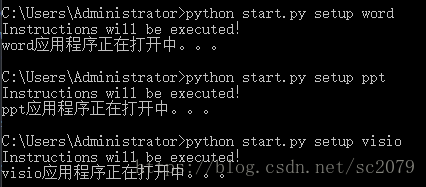
同样,用subprocess模块可以打开计算机上的应用程序。虽然现在电脑软件大多有快捷方式,但是用命令行打开其实也挺不错的。
# -*- coding: utf-8 -*-

"""

Created on Wed Aug  8 10:59:15 2018

命令行启动应用程序

@author: Administrator

"""

import subprocess

def setup(word):

    words=['excel','word','ppt','visio','pycharm']

    if word not in words:

        print('打开失败!')

    else:

        for i in range(len(words)):

            if word==words[i]:

                print(word+'应用程序正在打开中。。。')

                break

        if i==0:

            subprocess.Popen('C:\\Program Files\\Microsoft Office\\Office16\\EXCEL.exe')

        if i==1:

            subprocess.Popen('C:\\Program Files\\Microsoft Office\\Office16\\WINWORD.exe')

        if i==2:

            subprocess.Popen('C:\\Program Files\\Microsoft Office\\Office16\\POWERPNT.exe')

        if i==3:

            subprocess.Popen('C:\\Program Files\\Microsoft Office\\Office16\\VISIO.exe')

        if i==4:

            subprocess.Popen('C:\\Program Files\\JetBrains\\PyCharm Community Edition 2017.2.4\\bin\\pycharm64')
- 图片转字符
参考《python 极客项目编程》这本书有关于ASCII文本图形的代码,并做相应修改。如下:
"""

ascii.py

A python program that convert images to ASCII art.

Author: Mahesh Venkitachalam

"""

import numpy as np

from PIL import Image

# gray scale level values from:

# http://paulbourke.net/dataformats/asciiart/

# 70 levels of gray

gscale1 = "$@B%8&WM#*oahkbdpqwmZO0QLCJUYXzcvunxrjft/\|()1{}[]?-_+~<>i!lI;:,\"^`'. "

# 10 levels of gray

gscale2 = '@%#*+=-:. '

def getAverageL(image):

    """

    Given PIL Image, return average value of grayscale value

    """

    # get image as numpy array

    im = np.array(image)

    # get shape

    w,h = im.shape

    # get average

    return np.average(im.reshape(w*h))

def covertImageToAscii(fileName, cols, scale, moreLevels):

    """

    Given Image and dims (rows, cols) returns an m*n list of Images

    """

    # declare globals

    global gscale1, gscale2

    # open image and convert to grayscale

    image = Image.open(fileName).convert('L')

    # store dimensions

    W, H = image.size[0], image.size[1]

    print("input image dims: %d x %d" % (W, H))

    # compute width of tile

    cols=int(cols)

    w = W/cols

    # compute tile height based on aspect ratio and scale

    h = w/scale

    # compute number of rows

    rows = int(H/h)

    print("cols: %d, rows: %d" % (cols, rows))

    print("tile dims: %d x %d" % (w, h))

    # check if image size is too small

    if cols > W or rows > H:

        print("Image too small for specified cols!")

        exit(0)

    # ascii image is a list of character strings

    aimg = []

    # generate list of dimensions

    for j in range(rows):

        y1 = int(j*h)

        y2 = int((j+1)*h)

        # correct last tile

        if j == rows-1:

            y2 = H

        # append an empty string

        aimg.append("")

        for i in range(cols):

            # crop image to tile

            x1 = int(i*w)

            x2 = int((i+1)*w)

            # correct last tile

            if i == cols-1:

                x2 = W

            # crop image to extract tile

            img = image.crop((x1, y1, x2, y2))

            # get average luminance

            avg = int(getAverageL(img))

            # look up ascii char

            if moreLevels:

                gsval = gscale1[int((avg*69)/255)]

            else:

                gsval = gscale2[int((avg*9)/255)]

            # append ascii char to string

            aimg[j] += gsval

    # return txt image

    return aimg

# main() function

def ascii_write(word):

    word=['D:\\pycodes\\命令行快速访问\\asc_data\\'+word[0],word[1]]

    imgFile = word[0]

    # set output file

    outFile = 'D:\\pycodes\\命令行快速访问\\asc_data\\out.txt'

    # set scale default as 0.43 which suits a Courier font

    scale = 0.43

    # set cols

    cols = word[1]

    print('generating ASCII art...')

    # convert image to ascii txt

    aimg = covertImageToAscii(imgFile, cols, scale,0)

    # open file

    f = open(outFile, 'w')

    # write to file

    for row in aimg:

        f.write(row + '\n')

    # cleanup

    f.close()

    print("ASCII art written to %s" % outFile)
命令行上输入python start.py pyascii panda1.jpg 200,回车,便得到由字符拼接的萌萌的大熊猫宝宝啦。由于截图大小有限,这里仅放上它炯炯有神的大眼睛。
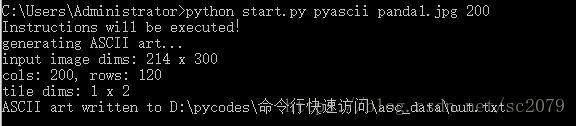
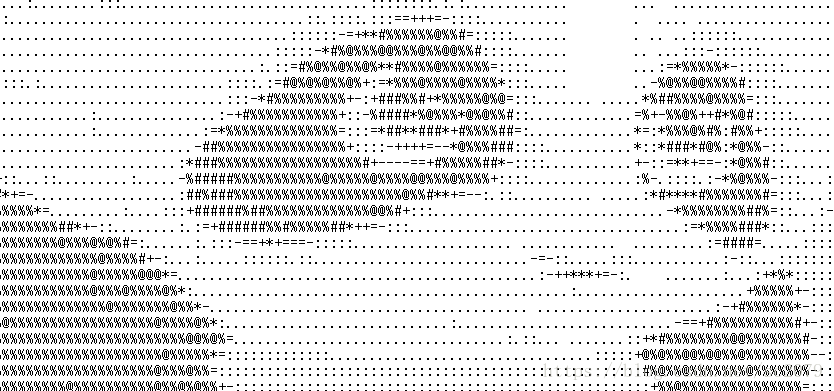
萌死我啦!注意:图片名后的数字代表像素,数字越大,图片细节越清晰,但txt文档打开一个界面看不完(必须滑动)
主程序
你可能会奇怪,为什么命令行执行的都是start.py文件,难道不可以直接运行各个子程序吗?本来是可以的,但是为了追求简洁统一,避免C:\Users\Administrator\目录下放到py文件过多,便写了个主程序start.py(必须放于C:\Users\Administrator\目录下!)。
Created on Mon Aug  6 21:05:09 2018

@author: Administrator

命令行快速查询、启动、运行

"""

import sys

sys.path.append('D:\\pycodes\\命令行快速访问')

import weather

import pyascii

import webopen

import setup

if len(sys.argv) < 2:

    sys.exit()

code= ' '.join(sys.argv[1:2])

word= ' '.join(sys.argv[2:3])

if len(sys.argv)>3:

    t=' '.join(sys.argv[3:4])

    word=[word,t]

codes=['weather','pyascii','webopen','setup']

if code not in codes:

    print('Wrong instructions!')

else:

    for i in range(len(codes)):

        if code==codes[i]:

            print('Instructions will be executed!')

            break

    if i==0:

        weather.data_of_tianqi(word)

    elif i==1:

        pyascii.ascii_write(word)

    elif i==2:

        webopen.webopen(word)

    elif i==3:

setup.setup(word)Github传送门:https://github.com/SCHaoZhang/python/tree/master/python_cmd
如果你还有其他的好点子,请分享给我哈!如果文中有不足之处,请私聊哈!
python之命令行可以做的事儿的更多相关文章
- Python执行命令行
背景 我们知道,虽然会破坏平台独立性,但是有的时候需要在代码里面调用命令行来获取一些信息,那么了解在 Python 中如何执行命令行至关重要 使用介绍 Python 中使用命令行可以通过 subpro ...
- Python之路,Day17 - 分分钟做个BBS论坛
Python之路,Day17 - 分分钟做个BBS论坛 本节内容: 项目:开发一个简单的BBS论坛 需求: 整体参考"抽屉新热榜" + "虎嗅网" 实现不同 ...
- 【python】命令行解析工具argparse用法
python的命令行参数 之前有用到optget, optparse, 现在这些都被弃用了. import argparse parser = argparse.ArgumentParser() ar ...
- 如何使用python自定义命令
dir.tree.cd等等,都是我们常见的命令.这些命令是开发者开发出来的,如果我们自己想按照自己的想法开发一个命令,应该怎么做呢? 以python语言来实现,问题就是:如何使用python自定义命令 ...
- python制作命令行工具——fire
python制作命令行工具--fire 前言 本篇教程的目的是希望大家可以通读完此篇之后,可以使用python制作一款符合自己需求的linux工具. 本教程使用的是google开源的python第三方 ...
- Monkey测试4——Monkey命令行可用的全部选项
Monkey命令行可用的全部选项 常规 --help 列出简单的用法. -v 命令行的每一个-v将增加反馈信息的级别. Level 0(缺省值)除启动提示.测试完成和最终结果之外,提供较少信息. Le ...
- Python 之 使用 PIL 库做图像处理
http://www.cnblogs.com/way_testlife/archive/2011/04/17/2019013.html Python 之 使用 PIL 库做图像处理 1. 简介. 图像 ...
- python 交互式命令行数据库连接助手 -- mysql、sql server (mssql)、redis
目录 python 交互式命令行数据库连接助手 0. 操作示例 1. python 连接mssql 2. python 连接mysql 3. python 连接redis n. Tips python ...
- Python的命令模式和交互模式
Python的命令行模式和交互模式 请注意区分命令行模式和Python交互模式. 在命令行模式下,可以执行python进入Python交互式环境,也可以执行python first.py运行一个.py ...
随机推荐
- Jmeter 逻辑控制器 之 循环控制器
今天和大家分享下循环控制器的使用. 一.认识循环控制器 如下图:新增一个循环控制器 循环控制器的设置界面: 循环次数:永远和自定义次数,这个应该比较好理解. 二.使用循环控制器 其实大家对Jmeter ...
- VS.左侧_蓝黄绿_竖线
1.vs2013中,写代码中,旁边会出现蓝色或者黄色的线,请问是什么意思?求大神告知_百度知道.html(https://zhidao.baidu.com/question/1862841692529 ...
- spring效验
相关依赖 如果开发普通 Java 程序的的话,你需要可能需要像下面这样依赖: <dependency> <groupId>org.hibernate.validator< ...
- POJ 3229:The Best Travel Design
Description Dou Nai ), and the end of the travel route hours on traveling every day. Input There are ...
- IOI 2005/bzoj 1812:riv 河流
Description 几乎整个Byteland王国都被森林和河流所覆盖.小点的河汇聚到一起,形成了稍大点的河.就这样,所有的河水都汇聚并流进了一条大河,最后这条大河流进了大海.这条大河的入海口处有一 ...
- 学习pandas apply方法,看这一篇就够了,你该这么学,No.10
最近好忙啊,好忙啊,忙的写不动博客了 时间过得飞快 一晃,一周就过去了 本着不进步就倒退的性格 我成功的在技术上面划水了一周 今天要学习的还是groupby的高级进阶 说是高级,其实就是比初级复杂了一 ...
- HanLP-基于HMM-Viterbi的人名识别原理介绍
Hanlp自然语言处理包中的基于HMM-Viterbi处理人名识别的内容大概在年初的有分享过这类的文章,时间稍微久了一点,有点忘记了.看了 baiziyu 分享的这篇比我之前分享的要简单明了的多.下面 ...
- Java实现无向图的建立与遍历
一.基于邻接矩阵表示法的无向图 邻接矩阵是一种利用一维数组记录点集信息.二维数组记录边集信息来表示图的表示法,因此我们可以将图抽象成一个类,点集信息和边集信息抽象成类的属性,就可以在Java中描述出来 ...
- (七)mybatis 的输入映射与输出映射
目录 前言 输入映射 - - 传递 pojo 包装类型 (复杂查询 ) 输出映射 - - resultType 输出映射 - - resultMap 前言 通过 paramterType 指定输入参数 ...
- S02_CH14_ EMIO_OLED 实验
S02_CH14_ EMIO_OLED 实验 本章将使用EMIO模拟OLED的时序来驱动OLED,本方案对米联系列Miz702,Miz702N和Miz701N全兼容. 14.1板载OLED硬件原理 M ...