
python之命令行可以做的事儿
前言
说起python,大家都知道可以做很多有趣的事儿。知乎、CSDN上很多大牛做过很多或高大上或实用的事儿。参见这篇文章Python趣味代码整合之提升学生编程兴趣,
另外,我发现命令行也可以做很多事。以下是我的一些想法,欢迎大家补充!
环境配置与模块安装
- 运行环境:Python3.6+cmd命令行
- 依赖模块:requests,bs4,numpy,PIL,webbrowser,subprocess
模块具体安装方法参见网上教程
实现功能
- 查询天气
早上起来,想看今天的天气,打开电脑,百度搜索地点,简直太麻烦。不妨命令行输入指令快速获取。(请忽略手机查看等其他更快捷方式,虽然相比较而言前者有些不足,但,存在即有意义,命令行也可以做很多事。)
import requests

from bs4 import BeautifulSoup

#获取www.tianqi.com的天气,参数:地名拼音

def data_of_tianqi(addr):

    response = requests.get("https://www.tianqi.com/"+addr+"/")

    soup = BeautifulSoup(response.text, 'html.parser')

    tag_dd = soup.find_all(name='dd')

    tag_span = soup.find_all(name='span')[0]

    temp = str(soup.find_all(name='b')[0])[3:-4]#温度

    city_html = BeautifulSoup(str(tag_dd[0]), 'html.parser')

    city = str(city_html.find_all(name='h2'))[5:-6]#城市

    if str(tag_dd[1])[41:43]=='</':

        time=str(tag_dd[1])[17:41]

    else:

        time=str(tag_dd[1])[17:43]

    weather_and_temp = str(tag_span)[9:-7].split('</b>')

    weather = weather_and_temp[0]#天气

    temp = str(soup.find_all(name='b')[0])[3:-4]#实时温度

    temp_from_to = weather_and_temp[1]#温度范围

    shidu = str(tag_dd[3]).replace("</b>","").replace("</dd>","").split("<b>")[1]#湿度

    fengxaing = str(tag_dd[3]).replace("</b>","").replace("</dd>","").split("<b>")[2]#风向

    ziwaixian = str(tag_dd[3]).replace("</b>","").replace("</dd>","").split("<b>")[3]#紫外线

    other_info = str(tag_dd[4])[57:-12].replace('</h5><h6>','<br/>').replace('</h6><span>','<br/>').split('<br/>')#空气质量、PM、日出、日落

    print('城市:'+city)

    print('时间:'+time)

    print('天气:'+weather)

    print('实时温度:'+temp+'  '+'温度范围:'+temp_from_to)

    print(shidu+'  '+fengxaing+'  '+ziwaixian)

    print(other_info[0]+'  '+other_info[1])

    print(other_info[2]+'  '+other_info[3])
代码参考了一些网上资料(表示感谢),再做了相应修改,展示更美观一些。
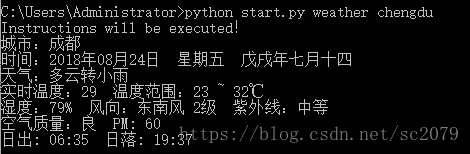
在命令行输入python start.py weather chengdu,便得到的成都天气信息:
- .浏览器操作
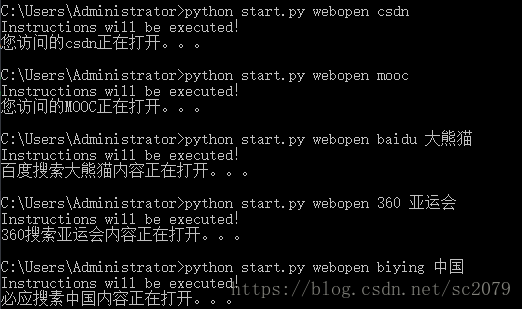
想在命令行百度搜索、360搜索、必应搜索?想快速打开指定网页?没关系,这些都可以实现!
# -*- coding: utf-8 -*-

"""

Created on Tue Aug  7 11:06:53 2018

快速搜索(百度、360、必应)&快速打开常用网站

csdn 百度 MOOC  新华社

@author: Administrator

"""

import webbrowser

def search(word):

    if word[0]=='baidu':

        print('百度搜索'+word[1]+'内容正在打开。。。')

        webbrowser.open('https://www.baidu.com/s?wd='+word[1])

    if word[0]=='360':

        print('360搜索'+word[1]+'内容正在打开。。。')

        webbrowser.open('https://www.so.com/s?q='+word[1])

    if word[0]=='biying':

        print('必应搜索'+word[1]+'内容正在打开。。。')

        webbrowser.open('http://global.bing.com/search?q='+word[1])

def webopen(word):

    name=['csdn','百度','MOOC','新华社']

    words=['csdn','baidu','mooc','xhs']

    if type(word)==list:

        search(word)

    elif word not in words:

        print('访问失败!')

    else:

        for i in range(len(words)):

            if word==words[i]:

                print('您访问的'+name[i]+'正在打开。。。')

                break

        if i==0:

            webbrowser.open('https://download.csdn.net/my')

        elif i==1:

            webbrowser.open('https://www.baidu.com/')

        elif i==2:

            webbrowser.open('http://www.icourse163.org/home.htm?userId=7816710#/home/course')

        elif i==3:

            webbrowser.open('http://www.xinhuanet.com/english/home.htm')
由于一些隐私原因,我删除了部分我常去的一些网站,你当然也可以按照格式添加属于你的网站访问快捷方式。
- 启动应用程序
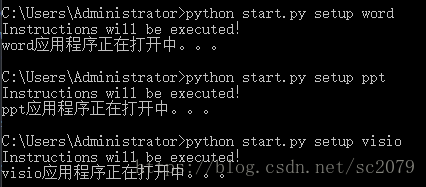
同样,用subprocess模块可以打开计算机上的应用程序。虽然现在电脑软件大多有快捷方式,但是用命令行打开其实也挺不错的。
# -*- coding: utf-8 -*-

"""

Created on Wed Aug  8 10:59:15 2018

命令行启动应用程序

@author: Administrator

"""

import subprocess

def setup(word):

    words=['excel','word','ppt','visio','pycharm']

    if word not in words:

        print('打开失败!')

    else:

        for i in range(len(words)):

            if word==words[i]:

                print(word+'应用程序正在打开中。。。')

                break

        if i==0:

            subprocess.Popen('C:\\Program Files\\Microsoft Office\\Office16\\EXCEL.exe')

        if i==1:

            subprocess.Popen('C:\\Program Files\\Microsoft Office\\Office16\\WINWORD.exe')

        if i==2:

            subprocess.Popen('C:\\Program Files\\Microsoft Office\\Office16\\POWERPNT.exe')

        if i==3:

            subprocess.Popen('C:\\Program Files\\Microsoft Office\\Office16\\VISIO.exe')

        if i==4:

            subprocess.Popen('C:\\Program Files\\JetBrains\\PyCharm Community Edition 2017.2.4\\bin\\pycharm64')
- 图片转字符
参考《python 极客项目编程》这本书有关于ASCII文本图形的代码,并做相应修改。如下:
"""

ascii.py

A python program that convert images to ASCII art.

Author: Mahesh Venkitachalam

"""

import numpy as np

from PIL import Image

# gray scale level values from:

# http://paulbourke.net/dataformats/asciiart/

# 70 levels of gray

gscale1 = "$@B%8&WM#*oahkbdpqwmZO0QLCJUYXzcvunxrjft/\|()1{}[]?-_+~<>i!lI;:,\"^`'. "

# 10 levels of gray

gscale2 = '@%#*+=-:. '

def getAverageL(image):

    """

    Given PIL Image, return average value of grayscale value

    """

    # get image as numpy array

    im = np.array(image)

    # get shape

    w,h = im.shape

    # get average

    return np.average(im.reshape(w*h))

def covertImageToAscii(fileName, cols, scale, moreLevels):

    """

    Given Image and dims (rows, cols) returns an m*n list of Images

    """

    # declare globals

    global gscale1, gscale2

    # open image and convert to grayscale

    image = Image.open(fileName).convert('L')

    # store dimensions

    W, H = image.size[0], image.size[1]

    print("input image dims: %d x %d" % (W, H))

    # compute width of tile

    cols=int(cols)

    w = W/cols

    # compute tile height based on aspect ratio and scale

    h = w/scale

    # compute number of rows

    rows = int(H/h)

    print("cols: %d, rows: %d" % (cols, rows))

    print("tile dims: %d x %d" % (w, h))

    # check if image size is too small

    if cols > W or rows > H:

        print("Image too small for specified cols!")

        exit(0)

    # ascii image is a list of character strings

    aimg = []

    # generate list of dimensions

    for j in range(rows):

        y1 = int(j*h)

        y2 = int((j+1)*h)

        # correct last tile

        if j == rows-1:

            y2 = H

        # append an empty string

        aimg.append("")

        for i in range(cols):

            # crop image to tile

            x1 = int(i*w)

            x2 = int((i+1)*w)

            # correct last tile

            if i == cols-1:

                x2 = W

            # crop image to extract tile

            img = image.crop((x1, y1, x2, y2))

            # get average luminance

            avg = int(getAverageL(img))

            # look up ascii char

            if moreLevels:

                gsval = gscale1[int((avg*69)/255)]

            else:

                gsval = gscale2[int((avg*9)/255)]

            # append ascii char to string

            aimg[j] += gsval

    # return txt image

    return aimg

# main() function

def ascii_write(word):

    word=['D:\\pycodes\\命令行快速访问\\asc_data\\'+word[0],word[1]]

    imgFile = word[0]

    # set output file

    outFile = 'D:\\pycodes\\命令行快速访问\\asc_data\\out.txt'

    # set scale default as 0.43 which suits a Courier font

    scale = 0.43

    # set cols

    cols = word[1]

    print('generating ASCII art...')

    # convert image to ascii txt

    aimg = covertImageToAscii(imgFile, cols, scale,0)

    # open file

    f = open(outFile, 'w')

    # write to file

    for row in aimg:

        f.write(row + '\n')

    # cleanup

    f.close()

    print("ASCII art written to %s" % outFile)
命令行上输入python start.py pyascii panda1.jpg 200,回车,便得到由字符拼接的萌萌的大熊猫宝宝啦。由于截图大小有限,这里仅放上它炯炯有神的大眼睛。
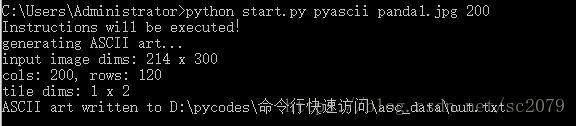
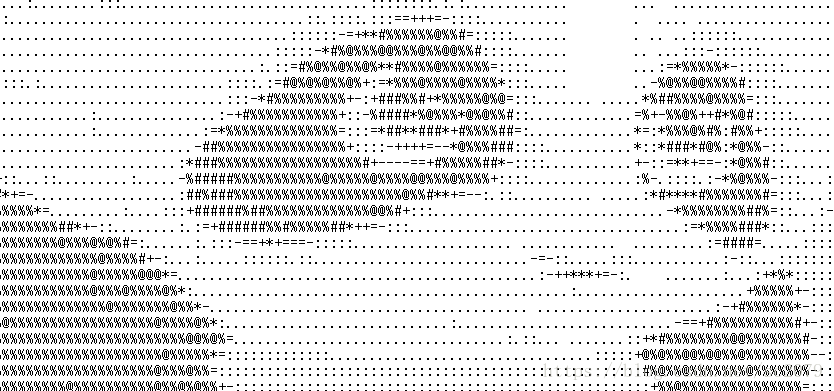
萌死我啦!注意:图片名后的数字代表像素,数字越大,图片细节越清晰,但txt文档打开一个界面看不完(必须滑动)
主程序
你可能会奇怪,为什么命令行执行的都是start.py文件,难道不可以直接运行各个子程序吗?本来是可以的,但是为了追求简洁统一,避免C:\Users\Administrator\目录下放到py文件过多,便写了个主程序start.py(必须放于C:\Users\Administrator\目录下!)。
Created on Mon Aug  6 21:05:09 2018

@author: Administrator

命令行快速查询、启动、运行

"""

import sys

sys.path.append('D:\\pycodes\\命令行快速访问')

import weather

import pyascii

import webopen

import setup

if len(sys.argv) < 2:

    sys.exit()

code= ' '.join(sys.argv[1:2])

word= ' '.join(sys.argv[2:3])

if len(sys.argv)>3:

    t=' '.join(sys.argv[3:4])

    word=[word,t]

codes=['weather','pyascii','webopen','setup']

if code not in codes:

    print('Wrong instructions!')

else:

    for i in range(len(codes)):

        if code==codes[i]:

            print('Instructions will be executed!')

            break

    if i==0:

        weather.data_of_tianqi(word)

    elif i==1:

        pyascii.ascii_write(word)

    elif i==2:

        webopen.webopen(word)

    elif i==3:

setup.setup(word)Github传送门:https://github.com/SCHaoZhang/python/tree/master/python_cmd
如果你还有其他的好点子,请分享给我哈!如果文中有不足之处,请私聊哈!
python之命令行可以做的事儿的更多相关文章
- Python执行命令行
背景 我们知道,虽然会破坏平台独立性,但是有的时候需要在代码里面调用命令行来获取一些信息,那么了解在 Python 中如何执行命令行至关重要 使用介绍 Python 中使用命令行可以通过 subpro ...
- Python之路,Day17 - 分分钟做个BBS论坛
Python之路,Day17 - 分分钟做个BBS论坛 本节内容: 项目:开发一个简单的BBS论坛 需求: 整体参考"抽屉新热榜" + "虎嗅网" 实现不同 ...
- 【python】命令行解析工具argparse用法
python的命令行参数 之前有用到optget, optparse, 现在这些都被弃用了. import argparse parser = argparse.ArgumentParser() ar ...
- 如何使用python自定义命令
dir.tree.cd等等,都是我们常见的命令.这些命令是开发者开发出来的,如果我们自己想按照自己的想法开发一个命令,应该怎么做呢? 以python语言来实现,问题就是:如何使用python自定义命令 ...
- python制作命令行工具——fire
python制作命令行工具--fire 前言 本篇教程的目的是希望大家可以通读完此篇之后,可以使用python制作一款符合自己需求的linux工具. 本教程使用的是google开源的python第三方 ...
- Monkey测试4——Monkey命令行可用的全部选项
Monkey命令行可用的全部选项 常规 --help 列出简单的用法. -v 命令行的每一个-v将增加反馈信息的级别. Level 0(缺省值)除启动提示.测试完成和最终结果之外,提供较少信息. Le ...
- Python 之 使用 PIL 库做图像处理
http://www.cnblogs.com/way_testlife/archive/2011/04/17/2019013.html Python 之 使用 PIL 库做图像处理 1. 简介. 图像 ...
- python 交互式命令行数据库连接助手 -- mysql、sql server (mssql)、redis
目录 python 交互式命令行数据库连接助手 0. 操作示例 1. python 连接mssql 2. python 连接mysql 3. python 连接redis n. Tips python ...
- Python的命令模式和交互模式
Python的命令行模式和交互模式 请注意区分命令行模式和Python交互模式. 在命令行模式下,可以执行python进入Python交互式环境,也可以执行python first.py运行一个.py ...
随机推荐
- JKD1.8新特性
1.Optional类 Optional是jdk1.8引入的类型,Optional是一个容器对象,它包括了我们需要的对象,使用isPresent方法判断所包 含对象是否为空,isPresent方法返回 ...
- Django:(08)序列化器
1.序列化和反序列化变量从内存中变成可存储或传输的过程称之为序列化,序列化之后,就可以把序列化后的内容写入磁盘,或者通过网络传输到别的机器上.反过来,把变量内容从序列化的对象重新读到内存里称之为反序列 ...
- go 二进制数据处理
以下是利用标准库binary来进行编解码 编码 ①使用bytes.Buffer来存储编码生成的串②使用binary.Write来编码存储在①的buf中 package main import ( &q ...
- 小菜鸟之oracle
oracle 存储过程 函数 创建 删除 参数 传递 函数 查看 包 系统包 分类: Oracle 2011-10-27 17:31 264人阅读 评论(0) 收藏 举报 认识存储过程和函数 存储 ...
- 小菜鸟之liunx
目录 第一章:Linux简介 1 Linux特点 1 CentOS 1 第二章:Linux安装 2 Linux目录结构 2 第三章:Linux常用命令 2 Linux命令的分类 3 操作文件或目录常用 ...
- springboot集成mongoDB简易使用
1.首先是添加Spring Data mongo的配置依赖 <dependency> <groupId>org.springframework.boot</groupId ...
- Python解Leetcode: 724. Find Pivot Index
leetcode 724. Find Pivot Index 题目描述:在数组中找到一个值,使得该值两边所有值的和相等.如果值存在,返回该值的索引,否则返回-1 思路:遍历两遍数组,第一遍求出数组的和 ...
- Codeforces Round #590 (Div. 3)补题
要想上2000分,先刷几百道2000+的题再说 ---某神 题目 E F 赛时是否尝试 × × tag math bitmask 难度 2000 2400 状态 ∅ √ 解 E 待定 F 传送门 第一 ...
- THUSC2013
魔塔 BZOJ 设每个敌人的属性值为\(hp_i,atk_i,def_i\).自己的为\(HP,ATK,DEF\) 首先我们可以发现顺序是没有影响的. 然后我们可以发现合适的\(ATK\)一定满足\( ...
- 剑指offer32:把数组排成最小的数
1 题目描述 输入一个正整数数组,把数组里所有数字拼接起来排成一个数,打印能拼接出的所有数字中最小的一个.例如输入数组{3,32,321},则打印出这三个数字能排成的最小数字为321323. 2 思路 ...