
vue首页组件切换
结构如下
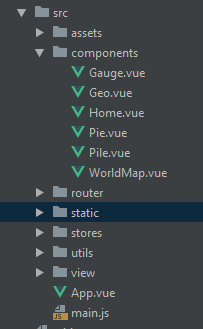
代码如下:
<template>

    <div id="page">

        <div style="width: 100%" class="flex-container column">

            <div class="item one" @click="clickChart('1')" style="transform: translate(-38.4%, -24.5%) scale(0.23)">

                <Pie ref="pie"></Pie>

            </div>

            <div class="item two" @click="clickChart('2')" style="transform: translate(-38.4%, 14.5%) scale(0.23)">

                <WorldMap ref="worldMap"></WorldMap>

            </div>

            <div class="item three" style="transform: translate(-18.6%, -28.5%) scale(0.33);height: 20%;width: 160%">

                <Home></Home>

            </div>

            // active 很关键 别写漏掉了

            <div class="item four active" @click="clickChart('4')" style="transform: translate(0%, -9.5%) scale(0.55);">

                <Geo ref="geo"></Geo>

            </div>

            <div class="item five" @click="clickChart('5')" style="transform: translate(38.29%, -24.5%) scale(0.23);">

                <Pile ref="pile"></Pile>

            </div>

            <div class="item six" @click="clickChart('6')" style="transform: translate(38.29%, 14.5%) scale(0.23);">

                <Gauge></Gauge>

            </div>

        </div>

    </div>

</template>

<script>

    import Geo from '@/components/Geo'

    import Pile from '@/components/Pile'

    import Pie from '@/components/Pie'

    import Gauge from '@/components/Gauge'

    import WorldMap from '@/components/WorldMap'

    import Home from '@/components/Home'

    export default {

        components: {

            Geo,

            Pie,

            Pile,

            Gauge,

            WorldMap,

            Home

        },

        data() {

            return {iconDisplay: ''}

        },

        methods: {

            clickChart(clickIndex) {

                let activeItem = document.querySelector('.flex-container .active')

                let activeIndex = activeItem.dataset.order

                let clickItem = this.items[clickIndex - ]

                if (activeIndex === clickIndex) {

                    return

                }

                activeItem.classList.remove('active')

                clickItem.classList.add('active')

                this._setStyle(clickItem, activeItem)

                this.iconDisplay = clickIndex

            }, _setStyle(el1, el2) {

                let transform1 = el1.style.transform

                let transform2 = el2.style.transform

                el1.style.transform = transform2

                el2.style.transform = transform1

            }

        }

    }

</script>

<style scoped> .active {

    height: %;

    width: %;

    margin-left: 10px;

    line-height: 300px;

    background-color: rgba(, , , 0.35) !important;

    z-index: ;

}

.item {

    padding: 0px;

    margin: 0px;

    position: absolute;

    transform: scale(0.33);

    text-align: center;

    transition: all .8s;

    background: rgba(, , , 0.3);

}

.flex-container.column {

    position: relative;

    height: %;

    width: %;

    overflow: hidden;

    box-sizing: content-box;

} </style>
vue首页组件切换的更多相关文章
- vue动态组件切换(选项卡)
vue的动态组件 <template :is='变量'></template> 可以通过改变变量,来改变template的替换内容.达到选项卡的功能 如果想要切换保持不重新创建 ...
- vue实现组件切换的两种方式
<!DOCTYPE html> <html> <head> <title>组件的切换</title> <meta charset=&q ...
- vue.js(17)--vue的组件切换
<!DOCTYPE html> <html lang="en"> <head> <meta charset="UTF-8&quo ...
- vue 实现tab切换动态加载不同的组件
vue 实现tab切换动态加载不同的组件 使用vue中的is特性来加载不同的组件.具体看如下代码:这个功能对于vue比较复杂的页面可以使用上,可以把一个页面的功能拆分出来,使代码更简单.使用方式具体看 ...
- Vue系列之 => 组件切换
组件切换方式一 <!DOCTYPE html> <html lang="en"> <head> <meta charset="U ...
- AntDesign vue学习笔记(四)使用组件切换
同样实现上一篇功能, 改为使用组件切换,实现方法如下 1.修改MainFrm中的<router-view/>如下代码 2.注册局部组件 export default { name: 'Ma ...
- 组件切换方式(Vue.js)
这里,我用一个注册登录两组件的切换实例来演示: 切换方式一 <!DOCTYPE html> <html lang="zh-CN"> <head> ...
- Vue学习之组件切换及父子组件小结(八)
一.组件切换: 1.v-if与v-else方式: <!DOCTYPE html> <html lang="en"> <head> <met ...
- Vue学习笔记【24】——Vue组件(组件切换)
使用flag标识符结合v-if和v-else切换组件 页面结构:(缺点:只适用于两个组件间切换,不适合多个) <div id="app"> <input ...
随机推荐
- DisplayModeProvider完成移动开发自动视图解析
MVC中新建视图命名:XXX.cshtml.XXX.mobile.cshtml:用手机访问会自动到xxx.mobile.cshtml 一.原理 MVC中是通过DisplayModeProvider实现 ...
- Vue之合理划分容器组件与展示组件
Vue之合理划分容器组件与展示组件 时间 2019-06-02 00:30:32 Poetry's Blog 原文 http://blog.poetries.top/2019/06/01/vue- ...
- poi操作excel之: 将NUMERIC转换成TEXT
一.NUMERIC TO TEXT(生成excel)代码生成一个excel文件: public static void generateExcel() throws Exception { XSSFW ...
- Codeforces 1221 F Choose a Square
题面 不知道大佬们怎么想的,反正我看到这种区间包含性质的并且score只和包含的区间与询问区间挂钩的题,马上就想到了扫描线23333 虽然革命方向无比正确,但却因为SB错误交了5次才 A. WA第一发 ...
- msql数据库常用指令操作
数据库指令 1.数据库指令 创建数据库:create database db_name; 删除数据库:drop database db_name; 显示数据库:show databases: 导出数据 ...
- nginx open_file_cache指令影响静态文件更新时间
有这样的需求,客户上传图片,覆盖以前的图片,因为客户可能会频繁的换图片,上传覆盖完后,页面会自动请求刚才的图片,图片已经换掉,但是url并没有换,因为图片名字没改. 因为更新的图要及时显示所以这个目录 ...
- Open Live Writer 显示不出来代码着色插件解决办法
下载地址: Open Live Writer 插件更新 下载后要把下面这5个文件,全部解除锁定(右键属性打开) Memento.OLW.Plugins.dll OLWPlugins.css OpenL ...
- Java并发指南9:AQS共享模式与并发工具类的实现
一行一行源码分析清楚 AbstractQueuedSynchronizer (三) 转自:https://javadoop.com/post/AbstractQueuedSynchronizer-3 ...
- ILI9341液晶显示
17.1液晶显示原理 TFT-LCD(Thin Film Transistor Liquid Crystal Display)即薄膜晶体管液晶显示器,是微电子技术与液晶显示器技术巧妙结合的的一种技术. ...
- kotlin标准委托之阻止属性的赋值操作
import kotlin.properties.Delegates fun main(arg: Array<String>) { val user = user() user.name= ...