
Android 基于身份证号的自定义键盘
上图上代码
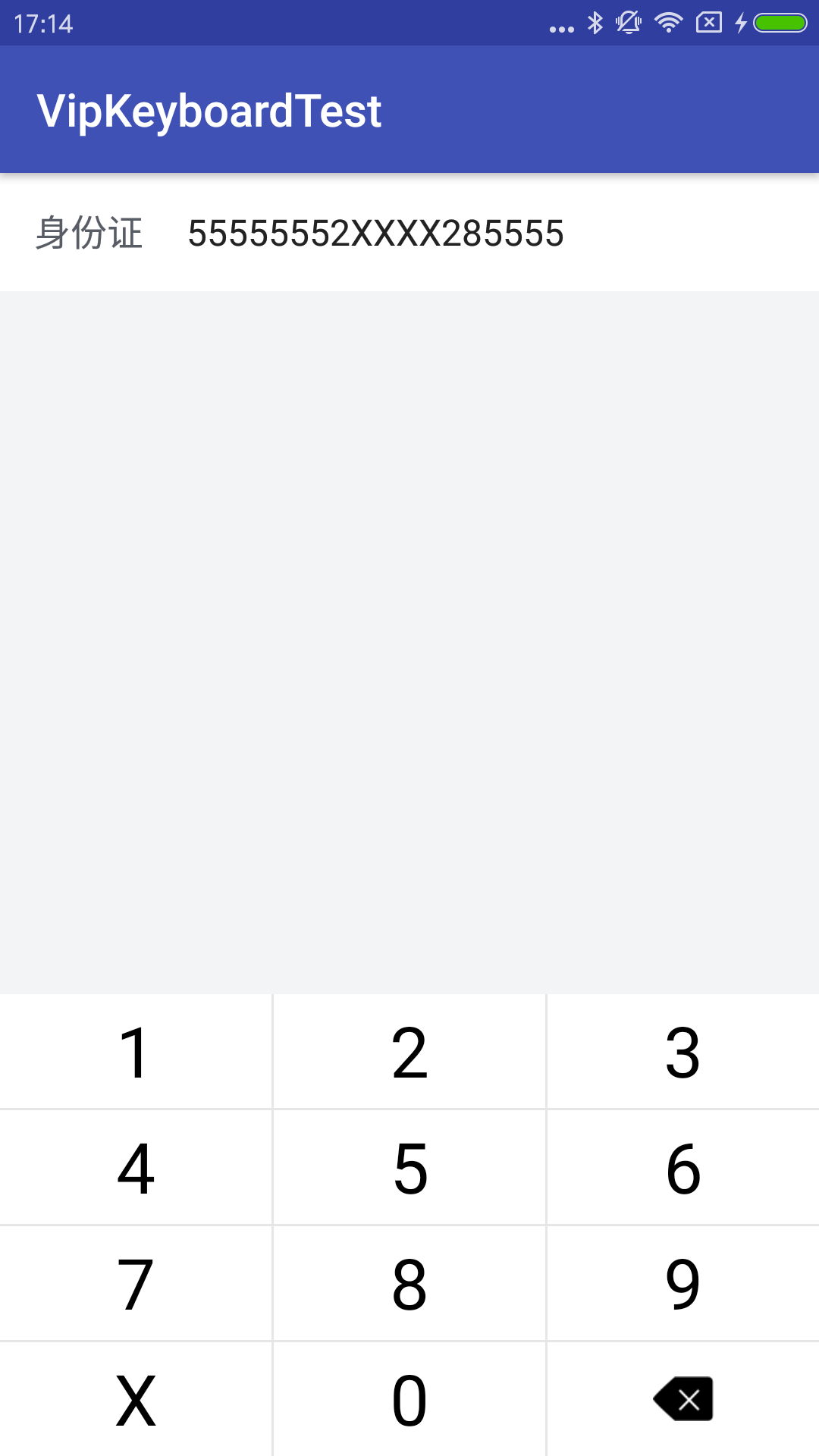
public class MainActivity extends AppCompatActivity {

    EditText writebankcard_mobileedit;

    CustomKeyboard mCustomKeyboard;

    @Override

    protected void onCreate(Bundle savedInstanceState) {

        super.onCreate(savedInstanceState);

        setContentView(R.layout.activity_main);

        writebankcard_mobileedit = (EditText) findViewById(R.id.writebankcard_mobileedit);

        //1 屏蔽掉系统默认输入法

        if (Build.VERSION.SDK_INT <= 10) {

            writebankcard_mobileedit.setInputType(InputType.TYPE_NULL);

        } else {

            getWindow().setSoftInputMode(WindowManager.LayoutParams.SOFT_INPUT_STATE_ALWAYS_HIDDEN);

            try {

                Class<EditText> cls = EditText.class;

                Method setShowSoftInputOnFocus = cls.getMethod("setShowSoftInputOnFocus", boolean.class);

                setShowSoftInputOnFocus.setAccessible(true);

                setShowSoftInputOnFocus.invoke(writebankcard_mobileedit, false);

            } catch (Exception e) {

                e.printStackTrace();

            }

        }

        //2 初试化键盘

        MyKeyboardView keyboardView = (MyKeyboardView) findViewById(R.id.customKeyboard);

        mCustomKeyboard = new CustomKeyboard(MainActivity.this, keyboardView, writebankcard_mobileedit);

        mCustomKeyboard.showKeyboard();

        writebankcard_mobileedit.setOnTouchListener(new View.OnTouchListener() {

            @Override

            public boolean onTouch(View v, MotionEvent event) {

                mCustomKeyboard.showKeyboard();

                return false;

            }

        });

    }

    //物理返回键

    @Override

    public void onBackPressed() {

        if (mCustomKeyboard.isShowKeyboard()){

            mCustomKeyboard.hideKeyboard();

        }else {

            finish();

        }

    }

}
public class CustomKeyboard {

    private EditText mEdittext;

    private MyKeyboardView mKeyboardView;

    private Keyboard mKeyboard;

    public CustomKeyboard(Context context, MyKeyboardView keyboardView, EditText editText) {

        this.mEdittext = editText;

        mKeyboard = new Keyboard(context, R.xml.keyboard);//从xml中加载自定义的键盘

        mKeyboardView = keyboardView;

        mKeyboardView.setContext(context);

        mKeyboardView.setKeyboard(mKeyboard);

        mKeyboardView.setPreviewEnabled(false);

        mKeyboardView.setOnKeyboardActionListener(actionListener);

    }

    private KeyboardView.OnKeyboardActionListener actionListener = new KeyboardView.OnKeyboardActionListener() {

        @Override

        public void onPress(int primaryCode) {

        }

        @Override

        public void onRelease(int primaryCode) {

        }

        @Override

        public void onKey(int primaryCode, int[] keyCodes) {

            Editable editable = mEdittext.getText();

            int index = mEdittext.getSelectionStart();//光标位置

            switch (primaryCode) {

                case Keyboard.KEYCODE_DELETE://回退

                    if (editable != null && editable.length() > 0) {

                        if (index > 0) {

                            editable.delete(index - 1, index);

                        }

                    }

                    break;

                case 9995://重输

                    mEdittext.setText("");

                    break;

                case 9994://左移

                    if (index > 0) {

                        mEdittext.setSelection(index - 1);

                    }

                    break;

                case 9996://右移

                    if (index < mEdittext.length()) {

                        mEdittext.setSelection(index + 1);

                    }

                    break;

                default:

                    editable.insert(index, Character.toString((char) primaryCode));

                    break;

            }

        }

        @Override

        public void onText(CharSequence text) {

        }

        @Override

        public void swipeLeft() {

        }

        @Override

        public void swipeRight() {

        }

        @Override

        public void swipeDown() {

        }

        @Override

        public void swipeUp() {

        }

    };

    public void showKeyboard() {

        if (mKeyboardView.getVisibility() != View.VISIBLE) {

            mKeyboardView.setVisibility(View.VISIBLE);

        }

    }

    public void hideKeyboard() {

        if (mKeyboardView.getVisibility() == View.VISIBLE) {

            mKeyboardView.setVisibility(View.GONE);

        }

    }

    public boolean isShowKeyboard() {

        return mKeyboardView.getVisibility() == View.VISIBLE;

    }

}
public class MyKeyboardView extends KeyboardView {

    private Context context;

    public MyKeyboardView(Context context, AttributeSet attrs) {

        super(context, attrs);

    }

    public void setContext(Context context) {

        this.context = context;

    }

    @Override

    public void onDraw(Canvas canvas) {

        super.onDraw(canvas);

       /* List<Keyboard.Key> keys = getKeyboard().getKeys();

        for(Keyboard.Key key: keys) {

            if(key.label.equals("delete"))

                resetOKBtn(key, canvas);

        }*/

    }

    /**

     * 绘制OK键的点9图

     * @author Song

     * @param key

     * @param canvas

     */

    private void resetOKBtn(Keyboard.Key key, Canvas canvas) {

        //将OK键重新绘制

       /* Drawable npd = (Drawable) context.getResources().getDrawable(R.mipmap.icon_number_del);

        npd.setBounds(key.x, key.y + 1, key.x + key.width, key.y + key.height + 1);

        npd.draw(canvas);*/

    }

}
键盘点击变色
<?xml version="1.0" encoding="utf-8"?>

<selector xmlns:android="http://schemas.android.com/apk/res/android" >

    <item android:state_pressed="true" >

        <color android:color="#d1d5db"/>

    </item>

    <item android:state_pressed="false" >

        <color android:color="#ffffff"/>

    </item>

</selector>
光标颜色
<?xml version="1.0" encoding="utf-8"?>

<shape xmlns:android="http://schemas.android.com/apk/res/android" android:shape="rectangle">

    <size android:width="2px" />

    <solid android:color="#000000"  />

</shape>
键盘
<?xml version="1.0" encoding="utf-8"?>

<Keyboard xmlns:android="http://schemas.android.com/apk/res/android"

    android:horizontalGap="3px"

    android:verticalGap="3px"

    android:keyHeight="50dp"

    android:keyWidth="33.33%p">

    <Row>

        <Key

            android:codes="49"

            android:keyLabel="1" />

        <Key

            android:codes="50"

            android:keyLabel="2" />

        <Key

            android:codes="51"

            android:keyLabel="3" />

    </Row>

    <Row>

        <Key

            android:codes="52"

            android:keyLabel="4" />

        <Key

            android:codes="53"

            android:keyLabel="5" />

        <Key

            android:codes="54"

            android:keyLabel="6" />

    </Row>

    <Row>

        <Key

            android:codes="55"

            android:keyLabel="7" />

        <Key

            android:codes="56"

            android:keyLabel="8" />

        <Key

            android:codes="57"

            android:keyLabel="9" />

    </Row>

    <Row>

        <Key

            android:codes="88"

            android:keyLabel="X"

            />

        <Key

            android:codes="48"

            android:keyLabel="0" />

        <Key

            android:codes="-5"

            android:keyIcon="@mipmap/icon_number_del"/>

    </Row>

</Keyboard>
demo地址 https://github.com/huanyi0723/VipKeyboardTest
Android 基于身份证号的自定义键盘的更多相关文章
- 银行卡号、电话号、身份证号 EditText 自定义格式的输入框
package com.yidian.AddSpaceEditText;import android.text.Editable;import android.text.InputFilter;imp ...
- 基于struts2框架-自定义身份证号验证器
自定义拦截器的步骤: 1.定义一个验证器的类: > 自定义的验证器都需要实现 Validator接口. > 可以选择继承 ValidatorSupport 或 FieldValidato ...
- KeyboardDemo - Android身份证号、车牌号快捷输入键盘
Android身份证号.车牌号快捷输入键盘 项目地址 Github 键盘部分在 keyboard module 中 键盘与EditText绑定参照 MainActivity
- 移动开发首页业界资讯移动应用平台技术专题 输入您要搜索的内容 基于Java Socket的自定义协议,实现Android与服务器的长连接(二)
在阅读本文前需要对socket以及自定义协议有一个基本的了解,可以先查看上一篇文章<基于Java Socket的自定义协议,实现Android与服务器的长连接(一)>学习相关的基础知识点. ...
- android自定义键盘(解决弹出提示的字体颜色问题)
最近准备要做一个项目,需要用到自定义小键盘来确保安全,而且还需要精确获得用户点击键盘时的落点位置.力度.指尖接触屏幕的面积等参数. 在写自定义键盘的时候,用到了国内网上的一些代码,出处是 向先人致敬! ...
- Laravel 中自定义 手机号和身份证号验证
首先在 Providers\AppServiceProvider.php 文件中自定义 手机号和身份证号验证 // AppServiceProvider.php 文件 <?php namespa ...
- Android 正则表达式验证手机号、姓名(包含少数民族)、身份证号
最近项目中新增的功能,需要对手机号.姓名.身份证号等一些信息进行验证,最好的方法是通过正则表达式来验证,网上查了一些资料,写了这几个工具方法. 1.验证手机号 规则:第一位只能是1,第二位为3-8中的 ...
- Android 使用正则表达式验证身份证号是否符合规则
我国当前的身份证号分为三种: 一.15位身份证号 二.18位身份证号(前17位位数字,最后一位为字母x) 三.18为身份证号(18位都是数字) 具体验证请参考下面代码: /** * 验证身份证号是否符 ...
- bootstrap-validator基本使用(自定义验证身份证号和手机号)
<!DOCTYPE html> <html lang="en"> <head> <meta charset="utf-8&quo ...
随机推荐
- scrum立会报告+燃尽图(第三周第一次)
此作业要求参见:https://edu.cnblogs.com/campus/nenu/2018fall/homework/2284 项目地址:https://coding.net/u/wuyy694 ...
- Android 中的广播机制
Android 中的广播机制 Android 中的广播,按照广播响应范围,可以分为应用内广播和全局广播.按照广播的接收方式,可以分为标准广播和有序广播. 广播的分类 响应范围 应用内广播:此类广播只能 ...
- 《C》数组
数组 数组方法: var arr = [1, 2, 3]; arr.push(4)://arr='[1, 2, 3, 4]' 向末尾添加一个或者多个元素 arr.pop()://删除末位元素 var ...
- psp项目计划
日期/任务 听课 编写程序 阅读书籍 查阅资料 日总计 周一 2h 0.5h 2.5 周二 1h 1 周三 1h 周四 2h 0.5h 2.5 周五 3 ...
- 元素相加交换另解&puts的一个用法
#include<iostream> using namespace std; int main(){ int a,b; cin>>a>>b; a^=b; b^=a ...
- DS06--图
一.学习总结 1.图的思维导图 2.图学习体会 深度优先遍历与广度优先遍历 不同点:广度优先搜索,适用于所有情况下的搜索,但是深度优先搜索不一定能适用于所有情况下的搜索.因为由于一个有解的问题树可能含 ...
- 关于双系统下Ubuntu不能访问Windows中某个盘的问题
1.问题描述 在Ubuntu系统下访问Windows系统中磁盘时出现无法访问的情况,具体如下显示: 该问题为磁盘挂载错误,需要进行修复. 2.解决办法 (1)打开终端:如果没有安装ntfs ...
- TCP系列44—拥塞控制—7、SACK关闭的快速恢复
) return; delta = ssthresh - in_flight; prr_delivered += newly_acked_sacked; if (delta < 0 ...
- Microsoft Orleans 之简介
Microsoft Orleans 在.net用简单方法构建高并发.分布式的大型应用程序框架. 原文:http://dotnet.github.io/orleans/ 在线文档:http://dotn ...
- PXE Centos7和Centos6
外网网卡:192.168.23.10, 内网网卡:192.168.10.2 PXE(preboot execute environment,预引导执行环境)是由Intel公司开发的最新技术,工作于Cl ...