
1-22-shell脚本基本应用-实验手册
脚本应用思路
1. 确定命令操作(设计并执行任务)
2. 编写Shell脚本(组织任务过程)
3. 设置计划任务(控制时间,调用任务脚本)
---------------------------------------------
实战-1、实现管理员在登录系统时显示如下信息
1)当前运行的进程数量
2)当前系统的登录用户的数量
3)当前使用的磁盘根分区的使用情况
操作过程如下图:
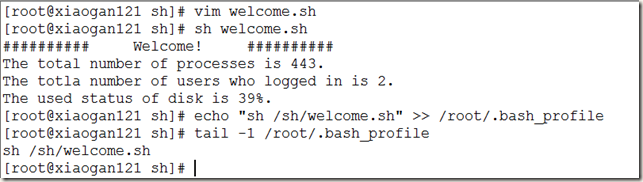
注意:也可修改/etc/profile配置文件,实现开机运行
脚本源码如下:
#!/bin/bash
# welcome information for login
#
# Print below information:
# 1. The total number of processes.
# 2. The totla number of users who logged in.
# 3. The used status of disk.
echo "########## Welcome! ##########"
# 1. The total number of processes.
echo "The total number of processes is $(ps -aux | wc -l)."
# 2. The totla number of users who logged in.
echo "The totla number of users who logged in is $(who | wc -l)."
# 3. The used status of disk.
echo "The used status of disk is $(df -hT | grep root | awk '{print $6}')."
---------------------------------------------
实战-2、编写脚本实现系统服务启动 停止 当前状态的脚本
#!/bin/bash
#service manager script
# status start stop restart
if [ $1 = 'start' ] #start server of $2
then systemctl start $2 2>>server.logs
elif [ $1 = 'stop' ] #stop server of $2
then systemctl stop $2 2>>server.logs
elif [ $1 = 'status' ] #status server of $2
then systemctl status $2 2>>server.logs
elif [ $1 = 'restart' ] #restart server of $2
then systemctl restart $2 2>>server.logs
fi
---------------------------------------------
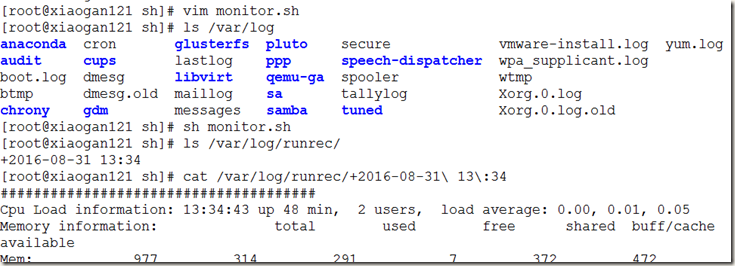
实战-3、写运行状况监控脚本
/sh/monitor.sh,用于记录CPU负载、内存和交换空间、磁盘空间、最近的用户登录情况等信息,以及当时的时间信息。
#!/bin/bash
#back monitor CPU Mem Swap Disk LastLogin information to file
# set recored Dir
Dir=/var/log/runrec/
# prepare the environment
mkdir -p $Dir
# get current time
RecTime=$(date +"%Y-%m-%d %H:%M")
# set record filename
RecFile=$Dir$RecTime.log
# get CPU
RecLoad=$(uptime)
# get Mem and Swap
RecMem=$(free -m)
# get Disk
RecDisk=$(df -hT)
# get Last
RecLastLogin=$(last -n 20)
# echo information and saved to RecFile
echo "######################################
Cpu Load information:$RecLoad
Memory information:$RecMem
Disk Usage information:$RecDisk
Last Login 20 users record:$RecLastLogin" >> $RecFile
设置定时备份:

---------------------------------------------
实战-4、过滤出本机echo网卡的MAC地址,并赋值给hwaddr
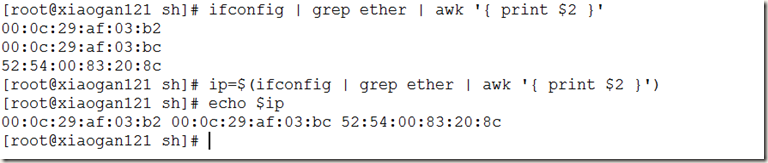
[root@xiaogan121 sh]# ifconfig | grep ether | awk '{ print $2 }'
00:0c:29:af:03:b2
00:0c:29:af:03:bc
52:54:00:83:20:8c
[root@xiaogan121 sh]# ip=$(ifconfig | grep ether | awk '{ print $2 }')
[root@xiaogan121 sh]# echo $ip
00:0c:29:af:03:b2 00:0c:29:af:03:bc 52:54:00:83:20:8c
[root@xiaogan121 sh]#
---------------------------------------------
实战-5、编写脚本计算当前的内存使用百分比
MemTotal=$(free -m | grep Mem | awk '{ print $2 }')
MemUse=$(free -m | grep Mem | awk '{ print $3 }')
usage=$( expr $( expr $MemUse \* 100 ) / $MemTotal )

[root@xiaogan121 sh]# usage=$( expr $( expr $(free -m | grep Mem | awk '{ print $3 }') \* 100 ) / $(free -m | grep Mem | awk '{ print $2 }') )
[root@xiaogan121 sh]# echo $usage
31
[root@xiaogan121 sh]# free -m | grep Mem | awk '{ print $3 }'
311
[root@xiaogan121 sh]# free -m | grep Mem | awk '{ print $2 }'
977
[root@xiaogan121 sh]# free -m
total used free shared buff/cache available
Mem: 977 312 292 7 373 474
Swap: 2047 0 2047
[root@xiaogan121 sh]#
---------------------------------------------
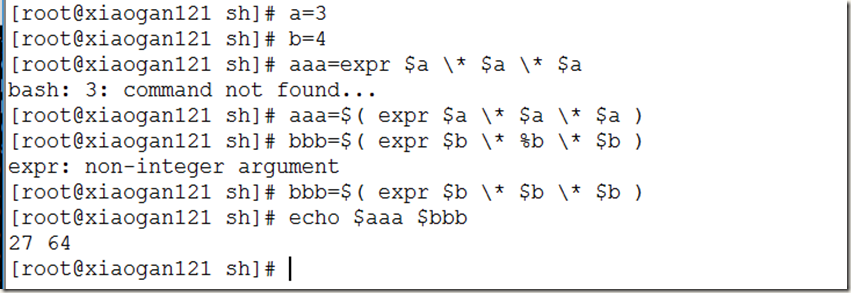
实战-6、计算3 4 的平方和
1-22-shell脚本基本应用-实验手册的更多相关文章
- Miniconda 安装 & Pip module 安装 & Shell 脚本调用 Miniconda 虚拟环境手册(实战项目应用)
(实战项目应用) 1. 下载Miniconda 两个安装方式: 方式1:wget https://mirrors.tuna.tsinghua.edu.cn/anaconda/miniconda/Min ...
- Shell脚本编程总结及速查手册
Shell是一种编程语言, 它像其它编程语言如: C, Java, Python等一样也有变量/函数/运算符/if语句/循环控制/… 但在开始之前, 我想先理清Shell语言与Shell之间的关系. ...
- 让你提前知道软件开发(22):shell脚本文件操作
文章1部分 再了解C语言 shell脚本中的文件操作 [文章摘要] 编写shell脚本时,经常会涉及到对文件的操作,比方从文件里读取一行数据.向文件追加一行数据等. 完毕文件读写操作的方法有非常多,了 ...
- Linux编程 22 shell编程(输出和输入重定向,管道,数学运算命令,退出脚本状态码)
1. 输出重定向 最基本的重定向是将命令的输出发送到一个文件中.在bash shell中用大于号(>) ,格式如下:command > inputfile.例如:将date命令的输出内容, ...
- 《Linux命令行与shell脚本编程大全 第3版》Linux命令行---22
以下为阅读<Linux命令行与shell脚本编程大全 第3版>的读书笔记,为了方便记录,特地与书的内容保持同步,特意做成一节一次随笔,特记录如下:
- 2019.11.13课堂实验之用Linux下的shell脚本完成两文本交替输出
有两个文本如下,实际中并不知道两文本各有多少行: 文本1.txt aaaaaaaaaaaaaaaaaaaaaaaaaaaaaaaaaaaaaaa ccccccccccccccccccccccccccc ...
- 实验五:shell脚本编程
项目 内容 这个作业属于哪个课程 班级课程的主页链接 这个作业的要求在哪里 作业要求链接地址 学号-姓名 17043133-木腾飞 作业学习目标 1.了解shell 脚本的概念及应用2.掌握shell ...
- 实验五 shell脚本编程
项目 内容 这个作业属于哪个课程 课程链接 这个作业的要求在哪里 作业要求 学号-姓名 17041428-朱槐健 作业学习目标 1. 了解shell脚本的概念及使用 2.掌握shell脚本语言的基本语 ...
- 实验五shell脚本编程
项目 内容 这个作业属于哪个课程 <班级课程的主页链接> 这个作业的要求在哪里 作业要求链接地址 学号-姓名 17043220-万文文 作业学习目标 1)了解shell脚本的概念及使用.2 ...
随机推荐
- Linux系统——VMware克隆
克隆VMware 1. 关闭防火墙 2. 关闭selinux 3. 删除UUID和Mac地址 4.清空网卡缓存 5.关机 ===================== 关闭防火墙 #service ip ...
- Linux系统——vim编辑器
一.Linux系统中最常用的文本编辑器 vi:类Unix系统中默认的文本编辑器 vim:vi编辑器的增强版 作用:创建或修改文本文件:维护Linux系统中各种配置文件 二.三种切换模式命令模式输入模式 ...
- Spark --【宽依赖和窄依赖】
前言 Spark中RDD的高效与DAG图有着莫大的关系,在DAG调度中需要对计算过程划分stage,暴力的理解就是stage的划分是按照有没有涉及到shuffle来划分的,没涉及的shuffle的都划 ...
- Ubuntu下安装keras
0 系统版本Ubuntu16.04 1 系统更新 sudo apt update sudo apt upgrade 2 安装python基础开发包 sudo apt install -y python ...
- 保持简单----纪念丹尼斯•里奇(Dennis Ritchie)
http://www.ruanyifeng.com/blog/2011/10/dennis_ritchie.html
- $如何用Python装饰器实现一个代码计时器?
有时候我们很希望看到程序中某个函数或某个代码段的耗时情况,那么该如何办呢?本文用两种方式实现了代码计时器的功能,第一种方式是采用装饰器来实现,第二种方式采用上下文管理器实现. 其实计算代码的运行时间, ...
- CentOS6.5安装Qt4.8.6+QtCreator2.6.1
工作中需要用到Qt在Linux下做开发,公司提供的电脑安装的CentOS6.2,但是为了和windows下自己使用的QT版本一直,于是也选择安装了Qt5.1.0.但是在CentOS下刚开始是无法启动, ...
- CSS Table(表格)
CSS Table(表格) 一.表格边框 border 指定CSS表格边框,使用border属性. 下面的例子指定了一个表格的Th和TD元素的黑色边框: table, th, td { border: ...
- elasticsearch 5.5.1 head插件安装
5.5.1版本与之前版本有很大不同. 1. 下载插件 git clone git://github.com/mobz/elasticsearch-head.git 2. 编译 cd elasticse ...
- innodb 行级锁
InnoDB行锁是通过给索引上的索引项加锁来实现的,这一点MySQL与Oracle不同,后者是通过在数据块中对相应数据行加锁来实现的.InnoDB这种行锁实现特点意味着:只有通过索引条件检索数据,In ...