
anaconda的一些命令
先安装好TensorFlow。
1.安装sklearn
本安装方式是在anaconda prompt上用命令来更新
(1)激活TensorFlow:activate tensorflow
(2)查看是否有sklearn:conda list
(3)安装:conda install scikit-learn
sklearn使用示例:
>>> import numpy as np

>>> from sklearn.model_selection import train_test_split

>>> X, y = np.arange().reshape((, )), range()

>>> X

array([[, ],

       [, ],

       [, ],

       [, ],

       [, ]])

>>> list(y)

[, , , , ]
>>> X_train, X_test, y_train, y_test = train_test_split(

...     X, y, test_size=0.33, random_state=)

...

>>> X_train

array([[, ],

       [, ],

       [, ]])

>>> y_train

[, , ]

>>> X_test

array([[, ],

       [, ]])

>>> y_test

[, ]
>>> train_test_split(y, shuffle=False)

[[, , ], [, ]]
2.安装matplotlib
安装与1相同
(1)激活TensorFlow:activate tensorflow
(2)查看是否有sklearn:conda list
(3)安装:conda install matplotlib
matplotlib使用示例:
import matplotlib

import numpy

import scipy

import matplotlib.pyplot as plt

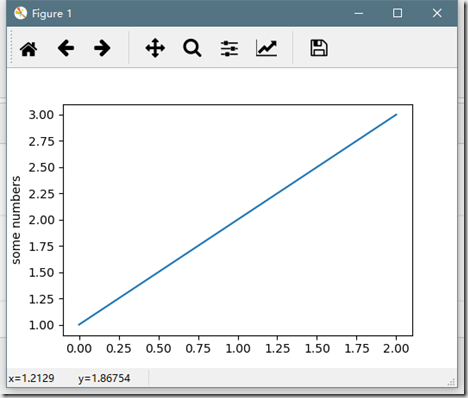
plt.plot([1,2,3])

plt.ylabel('some numbers')

plt.show()
import numpy as np

import matplotlib.pyplot as plt

X = np.arange(-5.0, 5.0, 0.1)

Y = np.arange(-5.0, 5.0, 0.1)

x, y = np.meshgrid(X, Y)

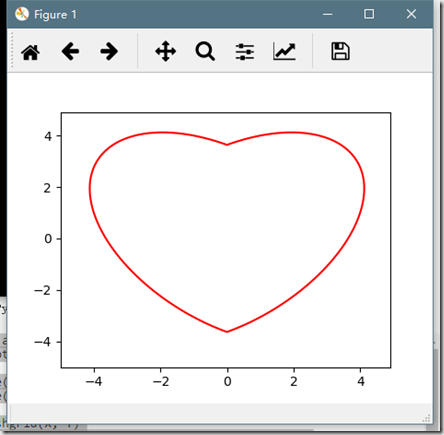
f = 17 * x ** 2 - 16 * np.abs(x) * y + 17 * y ** 2 - 225

fig = plt.figure()

cs = plt.contour(x, y, f, 0, colors = 'r')

plt.show()
import numpy as np

import matplotlib.pyplot as plt

N = 5

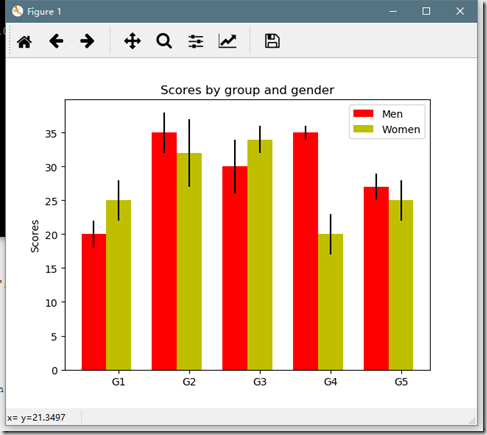
menMeans = (20, 35, 30, 35, 27)

menStd =   (2, 3, 4, 1, 2)

ind = np.arange(N)  # the x locations for the groups

width = 0.35        # the width of the bars

fig, ax = plt.subplots()

rects1 = ax.bar(ind, menMeans, width, color='r', yerr=menStd)

womenMeans = (25, 32, 34, 20, 25)

womenStd =   (3, 5, 2, 3, 3)

rects2 = ax.bar(ind+width, womenMeans, width, color='y', yerr=womenStd)

# add some

ax.set_ylabel('Scores')

ax.set_title('Scores by group and gender')

ax.set_xticks(ind+width)

ax.set_xticklabels( ('G1', 'G2', 'G3', 'G4', 'G5') )

ax.legend( (rects1[0], rects2[0]), ('Men', 'Women') )

def autolabel(rects):

    # attach some text labels

    for rect in rects:

        height = rect.get_height()

        ax.text(rect.get_x()+rect.get_width()/2., 1.05*height, '%d'%int(height),

                ha='center', va='bottom')

autolabel(rects1)

autolabel(rects2)

plt.show()
anaconda的一些命令的更多相关文章
- anaconda常用的命令
常用操作命令: 一.环境操作 1.查看环境管理的全部命令帮助: conda env -h 2.查看当前系统下的环境: conda info -e 3.创建环境: conda create env_na ...
- anaconda 使用conda命令创建虚拟环境
1.首先在所在系统中安装Anaconda.可以打开命令行输入conda -V检验是否安装以及当前conda的版本. 2.conda常用的命令. 1)conda list 查看安装了哪些包. 2)con ...
- Anaconda之常用命令
1.查看环境列表:conda-env list 2.删除环境:conda env remove -n tf1.2 3.创建指定python的环境:conda create -n tf1.2 pyth ...
- 在Mac上安装anaconda,在命令行中输入conda,提示不是有效命令的解决办法
原链接:https://stackoverflow.com/questions/18675907/how-to-run-conda
- Anaconda换源及常用命令
推荐一篇文章:http://www.cnblogs.com/IT-LearnHall/p/9486029.html 另外,记录几个自己遇到的问题 首先是换源.无论是安装包还是安装后更新python包, ...
- ML学习笔记之Anaconda中命令形式安装XGBoost(pip install)
0x00 概述 在没有安装XGBoost之前,import xgboot会出错,如下: # ModuleNotFoundError: No module named ‘xgboost’ 0x01 安装 ...
- 安装Anaconda
安装Anaconda来安装一切 spyder是python科学计算IDE,类似matlab.这是一个基于Qt的软件,如果使用pip install安装,会出现各种bug.pip install spy ...
- Anaconda使用
转自PeterYuan 序 Python易用,但用好却不易,其中比较头疼的就是包管理和Python不同版本的问题,特别是当你使用Windows的时候.为了解决这些问题,有不少发行版的Python, ...
- Conda常见命令
Anaconda,Miniconda,Conda,Pip的区别: Anaconda:用于科学计算的python发行版,里面预装好了conda,某个版本的python,众多packages,科学计算工具 ...
随机推荐
- macOS Sierra上Opencv的安装与使用
安装cmake brew install cmake 安装OpenCV brew install opencv //opencv升级 # brew upgrade opencv 配置OpenCV环境: ...
- ruby中的方法查找
ruby中的方法调用都是 对象.方法 的形式,那么对象如何找到这个方法呢? 首先必须了解祖先链的概念,祖先链就是从一个类开始,到它的父类,再到父类的父类...一直到最终的起点(ruby中是BasicO ...
- PL/SQL编程—函数
SQL> select * from mytest; ID NAME PASSWD SALARY ----- -------------------- -------------------- ...
- 2018.9 ECNU ICPC/CCPC Trial Round #2 Query On Tree (树链剖分+线段树维护)
传送门:https://acm.ecnu.edu.cn/contest/105/problem/Q/ 一棵树,支持两种操作:给一条路径上的节点加上一个等差数列;求两点路径上节点和. 很明显,熟练剖分. ...
- iOS 提升代码的安全性,可以做哪些措施???
希望能尽量防止别人 反编译你的代码: 目前苹果审核规则可知,苹果官方是不希望你使用代码混淆的...如果发现了你用代码混淆,甚至会勒令你修改你的代码,否则下一次审核会直接移除你的app…尤其是跑脚本的那 ...
- MYSQL基本操作总结
(1)cd c:/ //进入c:\-> (2)mysql -h 127.0.0.1 -u root -p //进入数据库 SHOW DATABASES; //显示所有数据库 CREATE DAT ...
- Web安全学习笔记之Nmap命令参考指南
最近研究Nmap,命令太多,详细还是需要参考官方文档(可选中文) 本文转载 在网络技术中,端口(Port)包括逻辑端口和物理端口两种类型.物理端口指的是物理存在的端口,如ADSL Modem.集线器. ...
- linux目录结构及文件权限
安装banner用到的指令: 第一步: sudo apt-get update 第二步: sudo apt-get install sysvbanner 成功了 创建新用户指令: sudo addus ...
- Docker 的一些使用心得
Docker 的使用心得 预备知识·必备· bash(bsd) Net ,ip know hot to search in Google and Baidu 安装 一般找一个不错的网络环境...不然玩 ...
- c语言数据类型字节长度
突然间就想到了long和int到底什么区别(发现有很多问题都是突然间想到的),然后百度.google各种查找,各种书籍:<C++ Primer>.<C程序设计语言>查看,终于明 ...