
Quartz.NET文档 入门教程
概述
Quartz.NET是一个开源的作业调度框架,非常适合在平时的工作中,定时轮询数据库同步,定时邮件通知,定时处理数据等。 Quartz.NET允许开发人员根据时间间隔(或天)来调度作业。它实现了作业和触发器的多对多关系,还能把多个作业与不同的触发器关联。整合了 Quartz.NET的应用程序可以重用来自不同事件的作业,还可以为一个事件组合多个作业。
下载下来官方的例子,我们来分析一下:
解压后,看到的文档

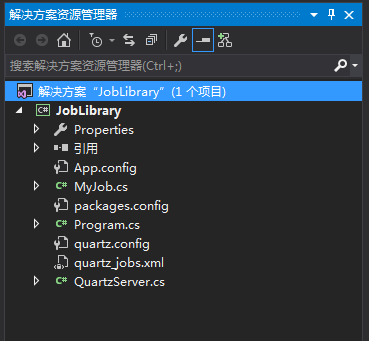
打开后,看到的项目结构如下:

项目可以直接运行:

运行后,我们可以看到,每隔10秒有输出,那是因为,在配置quart.net的服务文件里,配置了每10秒执行一次

快速搭建一个Quartz
可以不用自己搭建,官方的例子直接用就可以
下面以2.6.1为例
第一步:安装
新建一个QuartzDemo项目后,安装下面的程序包
Install-Package QuartzInstall-Package Common.Logging.Log4Net1211Install-Package log4netInstall-PackageTopshelfInstall-Package Topshelf.Log4Net
Quartz依赖Common.Logging和Common.Logging.Log4Net1211,又因为Log4Net是比较标准的日志工具,因此我们一般都会安装log4net,另外定时作业一般都允许在后台服务中,因此我们也安装了Topshelf。
因为版本之间的依赖,分别安装可能会出问题,建议直接复制下面的Nuget配置,然后手动添加引用,或者安装下面对应的版本
<?xml version="1.0" encoding="utf-8"?>

<packages>

  <package id="Common.Logging" version="3.3.1" targetFramework="net4" />

  <package id="Common.Logging.Core" version="3.3.1" targetFramework="net4" />

  <package id="Common.Logging.Log4Net1213" version="3.3.1" targetFramework="net4" />

  <package id="log4net" version="2.0.3" targetFramework="net4" />

  <package id="Quartz" version="2.6.1" targetFramework="net4" />

  <package id="Topshelf" version="3.1.4" targetFramework="net4" />

</packages>
第二步:实现IJob
SampleJob.cs 实现IJob,在Execute方法里编写要处理的业务逻辑,系统就会按照Quartz的配置,定时处理。
using log4net;

using Quartz;

using System;

using System.Collections.Generic;

using System.Linq;

using System.Text;

using System.Threading.Tasks;

namespace JobLibrary

{

    public class MyJob : IJob

    {

        private static readonly ILog logger = LogManager.GetLogger(typeof(MyJob));

        public void Execute(IJobExecutionContext context)

        {

            logger.Info("MyJob running...");

            //Thread.Sleep(TimeSpan.FromSeconds(5));

            //logger.Info("SampleJob run finished.");

        }

    }

}
第三步:使用Topshelf调度任务
QuartzServer.cs
using log4net;

using Quartz;

using System;

using System.Collections.Generic;

using System.Linq;

using System.Text;

using System.Threading.Tasks;

using Topshelf;

namespace JobLibrary

{

    public class QuartzServer : ServiceControl

    {

        private readonly ILog logger;

        private ISchedulerFactory schedulerFactory;

        private IScheduler scheduler;

        /// <summary>

        /// Initializes a new instance of the <see cref="QuartzServer"/> class.

        /// </summary>

        public QuartzServer()

        {

            logger = LogManager.GetLogger(GetType());

        }

        /// <summary>

        /// Initializes the instance of the <see cref="QuartzServer"/> class.

        /// </summary>

        public virtual void Initialize()

        {

            try

            {

                schedulerFactory = CreateSchedulerFactory();

                scheduler = GetScheduler();

            }

            catch (Exception e)

            {

                logger.Error("Server initialization failed:" + e.Message, e);

                throw;

            }

        }

        /// <summary>

        /// Gets the scheduler with which this server should operate with.

        /// </summary>

        /// <returns></returns>

        protected virtual IScheduler GetScheduler()

        {

            return schedulerFactory.GetScheduler();

        }

        /// <summary>

        /// Returns the current scheduler instance (usually created in <see cref="Initialize" />

        /// using the <see cref="GetScheduler" /> method).

        /// </summary>

        protected virtual IScheduler Scheduler

        {

            get { return scheduler; }

        }

        /// <summary>

        /// Creates the scheduler factory that will be the factory

        /// for all schedulers on this instance.

        /// </summary>

        /// <returns></returns>

        protected virtual ISchedulerFactory CreateSchedulerFactory()

        {

            return new StdSchedulerFactory();

        }

        /// <summary>

        /// Starts this instance, delegates to scheduler.

        /// </summary>

        public virtual void Start()

        {

            try

            {

                scheduler.Start();

            }

            catch (Exception ex)

            {

                logger.Fatal(string.Format("Scheduler start failed: {0}", ex.Message), ex);

                throw;

            }

            logger.Info("Scheduler started successfully");

        }

        /// <summary>

        /// Stops this instance, delegates to scheduler.

        /// </summary>

        public virtual void Stop()

        {

            try

            {

                scheduler.Shutdown(true);

            }

            catch (Exception ex)

            {

                logger.Error(string.Format("Scheduler stop failed: {0}", ex.Message), ex);

                throw;

            }

            logger.Info("Scheduler shutdown complete");

        }

        /// <summary>

        /// Performs application-defined tasks associated with freeing, releasing, or resetting unmanaged resources.

        /// </summary>

        public virtual void Dispose()

        {

            // no-op for now

        }

        /// <summary>

        /// Pauses all activity in scheduler.

        /// </summary>

        public virtual void Pause()

        {

            scheduler.PauseAll();

        }

        /// <summary>

        /// Resumes all activity in server.

        /// </summary>

        public void Resume()

        {

            scheduler.ResumeAll();

        }

        /// <summary>

        /// TopShelf's method delegated to <see cref="Start()"/>.

        /// </summary>

        public bool Start(HostControl hostControl)

        {

            Start();

            return true;

        }

        /// <summary>

        /// TopShelf's method delegated to <see cref="Stop()"/>.

        /// </summary>

        public bool Stop(HostControl hostControl)

        {

            Stop();

            return true;

        }

        /// <summary>

        /// TopShelf's method delegated to <see cref="Pause()"/>.

        /// </summary>

        public bool Pause(HostControl hostControl)

        {

            Pause();

            return true;

        }

        /// <summary>

        /// TopShelf's method delegated to <see cref="Resume()"/>.

        /// </summary>

        public bool Continue(HostControl hostControl)

        {

            Resume();

            return true;

        }

    }

}
第四步:程序入口
using log4net;

using System;

using System.Collections.Generic;

using System.IO;

using System.Linq;

using System.Text;

using System.Threading.Tasks;

using Topshelf;

namespace JobLibrary

{

    class Program

    {

        static void Main(string[] args)

        {

            Directory.SetCurrentDirectory(System.AppDomain.CurrentDomain.BaseDirectory);

            HostFactory.Run(x =>

            {

                x.RunAsLocalSystem();

                x.SetDescription("SetDescription");

                x.SetDisplayName("SetDisplayName");

                x.SetServiceName("SetServiceName");

                x.Service(factory =>

                {

                    QuartzServer server = CreateServer();

                    server.Initialize();

                    return server;

                });

            });

        }

        private static readonly ILog logger = LogManager.GetLogger(typeof(Program));

        /// <summary>

        /// Creates a new instance of an Quartz.NET server core.

        /// </summary>

        /// <returns></returns>

        public static QuartzServer CreateServer()

        {

            string typeName = typeof(QuartzServer).AssemblyQualifiedName;

            Type t = Type.GetType(typeName, true);

            logger.Debug("Creating new instance of server type '" + typeName + "'");

            QuartzServer retValue = (QuartzServer)Activator.CreateInstance(t);

            logger.Debug("Instance successfully created");

            return retValue;

        }

    }

}
第五步:配置文件
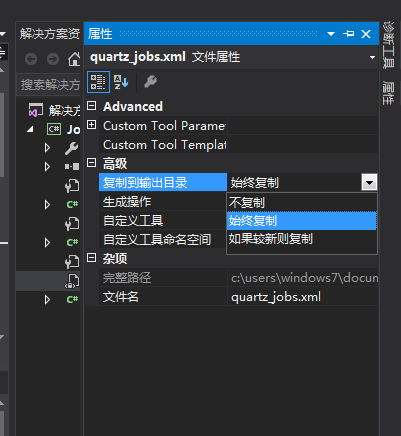
quartz.config、quartz_jobs.xml、 log4net.conf
说明:这三个文件,分别选中→右键属性→复制到输入目录设为:始终复制
quartz.config
# You can configure your scheduler in either <quartz> configuration section

# or in quartz properties file

# Configuration section has precedence

quartz.scheduler.instanceName = ServerScheduler

# configure thread pool info

quartz.threadPool.type = Quartz.Simpl.SimpleThreadPool, Quartz

quartz.threadPool.threadCount = 10

quartz.threadPool.threadPriority = Normal

# job initialization plugin handles our xml reading, without it defaults are used

quartz.plugin.xml.type = Quartz.Plugin.Xml.XMLSchedulingDataProcessorPlugin, Quartz

quartz.plugin.xml.fileNames = ~/quartz_jobs.xml

# export this server to remoting context

quartz.scheduler.exporter.type = Quartz.Simpl.RemotingSchedulerExporter, Quartz

quartz.scheduler.exporter.port = 555

quartz.scheduler.exporter.bindName = QuartzScheduler

quartz.scheduler.exporter.channelType = tcp

quartz.scheduler.exporter.channelName = httpQuartz
quartz_jobs.xml
<?xml version="1.0" encoding="UTF-8"?>

<!-- This file contains job definitions in schema version 2.0 format -->

<job-scheduling-data xmlns="http://quartznet.sourceforge.net/JobSchedulingData" xmlns:xsi="http://www.w3.org/2001/XMLSchema-instance" version="2.0">

  <processing-directives>

    <overwrite-existing-data>true</overwrite-existing-data>

  </processing-directives>

  <schedule>

    <!--如果多个任务就配置多个Job/trigger-->

    <job>

      <name>MyJob</name>

      <group>sampleGroup</group>

      <description>Sample job for Quartz Server</description>

      <job-type>JobLibrary.MyJob, JobLibrary</job-type>

      <durable>true</durable>

      <recover>false</recover>

    </job>

    <trigger>

      <simple>

        <name>MyJobTrigger</name>

        <group>sampleSimpleGroup</group>

        <description>Simple trigger to simply fire sample job</description>

        <job-name>MyJob</job-name>

        <job-group>sampleGroup</job-group>

        <misfire-instruction>SmartPolicy</misfire-instruction>

        <repeat-count>-1</repeat-count>

        <repeat-interval>500</repeat-interval>

      </simple>

    </trigger>

  </schedule>

</job-scheduling-data>
App.config
<?xml version="1.0" encoding="utf-8" ?>
<configuration>
<configSections>
<section name="quartz" type="System.Configuration.NameValueSectionHandler, System, Version=1.0.5000.0,Culture=neutral, PublicKeyToken=b77a5c561934e089" />
<section name="log4net" type="log4net.Config.Log4NetConfigurationSectionHandler, log4net" />
<sectionGroup name="common">
<section name="logging" type="Common.Logging.ConfigurationSectionHandler, Common.Logging" />
</sectionGroup>
</configSections> <common>
<logging>
<factoryAdapter type="Common.Logging.Log4Net.Log4NetLoggerFactoryAdapter, Common.Logging.Log4net1213">
<arg key="configType" value="INLINE" />
</factoryAdapter>
</logging>
</common> <log4net>
<appender name="ConsoleAppender" type="log4net.Appender.ConsoleAppender">
<layout type="log4net.Layout.PatternLayout">
<conversionPattern value="%d - %m%n" />
</layout>
</appender>
<appender name="EventLogAppender" type="log4net.Appender.EventLogAppender">
<layout type="log4net.Layout.PatternLayout">
<conversionPattern value="%d [%t] %-5p %l - %m%n" />
</layout>
</appender> <appender name="RollingLogFileAppender" type="log4net.Appender.RollingFileAppender">
<!--日志路径-->
<param name= "File" value= "C:\App_Log\servicelog\"/>
<!--是否是向文件中追加日志-->
<param name= "AppendToFile" value= "true"/>
<!--log保留天数-->
<param name= "MaxSizeRollBackups" value= "10"/>
<!--日志文件名是否是固定不变的-->
<param name= "StaticLogFileName" value= "false"/>
<!--日志文件名格式为:2008-08-31.log-->
<param name= "DatePattern" value= "yyyy-MM-dd".read.log""/>
<!--日志根据日期滚动-->
<param name= "RollingStyle" value= "Date"/>
<layout type="log4net.Layout.PatternLayout">
<param name="ConversionPattern" value="%d [%t] %-5p %c - %m%n %loggername" />
</layout>
</appender> <root>
<level value="INFO" />
<!--<appender-ref ref="RollingLogFileAppender" />-->
<appender-ref ref="ConsoleAppender" />
<!-- uncomment to enable event log appending -->
<!-- <appender-ref ref="EventLogAppender" /> -->
</root>
</log4net> <!--
We use quartz.config for this server, you can always use configuration section if you want to.
Configuration section has precedence here.
-->
<!--
<quartz >
</quartz>
-->
<runtime> <assemblyBinding xmlns="urn:schemas-microsoft-com:asm.v1">
<dependentAssembly>
<assemblyIdentity name="Common.Logging" publicKeyToken="af08829b84f0328e" culture="neutral" />
<bindingRedirect oldVersion="0.0.0.0-3.3.1.0" newVersion="3.3.1.0" />
</dependentAssembly> <assemblyBinding xmlns="urn:schemas-microsoft-com:asm.v1">
<dependentAssembly>
<assemblyIdentity name="log4net" publicKeyToken="669e0ddf0bb1aa2a" culture="neutral" />
<bindingRedirect oldVersion="0.0.0.0-1.2.11.0" newVersion="1.2.11.0" />
</dependentAssembly>
</assemblyBinding> <dependentAssembly>
<assemblyIdentity name="Common.Logging.Core" publicKeyToken="af08829b84f0328e" culture="neutral" />
<bindingRedirect oldVersion="0.0.0.0-3.3.1.0" newVersion="3.3.1.0" />
</dependentAssembly>
<dependentAssembly> <assemblyIdentity name="log4net" publicKeyToken="669e0ddf0bb1aa2a" culture="neutral" /> <bindingRedirect oldVersion="0.0.0.0-1.2.12.0" newVersion="1.2.12.0" /> </dependentAssembly> </assemblyBinding> </runtime>
</configuration>
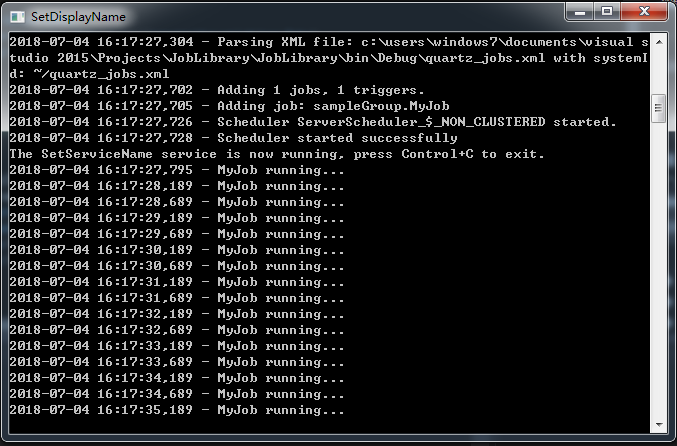
运行后,效果下图,每隔0.5秒有输出
项目结构
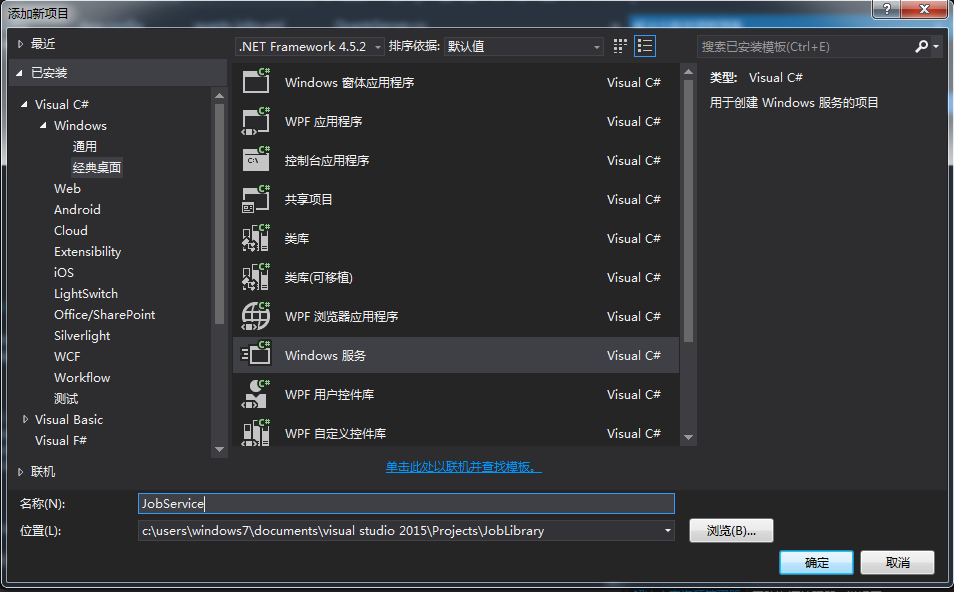
第六步:配置windows服务
添加项目:
项目结构
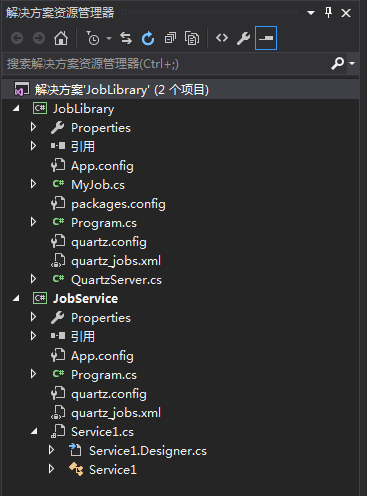
Service1.cs
using log4net;

using Quartz;

using Quartz.Impl;

using System;

using System.Collections.Generic;

using System.ComponentModel;

using System.Data;

using System.Diagnostics;

using System.Linq;

using System.ServiceProcess;

using System.Text;

using System.Threading.Tasks;

namespace JobService

{

    public partial class Service1 : ServiceBase

    {

        private IScheduler scheduler;

        private readonly ILog logger;

        public Service1()

        {

            InitializeComponent();

            ISchedulerFactory schedulerFactory = new StdSchedulerFactory();

            scheduler = schedulerFactory.GetScheduler();

            logger = LogManager.GetLogger(GetType());

        }

        protected override void OnStart(string[] args)

        {

            logger.Info("Quartz服务成功启动");

            scheduler.Start();

        }

        protected override void OnStop()

        {

            scheduler.Shutdown(false);

        }

    }

}
然后把 app.config quartz_jobs.xml quartz.config 复制到该项目 quartz_jobs.xml quartz.config 设置为始终复制
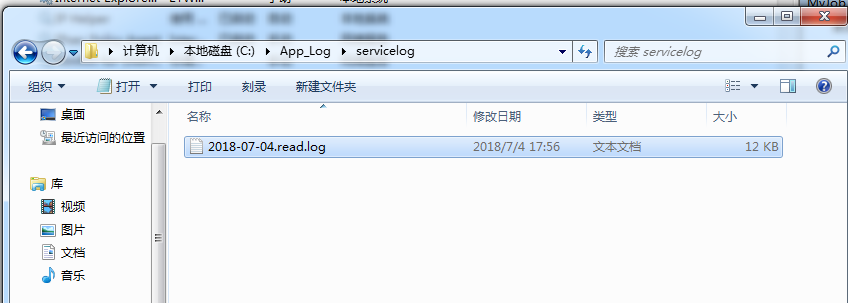
把app.config中 log4net配置改为文件模式
    <root>

      <level value="INFO" />

      <appender-ref ref="RollingLogFileAppender" />

      <!--<appender-ref ref="ConsoleAppender" />-->

      <!-- uncomment to enable event log appending -->

      <!-- <appender-ref ref="EventLogAppender" /> -->

    </root>
编译后找到bin目录下exe注册服务
注册服务
注意: 等号后面一定要有空格
c:\>sc create qj1 binpath= "C:\Users\windows7\Desktop\QuartzDemo\QuartzDemo\JobSe

rvice\bin\Release\JobService.exe"
启动服务 可以设置为自动 以后开机自动启动

查看效果
卸载服务
sc delete MyJob
Quartz配置
quartz_jobs.xml
job 任务
其实就是1.x版本中的<job-detail>,这个节点是用来定义每个具体的任务的,多个任务请创建多个job节点即可
- name(必填) 任务名称,同一个group中多个job的name不能相同,若未设置group则所有未设置group的job为同一个分组,如:<name>sampleJob</name>
- group(选填) 任务所属分组,用于标识任务所属分组,如:<group>sampleGroup</group>
- description(选填) 任务描述,用于描述任务具体内容,如:<description>Sample job for Quartz Server</description>
- job-type(必填) 任务类型,任务的具体类型及所属程序集,格式:实现了IJob接口的包含完整命名空间的类名,程序集名称,如:<job-type>Quartz.Server.SampleJob, Quartz.Server</job-type>
- durable(选填) 具体作用不知,官方示例中默认为true,如:<durable>true</durable>
- recover(选填) 具体作用不知,官方示例中默认为false,如:<recover>false</recover>
trigger 任务触发器
用于定义使用何种方式出发任务(job),同一个job可以定义多个trigger ,多个trigger 各自独立的执行调度,每个trigger 中必须且只能定义一种触发器类型(calendar-interval、simple、cron)
calendar-interval 一种触发器类型,使用较少,此处略过
simple 简单任务的触发器,可以调度用于重复执行的任务
- name(必填) 触发器名称,同一个分组中的名称必须不同
- group(选填) 触发器组
- description(选填) 触发器描述
- job-name(必填) 要调度的任务名称,该job-name必须和对应job节点中的name完全相同
- job-group(选填) 调度任务(job)所属分组,该值必须和job中的group完全相同
- start-time(选填) 任务开始执行时间utc时间,北京时间需要+08:00,如:<start-time>2012-04-01T08:00:00+08:00</start-time>表示北京时间2012年4月1日上午8:00开始执行,注意服务启动或重启时都会检测此属性,若没有设置此属性或者start-time设置的时间比当前时间较早,则服务启动后会立即执行一次调度,若设置的时间比当前时间晚,服务会等到设置时间相同后才会第一次执行任务,一般若无特殊需要请不要设置此属性
- repeat-count(必填) 任务执行次数,如:<repeat-count>-1</repeat-count>表示无限次执行,<repeat-count>10</repeat-count>表示执行10次
- repeat-interval(必填) 任务触发间隔(毫秒),如:<repeat-interval>10000</repeat-interval> 每10秒执行一次
cron复杂任务触发器--使用cron表达式定制任务调度(强烈推荐)
- name(必填) 触发器名称,同一个分组中的名称必须不同
- group(选填) 触发器组d
- escription(选填) 触发器描述
- job-name(必填) 要调度的任务名称,该job-name必须和对应job节点中的name完全相同
- job-group(选填) 调度任务(job)所属分组,该值必须和job中的group完全相同
- start-time(选填) 任务开始执行时间utc时间,北京时间需要+08:00,如:<start-time>2012-04-01T08:00:00+08:00</start-time>表示北京时间2012年4月1日上午8:00开始执行,注意服务启动或重启时都会检测此属性,若没有设置此属性,服务会根据cron-expression的设置执行任务调度;若start-time设置的时间比当前时间较早,则服务启动后会忽略掉cron-expression设置,立即执行一次调度,之后再根据cron-expression执行任务调度;若设置的时间比当前时间晚,则服务会在到达设置时间相同后才会应用cron-expression,根据规则执行任务调度,一般若无特殊需要请不要设置此属性
- cron-expression(必填) cron表达式,如:<cron-expression>0/10 * * * * ?</cron-expression>每10秒执行一次
Quartz的cron表达式
官方英文介绍地址:http://www.quartz-scheduler.net/documentation/quartz-2.x/tutorial/crontrigger.html
cron expressions 整体上还是非常容易理解的,只有一点需要注意:"?"号的用法,看下文可以知道“?”可以用在 day of month 和 day of week中,他主要是为了解决如下场景,如:每月的1号的每小时的31分钟,正确的表达式是:* 31 * 1 * ?,而不能是:* 31 * 1 * *,因为这样代表每周的任意一天。
由7段构成:秒 分 时 日 月 星期 年(可选)
"-" :表示范围 MON-WED表示星期一到星期三
"," :表示列举 MON,WEB表示星期一和星期三
"*" :表是“每”,每月,每天,每周,每年等
"/" :表示增量:0/15(处于分钟段里面) 每15分钟,在0分以后开始,3/20 每20分钟,从3分钟以后开始
"?" :只能出现在日,星期段里面,表示不指定具体的值
"L" :只能出现在日,星期段里面,是Last的缩写,一个月的最后一天,一个星期的最后一天(星期六)
"W" :表示工作日,距离给定值最近的工作日
"#" :表示一个月的第几个星期几,例如:"6#3"表示每个月的第三个星期五(1=SUN...6=FRI,7=SAT)
官方实例
| Expression | Meaning |
|---|---|
| 0 0 12 * * ? | 每天中午12点触发 |
| 0 15 10 ? * * | 每天上午10:15触发 |
| 0 15 10 * * ? | 每天上午10:15触发 |
| 0 15 10 * * ? * | 每天上午10:15触发 |
| 0 15 10 * * ? 2005 | 2005年的每天上午10:15触发 |
| 0 * 14 * * ? | 在每天下午2点到下午2:59期间的每1分钟触发 |
| 0 0/5 14 * * ? | 在每天下午2点到下午2:55期间的每5分钟触发 |
| 0 0/5 14,18 * * ? | 在每天下午2点到2:55期间和下午6点到6:55期间的每5分钟触发 |
| 0 0-5 14 * * ? | 在每天下午2点到下午2:05期间的每1分钟触发 |
| 0 10,44 14 ? 3 WED | 每年三月的星期三的下午2:10和2:44触发 |
| 0 15 10 ? * MON-FRI | 周一至周五的上午10:15触发 |
| 0 15 10 15 * ? | 每月15日上午10:15触发 |
| 0 15 10 L * ? | 每月最后一日的上午10:15触发 |
| 0 15 10 L-2 * ? | Fire at 10:15am on the 2nd-to-last last day of every month |
| 0 15 10 ? * 6L | 每月的最后一个星期五上午10:15触发 |
| 0 15 10 ? * 6L | Fire at 10:15am on the last Friday of every month |
| 0 15 10 ? * 6L 2002-2005 | 2002年至2005年的每月的最后一个星期五上午10:15触发 |
| 0 15 10 ? * 6#3 | 每月的第三个星期五上午10:15触发 |
| 0 0 12 1/5 * ? | Fire at 12pm (noon) every 5 days every month, starting on the first day of the month. |
| 0 11 11 11 11 ? | Fire every November 11th at 11:11am. |
Quartz.NET 3.0 正式发布
转自:https://www.cnblogs.com/shanyou/p/8269641.html
Quartz.NET是一个强大、开源、轻量的作业调度框架,你能够用它来为执行一个作业而创建简单的或复杂的作业调度。它有很多特征,如:数据库支持,集群,插件,支持cron-like表达式等等。在2017年的最后一天Quartz.NET 3.0发布,正式支持了.NET Core 和async/await。这是一个大版本,有众多新特性和大的功能
新功能
- 支持 async/await 基于任务的作业,内部以async/await工作
- 支持.NET Core / netstandard 2.0和.NET Framework 4.5.2及更高版本
- 通过提供程序名称SQLite-Microsoft支持Microsoft.Data.Sqlite,旧的提供程序SQLite也仍然有效,还可以用
- 增加了对SQL Server内存优化表的初步支持和Quartz.Impl.AdoJobStore.UpdateLockRowSemaphoreMOT
- 从依赖关系中删除Common.Logging
- 删除C5 Collections,使用.NET框架内置的Collections
- 在插件启动时添加对作业调度XML文件的验证
- 在TimeZoneUtil中添加对额外自定义时区解析器功能的支持
API 不兼容
- 作业和插件分离到一个单独的程序集/ NuGet包里 Quartz.Jobs和Quartz.Plugins
- ADO.NET提供程序名称已经简化,提供程序名称不带版本,例如SqlServer-20 => SqlServer
- API方法已经被重新定义,主要使用IReadOnlyCollection,这隐藏了两个HashSets和List
- LibLog已经隐藏到内部(ILog等),就像它本来打算的那样
- SimpleThreadPool 消失了,用系统的线程池取代了
- 调度程序方法已经改为基于Task,记得要await 它们
- IJob接口现在返回一个Task
- 一些IList属性已经更改为IReadOnlyList ,以正确反映意图
- SQL Server CE支持已被删除
- DailyCalendar现在使用日期时间排除日期,并具有ISet接口来访问它们
- IObjectSerializer有新的方法,必须实现 void Initialize()
- IInterruptableJob取消了上下文的CancellationToken
已知的问题
- Windows和Linux之间的时区id有问题,它们在同一个区域使用不同的ID
- .NET Core的没有Remoting 支持
这次的版本变化很大,如果你是老用户,大家要认真看下迁移指南: https://www.quartz-scheduler.net/documentation/quartz-3.x/migration-guide.html
源码下载及可能需要了解的资料
参考:http://www.cnblogs.com/jys509/
官网:http://www.quartz-scheduler.net/
源码:https://github.com/quartznet/quartznet
示例:https://www.quartz-scheduler.net/documentation/quartz-3.x/quick-start.html
官方学习文档:http://www.quartz-scheduler.net/documentation/index.html
使用实例介绍:http://www.quartz-scheduler.net/documentation/quartz-2.x/quick-start.html
官方的源代码下载:http://sourceforge.net/projects/quartznet/files/quartznet/
Quartz.NET文档 入门教程的更多相关文章
- 传智播客C/C++各种开发环境搭建视频工具文档免费教程
传智播客作为中国IT培训的领军品牌,一直把握技术趋势,给大家带来最新的技术分享!传智播客C/C++主流开发环境免费分享视频文档中,就有写一个helloworld程序的示范.火速前来下载吧 所谓&quo ...
- Struts2 API的chm格式帮助文档制作教程
Struts2 API的chm格式帮助文档制作教程 在SSH三个框架中,Struts2的API文档是最难做的,这里所说的格式是chm格式的,chm的格式很方便,Hibernate API文档和Spri ...
- .net core的Swagger接口文档使用教程(二):NSwag
上一篇介绍了Swashbuckle ,地址:.net core的Swagger接口文档使用教程(一):Swashbuckle 讲的东西还挺多,怎奈微软还推荐了一个NSwag,那就继续写吧! 但是和Sw ...
- 强大的矢量图形库:Raphael JS 中文帮助文档及教程
Raphael 是一个用于在网页中绘制矢量图形的 Javascript 库.它使用 SVG W3C 推荐标准和 VML 作为创建图形的基础,你可以通过 JavaScript 操作 DOM 来轻松创建出 ...
- Dash文档制作教程
前言 什么是Dash 面向程序员的文档库(Mac) 代码片段管理工具 这是强烈推荐给每天在各种API文档中摸爬滚打的程序员们的神器. 为什么要自己制作文档 官方的源中没有相关文档 文档在离线下体验更好 ...
- ABBYY PDF Transformer+从文件选项中创建PDF文档的教程
可使用OCR文字识别软件ABBYY PDF Transformer+从Microsoft Word.Microsoft Excel.Microsoft PowerPoint.HTML.RTF.Micr ...
- https://github.com/coolnameismy/BabyBluetooth github上的一个ios 蓝牙4.0的库并带文档和教程
The easiest way to use Bluetooth (BLE )in ios,even bady can use. 简单易用的蓝牙库,基于CoreBluetooth的封装,并兼容ios和 ...
- Django2文档-入门概览
Django 概览 Django 是设计是为了使通用的Web开发任务变得快速而又简单, 一下是如何使用Django编写数据库驱动的Web应用程序的非正式概述. 这个文档的目标是给你足够的技术细节来理解 ...
- Node.js文档和教程
七天学会NodeJS:https://nqdeng.github.io/7-days-nodejs/ Node入门:http://www.nodebeginner.org/index-zh-cn.ht ...
随机推荐
- BZOJ2724 蒲公英 【分块】
BZOJ2724 蒲公英 题目背景 亲爱的哥哥: 你在那个城市里面过得好吗? 我在家里面最近很开心呢.昨天晚上奶奶给我讲了那个叫「绝望」的大坏蛋的故事的说!它把人们的房子和田地搞坏,还有好多小朋友也被 ...
- JS 区分单击双击
var timeout =null; $("#Btn").on("click",function(){ clearTimeout(timeout);//停止单击 ...
- python环境搭建-Linux系统下python2.7升级python3.5.2步骤
首先Python 查看版本 , 在Linux下特别注意权限问题,创建目录时候切记给予权限 如果是 ubnutu 请使用首先切换到 sudo su , 否则 make install 会出现问题.. 升 ...
- 7-4线性分组码的matlab程序
补充一点,关于生成矩阵G和校验矩阵H的关系:生成矩阵G是4*7矩阵,分为两块,前4列组成的4*4矩阵为单位矩阵,后3列组成的4*3矩阵我称它监督矩阵,校验矩阵是3*7矩阵,前4列组成的3*4矩阵是监督 ...
- 【DUBBO】Dubbo:protocol 的配置项
[一]:配置项 <dubbo:protocol id="标识" port="端口号" name="名字"/> [二]:配置解析器 ...
- python一些内建函数(map,zip,filter,reduce,yield等)
python一些内建函数(map,zip,filter,reduce,yield等) map函数 Python实际上提供了一个内置的工具,map函数.这个函数的主要功能是对一个序列对象中的每一个元素应 ...
- fail2ban的介绍
fail2ban的介绍 http://www.jb51.net/article/48591.htm http://lilinji.blog.51cto.com/5441000/1784726 fail ...
- Ubuntu上kubeadm安装Kubernetes集群
一 创建VM 3台VM,其中一台为master节点,2台work node: 二 安装相关软件 在所有节点上运行: apt-get update apt-get install apt-transpo ...
- cowboy的中间件
想不到cowboy这样的,居然也有中间件的概念,膜拜作者 创建工程 rebar-creator create-app testCowboy testCowboy_app.erl -module(tes ...
- iso网络模型
tcp/ip知识 1.iOS七层模型 应用层 表示层 应用层 ssh httpssl tls ftp mime html snmp 会话层 传输层 传输层 tcp udp 网络层 网络层 ipv6 i ...