
VC++:ActiveX Test Container
VC++6.0安装后包含了ActiveX Test Container工具,位置为:
"C:\Program Files (x86)\Microsoft Visual Studio\Common\Tools\TSTCON32.EXE"
但是在VS2008以及VS2010中就不能明显地找到这个工具了~ 怎么获取呢?
The ActiveX Text Container tool is still available as a sample in Visual Studio 2008 and Visual Studio 2010. It is included in the Visual C++ samples ZIP file included with Visual Studio:
- ·For VS2008, it’s in [Program Files]\Microsoft Visual Studio 9.0\Samples\1033\AllVCLanguageSamples.zip
- ·For VS2010, it’s in [Program Files]\Microsoft Visual Studio 10.0\Samples\1033\VC2010Samples.zip
The sample is named TSTCON and is in the C++\MFC\OLE\TstCon folder in the ZIP file. You can build this sample and run it to test the functionality of your ActiveX controls.
Note that there is a problem with the sample in Visual Studio 2008. After building the application, running it will give an error message because “the application configuration is incorrect”. To fix this, change the “Enable User Account Control” property on the Linker / Manifest File property page for the TCProps project to No (as in the screen shot below) and rebuild the solution. You will need to do this for all configurations and platforms that you want to run. Once you do so, the tool will run (in both Win32 and x64 configurations) without issue.
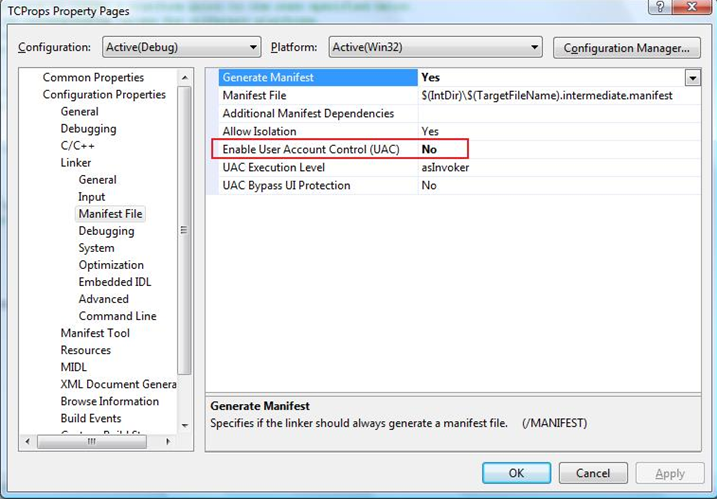
For Visual Studio 2010, the sample was converted to the new Visual C++ build system (based on MSBuild) and the problematic setting was removed during the conversion. So for Visual Studio 2010, the sample builds and runs (in both Win32 and x64 configurations) without issue.
VC++:ActiveX Test Container的更多相关文章
- Maven使用tomcat7-maven-plugin插件run时出现错误: A child container failed during start java.util.concurrent.ExecutionException: org.apache.catalina.LifecycleException: Failed to start component
错误如下: A child container failed during startjava.util.concurrent.ExecutionException: org.apache.catal ...
- 1.端口被占用问题:Embedded servlet container failed to start. Port 8097 was already in use.
1.端口被占用问题:Embedded servlet container failed to start. Port 8097 was already in use.netstat -anonetst ...
- VC ++ MFC activex 控件获取连接的VPN 信息
vc++ MFC 进行activex 控件的开发步骤就不用多写了,只是简单的说明一下方法,以及具体的代码: 使用的类库是 windows 系统的 rasapi32.dll 记住需要添加的头文件如下 ...
- VC++编写ActiveX控件
ActiveX这门技术是通过生成“*.ocx”文件来实现的.先来了解下OCX文件,在百度百科上面对OCX是这样解释的:“.ocx是ocx控件的扩展名,OCX 是对象类别扩充组件.如果你用过Visual ...
- Java tomcat启动失败(Servlet3.0 Web Project):A child container failed during start
Tomcat启动失败,失败全部信息: 五月 , :: 下午 org.apache.tomcat.util.digester.SetPropertiesRule begin 警告: [SetProper ...
- VBA中练习ADO:ActiveX Data Object
前期绑定,要先添加引用---"Microsoft ActiveX Data Objects 6.1" ADO学习的权威参考可点击:w3school ADO简单理解:是几个Activ ...
- 一个不错的扩展:Ext.ux.container.ButtonSegment
地址:http://www.sencha.com/forum/showthread.php?132048-Ext.ux.container.ButtonSegment
- 解决Eclipse 项目报错:Unbound classpath container: ‘JRE System Library [JavaSE-1.7]
MyEclipse出现下面两条报错: The project cannot be built until build path errors are resolved HelloWord Unknow ...
- VC++:制作一个控件注册的小工具
在平时的工作中,时常需要注册与反注册ActiveX控件,有时需要判断控件是否已经注册. 所以通过查找资料编写了一个控件注册的小工具,欢迎学习交流,不当之处请多多交流. 先直接上图: 主要代码: ...
随机推荐
- 〖Android〗/system/etc/recovery-resource.dat
源代码中的解释:[platform_build/tools/releasetools/ota_from_target_files] # Recovery is generated as a patch ...
- RBAC权限管理(转)
RBAC(Role-Based Access Control,基于角色的访问控制),就是用户通过角色与权限进行关联.简单地说,一个用户拥有若干角色,每一个角色拥有若干权限.这样,就构造成“用户-角色- ...
- Swift 的 pod 第三方库
#HTTPpod 'Alamofire' #Elegant HTTP Networking in Swiftpod 'SwiftHTTP' #Thin wrapper around NSURLSess ...
- Atitit.spring体系结构大总结
Atitit.spring体系结构大总结 1. Srping mvc 1 2. Ioc 4 3. ApplicationContext在BeanFactory的基础上构建,区别 4 4. Aop 5 ...
- MongoDB Replica Set搭建集群
MongoDB做集群,版本3.2官网推荐的集群方式Replica Set 准备服务器3台 两个standard节点(这两个节点直接可以互切primary secondary). 一个arbiter节点 ...
- 【转】如何把hadoop-1.x源码关联到Eclipse工程
[转]http://www.tuicool.com/articles/mIb2EzU
- iPhone4 降级6.12教程 无须SHSH 不装插件 不睡死[转载] by 轻鸢
无shsh降级电脑系统,细节操作等其它影响因素较多,不确保每个人都能成功,楼主发帖前刷机几十次均成功.步骤有些繁琐,按照步骤每一步都正确可保证最后不睡死 注意一下,无SHSH降级都是不完美的,开机需要 ...
- C语言 面试
P1(多选)有如下定义 int a; int *b; 则下列哪些语句是正确的:A: b=&a;B: b=*a;C: b=(int*)a;D: *b=a; 思路如下:b是一个int类型指针,a是 ...
- FreeRTOS 任务优先级分配方案
任务优先级说明下面对 FreeRTOS 优先级相关的几个重要知识点进行下说明,这些知识点在以后的使用中务必要掌握牢固. FreeRTOS 中任务的最高优先级是通过 FreeRTOSConfig.h ...
- Log4j容器深入探究
1.思考 容器是什么? 水壶是容器,水壶中存放着水,等我们需要水了,直接用 Spring中的ApplicationContext是容器,里面存放着各种Bean,等我们需要了直接用,并且可以创建管理Be ...