
第四章.使用ant编译hadoop eclipse插件
从hadoop 0.20.203以后,hadoop的发布包里,不再对eclipse插件进行jar包发布,而是给出了打包的代码,需要各位开发人员自己进行打包和设置。我们打的包必须跟自己使用的hadoop版本一致
第一步:先下载hadoop版本,我们这里以hadoop-1.2.1.tar.gz为例,解压,把这个项目全部倒入到MyEclipse里
File-----import----

选择项目导入

第二步 我们要修改Hadoop根目录下的src/contrib/META-INFO/MANIFEST.MF,修改这个jar的classpath。
找到这个文件的Bundle-ClassPath这一行,然后,修改成
Bundle-ClassPath: classes/,lib/commons-cli.jar,lib/commons-httpclient.jar,lib/hadoop-core.jar,lib/jackson-mapper-asl.jar,lib/commons-configuration.jar,lib/commons-lang.jar,lib/jackson-core-asl.jar
这些jar包都可以在hadoop文件里面搜索到
第三步:修改build.xml文件,修改的地方我用红色标记了,一个是myeclipse位置,另一个是hadoop版本,其它还是原封不动
<?xml version="1.0" encoding="UTF-8" standalone="no"?>
<!--
Licensed to the Apache Software Foundation (ASF) under one or more
contributor license agreements. See the NOTICE file distributed with
this work for additional information regarding copyright ownership.
The ASF licenses this file to You under the Apache License, Version 2.0
(the "License"); you may not use this file except in compliance with
the License. You may obtain a copy of the License at
http://www.apache.org/licenses/LICENSE-2.0
Unless required by applicable law or agreed to in writing, software
distributed under the License is distributed on an "AS IS" BASIS,
WITHOUT WARRANTIES OR CONDITIONS OF ANY KIND, either express or implied.
See the License for the specific language governing permissions and
limitations under the License.
-->
<project default="deploy" name="eclipse-plugin">
<import file="../build-contrib.xml"/>
<property name="eclipse.home" location="D:/Program Files/MyEclipse"/>
<property name="version" value="1.2.1"/>
<path id="eclipse-sdk-jars">
<fileset dir="${eclipse.home}/plugins/">
<include name="org.eclipse.ui*.jar"/>
<include name="org.eclipse.jdt*.jar"/>
<include name="org.eclipse.core*.jar"/>
<include name="org.eclipse.equinox*.jar"/>
<include name="org.eclipse.debug*.jar"/>
<include name="org.eclipse.osgi*.jar"/>
<include name="org.eclipse.swt*.jar"/>
<include name="org.eclipse.jface*.jar"/>
<include name="org.eclipse.team.cvs.ssh2*.jar"/>
<include name="com.jcraft.jsch*.jar"/>
</fileset>
</path>
<!-- Override classpath to include Eclipse SDK jars -->
<path id="classpath">
<pathelement location="${build.classes}"/>
<pathelement location="${hadoop.root}/build/classes"/>
<fileset dir="${hadoop.root}">
<include name="**/*.jar" />
</fileset>
<path refid="eclipse-sdk-jars"/>
</path>
<!-- Skip building if eclipse.home is unset. -->
<target name="check-contrib" unless="eclipse.home">
<property name="skip.contrib" value="yes"/>
<echo message="eclipse.home unset: skipping eclipse plugin"/>
</target>
<target name="compile" depends="init, ivy-retrieve-common" unless="skip.contrib">
<echo message="contrib: ${name}"/>
<javac
encoding="${build.encoding}"
srcdir="${src.dir}"
includes="**/*.java"
destdir="${build.classes}"
debug="${javac.debug}"
deprecation="${javac.deprecation}"
includeantruntime="on">
<classpath refid="classpath"/>
</javac>
</target>
<!-- Override jar target to specify manifest -->
<target name="jar" depends="compile" unless="skip.contrib">
<mkdir dir="${build.dir}/lib"/>
<copy file="${hadoop.root}/hadoop-core-${version}.jar" tofile="${build.dir}/lib/hadoop-core.jar" verbose="true"/>
<copy file="${hadoop.root}/lib/commons-cli-${commons-cli.version}.jar" tofile="${build.dir}/lib/commons-cli.jar" verbose="true"/>
<copy file="${hadoop.root}/lib/commons-configuration-1.6.jar" tofile="${build.dir}/lib/commons-configuration.jar" verbose="true"/>
<copy file="${hadoop.root}/lib/commons-httpclient-3.0.1.jar" tofile="${build.dir}/lib/commons-httpclient.jar" verbose="true"/>
<copy file="${hadoop.root}/lib/commons-lang-2.4.jar" tofile="${build.dir}/lib/commons-lang.jar" verbose="true"/>
<copy file="${hadoop.root}/lib/jackson-core-asl-1.8.8.jar" tofile="${build.dir}/lib/jackson-core-asl.jar" verbose="true"/>
<copy file="${hadoop.root}/lib/jackson-mapper-asl-1.8.8.jar" tofile="${build.dir}/lib/jackson-mapper-asl.jar" verbose="true"/>
<echo message="${build.dir}"/>
<echo message="${root}"/>
<jar
jarfile="${build.dir}/hadoop-${name}-${version}.jar"
manifest="${root}/META-INF/MANIFEST.MF">
<fileset dir="${build.dir}" includes="classes/ lib/"/>
<fileset dir="${root}" includes="resources/ plugin.xml"/>
</jar>
</target>
<target name="deploy" depends="jar" unless="skip.contrib">
<copy file="${build.dir}/hadoop-${name}-${version}.jar" todir="${eclipse.home}/plugins" verbose="true"/>
</target>
</project>
第四步:点击window----Show View-----other----Ant----ok
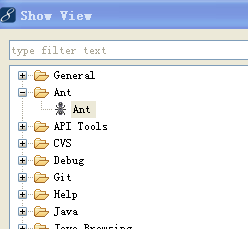
会出现一个
这个目录是原先下载hadoop原路径。
第四章.使用ant编译hadoop eclipse插件的更多相关文章
- Windows平台上使用ANT编译Hadoop Eclipse Plugin
一.准备工作: 1.安装JDK 下载页面:http://www.oracle.com/technetwork/java/javase/downloads/index.html JDK6,JDK7都 ...
- 使用Ant编译Hadoop工程报错
在win7用Ant编译hadoop工程的时候,遇到了一个报错,如下: org.eclipse.core.runtime.CoreException: D:\workspace\hadoop-1.1.2 ...
- hadoop eclipse插件生成
hadoop eclipse插件生成 做了一年的hadoop开发.还没有自动生成过eclipse插件,一直都是在网上下载别人的用,今天有时间,就把这段遗憾补回来,自己生成一下,废话不说,開始了. 本文 ...
- Hadoop学习笔记—6.Hadoop Eclipse插件的使用
开篇:Hadoop是一个强大的并行软件开发框架,它可以让任务在分布式集群上并行处理,从而提高执行效率.但是,它也有一些缺点,如编码.调试Hadoop程序的难度较大,这样的缺点直接导致开发人员入门门槛高 ...
- The command ("dfs.browser.action.delete") is undefined 解决Hadoop Eclipse插件报错
Hadoop Eclipse插件 报错. 使用 hadoop-eclipse-kepler-plugin-2.2.0.jar 如下所示 Error Log 强迫症看了 受不了 The command ...
- 编译hadoop eclipse的插件(hadoop1.0)
原创文章,转载请注明: 转载自工学1号馆 欢迎关注我的个人博客:www.wuyudong.com, 更多云计算与大数据的精彩文章 在hadoop-1.0中,不像0.20.2版本,有现成的eclipse ...
- 每天收获一点点------Hadoop Eclipse插件的使用
本文所用软件版本:myeclipe2014 hadoop1.2.1 1.安装Hadoop开发插件 下载hadoop-eclipse-plugin-1.2.1.jar,拷贝到myeclipse根目 ...
- ANT编译Android Eclipse工程
将Android SDK的tools/和platform-tools/目录包含在可执行文件的搜索路径中.Windows下,将其添加到PATH环境变量中 切换到Android Eclipse项目目录下, ...
- Hadoop Eclipse 插件制作以及安装
在本地使用Eclipse调试MapReduce程序,需要Hadoop插件,笔摘记录下制作安装过程. 准备工作(hadoop-2.6.0为例): 搭建好Hadoop环境 下载Hadoop安装包,解压到某 ...
随机推荐
- [置顶]
Retrofit2 初印象?
鄙人由于工作繁忙很久没写博客了还望大家谅解!之前csdn登不上,算了不说借口了,retrofit2相信已经很火了吧,而且上手也比较容易,之前可能大家都是用Volley,Okhttp.Okhttp3其实 ...
- ng开启缓存 造成的问题:
开启缓存 造成的问题:
- learn go passing variable-length arguments
package main // 参考文档: // https://github.com/Unknwon/the-way-to-go_ZH_CN/blob/master/eBook/06.3.md im ...
- 一步步搭建自己的web服务器
IIS或者其他Web服务器究竟做了哪些工作,让浏览器请求一个URL地址后显示一个漂亮的网页?要想弄清这个疑问,我想我们可以自己写一个简单的web服务器. 思路: 创建socket监听浏览器请求. 连接 ...
- SLIP 协议
SLIP 协议 SLIP 英文原义:Serial Line Internet Protocol 中文释义:串行线路网际协议 注解:该协议是Windows远程访问的一种旧工业标准,主要在Unix远程访问 ...
- linux下环境变量PATH设置错误的补救
本文转自: http://blog.clzg.cn/blog-614449-740527.html 之前不小心在/etc/profile中添加了错误的PATH变量,导致几乎所有的系统命令无法使用 ...
- [转载]Unicode中对中文字符的编码
以前写过一篇贴子是写中文在unicode中的编码范围 unicode中文范围,但写的不是很详细,今天再次研究了下unicode,并给出详细的unicode取值范围. 本次研究的unicode对象是un ...
- dom4j 改变XML声明和编码格式
dom4j 改变XML编码 Element rootElement = document.addElement("data"); document.setXMLEncoding(& ...
- direct2d封装
图片项目
- Promise详解
前言 && 基础概念 Promise 是解决 JS 异步的一种方案,相比传统的回调函数,Promise 能解决多个回调严重嵌套的问题. Promise 对象代表一个异步操作,有三种状态 ...