
Android 图片压缩器
概述
详细
一、android图片压缩器特点
1.压缩比可以选择控制。
2.高效率的多线程压缩
3.支持批量压缩
二、实现过程
2.1 压缩任务线程类
该类是用于实现多线程压缩任务,利用CountDownLatch 计数计数实现多线程任务等待机制,核心代码如下:
/**

 * Created by caizhiming on 2016/6/2.

 * 图片压缩任务线程

 */

public class CompressTask extends Thread{

    CountDownLatch mLatch;

    Boolean mRet;

    String mInFilePath;

    String mOutFilePath;

    boolean mIsNeedCompress;

    public CompressTask(CountDownLatch latch,Boolean ret,String inFilePath,String outFilePath,boolean isNeedCompress){

        mLatch = latch;

        mRet = ret;

        mInFilePath = inFilePath;

        mOutFilePath = outFilePath;

        mIsNeedCompress = isNeedCompress;

    }

    @Override

    public void run() {

        if(mIsNeedCompress) {

            mRet = NativeBitmapUtil.syncCompressBitmap(mInFilePath,mOutFilePath);

            mLatch.countDown();

        }else{

            mRet = true;

            mLatch.countDown();

        }

    }

}
2.2 图片图像工具类
该工具类主要对Bitmap图像处理做了一些封装,比如Bitmap旋转,获取旋转角度等,核心代码如下:
/**

 * 获取旋转后的图片

 * @param path

 * @return

 */

public static Bitmap getRotateBitmapByPath(String path) {

    return rotateBitmapByDegree(BitmapFactory.decodeFile(path), getBitmapDegree(path));

}

/**

 * 获取旋转后的图片

 * @param path

 * @return

 */

public static Bitmap getRotateBitmapByPath(String path,final int maxSize) {

    BitmapFactory.Options  options= new BitmapFactory.Options();

    options.inJustDecodeBounds = true;

    BitmapFactory.decodeFile(path, options);

    options.inSampleSize = BitmapUtils.calculateInSampleSize(options,maxSize,maxSize);

    options.inJustDecodeBounds = false;

    return rotateBitmapByDegree(BitmapFactory.decodeFile(path,options), getBitmapDegree(path));

}

/**

 * 将图片按照某个角度进行旋转

 *

 * @param bm

 *            需要旋转的图片

 * @param degree

 *            旋转角度

 * @return 旋转后的图片

 */

public static Bitmap rotateBitmapByDegree(Bitmap bm, int degree) {

    Bitmap returnBm = null;

    // 根据旋转角度,生成旋转矩阵

    Matrix matrix = new Matrix();

    matrix.postRotate(degree);

    try {

        if (bm != null) {

            // 将原始图片按照旋转矩阵进行旋转,并得到新的图片

            returnBm = Bitmap.createBitmap(bm, 0, 0, bm.getWidth(), bm.getHeight(), matrix, true);

        }

    } catch (OutOfMemoryError e) {

    }

    if (returnBm == null) {

        returnBm = bm;

    }

    if (bm != returnBm) {

        bm.recycle();

    }

    return returnBm;

}

/**

 * 读取图片的旋转的角度

 *

 * @param path

 *            图片绝对路径

 * @return 图片的旋转角度

 */

public static int getBitmapDegree(String path) {

    int degree = 0;

    try {

        // 从指定路径下读取图片,并获取其EXIF信息

        ExifInterface exifInterface = new ExifInterface(path);

        // 获取图片的旋转信息

        int orientation = exifInterface.getAttributeInt(ExifInterface.TAG_ORIENTATION,

                ExifInterface.ORIENTATION_NORMAL);

        switch (orientation) {

            case ExifInterface.ORIENTATION_ROTATE_90:

                degree = 90;

                break;

            case ExifInterface.ORIENTATION_ROTATE_180:

                degree = 180;

                break;

            case ExifInterface.ORIENTATION_ROTATE_270:

                degree = 270;

                break;

        }

    } catch (IOException e) {

        e.printStackTrace();

    }

    return degree;

}
2.3 压缩器类的实现
该功能类只要实现多线程文件压缩功能,支持异步压缩单张图片和多张图片等特性。
2.3.1首先定义图片压缩状态监听接口,如下:
/**

 * 图片压缩监听器

 */

public interface ImageCompressListener {

    void onSuccess(List<String> outFilePathList);

    void onFailure(String message);

}
2.3.2 其次提供是否压缩判断方案:
public static long MAX_FILE_SIZE = 1024 * 1024;

/**

 * 是否压缩图片:大于 1280*1280的 图片 需要压缩 或者 大小大于1M

 * @param inFilePath

 * @return isNeedCompress

 */

public static boolean isNeedCompress(String inFilePath){

    boolean ret = true;

    File file = new File(inFilePath);

    if(file != null && file.exists()){

        BitmapFactory.Options  options= new BitmapFactory.Options();

        options.inJustDecodeBounds = true;

        BitmapFactory.decodeFile(inFilePath,options);

        if(options.outWidth <= BitmapUtil.MAX_SIZE

                && options.outHeight <= BitmapUtil.MAX_SIZE){

            ret = false;

        }

        if(file.length() > MAX_FILE_SIZE){

            ret = true;

        }

    }

    return ret;

}
2.3.3 最后实现异步压缩功能,核心代码如下:
/**

 * 异步压缩多张图片

 * @param inFilePathList:需要压缩的图片的路径列表

 * @param outList:压缩后输出的新图片的路径列表

 * @param listener:压缩监听器

 */

public static void compress(final List<String> inFilePathList, final List<String> outList

        , final ImageCompressListener listener) {

    final List<String> outFilePathList = (outList == null) ? createOutFilePathList(inFilePathList) : outList;

    new AsyncTask<Void, Void, Boolean>() {

        @Override

        protected Boolean doInBackground(Void... params) {

            boolean isSuccess = true;

            CountDownLatch singal = new CountDownLatch(inFilePathList.size());

            List<Boolean> retList = new ArrayList<>();

            for (int i = 0; i < inFilePathList.size(); i++) {

                retList.add(i, Boolean.TRUE);

                boolean isNeedCompress = isNeedCompress(inFilePathList.get(i));

                if(!isNeedCompress){

                    outFilePathList.set(i,inFilePathList.get(i));

                }

                CompressTask compressTask = new CompressTask(singal, retList.get(i)

                        , inFilePathList.get(i), outFilePathList.get(i),isNeedCompress);

                compressTask.start();

            }

            try {

                singal.await();

                for (Boolean ret : retList) {

                    if(!ret) isSuccess = false;

                }

            } catch (InterruptedException e) {

                e.printStackTrace();

                isSuccess = false;

            }finally {

                if(!isSuccess) {

                    String failErrorMsg = "";

                    for(int i =0;i < retList.size();i++){

                        if(!retList.get(i)){

                            failErrorMsg += "\nCompress error: "+inFilePathList.get(i);

                        }

                    }

                }

                return isSuccess;

            }

        }

        @Override

        protected void onPostExecute(Boolean result) {

            super.onPostExecute(result);

            if(listener != null){

                if(result) {

                    listener.onSuccess(outFilePathList);

                    for(String path :outFilePathList){

                        Log.v("czm","outFilePath="+path);

                    }

                }else{

                    listener.onFailure("图片压缩失败!!");

                }

            }

        }

    }.execute();

}
三、使用方法
3.1 使用该压缩器很简单,直接一个方法搞定:
    List<String> srcFilePathList = new ArrayList<>();

    List<String> outputFilePathList = new ArrayList<>();

    //默认压缩方法

    XCImageCompressor.compress(srcFilePathList, new XCImageCompressor.ImageCompressListener() {

        @Override

        public void onSuccess(List<String> outFilePathList) {

        }

        @Override

        public void onFailure(String message) {

        }

    });

    //支持压缩后的输出目录的压缩方法

    XCImageCompressor.compress(srcFilePathList, outputFilePathList,new XCImageCompressor.ImageCompressListener() {

        @Override

        public void onSuccess(List<String> outFilePathList) {

        }

        @Override

        public void onFailure(String message) {

        }

    });
四、源码目录截图
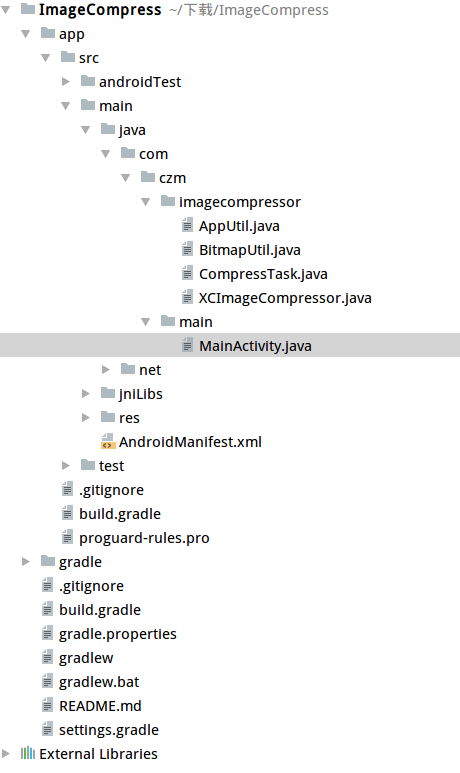
注:本文著作权归作者,由demo大师发表,拒绝转载,转载需要作者授权
Android 图片压缩器的更多相关文章
- Android 图片压缩、照片选择、裁剪,上传、一整套图片解决方案
1.Android一整套图片解决方案 http://mp.weixin.qq.com/s?__biz=MzAxMTI4MTkwNQ==&mid=2650820998&idx=1& ...
- android图片压缩方法
android 图片压缩方法: 第一:质量压缩法: private Bitmap compressImage(Bitmap image) { ByteArrayOutputStream baos = ...
- android图片压缩的3种方法实例
android 图片压缩方法: 第一:质量压缩法: private Bitmap compressImage(Bitmap image) { ByteArrayOutputStream baos = ...
- Android 图片压缩各种方式
前言:由于公司项目当中需要用到压缩这块的相应技术,之前也做过的图片压缩都不是特别的理想, 所以这次花了很多心思,仔细研究和在网上找到了很多相对应的资料.为了就是 以后再做的时候直接拿来用就可以了 ...
- Android图片压缩上传(二)
之前有用到libjpeg,还是有一定的局限性,最近用了一个新的方式,效果还是挺不错,随着作者的版本更新,Bug也随之变少,目前项目中运用已上线. 1.之前的方式Android图片压缩,不失真,上线项目 ...
- Android图片压缩方法总结
本文总结Android应用开发中三种常见的图片压缩方法,分别是:质量压缩法.比例压缩法(根据路径获取图片并压缩)和比例压缩法(根据Bitmap图片压缩). 第一:质量压缩方法: ? 1 2 3 ...
- Android图片压缩
import java.io.File;import java.io.FileNotFoundException;import java.io.FileOutputStream;import java ...
- 性能优化——Android图片压缩与优化的几种方式
图片优化压缩方式大概可以分为以下几类:更换图片格式,质量压缩,采样率压缩,缩放压缩,调用jpeg压缩等1.设置图片格式Android目前常用的图片格式有png,jpeg和webp,png:无损压缩图片 ...
- android图片压缩总结
一.bitmap 图片格式介绍 android中图片是以bitmap形式存在的,那么bitmap所占内存,直接影响到了应用所占内存大小,首先要知道bitmap所占内存大小计算方式: bitmap内存大 ...
随机推荐
- python开发_copy(浅拷贝|深拷贝)_博主推荐
在python中,有着深拷贝和浅拷贝,即copy模块 下面我们就来聊一下: 运行效果: ================================================== 代码部分: ...
- SSM+Maven(教程二):Idea快速入门SSM+Maven框架。
快速入门须知 这篇文章,直接应用已经搭建好的SSM框架.一般在公司里面,考虑框架的搭建.封装等问题,都由研发经理或者架构师完成,所以对于刚入门的小白来说,在去搭建整合花费的时间会很多很多.对于理解能力 ...
- 打开/查找xcode6的沙盒地目录
用以下代码 打开沙盒目录 NSArray *paths = NSSearchPathForDirectoriesInDomains(NSDocumentDirectory, NSUserDomainM ...
- Mr.Xu的找实习之路
长长的路慢慢走 深深的话浅浅说 --广工Mr.Xu的找前端实习之路 这 不(display:none) 是 广 告 本人广工大三学生一枚,也是学校TopView团队的成员之中的一个.之前我们团队有位屌 ...
- 前端必备工具-IETest
浏览器兼容性可以检查IE5.5到10 ,一直还用IE6来测试,因为觉得这样错误显示更真实,但是现在不换也不行,很多网页都已经不支持ie6了,实在受不了,果断升级,而且这个也是升级了才能用的,既然很多前 ...
- mysql -- 用索引应避免空值
由于数据库的复杂性,以讹传讹的空间非常大,快赶上中医养生了.避免使用 NULL 的理由,在高性能MySQL里有提到一段.建议大家多读些书,少看网上的奇技淫巧.特意把书翻出来摘录了下以供参考: 要尽量避 ...
- 由 12306.cn 谈谈高并发+高负载网站性能技术
12306.cn 网站挂了,被全国人民骂了.我这两天也在思考这个事,我想以这个事来粗略地和大家讨论一下网站性能的问题.因为仓促,而且完全基于本人有限的经验和了解, 所以,如果有什么问题还请大家一起讨论 ...
- WPF性能调试系列 – Ants Performance Profiler
WPF性能调试系列文章: WPF页面渲染优化:Application Timeline WPF页面业务加载优化:Ants Performance Profiler WPF内存优化:Ants Memor ...
- tyvj P1403 关押罪犯 题解
P1403 [NOIP2010]关押罪犯 时间: 1000ms / 空间: 131072KiB / Java类名: Main 描述 S 城现有两座监狱,一共关押着N 名罪犯,编号分别为1~N.他 ...
- INFORMATICA 的元数据管理之二:运行状态信息查询
本项目里的两个哥们做的关于运行状态元数据的两个JOB挺酷的,最近一段时间运行状况良好,自己参考学习的同时以做日志记载,呵呵,为了节省笔墨,相关元数据表结构以及MAPPING设计之类不做介绍(如有疑问欢 ...