
Box layout
Layout management with layout classes is much more flexible and practical. It is the preferred way to place widgets on a window. The QtGui.QHBoxLayout and QtGui.QVBoxLayout are basic layout classes that line up widgets horizontally and vertically.
Imagine that we wanted to place two buttons in the right bottom corner. To create such a layout, we will use one horizontal, and one vertical box. To create the necessary space, we will add a stretch factor.
#!/usr/bin/python

# -*- coding: utf-8 -*-

"""

ZetCode PyQt4 tutorial

In this example, we position two push

buttons in the bottom-right corner

of the window.

author: Jan Bodnar

website: zetcode.com

last edited: October 2011

"""

import sys

from PyQt4 import QtGui

class Example(QtGui.QWidget):

    def __init__(self):

        super(Example, self).__init__()

        self.initUI()

    def initUI(self):

        okButton = QtGui.QPushButton("OK")

        cancelButton = QtGui.QPushButton("Cancel")

        hbox = QtGui.QHBoxLayout()

        hbox.addStretch(1)

        hbox.addWidget(okButton)

        hbox.addWidget(cancelButton)

        vbox = QtGui.QVBoxLayout()

        vbox.addStretch(1)

        vbox.addLayout(hbox)

        self.setLayout(vbox)

        self.setGeometry(300, 300, 300, 150)

        self.setWindowTitle('Buttons')

        self.show()

def main():

    app = QtGui.QApplication(sys.argv)

    ex = Example()

    sys.exit(app.exec_())

if __name__ == '__main__':

    main()
The example places two buttons in the bottom-right corner of the window. They stay there when we resize the application window. We use both a QtGui.HBoxLayout and a QtGui.QVBoxLayout.
okButton = QtGui.QPushButton("OK")

cancelButton = QtGui.QPushButton("Cancel")
Here we create two push buttons.
hbox = QtGui.QHBoxLayout()

hbox.addStretch(1)

hbox.addWidget(okButton)

hbox.addWidget(cancelButton)
We create a horizontal box layout and add a stretch factor and both buttons. The stretch adds a stretchable space before the two buttons. This will push them to the right of the window.
vbox = QtGui.QVBoxLayout()

vbox.addStretch(1)

vbox.addLayout(hbox)
To create the necessary layout, we put a horizontal layout into a vertical one. The stretch factor in the vertical box will push the horizontal box with the buttons to the bottom of the window.
self.setLayout(vbox)
Finally, we set the main layout of the window.
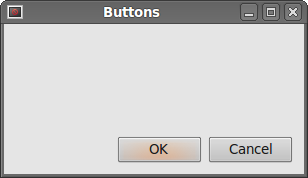 Figure: Buttons
Box layout的更多相关文章
- Layout( 布局)
一. 加载方式//class 加载方式<div id="box" class="easyui-layout"style="width:600px ...
- Box布局
import sys from PyQt4 import QtCore, QtGui class MainWindow(QtGui.QWidget): def __init__(self, paren ...
- PyQt4 Box布局
使用布局类别方式的布局管理器比绝对方式的布局管理器更加灵活实用.它是窗口部件的首选布局管理方式.最基本的布局类别是QHBoxLayout和QVBoxLayout布局管理方式,分别将窗口部件水平和垂直排 ...
- ZetCode PyQt4 tutorial layout management
!/usr/bin/python -*- coding: utf-8 -*- """ ZetCode PyQt4 tutorial This example shows ...
- PyQt的Layout的比例化分块。
一. QGridLayout: // 列比 第0列与第1列之比为 1:2 layout2p1 -> setColumnStretch(0, 1); layout2p1 -> setColu ...
- 第二百零二节,jQuery EasyUI,Layout(布局)组件
jQuery EasyUI,Layout(布局)组件 学习要点: 1.加载方式 2.布局属性 3.区域面板属性 4.方法列表 本节课重点了解 EasyUI 中 Layout(布局)组件的使用方法,这个 ...
- layout(布局)组件
一.依赖于 Panel(面 板)组件和 resizable(调整大小)组件. 二.class加载方式 <div id="box" class="easyui- ...
- CSS3 弹性盒子(Flex Box)
1 CSS3 弹性盒子(Flex Box) 1 http://caniuse.com/#search=flex%20box https://www.w3.org/TR/css-flexbox-1/ C ...
- CSS ? Layout Module : CSS 布局模型
1 1 1 https://www.w3.org/TR/css-grid-1/ CSS Grid Layout Module Level 1 W3C Working Draft, 19 May 201 ...
随机推荐
- 「WC2016」论战捆竹竿
「WC2016」论战捆竹竿 前置知识 参考资料:<论战捆竹竿解题报告-王鉴浩>,<字符串算法选讲-金策>. Border&Period 若前缀 \(pre(s,x)\ ...
- 什么是ClassLoader
ClassLoader 做什么的? 顾名思义,它是用来加载 Class 的.它负责将 Class 的字节码形式转换成内存形式的 Class 对象.字节码可以来自于磁盘文件 *.class,也可以是 j ...
- noip200805笨小猴
试题描述: 笨小猴的词汇量很小,所以每次做英语选择题的时候都很头疼.但是他找到了一种方法,经试验证明,用这种方法去选择选项的时候选对的几率非常大!这种方法的具体描述如下:假设maxn是单词中出现次数最 ...
- php回溯
$sl = debug_backtrace(); 返回的$sl 是一个二维数组 包含如下元素: function string 当前的函数名,参见: __FUNCTION__. line intege ...
- Swift 自定义打印方法
Swift 自定义打印方法 代码如下 // MARK:- 自定义打印方法 func MLLog<T>(_ message : T, file : String = #file, funcN ...
- Two-transistor circuit replaces IC
Linear Technology's recently introduced LTC4300 chip buffers I2C clock and data lines to and from a ...
- springMvc 的参数验证 BindingResult result 的使用
http://blog.sina.com.cn/s/blog_6829be5c0101alxh.html 非常详细的一篇讲解 并且值得深入探讨 http://bbs.csdn.NET/topics/3 ...
- c++多行字符串,可以这么写
c++多行字符串,可以这么写:CString s;s.Format("CREATE TABLE %s(\[ID] [int] IDENTITY(1,1) NOT NULL,\[Vendor] ...
- 三款工作流引擎比较:WWF、netBPM 和 ccflow
下面将对目前比较主流的三款工作流进行介绍和比较,然后通过三款流程引擎分别设计一个较典型的流程来给大家分别演示这三款创建流程的过程.这三款工作流程引擎分别是 Windows Workflow Found ...
- appium+python自动化60-windows上同时启动多个appium服务,让多个android机器并行运行
前言 做android自动化的时候,启动一个appium服务,只能匹配一个手机去自动化执行.有时候想同一套代码,可以在不同的手机上执行,测下app在不同手机上兼容性. 这就需要启动多个appium服务 ...