
Redis之Redis
Redis 环境安装
安装
如果已经安装了老版本3.0.6
1. 卸载软件

sudo apt-get remove redis-server

2. 清除配置

sudo apt-get remove --purge redis-server

3. 删除残留文件

sudo find / -name redis

一般设置如下

sudo rm -rf var/lib/redis/

sudo rm -rf /var/log/redis

sudo rm -rf /etc/redis/

sudo rm -rf /usr/bin/redis-*
下载地址:http://redis.io/download ,下载最新文档版本,稳定版系列.
- 下载安装文件
wget http://download.redis.io/releases/redis-3.2.3.tar.gz
- 解压
tar -zxvf redis-3.2.3.tar.gz
- copy文件并ls查看
sudo mkdir -p /usr/local/redis/

sudo cp -r redis-3.2.3/* /usr/local/redis/

ls /usr/local/redis/
- 进入安装目录
cd /usr/local/redis/
编译
首先打开
README.md,翻阅基本build和install方式。sudo make
尝试环境是否可以正常使用(Hint: It's a good idea to run 'make test' ;)
sudo make test
如果出现
\o/ All tests passed without errors!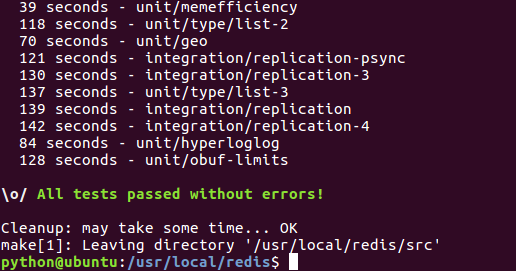

表示redis环境没有问题。
安装 最后安装路径
sudo make install
查看编译好的命令文件
ls /usr/local/bin/redis-*

--/usr/local/bin/redis-benchmark     性能测试工具,例如:redis-benchmark -n 1000000 -c 50 , 50个客户端,并发1000000个SETs/GETs查询

--/usr/local/bin/redis-check-aof     更新日志检查

--/usr/local/bin/redis-check-dump    本地数据文件检查

--/usr/local/bin/redis-cli           命令行操作工具

--/usr/local/bin/redis-server        服务器程序
- 修改配置文件
sudo mkdir /etc/redis

sudo cp redis.conf /etc/redis/

ls /etc/redis/redis.conf
启动redis
$redis-server /etc/redis/redis.conf
出现以下代表启动成功
python@ubuntu:~$ redis-sever /etc/redis/redis.conf

未找到 'redis-sever' 命令,您要输入的是否是:

 命令 'redis-server' 来自于包 'redis-server' (universe)

redis-sever:未找到命令

python@ubuntu:~$ redis-server /etc/redis/redis.conf

23003:M 17 Sep 10:52:57.535 * Increased maximum number of open files to 10032 (it was originally set to 1024).

                _._

           _.-``__ ''-._

      _.-``    `.  `_.  ''-._           Redis 3.2.3 (00000000/0) 64 bit

  .-`` .-```.  ```\/    _.,_ ''-._

 (    '      ,       .-`  | `,    )     Running in standalone mode

 |`-._`-...-` __...-.``-._|'` _.-'|     Port: 6379

 |    `-._   `._    /     _.-'    |     PID: 23003

  `-._    `-._  `-./  _.-'    _.-'

 |`-._`-._    `-.__.-'    _.-'_.-'|

 |    `-._`-._        _.-'_.-'    |           http://redis.io

  `-._    `-._`-.__.-'_.-'    _.-'

 |`-._`-._    `-.__.-'    _.-'_.-'|

 |    `-._`-._        _.-'_.-'    |

  `-._    `-._`-.__.-'_.-'    _.-'

      `-._    `-.__.-'    _.-'

          `-._        _.-'

              `-.__.-'

23003:M 17 Sep 10:52:57.536 # WARNING: The TCP backlog setting of 511 cannot be enforced because /proc/sys/net/core/somaxconn is set to the lower value of 128.

23003:M 17 Sep 10:52:57.537 # Server started, Redis version 3.2.3

23003:M 17 Sep 10:52:57.537 # WARNING overcommit_memory is set to 0! Background save may fail under low memory condition. To fix this issue add 'vm.overcommit_memory = 1' to /etc/sysctl.conf and then reboot or run the command 'sysctl vm.overcommit_memory=1' for this to take effect.

23003:M 17 Sep 10:52:57.537 # WARNING you have Transparent Huge Pages (THP) support enabled in your kernel. This will create latency and memory usage issues with Redis. To fix this issue run the command 'echo never > /sys/kernel/mm/transparent_hugepage/enabled' as root, and add it to your /etc/rc.local in order to retain the setting after a reboot. Redis must be restarted after THP is disabled.

23003:M 17 Sep 10:52:57.537 * The server is now ready to accept connections on port 6379
连接redis服务器
新开一个窗口,或者redis-server后台启动。
通过
$ redis-cli
得到
127.0.0.1:6379>
127.0.0.1:6379> ping

PONG
代表redis服务器已经正常安装并且可以使用了。
Redis之Redis的更多相关文章
- Java Spring mvc 操作 Redis 及 Redis 集群
本文原创,转载请注明:http://www.cnblogs.com/fengzheng/p/5941953.html 关于 Redis 集群搭建可以参考我的另一篇文章 Redis集群搭建与简单使用 R ...
- CentOS下安装Redis及Redis的PHP扩展
1.安装Redis 1.1 如果没有安装wget,安装wget yum install wget 1.2 在http://redis.io/download页面查看redis版本,并下载安装 wget ...
- redis/php redis扩展 安装
作者:silenceper 日期:2013-10-03 原文地址: http://silenceper.com/archives/952.html 我是在CentOS 6.3 中进行的. 使用到的软件 ...
- windows下与linux下安装redis及redis扩展
1. Redis的介绍 Redis是一个开源的使用ANSI C语言编写.支持网络.可基于内存亦可持久化的日志型.Key-Value数据库,并提供多种语言的API.从2010年3月15日起 ...
- redis系列-redis的使用场景
redis越来越受大家欢迎,提升下速度,做下缓存,完成KPI之利器呀.翻译一篇文章<<How to take advantage of Redis just adding it to yo ...
- 搭建LNAMP环境(五)- PHP7源码安装Redis和Redis拓展
上一篇:搭建LNAMP环境(四)- 源码安装PHP7 一.安装Redis 1.创建redis用户组和用户 groupadd redis useradd -r -g redis -s /sbin/nol ...
- redis配置文件redis.conf参数说明
redis配置文件redis.conf参数说明 (2013-01-09 21:20:40)转载▼ 标签: redis配置 redis.conf 配置说明 杂谈 分类: nosql # By defau ...
- 【Redis】Redis的基本安装及使用
在Linux上安装Redis Redis的安装很简单.基本上是下载.解压.运行安装脚本.我用的Redis版本是3.2.1. [nicchagil@localhost app]$ wget -q htt ...
- vagrant系列教程(四):vagrant搭建redis与redis的监控程序redis-stat(转)
上一篇php7环境的搭建 真是火爆,仅仅两天时间,就破了我之前swagger系列的一片文章,看来,大家对搭建环境真是情有独钟. 为了访问量,我今天再来一篇Redis的搭建.当然不能仅仅是redis的搭 ...
- [redis] 分布式 Redis 的 CRUD 实现
1.applicationContext-redis.xml <?xml version="1.0" encoding="UTF-8"?> < ...
随机推荐
- Buffer Data
waylau/netty-4-user-guide: Chinese translation of Netty 4.x User Guide. 中文翻译<Netty 4.x 用户指南> h ...
- golang的指针和切片
首先为什么要讲go的指针和切片放在一起? 因为go指针和切片都是引用类型 引用类型就是说切片和指针保存的只是内存的地址,而不是具体的值,效率在大数据读取方面效率会高很多. 1.怎么定义一个切片 方法1 ...
- 转!mysql备份与还原数据库
备份数据库:1) mysqldump -uroot -p db_name > 20181018_preprod_bak.sql2) 输入数据库密码 还原数据库:1. 系统命令行:mysqladm ...
- MFC工具栏设计
工具栏中包含了一组用于执行命令的按钮,每个按钮都用一个图标来表示.当单击某个按钮时,会产生一个相应的消息,对这个消息的处理就是按钮的功能实现.将菜单中常用的功能放置在工具栏中,这样可以方便用户操作,省 ...
- int文档
文档 class int(object): """ int(x=0) -> integer int(x, base=10) -> integer ------ ...
- Django REST framework 理解
Web应用模式 1 .前后端不分离:在前后端不分离的应用模式中,前端页面看到的效果都是由后端控制,由后端渲染页面或重定向,也就是后端需要控制前端的展示,前端与厚度那的耦合度很高. 这种应用模式比较 ...
- table添加横向滚动条
<div style="width:1000px; height:200px; overflow:scroll;"> <table border=" r ...
- 论MYSQL数据库数据错误的处理
1,备份 2,事务回滚 3,binlog日志回复 4,以上措施都没有,那就望洋兴叹吧
- docker——三大核心概念
镜像.容器.仓库是docker的三大核心概念. docker镜像类似于虚拟机镜像,你可以将其理解为一个只读模板. docker容器类似于一个轻量级的沙箱,Docker利用容器来运行和隔离应用.容器是从 ...
- debian 如何切换为root用户
debian 如何切换为root用户 debian 如何切换为root用户 sudo su 输入命令后提示输入密码,输入密码切换为root用户