
vue - 页面跳转
HTML:a
小程序:navigator
Vue:router-link
1. router-link => a标签

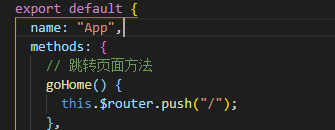
2. javascript标签跳转页面
2.1

2.2
3. 常用方法之跳上一页/下一页
3.1
3.2
 <template>

   <div id="app">

     <img src="./assets/logo.png">

     <router-view/>

     <router-link to="/">[跳转到主页]</router-link>

     <router-link to="/login">[登录]</router-link>

     <router-link to="/logout">[登出]</router-link>

     <!-- javascript跳转页面 -->

     <button @click="goHome">[跳转到主页]</button>

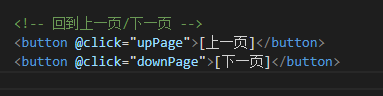
     <!-- 回到上一页 -->

     <button @click="upPage">[上一页]</button>

     <button @click="downPage">[下一页]</button>

     <!-- 回到下一页 -->

   </div>

 </template>

 <script>

 export default {

   name: "App",

   methods: {

     // 跳转页面方法

     goHome() {

       this.$router.push("/");

     },

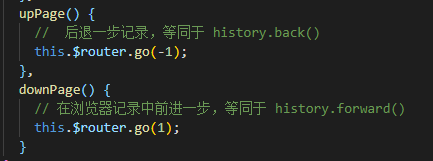
     upPage() {

       //  后退一步记录,等同于 history.back()

       this.$router.go(-1);

     },

     downPage() {

       // 在浏览器记录中前进一步,等同于 history.forward()

       this.$router.go(1);

     }

   }

 };

 </script>

 <style lang='scss' type='text/css'>

 #app {

   font-family: "Avenir", Helvetica, Arial, sans-serif;

   -webkit-font-smoothing: antialiased;

   -moz-osx-font-smoothing: grayscale;

   text-align: center;

   color: #f00;

   margin-top: 60px;

   img {

     // width: 200px;

     height: 100px;

   }

 }

 </style>
vue - 页面跳转的更多相关文章
- Vue页面跳转动画效果实现
Vue页面跳转动画效果实现:https://juejin.im/post/5ba358a56fb9a05d2068401d
- vue页面跳转以及传参和取参
vue中this.$router.push()路由传值和获取的两种常见方法 1.路由传值 this.$router.push() (1) 想要导航到不同的URL,使用router.push()方法 ...
- VUE页面跳转方式
一.to +跳转路径 <router-link to="/">跳转到主页</router-link> <router-link :to="{ ...
- 生产环境,vue页面跳转的时候,js报404的问题
最近上线的一个vue项目,需要各种路由跳转,在开发和测试环境都没问题,但是在生产环境,发现后期更新代码的时候,有些机型(ios机型,暂未发现android有问题)跳转路由的时候,标题修改了,但是内容并 ...
- Vue页面跳转$router.push 的用法
vue2.0在使用的过程中, .vue文件之间的跳转,在template中的常见写法是: <router-link to="/miniCard/statement/horizon&qu ...
- vue 页面跳转传参
页面之间的跳转传参,正常前端js里写 window.location.href="xxxxx?id=1" 就可以了: 但是vue不一样 需要操作的是路由history,需要用到 V ...
- vue页面跳转拦截器
登录拦截逻辑 第一步:路由拦截 首先在定义路由的时候就需要多添加一个自定义字段requireAuth,用于判断该路由的访问是否需要登录.如果用户已经登录,则顺利进入路由, 否则就进入登录页面.在路由管 ...
- vue 页面跳转的两种方式
1,标签跳转 <router-link to='two'><button>点我到第二个页面</button></router-link> 2,点 ...
- vue:页面跳转和传参(页面之间,父传子,子传父)
1.返回上一个页面: A.<a @click="$router.back(-1)" class="btn">重新加载</a> B.thi ...
随机推荐
- 【BZOJ 3307】 3307: 雨天的尾巴 (线段树+树链剖分)
3307: 雨天的尾巴 Time Limit: 10 Sec Memory Limit: 128 MBSubmit: 458 Solved: 210 Description N个点,形成一个树状结 ...
- android fragment activity 区别
韩梦飞沙 韩亚飞 313134555@qq.com yue31313 han_meng_fei_sha fragment 负责一个模块 的展示. 由 活动 管理. 碎片 可以 解决 太多活动 ...
- QT学习笔记2:QT中常用函数
一.QString转number QString number() QString number() QString number() QString number() QString number( ...
- luogu P1809 过河问题_NOI导刊2011提高(01)
题目描述 有一个大晴天,Oliver与同学们一共N人出游,他们走到一条河的东岸边,想要过河到西岸.而东岸边有一条小船. 船太小了,一次只能乘坐两人.每个人都有一个渡河时间T,船划到对岸的时间等于船上渡 ...
- 我的OI生涯 第七章 终篇
11.10日. 我们TSOI再次来到了熟悉的燕山大学,只不过这次是真刀真枪的干了. 望着那座熟悉的小桥,身边的好友不知此行过后还有多少. 下午才到,出人意外的是这次没有住燕大宾馆而是选择了熟悉的格林豪 ...
- zend studio10 创建重复project from remote server
zend studio10创建重复project from remote server [本地远程到dev服务器]1.删掉已存在project隐藏文件.project .build2.如果zend10 ...
- bzoj 3389: [Usaco2004 Dec]Cleaning Shifts安排值班 -- 贪心
3389: [Usaco2004 Dec]Cleaning Shifts安排值班 Time Limit: 1 Sec Memory Limit: 128 MB Description 一天有 ...
- CountDownLatch源码分析
CountDownLatch.Semaphore(信号量)和ReentrantReadWriteLock.ReadLock(读锁)都采用AbstractOwnableSynchronizer共享排队的 ...
- SCOJ 4484 The Graver Robbers' Chronicles 后缀自动机
4484: The Graver Robbers' Chronicles 题目连接: http://acm.scu.edu.cn/soj/problem.action?id=4484 Descript ...
- Codeforces Round #300 D. Weird Chess 水题
D. Weird Chess Time Limit: 1 Sec Memory Limit: 256 MB 题目连接 http://codeforces.com/contest/538/proble ...