
vue - 页面跳转
HTML:a
小程序:navigator
Vue:router-link
1. router-link => a标签

2. javascript标签跳转页面
2.1

2.2
3. 常用方法之跳上一页/下一页
3.1
3.2
 <template>

   <div id="app">

     <img src="./assets/logo.png">

     <router-view/>

     <router-link to="/">[跳转到主页]</router-link>

     <router-link to="/login">[登录]</router-link>

     <router-link to="/logout">[登出]</router-link>

     <!-- javascript跳转页面 -->

     <button @click="goHome">[跳转到主页]</button>

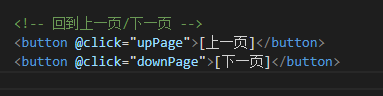
     <!-- 回到上一页 -->

     <button @click="upPage">[上一页]</button>

     <button @click="downPage">[下一页]</button>

     <!-- 回到下一页 -->

   </div>

 </template>

 <script>

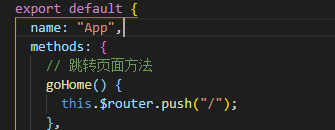
 export default {

   name: "App",

   methods: {

     // 跳转页面方法

     goHome() {

       this.$router.push("/");

     },

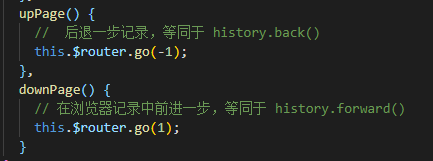
     upPage() {

       //  后退一步记录,等同于 history.back()

       this.$router.go(-1);

     },

     downPage() {

       // 在浏览器记录中前进一步,等同于 history.forward()

       this.$router.go(1);

     }

   }

 };

 </script>

 <style lang='scss' type='text/css'>

 #app {

   font-family: "Avenir", Helvetica, Arial, sans-serif;

   -webkit-font-smoothing: antialiased;

   -moz-osx-font-smoothing: grayscale;

   text-align: center;

   color: #f00;

   margin-top: 60px;

   img {

     // width: 200px;

     height: 100px;

   }

 }

 </style>
vue - 页面跳转的更多相关文章
- Vue页面跳转动画效果实现
Vue页面跳转动画效果实现:https://juejin.im/post/5ba358a56fb9a05d2068401d
- vue页面跳转以及传参和取参
vue中this.$router.push()路由传值和获取的两种常见方法 1.路由传值 this.$router.push() (1) 想要导航到不同的URL,使用router.push()方法 ...
- VUE页面跳转方式
一.to +跳转路径 <router-link to="/">跳转到主页</router-link> <router-link :to="{ ...
- 生产环境,vue页面跳转的时候,js报404的问题
最近上线的一个vue项目,需要各种路由跳转,在开发和测试环境都没问题,但是在生产环境,发现后期更新代码的时候,有些机型(ios机型,暂未发现android有问题)跳转路由的时候,标题修改了,但是内容并 ...
- Vue页面跳转$router.push 的用法
vue2.0在使用的过程中, .vue文件之间的跳转,在template中的常见写法是: <router-link to="/miniCard/statement/horizon&qu ...
- vue 页面跳转传参
页面之间的跳转传参,正常前端js里写 window.location.href="xxxxx?id=1" 就可以了: 但是vue不一样 需要操作的是路由history,需要用到 V ...
- vue页面跳转拦截器
登录拦截逻辑 第一步:路由拦截 首先在定义路由的时候就需要多添加一个自定义字段requireAuth,用于判断该路由的访问是否需要登录.如果用户已经登录,则顺利进入路由, 否则就进入登录页面.在路由管 ...
- vue 页面跳转的两种方式
1,标签跳转 <router-link to='two'><button>点我到第二个页面</button></router-link> 2,点 ...
- vue:页面跳转和传参(页面之间,父传子,子传父)
1.返回上一个页面: A.<a @click="$router.back(-1)" class="btn">重新加载</a> B.thi ...
随机推荐
- Codeforces Beta Round #5 D. Follow Traffic Rules 物理
D. Follow Traffic Rules 题目连接: http://www.codeforces.com/contest/5/problem/D Description Everybody kn ...
- Codeforces Round #300 C. Tourist's Notes 水题
C. Tourist's Notes Time Limit: 1 Sec Memory Limit: 256 MB 题目连接 http://codeforces.com/contest/538/pr ...
- UIImagePickerController导航字体颜色和背景
创建UIImagePickerController // 创建图片选择器 UIImagePickerController *picker = [[UIImagePickerController all ...
- Linux知识(2)----中文输入法安装
Ubantu14.04在English的环境下,没有中文输入法,自带的ibus不完整.现在基于ibus框架,有几个比较好用的输入法,如sunpingyin和google pinying,还有五笔的输入 ...
- ASP.NET获取文件的相关知识
string filePath = FileUpload1.PostedFile.FileName;//获取上传文件的路径 string fileName = filePath.Substring(f ...
- HTML5项目笔记4:使用Audio API设计绚丽的HTML5音乐播放器
HTML5 有两个很炫的元素,就是Audio和 Video,可以用他们在页面上创建音频播放器和视频播放器,制作一些效果很不错的应用. 无论是视屏还是音频,都是一个容器文件,包含了一些音频轨道,视频轨道 ...
- Android学习笔记(三)之带有侧边索引的快速查找(跟带字母索引查找的通讯录差不多)
喜欢另辟蹊径的我,在这里废话不多说了,直接上代码和图片了. 效果图如下: 第一步:MainActivity的代码如下: package net.loonggg.test; import java.ut ...
- C# 读取EXCEL文件出现数据丢失问题,数据不完整
将EXCEL数据导出的时候如果同一列数据中既有文字,又有数字!读取时一列中要么文字丢失只剩下数字,要么数字丢失,只剩下文字,这是由第一行的数据类型决定的.出现这种问题是由于数据类型不统一造成的. 原来 ...
- 一些值得学习的Unity教程 (很实用的包括源码)
***********************项目源码******************************** 1. 降临 2. 沉睡缤纷乐 3. 千炮捕鱼 4. Photon官方FSP示例 ...
- Spring Data JPA -1-CRUD入门
1) 引入jar包支持 <dependency> <groupId>org.springframework.boot</groupId> <artifactI ...