
基于HTML5 Canvas 实现的 Loading 效果
Sonic.js 是一个很小的 JavaScript 类,用于创建基于 HTML5 画布的加载图像。更强大的是 Sonic.js 还提供了基于现成的例子的创建工具,可以帮助你实现更多自定义的(Loading)加载动画效果。
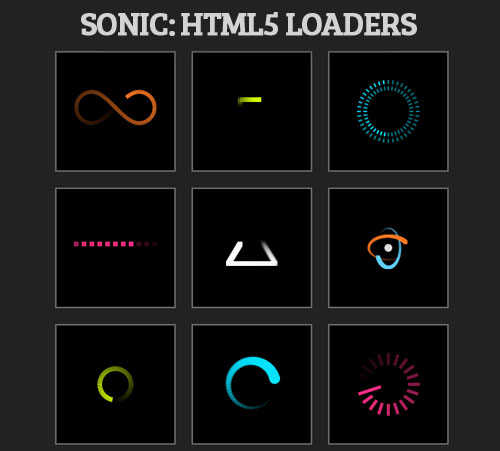
实现的代码。
html代码:
 var loaders = [

    {

        width: 100,

        height: 50,

        padding: 10,

        stepsPerFrame: 2,

        trailLength: 1,

        pointDistance: .03,

        strokeColor: '#FF7B24',

        step: 'fader',

        multiplier: 2,

        setup: function () {

            this._.lineWidth = 5;

        },

        path: [

            ['arc', 10, 10, 10, -270, -90],

            ['bezier', 10, 0, 40, 20, 20, 0, 30, 20],

            ['arc', 40, 10, 10, 90, -90],

            ['bezier', 40, 0, 10, 20, 30, 0, 20, 20]

        ]

    },

    {

        width: 30,

        height: 30,

        stepsPerFrame: 2,

        trailLength: .3,

        pointDistance: .1,

        padding: 10,

        fillColor: '#D4FF00',

        strokeColor: '#FFF',

        setup: function () {

            this._.lineWidth = 20;

        },

        path: [

            ['line', 0, 0, 30, 0],

            ['line', 30, 0, 30, 30],

            ['line', 30, 30, 0, 30],

            ['line', 0, 30, 0, 0]

        ]

    },

    {

        width: 100,

        height: 100,

        stepsPerFrame: 1,

        trailLength: 1,

        pointDistance: .025,

        strokeColor: '#05E2FF',

        fps: 20,

        setup: function () {

            this._.lineWidth = 2;

        },

        step: function (point, index) {

            var cx = this.padding + 50,

                cy = this.padding + 50,

                _ = this._,

                angle = (Math.PI / 180) * (point.progress * 360);

            this._.globalAlpha = Math.max(.5, this.alpha);

            _.beginPath();

            _.moveTo(point.x, point.y);

            _.lineTo(

                (Math.cos(angle) * 35) + cx,

                (Math.sin(angle) * 35) + cy

            );

            _.closePath();

            _.stroke();

            _.beginPath();

            _.moveTo(

                (Math.cos(-angle) * 32) + cx,

                (Math.sin(-angle) * 32) + cy

            );

            _.lineTo(

                (Math.cos(-angle) * 27) + cx,

                (Math.sin(-angle) * 27) + cy

            );

            _.closePath();

            _.stroke();

        },

        path: [

            ['arc', 50, 50, 40, 0, 360]

        ]

    },

    {

        width: 100,

        height: 50,

        stepsPerFrame: 1,

        trailLength: 1,

        pointDistance: .1,

        fps: 15,

        padding: 10,

        //step: 'fader',

        fillColor: '#FF2E82',

        setup: function () {

            this._.lineWidth = 20;

        },

        path: [

            ['line', 0, 20, 100, 20],

            ['line', 100, 20, 0, 20]

        ]

    },

    {

        width: 100,

        height: 100,

        stepsPerFrame: 7,

        trailLength: .7,

        pointDistance: .01,

        fps: 30,

        setup: function () {

            this._.lineWidth = 10;

        },

        path: [

            ['line', 20, 70, 50, 20],

            ['line', 50, 20, 80, 70],

            ['line', 80, 70, 20, 70]

        ]

    },

    {

        width: 100,

        height: 100,

        stepsPerFrame: 4,

        trailLength: 1,

        pointDistance: .01,

        fps: 25,

        fillColor: '#FF7B24',

        setup: function () {

            this._.lineWidth = 10;

        },

        step: function (point, i, f) {

            var progress = point.progress,

                degAngle = 360 * progress,

                angle = Math.PI / 180 * degAngle,

                angleB = Math.PI / 180 * (degAngle - 180),

                size = i * 5;

            this._.fillRect(

                Math.cos(angle) * 25 + (50 - size / 2),

                Math.sin(angle) * 15 + (50 - size / 2),

                size,

                size

            );

            this._.fillStyle = '#63D3FF';

            this._.fillRect(

                Math.cos(angleB) * 15 + (50 - size / 2),

                Math.sin(angleB) * 25 + (50 - size / 2),

                size,

                size

            );

            if (point.progress == 1) {

                this._.globalAlpha = f < .5 ? 1 - f : f;

                this._.fillStyle = '#EEE';

                this._.beginPath();

                this._.arc(50, 50, 5, 0, 360, 0);

                this._.closePath();

                this._.fill();

            }

        },

        path: [

            ['line', 40, 10, 60, 90]

        ]

    },

    {

        width: 100,

        height: 100,

        stepsPerFrame: 3,

        trailLength: 1,

        pointDistance: .01,

        fps: 30,

        step: 'fader',

        strokeColor: '#D4FF00',

        setup: function () {

            this._.lineWidth = 6;

        },

        path: [

            ['arc', 50, 50, 20, 360, 0]

        ]

    },

    {

        width: 100,

        height: 100,

        stepsPerFrame: 1,

        trailLength: 1,

        pointDistance: .02,

        fps: 30,

        fillColor: '#05E2FF',

        step: function (point, index) {

            this._.beginPath();

            this._.moveTo(point.x, point.y);

            this._.arc(point.x, point.y, index * 7, 0, Math.PI * 2, false);

            this._.closePath();

            this._.fill();

        },

        path: [

            ['arc', 50, 50, 30, 0, 360]

        ]

    },

    {

        width: 100,

        height: 100,

        stepsPerFrame: 1,

        trailLength: 1,

        pointDistance: .05,

        strokeColor: '#FF2E82',

        fps: 20,

        setup: function () {

            this._.lineWidth = 4;

        },

        step: function (point, index) {

            var cx = this.padding + 50,

                cy = this.padding + 50,

                _ = this._,

                angle = (Math.PI / 180) * (point.progress * 360),

                innerRadius = index === 1 ? 10 : 25;

            _.beginPath();

            _.moveTo(point.x, point.y);

            _.lineTo(

                (Math.cos(angle) * innerRadius) + cx,

                (Math.sin(angle) * innerRadius) + cy

            );

            _.closePath();

            _.stroke();

        },

        path: [

            ['arc', 50, 50, 40, 0, 360]

        ]

    }

];

        var d, a, container = document.getElementById('in');

        for (var i = -1, l = loaders.length; ++i < l; ) {

            d = document.createElement('div');

            d.className = 'l';

            a = new Sonic(loaders[i]);

            d.appendChild(a.canvas);

            container.appendChild(d);

            a.canvas.style.marginTop = (150 - a.fullHeight) / 2 + 'px';

            a.canvas.style.marginLeft = (150 - a.fullWidth) / 2 + 'px';

            a.play();

        }
via:http://www.w2bc.com/Article/26212
基于HTML5 Canvas 实现的 Loading 效果的更多相关文章
- 基于HTML5 Canvas可撕裂布料效果
分享一款布料效果的 HTML5 Canvas 应用演示,效果逼真.你会看到,借助 Canvas 的强大绘图和动画功能,只需很少的代码就能实现让您屏息凝神的效果. 在线预览 源码下载 实现的代码. ...
- 基于HTML5 Canvas粒子效果文字动画特效
之前我们分享过很多超酷的文字特效,其中也有利用HTML5和CSS3的.今天我们要来分享一款基于HTML5 Canvas的文字特效,输入框中输入想要展示的文字,回车后即可在canvas上绘制出粒子效果的 ...
- 基于HTML5 Canvas生成粒子效果的人物头像
前面我们分享过一个HTML5 Canvas实现的图像马赛克模糊效果,HTML5处理图片真的非常简单.今天我们要再利用HTML5 Canvas实现一个粒子效果的人物头像,你可以任意选择一张头像图片,接下 ...
- 超酷!!HTML5 Canvas 水流样式 Loading 动画
今天我们要分享另外一款基于HTML5 Canvas的液体流动样式Loading加载动画,这款Loading动画在加载时会呈现液体流动的动画效果,并且由于和背景颜色的对比,也略微呈现发光的动画效果. 效 ...
- 基于HTML5 Canvas实现的图片马赛克模糊特效
效果请点击下面网址: http://hovertree.com/texiao/html5/1.htm 一.开门见山受美国肖像画家Chuck Close的启发,此脚本通过使用HTML5 canvas元素 ...
- 基于html5 canvas和js实现的水果忍者网页版
今天爱编程小编给大家分享一款基于html5 canvas和js实现的水果忍者网页版. <水果忍者>是一款非常受喜欢的手机游戏,刚看到新闻说<水果忍者>四周年新版要上线了.网页版 ...
- 基于 HTML5 Canvas 的智能安防 SCADA 巡逻模块
基于 HTML5 Canvas 的智能安防 SCADA 巡逻模块 前言 最近学习了 HT for Web flow 插件,除了正常的 flow 效果,其中还有两个十分好用的两个接口 getPercen ...
- 基于HTML5 Canvas和jQuery 的绘图工具的实现
简单介绍 HTML5 提供了强大的Canvas元素.使用Canvas并结合Javascript 能够实现一些很强大的功能.本文就介绍一下基于HTML5 Canvas 的绘图工具的实现.废话少说,先看成 ...
- 18个基于 HTML5 Canvas 开发的图表库
如今,HTML5 可谓如众星捧月一般,受到许多业内巨头的青睐.很多Web开发者也尝试着用 HTML 5 来制作各种各样的富 Web 应用.HTML 5 规范引进了很多新特性,其中之一就是 Canvas ...
随机推荐
- Plugin with id 'com.github.dcendents.android-maven' not found
导入开源项目的时候老是报这个错 Error:(2, 0) Plugin with id 'com.github.dcendents.android-maven' not found 挺郁闷的,不知道是 ...
- 【Python】Django RestFramework资料
A ReSTful API is becoming a standard component of any modern web application. The Django Rest Frame ...
- aes加密在linux下会生成随机key的解决办法
直接贴代码了: package com.segerp.tygl.weixin.common; import java.io.UnsupportedEncodingException; import j ...
- 算法笔记_027:俄式乘法(Java)
1 问题描述 首先,了解一下何为俄式乘法?此处,借用<算法设计与分析基础>第三版上一段文字介绍: 2 解决方案 具体编码如下: package com.liuzhen.chapter4; ...
- 算法笔记_020:深度优先查找(Java)
目录 1 问题描述 2 解决方案 2.1 蛮力法 1 问题描述 深度优先查找(depth-first search,DFS)可以从任意顶点开始访问图的顶点,然后把该顶点标记为已访问.在每次迭代的时候, ...
- linux下vi编辑文件
vi 文件名.进入读文件模式 按i进入编辑模式 按g切光标换到第一行,按G光标切换到最后一行. 按Esc退出编辑模式 :q退出 :wq保存退出 以上命名后面加上!表示强制运行
- Android 应用开发实例之文件管理器
2013-07-02 10.2 文件管理器 能够浏览和管理手机/存储卡上的文件和文件夹,包括重命名.删除.新建.复制.粘帖等文件操作. 由于需要浏览大量的文件/文件夹,所以需要使用一个ListView ...
- storyboard,xib
1. 从xib的viewcontroll中启动storyboard 或者 从一个storyboard切换到另一个storyboard: – (IBAction)openStoryboard:(id)s ...
- IIS自定义404错误不能生效的原因
通过IIS自定义错误信息的功能,来自定义的404错误页面. 先制作显示错误信息的htm文件404.htm(随便什么名都行),我把文件入在根目录下. 使用Url类型,设置“/404.htm ”,可以成功 ...
- IO多路复用之poll
1.基本知识 poll的机制与select类似,与select在本质上没有多大差别,管理多个描述符也是进行轮询,根据描述符的状态进行处理,但是poll没有最大文件描述符数量的限制.poll和selec ...