
Spring报错:java.io.FileNotFoundException: class path resource [applicationContext.xml] cannot be opened because it does not exist
感谢:http://blog.chinaunix.net/uid-20681545-id-184633.html提供的解决方案,非常棒 !
问题说明:
新建一个Spring项目,新建一个Bean类:HelloWorld类,Main.java是主程序,xml是Spring配置文件。
项目结构如下:
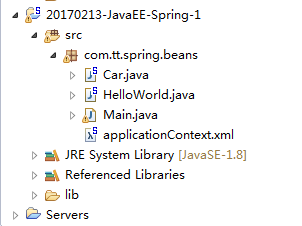
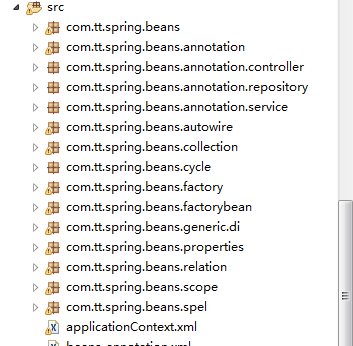
打开文件夹,src目录下的结构如下:

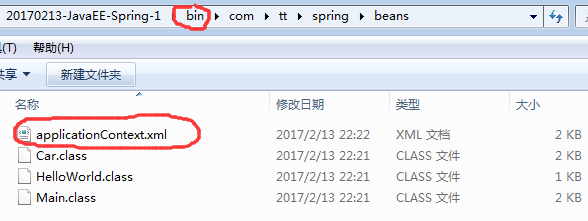
打开bin文件夹,目录如下
HelloWorld.java代码:
 package com.tt.spring.beans;

 public class HelloWorld {

     private String name;

     public void setName(String name) {

         this.name = name;

     }

     public void hello(){

         System.out.println("hello: "+name);

     }

 }
Main.java
 package com.tt.spring.beans;

 import org.springframework.context.ApplicationContext;

 import org.springframework.context.support.ClassPathXmlApplicationContext;

 public class Main {

     public static void main(String[] args){

         /*

         //创建HelloWorld的一个对象

         HelloWorld helloWorld = new HelloWorld();

         //为name属性赋值

         helloWorld.setName("tt");

         */

         //调用hello方法

         //1.创建Spring 的 IOC 容器对象

         ApplicationContext ctx = new ClassPathXmlApplicationContext("applicationContext.xml");

         //2.从IOC容器中获取Bean实例

         HelloWorld helloWorld = (HelloWorld) ctx.getBean("helloWorld");

         //3.调用Hello方法

         helloWorld.hello();

     }

 }
applicationContext.xml:
 <?xml version="1.0" encoding="UTF-8"?>

 <beans xmlns="http://www.springframework.org/schema/beans"

     xmlns:xsi="http://www.w3.org/2001/XMLSchema-instance"

     xsi:schemaLocation="http://www.springframework.org/schema/beans http://www.springframework.org/schema/beans/spring-beans.xsd">

     <!-- 配置bean -->

     <bean id="helloWorld" class="com.tt.spring.beans.HelloWorld">

          <property name="name" value="Spring"></property>

     </bean>

 </beans>
运行Main.java程序,结果显示报错。报错如下:
信息: Loading XML bean definitions from class path resource [applicationContext.xml]
Exception in thread "main" org.springframework.beans.factory.BeanDefinitionStoreException: IOException parsing XML document from class path resource [applicationContext.xml]; nested exception is java.io.FileNotFoundException: class path resource [applicationContext.xml] cannot be opened because it does not exist
at org.springframework.beans.factory.xml.XmlBeanDefinitionReader.loadBeanDefinitions(XmlBeanDefinitionReader.java:343)
at org.springframework.beans.factory.xml.XmlBeanDefinitionReader.loadBeanDefinitions(XmlBeanDefinitionReader.java:303)
at org.springframework.beans.factory.support.AbstractBeanDefinitionReader.loadBeanDefinitions(AbstractBeanDefinitionReader.java:180)
at org.springframework.beans.factory.support.AbstractBeanDefinitionReader.loadBeanDefinitions(AbstractBeanDefinitionReader.java:216)
at org.springframework.beans.factory.support.AbstractBeanDefinitionReader.loadBeanDefinitions(AbstractBeanDefinitionReader.java:187)
at org.springframework.beans.factory.support.AbstractBeanDefinitionReader.loadBeanDefinitions(AbstractBeanDefinitionReader.java:251)
at org.springframework.context.support.AbstractXmlApplicationContext.loadBeanDefinitions(AbstractXmlApplicationContext.java:127)
at org.springframework.context.support.AbstractXmlApplicationContext.loadBeanDefinitions(AbstractXmlApplicationContext.java:93)
at org.springframework.context.support.AbstractRefreshableApplicationContext.refreshBeanFactory(AbstractRefreshableApplicationContext.java:129)
at org.springframework.context.support.AbstractApplicationContext.obtainFreshBeanFactory(AbstractApplicationContext.java:540)
at org.springframework.context.support.AbstractApplicationContext.refresh(AbstractApplicationContext.java:454)
at org.springframework.context.support.ClassPathXmlApplicationContext.<init>(ClassPathXmlApplicationContext.java:139)
at org.springframework.context.support.ClassPathXmlApplicationContext.<init>(ClassPathXmlApplicationContext.java:83)
at com.tt.spring.beans.Main.main(Main.java:18)
Caused by: java.io.FileNotFoundException: class path resource [applicationContext.xml] cannot be opened because it does not exist
at org.springframework.core.io.ClassPathResource.getInputStream(ClassPathResource.java:158)
at org.springframework.beans.factory.xml.XmlBeanDefinitionReader.loadBeanDefinitions(XmlBeanDefinitionReader.java:329)
... 13 more
问题分析:
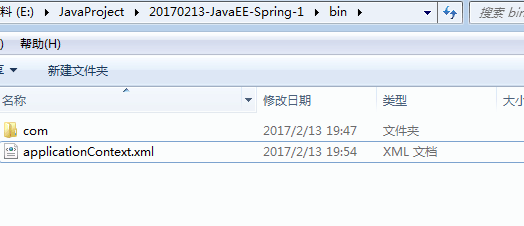
现在目录树如下:
  1 package com.tt.spring.beans;

  2

  3 public class Car {

  4

  5     private String brand;

  6     private String corp;

  7     private int price;

  8     private int maxSpeed;

  9

 10

 11     public Car() {

 12         System.out.println("Car's Constructor");

 13     }

 14

 15     public Car(String brand, String corp, int price) {

 16         super();

 17         this.brand = brand;

 18         this.corp = corp;

 19         this.price = price;

 20     }

 21

 22     @Override

 23     public String toString() {

 24         return "Car [brand=" + brand + ", corp=" + corp + ", price=" + price + ", maxSpeed=" + maxSpeed + "]";

 25     }

 26

 27 }
applicationContext.xml
 <?xml version="1.0" encoding="UTF-8"?>

 <beans xmlns="http://www.springframework.org/schema/beans"

     xmlns:xsi="http://www.w3.org/2001/XMLSchema-instance"

     xsi:schemaLocation="http://www.springframework.org/schema/beans

                         http://www.springframework.org/schema/beans/spring-beans.xsd">

    <context:component-scan base-package="com.tt.spring.beans"></context:component-scan>

     <!--

                      配置bean

         class:bean的全类名,通过反射的方式在IOC容器中创建Bean实例,所以要求Bean中必须有无参的构造器

         id:标识容器中的bean,id唯一

     -->

     <bean id="helloWorld" class="com.tt.spring.beans.HelloWorld">

          <property name="name" value="Spring"></property>

     </bean>

     <!-- 通过构造方法来配置bean的属性 -->

     <bean id="car" class="com.tt.spring.beans.Car">

          <constructor-arg value="Audi"></constructor-arg>

          <constructor-arg value="chengdu"></constructor-arg>

          <constructor-arg value="30000"></constructor-arg>

     </bean>

 </beans>
Main.java

控制台打印信息如下:

看到没?只能获取一个bean实例,不能获取两个。
原因分析:
在项目里,applicationContext.xml是在src最里面一层的,不在src的那一层,所以一旦运行Main.java文件,相应的就会在bin的目录下生成对应的applicationContext.xml文件。
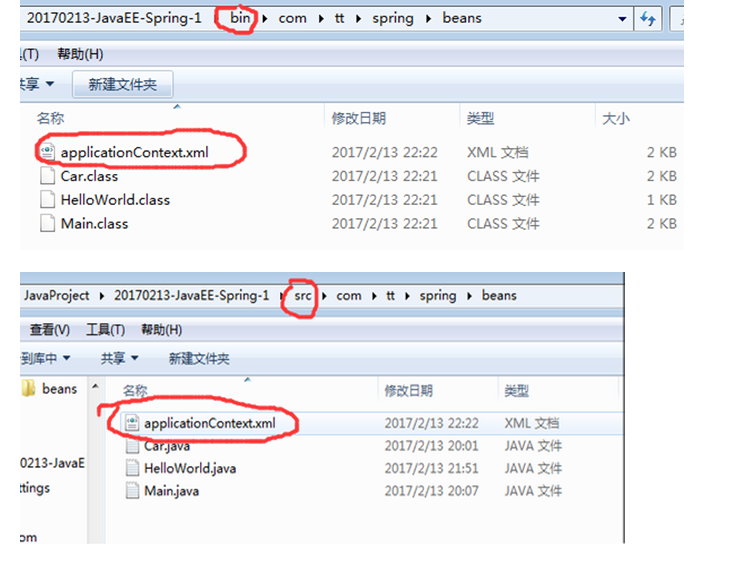
但是我们又在bin文件夹里做过粘贴applicationContext.xml。
所以说applicationContext.xml的目录压根就是混乱的!!!既是处于根目录,又处于com最里面的目录。
要么在项目上将xml移到src那一层,那么bin底下的xml也对应着-------xml就处于根目录。
要么在项目上仍然位于com的最里面,那么bin那里就不要将xml移出来----xml就处于最里面的目录
至于xml文件究竟在哪个目录,就该用相应的读取方式。
ClassPathXmlApplicationContext和FileSystemXmlApplicationContext读取xml
ApplicationContext applicationContext = new ClassPathXmlApplicationContext("applicationContext.xml")
Spring报错:java.io.FileNotFoundException: class path resource [applicationContext.xml] cannot be opened because it does not exist的更多相关文章
- nested exception is java.io.FileNotFoundException: class path resource [applicationContext.xml] cannot be opened because it does not exist
org.apache.ibatis.exceptions.PersistenceException: ### Error building SqlSession. ### The error may ...
- Caused by: java.io.FileNotFoundException: class path resource [applicationContext.xml] cannot be ope
1.错误描述 java.lang.IllegalStateException: Failed to load ApplicationContext at org.springframework.tes ...
- parsing XML document from class path resource [applicationtext.xml]; nested exception is java.io.FileNotFoundException: class path resource [applicationtext.xml] cannot be opened because it does not e
控制台异常: parsing XML document from class path resource [applicationtext.xml]; nested exception is java ...
- nested exception is java.io.FileNotFoundException: class path resource [jdbc.properties] cannot be opened because it does not exist
Could not load properties; nested exception is java.io.FileNotFoundException: class path resource [j ...
- java.io.FileNotFoundException class path resource [xxx.xml] cannot be opened
没有找到xxx.xml,首先确定你项目里有这个文件吗,如果没有请添加,或者你已经存在配置文件,只是名字不是xxx.xml,请改正名字.此外还要注意最好把xxx.xml加入到classpath里,就是放 ...
- class path resource [applicationContext.xml] cannot be opened because it does not exis
使用maven创建web工程,将spring配置文件applicationContext.xml放在src/resource下,用eclipse编译时提示class path resource [ap ...
- nested exception is java.io.FileNotFoundException: class path resource [spring/spring-datasource-mog
spring单元測试时发现的问题: org.springframework.beans.factory.BeanDefinitionStoreException: IOException parsin ...
- 关于SpringMVC项目报错:java.io.FileNotFoundException: Could not open ServletContext resource [/WEB-INF/xxxx.xml]
关于SpringMVC项目报错:java.io.FileNotFoundException: Could not open ServletContext resource [/WEB-INF/xxxx ...
- Caused by: java.io.FileNotFoundException: class path resource [spring/springmvc.xml] cannot be opene
Caused by: java.io.FileNotFoundException: class path resource [spring/springmvc. ...
随机推荐
- USB Transfer and Packet Sizes
https://msdn.microsoft.com/en-us/library/ff538112.aspx http://blog.csdn.net/chenyujing1234/article/d ...
- Java管程解决生产者消费者问题
同样是实验存档.//.. 依然以生产者消费者问题作为背景. 管程(=“资源管理程序”)将资源和对资源的操作封装起来,资源使用者通过接口操作资源就ok,不用去考虑进程同步的问题. 管程: package ...
- 重新想,重新看——CSS3变形,过渡与动画①
学习CSS3,觉得最难记忆的部分除了flex特性之外,就要属变形,过渡和动画部分了.作为初学者,总有种犯懒的心理,想着既然IE8浏览器都不完全支持CSS动画属性,还要考虑浏览器兼容问题,那么就不那么着 ...
- 打开Mac OSX原生的NTFS功能
插上磁盘 从finder或者使用以下命令查看到磁盘的Volume Name: diskutil list /dev/disk0 #: TYPE NAME SIZE IDENTIFIER 0: GUID ...
- git revert
1. 我认为这是正确的做法: git fetch --all git reset --hard origin/master git fetch下载远程最新的,但不尝试,或重订任何东西. 然后,git ...
- Linux 动态链接库包含静态链接库的方法
今天老司机们在讨论一个编译问题 A是一个静态库 C是一个动态库 B是运行程序,能不能将A打包到C 然后B只需要链接C 就可以了. 这个问题我以前在出来zlib库版本冲突的时候有点印象,所以写了个 ...
- java程序结构
if....else.... 1. if都需要接判断表达式 2. else不需要表达式 3. 有if没else可以,但else必须要有一个if,if数>=else数 if (A条件) ...
- 第一个版本库 Repository
Git安装 Windows系统 Git 为 Windows 系统提供了简易的 .exe 安装包, 直接下载并安装就可以了(点这里->):https://git-scm.com/download/ ...
- C# 生成图片缩略图
最近项目有部分需求,是关于图片操作部分的, 大致的功能就是图片的保存和展示.但是直接操作原图,程序运行效率太慢.而且如果传输数据量过大的话,可能直接导致调用WCF服务失败的问题. 为了解决这个问题,决 ...
- Python 输出百分比的两种方式
Python 输出百分比的两种方式 注: 在python3环境下测试. 方式1:直接使用参数格式化:{:.2%} {:.2%}: 显示小数点后2位 显示小数点后2位: >>> pri ...