
Spring报错:java.io.FileNotFoundException: class path resource [applicationContext.xml] cannot be opened because it does not exist
感谢:http://blog.chinaunix.net/uid-20681545-id-184633.html提供的解决方案,非常棒 !
问题说明:
新建一个Spring项目,新建一个Bean类:HelloWorld类,Main.java是主程序,xml是Spring配置文件。
项目结构如下:
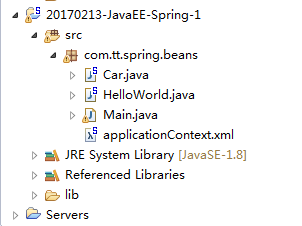
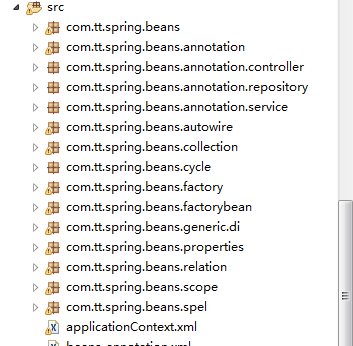
打开文件夹,src目录下的结构如下:

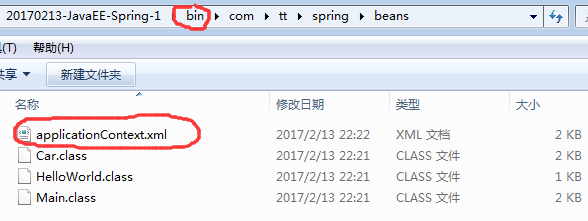
打开bin文件夹,目录如下
HelloWorld.java代码:
 package com.tt.spring.beans;

 public class HelloWorld {

     private String name;

     public void setName(String name) {

         this.name = name;

     }

     public void hello(){

         System.out.println("hello: "+name);

     }

 }
Main.java
 package com.tt.spring.beans;

 import org.springframework.context.ApplicationContext;

 import org.springframework.context.support.ClassPathXmlApplicationContext;

 public class Main {

     public static void main(String[] args){

         /*

         //创建HelloWorld的一个对象

         HelloWorld helloWorld = new HelloWorld();

         //为name属性赋值

         helloWorld.setName("tt");

         */

         //调用hello方法

         //1.创建Spring 的 IOC 容器对象

         ApplicationContext ctx = new ClassPathXmlApplicationContext("applicationContext.xml");

         //2.从IOC容器中获取Bean实例

         HelloWorld helloWorld = (HelloWorld) ctx.getBean("helloWorld");

         //3.调用Hello方法

         helloWorld.hello();

     }

 }
applicationContext.xml:
 <?xml version="1.0" encoding="UTF-8"?>

 <beans xmlns="http://www.springframework.org/schema/beans"

     xmlns:xsi="http://www.w3.org/2001/XMLSchema-instance"

     xsi:schemaLocation="http://www.springframework.org/schema/beans http://www.springframework.org/schema/beans/spring-beans.xsd">

     <!-- 配置bean -->

     <bean id="helloWorld" class="com.tt.spring.beans.HelloWorld">

          <property name="name" value="Spring"></property>

     </bean>

 </beans>
运行Main.java程序,结果显示报错。报错如下:
信息: Loading XML bean definitions from class path resource [applicationContext.xml]
Exception in thread "main" org.springframework.beans.factory.BeanDefinitionStoreException: IOException parsing XML document from class path resource [applicationContext.xml]; nested exception is java.io.FileNotFoundException: class path resource [applicationContext.xml] cannot be opened because it does not exist
at org.springframework.beans.factory.xml.XmlBeanDefinitionReader.loadBeanDefinitions(XmlBeanDefinitionReader.java:343)
at org.springframework.beans.factory.xml.XmlBeanDefinitionReader.loadBeanDefinitions(XmlBeanDefinitionReader.java:303)
at org.springframework.beans.factory.support.AbstractBeanDefinitionReader.loadBeanDefinitions(AbstractBeanDefinitionReader.java:180)
at org.springframework.beans.factory.support.AbstractBeanDefinitionReader.loadBeanDefinitions(AbstractBeanDefinitionReader.java:216)
at org.springframework.beans.factory.support.AbstractBeanDefinitionReader.loadBeanDefinitions(AbstractBeanDefinitionReader.java:187)
at org.springframework.beans.factory.support.AbstractBeanDefinitionReader.loadBeanDefinitions(AbstractBeanDefinitionReader.java:251)
at org.springframework.context.support.AbstractXmlApplicationContext.loadBeanDefinitions(AbstractXmlApplicationContext.java:127)
at org.springframework.context.support.AbstractXmlApplicationContext.loadBeanDefinitions(AbstractXmlApplicationContext.java:93)
at org.springframework.context.support.AbstractRefreshableApplicationContext.refreshBeanFactory(AbstractRefreshableApplicationContext.java:129)
at org.springframework.context.support.AbstractApplicationContext.obtainFreshBeanFactory(AbstractApplicationContext.java:540)
at org.springframework.context.support.AbstractApplicationContext.refresh(AbstractApplicationContext.java:454)
at org.springframework.context.support.ClassPathXmlApplicationContext.<init>(ClassPathXmlApplicationContext.java:139)
at org.springframework.context.support.ClassPathXmlApplicationContext.<init>(ClassPathXmlApplicationContext.java:83)
at com.tt.spring.beans.Main.main(Main.java:18)
Caused by: java.io.FileNotFoundException: class path resource [applicationContext.xml] cannot be opened because it does not exist
at org.springframework.core.io.ClassPathResource.getInputStream(ClassPathResource.java:158)
at org.springframework.beans.factory.xml.XmlBeanDefinitionReader.loadBeanDefinitions(XmlBeanDefinitionReader.java:329)
... 13 more
问题分析:
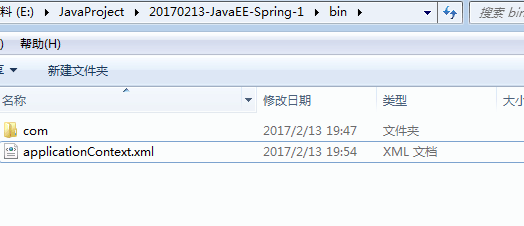
现在目录树如下:
  1 package com.tt.spring.beans;

  2

  3 public class Car {

  4

  5     private String brand;

  6     private String corp;

  7     private int price;

  8     private int maxSpeed;

  9

 10

 11     public Car() {

 12         System.out.println("Car's Constructor");

 13     }

 14

 15     public Car(String brand, String corp, int price) {

 16         super();

 17         this.brand = brand;

 18         this.corp = corp;

 19         this.price = price;

 20     }

 21

 22     @Override

 23     public String toString() {

 24         return "Car [brand=" + brand + ", corp=" + corp + ", price=" + price + ", maxSpeed=" + maxSpeed + "]";

 25     }

 26

 27 }
applicationContext.xml
 <?xml version="1.0" encoding="UTF-8"?>

 <beans xmlns="http://www.springframework.org/schema/beans"

     xmlns:xsi="http://www.w3.org/2001/XMLSchema-instance"

     xsi:schemaLocation="http://www.springframework.org/schema/beans

                         http://www.springframework.org/schema/beans/spring-beans.xsd">

    <context:component-scan base-package="com.tt.spring.beans"></context:component-scan>

     <!--

                      配置bean

         class:bean的全类名,通过反射的方式在IOC容器中创建Bean实例,所以要求Bean中必须有无参的构造器

         id:标识容器中的bean,id唯一

     -->

     <bean id="helloWorld" class="com.tt.spring.beans.HelloWorld">

          <property name="name" value="Spring"></property>

     </bean>

     <!-- 通过构造方法来配置bean的属性 -->

     <bean id="car" class="com.tt.spring.beans.Car">

          <constructor-arg value="Audi"></constructor-arg>

          <constructor-arg value="chengdu"></constructor-arg>

          <constructor-arg value="30000"></constructor-arg>

     </bean>

 </beans>
Main.java

控制台打印信息如下:

看到没?只能获取一个bean实例,不能获取两个。
原因分析:
在项目里,applicationContext.xml是在src最里面一层的,不在src的那一层,所以一旦运行Main.java文件,相应的就会在bin的目录下生成对应的applicationContext.xml文件。
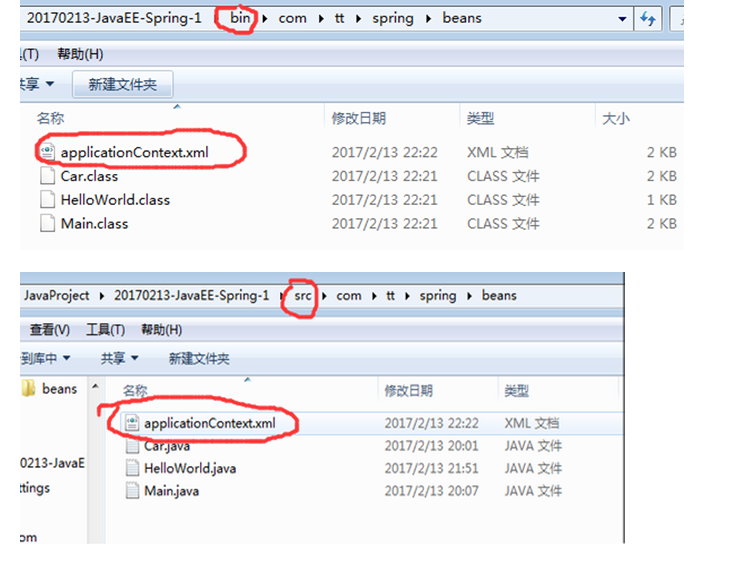
但是我们又在bin文件夹里做过粘贴applicationContext.xml。
所以说applicationContext.xml的目录压根就是混乱的!!!既是处于根目录,又处于com最里面的目录。
要么在项目上将xml移到src那一层,那么bin底下的xml也对应着-------xml就处于根目录。
要么在项目上仍然位于com的最里面,那么bin那里就不要将xml移出来----xml就处于最里面的目录
至于xml文件究竟在哪个目录,就该用相应的读取方式。
ClassPathXmlApplicationContext和FileSystemXmlApplicationContext读取xml
ApplicationContext applicationContext = new ClassPathXmlApplicationContext("applicationContext.xml")
Spring报错:java.io.FileNotFoundException: class path resource [applicationContext.xml] cannot be opened because it does not exist的更多相关文章
- nested exception is java.io.FileNotFoundException: class path resource [applicationContext.xml] cannot be opened because it does not exist
org.apache.ibatis.exceptions.PersistenceException: ### Error building SqlSession. ### The error may ...
- Caused by: java.io.FileNotFoundException: class path resource [applicationContext.xml] cannot be ope
1.错误描述 java.lang.IllegalStateException: Failed to load ApplicationContext at org.springframework.tes ...
- parsing XML document from class path resource [applicationtext.xml]; nested exception is java.io.FileNotFoundException: class path resource [applicationtext.xml] cannot be opened because it does not e
控制台异常: parsing XML document from class path resource [applicationtext.xml]; nested exception is java ...
- nested exception is java.io.FileNotFoundException: class path resource [jdbc.properties] cannot be opened because it does not exist
Could not load properties; nested exception is java.io.FileNotFoundException: class path resource [j ...
- java.io.FileNotFoundException class path resource [xxx.xml] cannot be opened
没有找到xxx.xml,首先确定你项目里有这个文件吗,如果没有请添加,或者你已经存在配置文件,只是名字不是xxx.xml,请改正名字.此外还要注意最好把xxx.xml加入到classpath里,就是放 ...
- class path resource [applicationContext.xml] cannot be opened because it does not exis
使用maven创建web工程,将spring配置文件applicationContext.xml放在src/resource下,用eclipse编译时提示class path resource [ap ...
- nested exception is java.io.FileNotFoundException: class path resource [spring/spring-datasource-mog
spring单元測试时发现的问题: org.springframework.beans.factory.BeanDefinitionStoreException: IOException parsin ...
- 关于SpringMVC项目报错:java.io.FileNotFoundException: Could not open ServletContext resource [/WEB-INF/xxxx.xml]
关于SpringMVC项目报错:java.io.FileNotFoundException: Could not open ServletContext resource [/WEB-INF/xxxx ...
- Caused by: java.io.FileNotFoundException: class path resource [spring/springmvc.xml] cannot be opene
Caused by: java.io.FileNotFoundException: class path resource [spring/springmvc. ...
随机推荐
- 为Android添加开机启动脚本
转:https://blog.csdn.net/u014316462/article/details/76438611 本文介绍了一种在Android 4.2.2源码中添加.修改文件或者代码,来达到使 ...
- 20145307第三次JAVA学习实验报告
20145307 <Java程序设计>第三次实验报告 北京电子科技学院(BESTI)实验报告 课程:Java程序设计 班级:1453 指导教师:娄嘉鹏 实验日期:2016.04.22 实验 ...
- iOS日常学习 - 如何配置.gitignore文件
文章为转载学习,原文地址 为什么要配置.gitigore 在我们使用git的过程当中,不是任何文件都需要commit到本地或者远程仓库的,比如一些三方库文件. 那么作为一个git新手,很多人不知道如何 ...
- maven 环境变量配置问题 cmd窗口报mvn -v不是内部或者外部的命令
早上整了一早上maven环境问题,配置的环境变量 系统变量 MAVEN_HOME C:\JavaTools\apache-maven-3.3.9 本机maven路径,Path变量中编辑,引用的是; ...
- HDU5299 圆的扫描线 && 树上删边博弈
HDU5299 圆的扫描线 && 树上删边博弈 标签(空格分隔): 未分类 给出若干个圆,可以互相嵌套但不相交或相切. 每次删去一个圆和它内部的圆,进行博弈,问谁赢. 分成两部分.首先 ...
- C# DES加密,KEY和IV不同设置的写法
1.KEY和IV分别赋值 //默认密钥向量 private static byte[] Iv= { 0x12, 0x34, 0x56, 0x78, 0x90, 0xAB, 0xCD, 0xEF }; ...
- .Net遍历窗体上控件
实现遍历窗体上的控件以及找出TextBox控件,代码如下: foreach( Control control in this.Controls ) { if( control is TextBox ) ...
- 动态延迟加载网页元素jQuery插件scrollLoading
如果一个网页很长,那么该页面的加载时间也会相应的较长.而这里给大家介绍的这个jQuery插件scrollLoading的作用则是,对页面元素进行动态加载,通俗的说就是滚到哪就加载到哪,屏幕以下看不见的 ...
- 使用idea引入注解@SpringBootApplication报错Cannot resolve symbol 'SpringBootApplication'
我在使用idea时,在类上使用注解@SpringBootApplication,但是一直报错. Cannot resolve symbol 'SpringBootApplication' 网络上有很多 ...
- JavaScript encodeURIComponent()
■ 把字符串作为 URI 组件进行编码.JavaScript中有三个可以对字符串编码的函数,分别是: escape,encodeURI,encodeURIComponent,相应3个解码函数:unes ...