
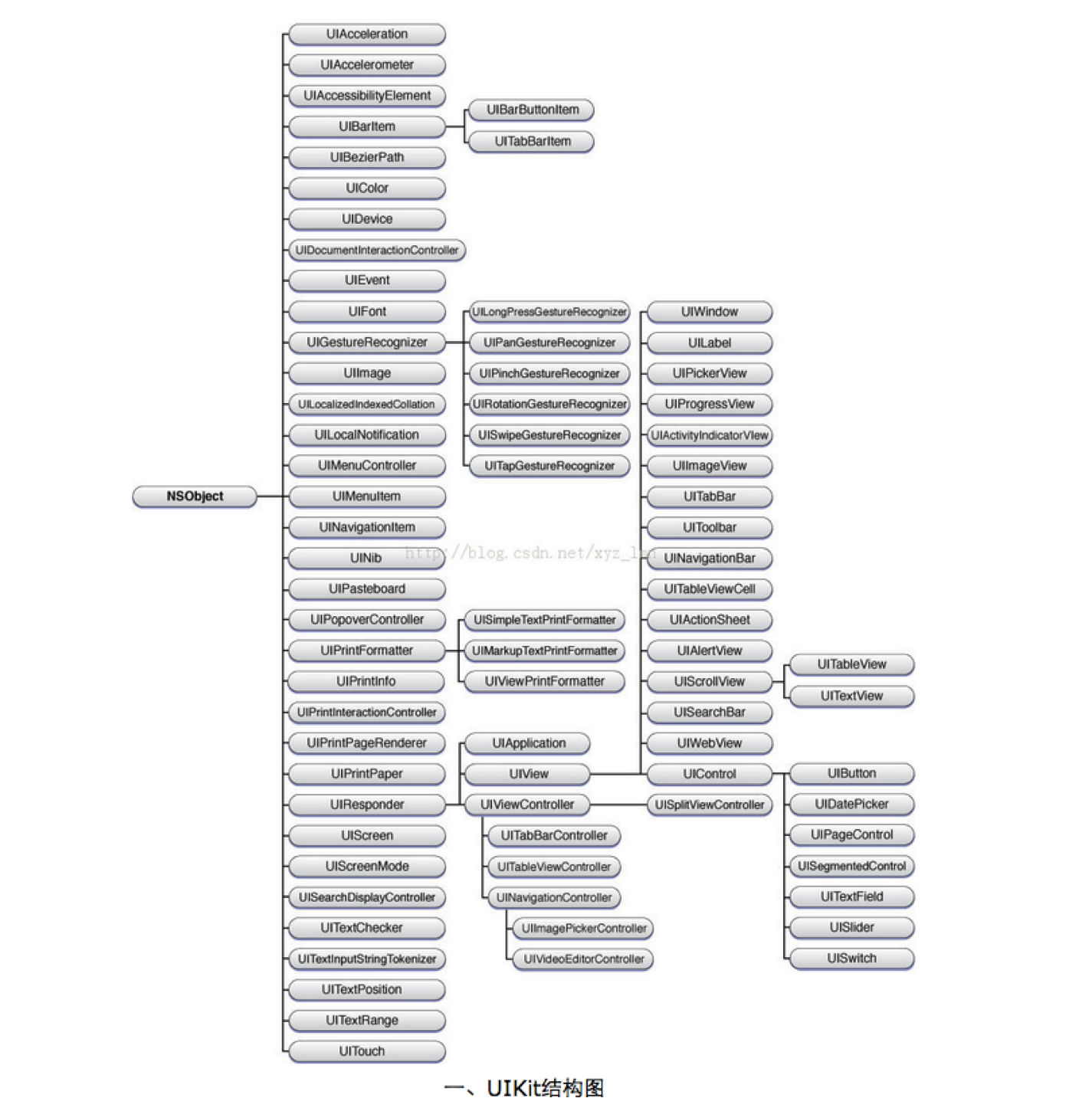
UIView常用属性与方法/UIKit继承结构
UIView常用属性与方法
@interface UIView : UIResponder<NSCoding, UIAppearance, UIAppearanceContainer, UIDynamicItem>

/**

 *  通过一个frame来初始化一个UI控件

 */

- (id)initWithFrame:(CGRect)frame;

// YES:能够跟用户进行交互

@property(nonatomic,getter=isUserInteractionEnabled) BOOL userInteractionEnabled;  // default is YES

// 控件的一个标记(父控件可以通过tag找到对应的子控件)

@property(nonatomic)                                 NSInteger tag;                // default is 0

// 图层(可以用来设置圆角效果\阴影效果)

@property(nonatomic,readonly,retain)                 CALayer  *layer;

@end

@interface UIView(UIViewGeometry)

// 位置和尺寸(以父控件的左上角为坐标原点(0, 0))

@property(nonatomic) CGRect            frame;

// 位置和尺寸(以自己的左上角为坐标原点(0, 0))

@property(nonatomic) CGRect            bounds;

// 中点(以父控件的左上角为坐标原点(0, 0))

@property(nonatomic) CGPoint           center;

// 形变属性(平移\缩放\旋转)

@property(nonatomic) CGAffineTransform transform;   // default is CGAffineTransformIdentity

// YES:支持多点触摸

@property(nonatomic,getter=isMultipleTouchEnabled) BOOL multipleTouchEnabled;   // default is NO

@end

@interface UIView(UIViewHierarchy)

// 父控件

@property(nonatomic,readonly) UIView       *superview;

// 子控件(新添加的控件默认都在subviews数组的后面, 新添加的控件默认都显示在最上面\最顶部)

@property(nonatomic,readonly,copy) NSArray *subviews;

// 获得当前控件所在的window

@property(nonatomic,readonly) UIWindow     *window;

// 从父控件中移除一个控件

- (void)removeFromSuperview;

// 添加一个子控件(可以将子控件插入到subviews数组中index这个位置)

- (void)insertSubview:(UIView *)view atIndex:(NSInteger)index;

// 交换subviews数组中所存放子控件的位置

- (void)exchangeSubviewAtIndex:(NSInteger)index1 withSubviewAtIndex:(NSInteger)index2;

// 添加一个子控件(新添加的控件默认都在subviews数组的后面, 新添加的控件默认都显示在最上面\最顶部)

- (void)addSubview:(UIView *)view;

// 添加一个子控件view(被挡在siblingSubview的下面)

- (void)insertSubview:(UIView *)view belowSubview:(UIView *)siblingSubview;

// 添加一个子控件view(盖在siblingSubview的上面)

- (void)insertSubview:(UIView *)view aboveSubview:(UIView *)siblingSubview;

// 将某个子控件拉到最上面(最顶部)来显示

- (void)bringSubviewToFront:(UIView *)view;

// 将某个子控件拉到最下面(最底部)来显示

- (void)sendSubviewToBack:(UIView *)view;

/**系统自动调用(留给子类去实现)**/

- (void)didAddSubview:(UIView *)subview;

- (void)willRemoveSubview:(UIView *)subview;

- (void)willMoveToSuperview:(UIView *)newSuperview;

- (void)didMoveToSuperview;

- (void)willMoveToWindow:(UIWindow *)newWindow;

- (void)didMoveToWindow;

/**系统自动调用**/

// 是不是view的子控件或者子控件的子控件(是否为view的后代)

- (BOOL)isDescendantOfView:(UIView *)view;  // returns YES for self.

// 通过tag获得对应的子控件(也可以或者子控件的子控件)

- (UIView *)viewWithTag:(NSInteger)tag;     // recursive search. includes self

/**系统自动调用(留给子类去实现)**/

// 控件的frame发生改变的时候就会调用,一般在这里重写布局子控件的位置和尺寸

// 重写了这个写方法后,一定调用[super layoutSubviews];

- (void)layoutSubviews;

@end

@interface UIView(UIViewRendering)

// YES : 超出控件边框范围的内容都剪掉

@property(nonatomic)                 BOOL              clipsToBounds;

// 背景色

@property(nonatomic,copy)            UIColor          *backgroundColor; // default is nil

// 透明度(0.0~1.0)

@property(nonatomic)                 CGFloat           alpha;                      // default is 1.0

// YES:不透明  NO:透明

@property(nonatomic,getter=isOpaque) BOOL              opaque;                     // default is YES

// YES : 隐藏  NO : 显示

@property(nonatomic,getter=isHidden) BOOL              hidden;

// 内容模式

@property(nonatomic)                 UIViewContentMode contentMode;                // default is UIViewContentModeScaleToFill

@end

@interface UIView(UIViewAnimationWithBlocks)

+ (void)animateWithDuration:(NSTimeInterval)duration delay:(NSTimeInterval)delay options:(UIViewAnimationOptions)options animations:(void (^)(void))animations completion:(void (^)(BOOL finished))completion;

+ (void)animateWithDuration:(NSTimeInterval)duration animations:(void (^)(void))animations completion:(void (^)(BOOL finished))completion;

+ (void)animateWithDuration:(NSTimeInterval)duration animations:(void (^)(void))animations;

+ (void)animateWithDuration:(NSTimeInterval)duration delay:(NSTimeInterval)delay usingSpringWithDamping:(CGFloat)dampingRatio initialSpringVelocity:(CGFloat)velocity options:(UIViewAnimationOptions)options animations:(void (^)(void))animations completion:(void (^)(BOOL finished))completion;

@end
UIKit继承结构
UIView常用属性与方法/UIKit继承结构的更多相关文章
- UIView的一些常用属性和方法
UIView的一些常用属性和方法 1. UIView的属性 UIView继承自UIResponder,拥有touches方法. - (instancetype)initWithFrame:(CGRec ...
- UITableView常用属性和方法 - 永不退缩的小白菜
UITableView常用属性和方法 - 永不退缩的小白菜 时间 2014-05-27 01:21:00 博客园精华区原文 http://www.cnblogs.com/zhaofucheng11 ...
- SVG DOM常用属性和方法介绍(1)
12.2 SVG DOM常用属性和方法介绍 将以Adobe SVG Viewer提供的属性和方法为准,因为不同解析器对JavaScript以及相关的属性和方法支持的程度不同,有些方法和属性是某个解析 ...
- javascript的函数、创建对象、封装、属性和方法、继承
转自原文javascript的函数.创建对象.封装.属性和方法.继承 一,function 从一开始接触到js就感觉好灵活,每个人的写法都不一样,比如一个function就有N种写法 如:functi ...
- Node.js process 模块常用属性和方法
Node.js是常用的Javascript运行环境,本文和大家发分享的主要是Node.js中process 模块的常用属性和方法,希望通过本文的分享,对大家学习Node.js http://www.m ...
- ios基础篇(四)——UILabel的常用属性及方法
UILabel的常用属性及方法:1.text //设置和读取文本内容,默认为nil label.text = @”文本信息”; //设置内容 NSLog(@”%@”, label.text); //读 ...
- 第190天:js---String常用属性和方法(最全)
String常用属性和方法 一.string对象构造函数 /*string对象构造函数*/ console.log('字符串即对象');//字符串即对象 //传统方式 - 背后会自动将其转换成对象 / ...
- JavaScript中Number常用属性和方法
title: JavaScript中Number常用属性和方法 toc: false date: 2018-10-13 12:31:42 Number.MAX_VALUE--1.79769313486 ...
- iOS UIView控件的常用属性和方法的总结
一 UIVIew 常见属性1.frame 位置和尺寸(以父控件的左上角为原点(0,0))2.center 中点 (以父控件的左上角为原点(0,0))3.bounds 位置和尺寸(以自己的左上角为原点 ...
随机推荐
- python3条件表达式和字符串
1.布尔表达式 布尔表达式的值只有两个:真和假.在python中,真值为1,假值为0 2.逻辑操作符 三种逻辑操作:and.or.not 3.条件语句 if. if...else.if...elif. ...
- linux环境变量配置文件
环境变量配置文件中主要是定义对系统操作环境生效的系统默认环境变量,如PATH等.当你登陆Linux系统启动一个bash shell时,默认情况下bash会几个文件中查找命令,bash检查的启动文件取决 ...
- Python Tornado框架(ioloop对象分析)
网上都说nginx和lighthttpd是高性能web服务器,而tornado也是著名的高抗负载应用,它们间有什么相似处呢?上节提到的ioloop对象是如何循环的呢?往下看. 首先关于TCP服务器的开 ...
- jmeter常用插件安装
转载:http://www.cnblogs.com/danqiu/p/6119156.html 下载地址:http://jmeter-plugins.org/downloads/all/ PerfMo ...
- [Cannot deserialize JSON array into type] NewtonSoft.Json解析数据出错原因
今天用NewtonSoft.JSon解析一个天气数据,数据格式如: {"status":1,"detail":"\u6570\u636e\u83b7\ ...
- 外部类与main方法笔记
外部类 1. 外部public class只能有一个 2. 外部类只能有两种访问控制级别: public 和默认 3. 一个文件中,可以有多个public class,即外部类为public,还可以有 ...
- authentication token manipulation error
用户服务器中修改密码,输入passwd命令后,报错authentication token manipulation error 发生该错误原因是: 1.分区没有空间导致. 2./etc/pass ...
- java web 实体类生成
工具下载地址:https://download.csdn.net/download/g342105676/10813246
- 指定library路径
1.执行 ?.jar文件: 1.1.“java -jar ?.jar” 1.2.如果 ?.jar里面使用了JNI调用了 ?.dll/?.so 等文件,可能会报错 找不到相关的 库文件,如果这样的话,可 ...
- ubantu中让g++支持c++11的办法
g++ main.cpp -std=c++11 -o a 其中: main.cpp是要编译的源文件 a是编译后的文件名 注意-std=c++11不要写成-std=c11