
[转]SSIS cannot convert between unicode and non-unicode string
Import Excel unicode data with SQL Server Integration Services
Problem
One task that most people are faced with at some point in time is the need to import data into SQL Server from an Excel spreadsheet. We have talked about different approaches to doing this in previous tips using OPENROWSET, OPENQUERY, Link Servers, etc... These options are great, but they may not necessarily give you as much control as you may need during the import process.
Another approach to doing this is using SQL Server Integration Services (SSIS). With SSIS you can import different types of data as well as apply other logic during the importing process. One problem though that I have faced with importing data from Excel into a SQL Server table is the issue of having to convert data types from Unicode to non-Unicode. SSIS treats data in an Excel file as Unicode, but my database tables are defined as non-Unicode, because I don't have the need to store other code sets and therefore I don't want to waste additional storage space. Is there any simple way to do this in SSIS?
Solution
If you have used SSIS to import Excel data into SQL Server you may have run into the issue of having to convert data from Unicode to non-Unicode. By default Excel data is treated as Unicode and also by default when you create new tables SQL Server will make your character type columns Unicode as well (nchar, nvarchar,etc...) If you don't have the need to store Unicode data, you probably always use non-Unicode datatypes such as char and varchar when creating your tables, so what is the easiest way to import my Excel data into non-Unicode columns?
The following shows two different examples of importing data from Excel into SQL Server. The first example uses Unicode datatypes and the second does not.
Here is what the data in Excel looks like.
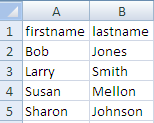
Example 1 - Unicode data types in SQL Server
Our table 'unicode" is defined as follows:
If we create a simple Data Flow Task and an Excel Source and an OLE DB Destination mapping firstname to firstname and lastname to lastname the import works great as shown below.
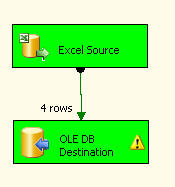
Example 2- non-Unicode data types in SQL Server
Our table 'non_unicode" is defined as follows:
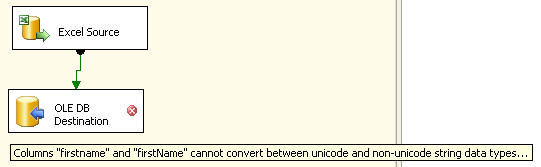
If we map the columns firstname to firstname and lastname to lastname we automatically get the following error in the OLE DB Destination.
Columns "firstname" and "firstname" cannot convert between unicode and non-unicode data types...
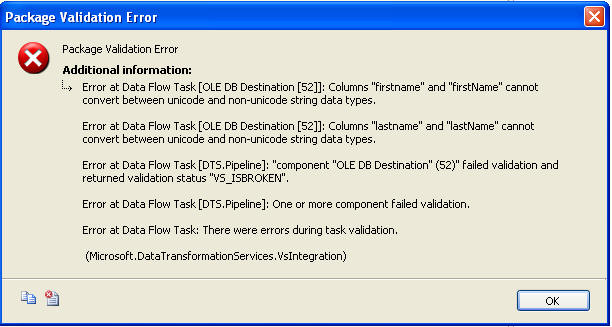
If we execute the task we get the following error dialog box which gives us additional information.
Solving the Problem
So based on the error we need to convert the data types so they are the same types.
If you right click on the OLE Destination and select "Show Advanced Editor" you have the option of changing the DataType from string [DT_STR] to Unicode string [DT_WSTR]. But once you click on OK it looks like the changed was saved, but if you open the editor again the change is gone and back to the original value. This makes sense since you can not change the data type in the actual table.
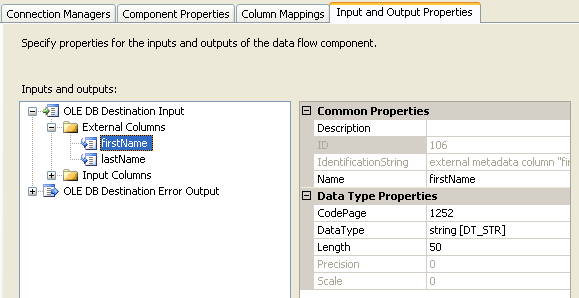
If you right click on the Excel Source and select "Show Advanced Editor" you have the option of changing the DataType from Unicode string [DT_WSTR] to string [DT_STR] and the change is saved.
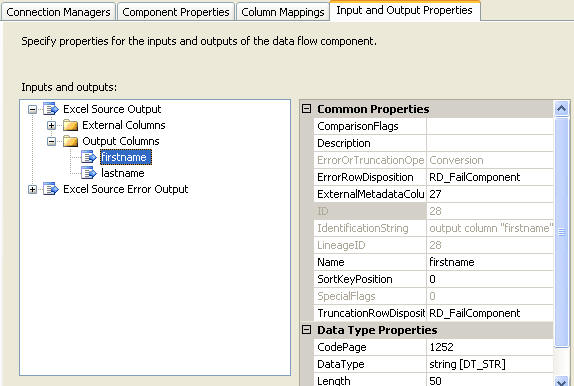
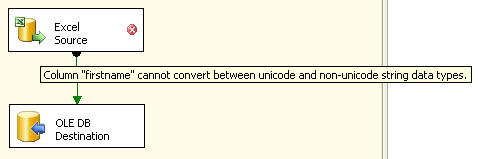
If you click OK the change is saved, but now you get the error in the Excel Source that you can not convert between unicode and non-unicode as shown below. So this did not solve the problem either.
Using the Data Conversion Task
So to get around this problem we have to also use a Data Conversion task. This will allow us to convert data types so we can get the import completed. The following picture shows the "Data Conversion" task in between the Excel Source and the OLE DB Destination.
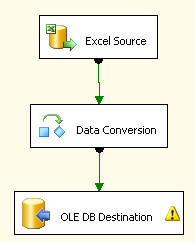
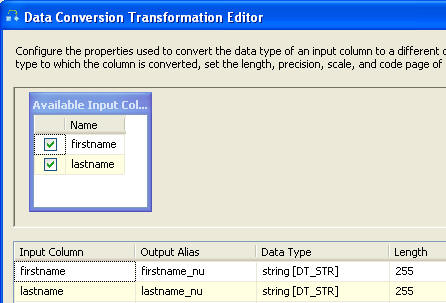
If you right click on "Data Conversion" and select properties you will get a dialog box such as the following. In here we created an Output Alias for each column.
Our firstname column becomes firstname_nu (this could be any name you want) and we are making the output be a non-unicode string. In addition we do the same thing for the lastname column.
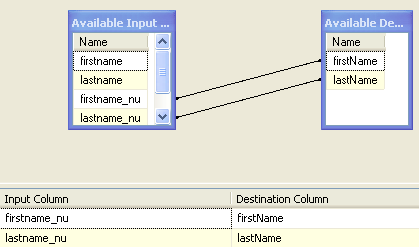
If we save this and change the mapping as shown to use our new output columns and then execute the task we can see that the import was successful.
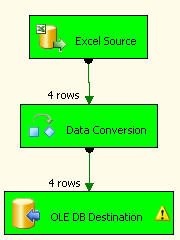
As you can see this is pretty simple to do once you know that you need to use the Data Conversion task to convert the data types.
Next Steps
- Next time you are importing data into SQL Server, don't forget about using the Data Conversion task if you are importing unicode data types into non-unicode columns
- If you encounter this error Columns "xx" and "xx" cannot convert between unicode and non-unicode data types...remember this tip
- Take a look at these other SSIS tips
Last Update: 10/22/2012
[转]SSIS cannot convert between unicode and non-unicode string的更多相关文章
- SSIS无法在unicode和非unicode 字符串数据类型之间转换
场景:SSIS从oracle抽到sqlserver,一个表对表到数据仓库ODS层的抽取,没有任何逻辑结果遇到问题: SSIS无法在unicode和非unicode 字符串数据类型之间转换 如下图2个字 ...
- SSIS 无法在 unicode 和非 unicode 字符串数据类型之间转换
最近在学SSIS,遇到一个问题,把平面文件源的数据导入到EXCEL中. 平面文件源的对象是CSV,读进来的PhoneNumber是 DT_STR 然后倒入Excel 对应列建立的是longtext 一 ...
- unicode,ansi,utf-8,unicode big endian编码的区别
知乎--http://www.zhihu.com/question/23374078 http://wenku.baidu.com/view/cb9fe505cc17552707220865.html ...
- Cannot convert value of type [java.lang.String] to required type [java.util.Date] for property 'xxx': no matching editors or conversion strategy found
今天在完成项目的时候遇到了下面的异常信息: 04-Aug-2014 15:49:27.894 SEVERE [http-apr-8080-exec-5] org.apache.catalina.cor ...
- 解决spring mvc 上传报错,Field [] isn't an enum value,Failed to convert value of type 'java.lang.String[]' to required type '
没有选择附件,但是点击上传按钮的时候会报错. 之前不选择文件,直接上传空文件是可以的,后来不知道改了什么就不行了. 错误信息: -- :: [http--] TRACE org.springframe ...
- Convert a byte[] array to readable string format. This makes the "hex" readable!
/* * Java Bittorrent API as its name indicates is a JAVA API that implements the Bittorrent Protocol ...
- Failed to convert value of type 'java.lang.String' to required type 'java.time.LocalDate';
springboot jdbc查询使用LocalDate报:Failed to convert value of type 'java.lang.String' to required type 'j ...
- Cannot convert value of type [java.lang.String] to required type [javax.sql.DataSource] for property 'dataSource': no matching editors or conversion strategy found
org.springframework.beans.factory.BeanCreationException: Error creating bean with name 'sqlSessionFa ...
- How to convert a byte to its binary string representation
How to convert a byte to its binary string representation For example, the bits in a byte B are 1000 ...
- 中文转换成Unicode编码 和 Unicode编码转换为中文
前几天,遇到一个问题,就是在浏览器地址栏传递中文时,出现乱码,考虑了一下,解决方式有很多,我还是采用了转换编码的方式,将中文转换为Unicode编码,然后再解码成中文,以下是实现的过程,非常简单! p ...
随机推荐
- Nginx事件管理机制-epoll
epoll的最大好处在于他不会随着被监控描述符的数目的增长而导致效率极致下降. select是遍历扫描来判断每个描述符是否有事件发生,当监控的描述付越多时,时间消耗就越多,并且由于系统的限制selec ...
- CCF试题:高速公路(Targin)
问题描述 某国有n个城市,为了使得城市间的交通更便利,该国国王打算在城市之间修一些高速公路,由于经费限制,国王打算第一阶段先在部分城市之间修一些单向的高速公路. 现在,大臣们帮国王拟了一个修高速公路的 ...
- 一个前端资源站 http://www.bootcss.com/
http://www.bootcss.com/ 里面有w3schools原版的镜像网站地址: https://www.quanzhanketang.com/ 这个网站正常版本被墙了,可以通过这个镜像访 ...
- 【JBPM4】任务form表单
主要是在任务节点处保存一个链接地址(表单),方便在执行到此时取值,访问. 好处是XML可随时修改,部署. JPDL <?xml version="1.0" encoding= ...
- vmware + ubuntu 64 安装 node.js v8.9.3
第一次使用虚拟机,第一次使用linux系统,第一次安装使用node.js 虚拟机安装不用多说,安装好之后下载ubuntu 64位版本文件 在vm中点击“创建新的虚拟机”,选择下载的ubuntu iso ...
- 前端读者 | 从一行代码里面学点JavaScript
本文来自 @张小俊128:链接:http://www.html-js.com/article/A-day-to-learn-from-a-line-of-code-inside-the-JavaScr ...
- Centos7使用squid实现正向代理
正向代理:代理服务器帮助客户端(浏览器)实现互联网的访问 (1)代理服务器配置 1.安装squid yum install squid -y 2.编辑squid配置文件 #vim /etc/squid ...
- RMQ入门
注:为方便描述算法 便于记忆 所以ST的代码用Pascal书写 见谅 RMQ,即Range Minimum/Maximum Query问题,给定一个区间,询问不同子区间的最值问题. 当询问次数较少时, ...
- 【UOJ #179】线性规划 单纯形模板
http://uoj.ac/problem/179 终于写出来了单纯性算法的板子,抄的网上大爷的qwq 辅助线性规划找非基变量时要加个随机化才能A,我也不知道为什么,卡精度吗? 2017-3-6UPD ...
- 【UOJ #279】【UTR #2】题目交流通道
http://uoj.ac/problem/279 先判断答案为0的情况,\(d(i,i)\neq 0\),\(d(i,j)\neq d(j,i)\),\(d(i,j)>d(i,k)+d(k,j ...