
Fixed: The Windows Process Activation Service service terminated with the following error: The system cannot find the file specified
I'm not yet clear what I did, but I'm blogging it so it can be found if someone else has this issue.
For whatever reason, last week both of my Vista 64-bit machines suddenly stopped being able to start IIS (Internet Information Server). The service just wouldn't start. I started getting this error instead "Cannot start service W3SVC on Computer '.'" which wasn't too helpful.
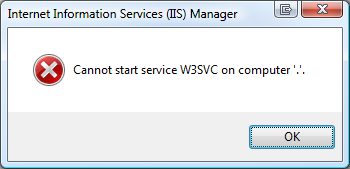
A visit to the System Event Log via the Event Viewer in Computer Management told me these four errors:
"The World Wide Web Publishing Service service depends on the Windows Process Activation Service service which failed to start because of the following error: The system cannot find the file specified."
and
"The Windows Process Activation Service service terminated with the following error:
The system cannot find the file specified."
and
"Windows Process Activation Service (WAS) is stopping because it encountered an error. The data field contains the error number."
and
"The directory specified for the temporary application pool config files is either missing or is not accessible by the Windows Process Activation Service. Please specify an existing directory and/or ensure that it has proper access flags. The data field contains the error number."
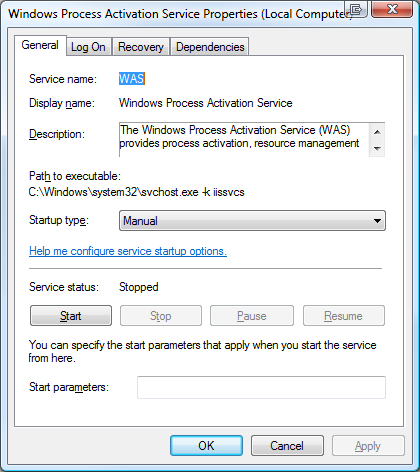 Unfortunately there's little information to go on in any of these error messages. However, it's clear (as mud) from the last error that there's a directory missing or not accessible. I'll add "anymore" to that because it worked before. That means that something changed.
If IIS won't start because Windows Process Activation Service won't start, then I need to get WAS started up first. However, I don't know what directory it doesn't have access to.
I can see from the Services application that WAS isn't its own executable, but rather lives inside of an instance of svchost.exe, where a lot of services live.
So I'll fire up Process Monitor and set the filters (filters are VERY important if you want to avoid being overwhelmed quickly in procmon) to show only svchost.exe processes.
Even still, there's a lot of svchost.exe processes out there and they will quickly fill the monitor up. I'll need to setup some strategic (read: guessed) highlighting as well.
The hotkey to stop capturing in procmon.exe is Ctrl-E. Basically I'll clear the screen, hit Ctrl-E to capture, try to start WAS (pronounced WAAZ), watch it fail, the stop capture with Ctrl-E.
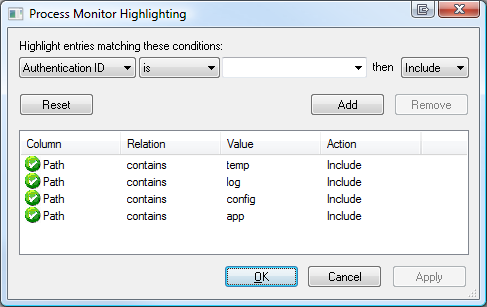
Based on the vague message about application pools temporary files and a directory I'll make a guess and configure highlighting to find paths that contain "temp," "log," "config" or "app" in Process Monitor as seen in the screenshot below.
After I run the capture, I scroll around looking for suspicious stuff. One of the nice things about Process Monitor is that you can EXCLUDE things in a given capture after that fact. For example, I saw a pile of Audio and Media related stuff that was visually confusing and cluttering the point, so I excluded it.
The result is here:
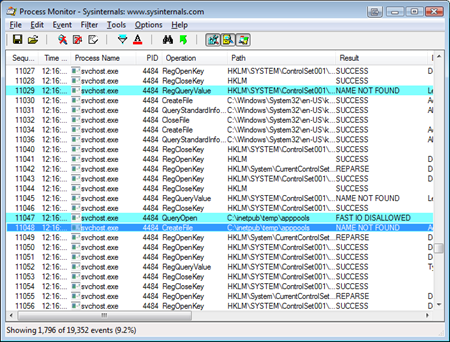
It looks like there SHOULD be a folder call c:\inetpub\temp\apppools and on my Vista 64 machines, in the last two weeks to a month, it just disappeared. No idea why. I just noticed recently when I tried to move from a local web development service to IIS itself.
I created the folder, started WAS, then IIS and I was back up and running.
I'll pass the feedback on to the WAS team about the obscure error messages, but I thought I'd share this little ten minute debugging session to point out a few things that I think are important and possibly helpful, Dear Reader:
- Know What Your Processes Are Doing (or at least, know how to find out)
- Knowing how to look INSIDE the Windows "Black Box" using tools like ProcMon makes you realize that no OS is a Black Box at all. It's very empowering to know that you CAN see inside.
- TASK: Learn Process Monitor and Process Explorer.
- Enable Your Intuition
- Debugging is 95% tools and 5% intuition. Know what tools can get you that next bit of information you need to take the next step in your analysis.
- If you feel you've hit a wall in your analysis, knock that wall down. Your process is doing IO to a file/registry/device/network/etc. Watch it. Look for failures.
Fixed: The Windows Process Activation Service service terminated with the following error: The system cannot find the file specified的更多相关文章
- IIS启动失败,启动Windows Process Activation Service时,出现错误13:数据无效 ;HTTP 错误 401.2 - Unauthorized 由于身份验证头无效,您无权查看此页
因为修改过管理员账号的密码后重启服务器导致IIS无法启动,出现已下异常 1.解决:"启动Windows Process Activation Service时,出现错误13:数据无效&quo ...
- 为应用程序池“XX”提供服务的进程在与 Windows Process Activation Service 通信时出现严重错误
场景 WCF应用程序部署在IIS7中,使用net.tcp协议对外给几百台客户端提供服务,应用程序池不断崩溃重启. 分析过程 在事件查看器中看到的错误信息类似于 为应用程序池“XX”提供服务的进程在与 ...
- [转帖]为应用程序池“XXX”提供服务的进程在与 Windows Process Activation Service 通信时出现严重错误。该进程 ID 为“XXXX”。数据字段包含错误号。
[终极解决方案]为应用程序池“XXX”提供服务的进程在与 Windows Process Activation Service 通信时出现严重错误.该进程 ID 为“XXXX”.数据字段包含错误号. ...
- IIS 为应用程序池提供服务的进程在与 Windows Process Activation Service 通信时出现严重错误的解决方法
系统环境:Windows Server 2008 R2 64位, IIS 7.0 错误信息: 为应用程序池提供服务的进程在与 Windows Process Activation Service 通信 ...
- 在启动Windows Process Activation Service时,出现错误13:数据无效
在启动Windows Process Activation Service时,出现错误13:数据无效 1.错误原因: 当Windows Process Activation Service从C:\Wi ...
- 【必杀】为应用程序池“XXX”提供服务的进程在与 Windows Process Activation Service 通信时出现严重错误。该进程 ID 为“XXXX”。数据字段包含错误号。
之前写过一篇文章,https://www.cnblogs.com/qidian10/p/6028784.html 解释如何解决此类问题,但现在回过头来想一下,之前的文章还是太过浅显,无法完全有效的彻底 ...
- 【终极解决方案】为应用程序池“XXX”提供服务的进程在与 Windows Process Activation Service 通信时出现严重错误。该进程 ID 为“XXXX”。数据字段包含错误号。
困扰我大半年的错误,今天偶然间被解决了,特此分享给被同样问题纠结的朋友们! 之前的求助帖,无人应答: http://www.cnblogs.com/freeton/archive/2012/08/28 ...
- IIS故障 应用程序池“XXX”提供服务的进程在与 Windows Process Activation Service 通信时出现严重错误。该进程 ID 为“XXXX”。数据字段包含错误号。
(尝试失败,但觉得有可行性) 参考https://www.cnblogs.com/qidian10/p/6028784.html https://yq.aliyun.com/articles/6434 ...
- 为应用程序池“XXX”提供服务的进程在与 Windows Process Activation Service 通信时出现严重错误。该进程 ID 为“XXXX”。数据字段包含错误号。 改进查找流程
原文链接:https://www.cnblogs.com/qidian10/p/6028784.html 为防止原作者删除,留作解决方法备份 ---------------------------- ...
随机推荐
- JQuery文本框验证
<" CODEPAGE="936"%><!--#include file="conncon.asp"--><!--#in ...
- 在线求助man page
一.举例——输入“man date” 图1 图2 图3 二.man之概述 用于:命令的使用说明 用法:man 命令 man page:执行“man 命令”后,出现的屏幕界面 补:man是manual( ...
- Notes of the scrum meeting(12.12)
meeting time:19:30~20:30p.m.,December 12th,2013 meeting place:3号公寓一层 attendees: 顾育豪 ...
- 20145214 《Java程序设计》第10周学习总结
20145214 <Java程序设计>第10周学习总结 学习内容总结 计算机网络概述 在计算机网络中,现在命名IP地址的规定是IPv4协议,该协议规定每个IP地址由4个0-255之间的数字 ...
- OSG数学基础:坐标系变换
三维实体对象需要经过一系列的坐标变换才能正确.真实地显示在屏幕上.在一个场景中,当读者对场景中的物体进行各种变换及相关操作时,坐标系变换是非常频繁的. 坐标系变换通常包括:世界坐标系-物体坐标系变换. ...
- Qt Creator子目录项目-类似VS解决方案
版权声明:若无来源注明,Techie亮博客文章均为原创. 转载请以链接形式标明本文标题和地址: 本文标题:Qt Creator子目录项目-类似VS解决方案 本文地址:http://techie ...
- python Django框架接入微信公众平台
1.在接入微信公众平台之前,需要在微信公众平台配置好基本信息,如下: 这个时候点击“提交”按钮,会提示“Token校验失败”,不要着急,这是必然会出现的现象,先不要退出页面,保留各项输入的数据,按第二 ...
- linux解压zip
用 unzip 的先安装 yum install -y unzip #unzip file.zip -d /root -d指解压路径 ,不写的话默认当前目录
- 关于c中的一些新函数
localtime 和 localtime_s: localtime:localtime(const time_t * _Time) time_t t;struct tm *local;time(&a ...
- udp->ip & tcp->ip 发送数据包的目的地址的源地址是什么时候确定的?
udp->ip & tcp->ip udp到ip层是:ip_send_skb tcp到ip层是: ip_queue_xmit 拿tcp为例,在使用[ip_queue_xmit, i ...