
Siki_Unity_1-8_使用Unity开发2D游戏_PongGame
Unity 1-8 使用Unity开发2D游戏 PongGame
任务1:演示
http://pan.baidu.com/s/1pKUHsev; up2i
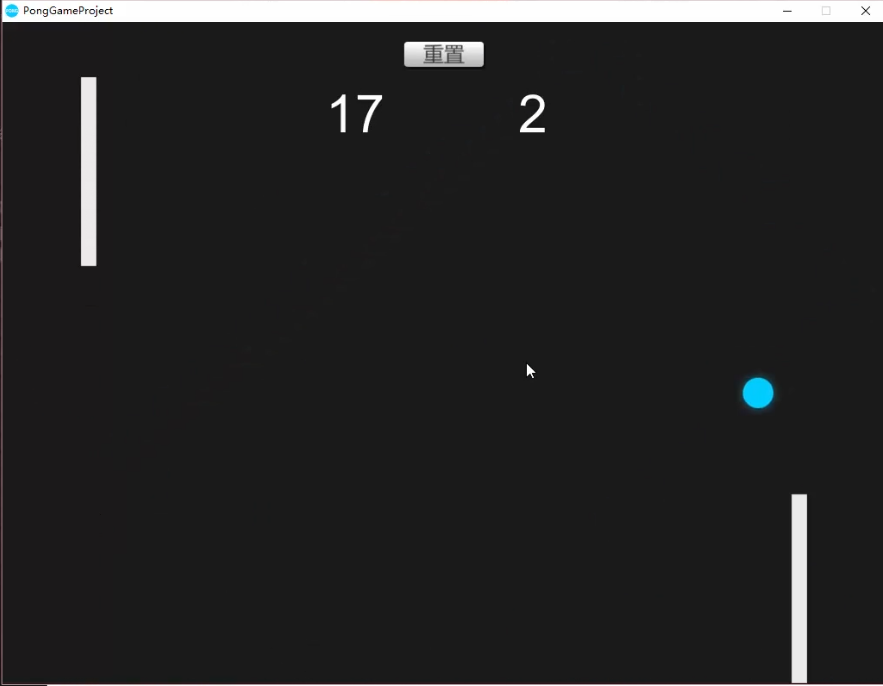
任务2:案例介绍
创建PongGame,注意勾选为2D
创建成了3D的话,在工程里面也可以修改 Edit->Project Settings->Editor->Default Behavior Mode: 2D
创建文件夹Sprites (2D图片)/ Audios/ Prefabs/ Scenes/ Scripts
任务3:添加背景
素材:Assets Pack->PONG->Individuals Sprites->Ball.png/BG.png/Player.png。将这三个文件导入Sprites
注意将Texture Type改为Sprite(2D and UI),因为工程是2D的,所以会自动改为这个属性
Pixels Per Unit:100 指的是100像素代表1米
拖入BG,需要把Camera大小保持和BG大小一致吗?-- 会出现问题,比如在不同长宽比的设备
解决方式:把Camera的size设置成5,避免极少数设备非常宽,再将背景颜色改成相似的
注:camera的高度不变,改变的只有宽度 -- 试试改变Game窗口的大小,发现Scene里的Camera高度不变
注:因为背景是很少需要修改的,而在操作的时候很容易会点到背景进行误操作,所以可以将背景锁定
将BG的Layer选择成新建Layer Background,并将这个Layer锁定
这个时候在Scene中是不能选择BG的,只有在Hierarchy中可以选择,有效地避免了许多误操作
背景在显示顺序上应该是放在最后面的
BG->Sprite Renderer->Sorting Layer->new layer Background,将Background拖放到Default之上即可
注:Order in Layer指的是同一层中的显示顺序(谁在谁上面)
任务4:设计Player预制体
拖入Player
添加Box Collider 2D,保持大小吻合 -- 碰撞检测
添加刚体Rigidbody2D,重力设置为0,锁定旋转和x轴移动 -- 控制移动
创建PlayerController.cs
因为有两个Player,所以不能对方向键的控制写死
public KeyCode upKey;
public KeyCode downKey;
public float speed = 10 ;
if(Input.GetKey(upKey)) {
rgd2d.velocity = new Vector2(0, speed); // Rigidbody2D rgd2d = GetComponent...;
}
GetKey() -- 只要在按下按键的那段时间内,都会一直触发
GetKeyDown() -- 只会在按下按钮的那一帧触发
运行,能向上移动了,但是发现松开按键后还是保持向上移动
else { rgd2d.velocity = new Vector2(0, 0);
向下移动:else if (downKey) { Vector2(0, -speed); } 即可
如果同时按下了上下键呢? -- if第一个条件满足 -- 向上移动
将Player作为Prefab
任务5&6:设置围墙
在周围添加围墙碰撞体,防止Player移动到屏幕外部
注意:围墙不能是恒定不变的,因为需要考虑到屏幕的自适应
创建空物体GameManager,创建四个子空物体Wall,在GameManager中控制Wall的位置和大小
给Wall添加Box Colllider 2D,给GameManager添加GameManager.cs
ResetWall() {
// 得到四堵墙的BoxCollider2D;
rightWall = transform.Find("RightWall").GetComponent<BoxCollider2D>();
// 控制Wall的位置
// 屏幕是以左下角为原点的,TopWall坐标 x = Screen.Width/2; y = Screen.Height
Vector3 topWallPosition = Camera.main.ScreenToWorldPoint
(new Vector2(Screen.width/2, Screen.height));
topWall.transform.position = topWallPosition;
// 控制Wall的大小
// 注意Screen和World中原点的不同
float width = Camera.main.ScreenToWorldPoint(new Vector2(Screen.width, Screen.height)).x*2;
topWall.size = new Vector2(width, 1);
// 运行发现topWall下半部分的Collider在屏幕内,因此position的y坐标+0.5f
}
void ResetWall() {
// 得到四堵墙的BoxCollider2D;
rightWall = transform.Find("RightWall").GetComponent<BoxCollider2D>();
leftWall = transform.Find("LeftWall").GetComponent<BoxCollider2D>();
topWall = transform.Find("TopWall").GetComponent<BoxCollider2D>();
bottomWall = transform.Find("BottomWall").GetComponent<BoxCollider2D>();
// 控制wall的位置
// 屏幕是以左下角为原点的,TopWall坐标 x = Screen.Width/2; y = Screen.Height/2
Vector3 rightWallPosition = Camera.main.ScreenToWorldPoint(new Vector2(Screen.width, Screen.height / )) + new Vector3(0.5f, );
Vector3 leftosition = Camera.main.ScreenToWorldPoint(new Vector2(, Screen.height / )) - new Vector3(0.5f, );
Vector3 topWallPosition = Camera.main.ScreenToWorldPoint(new Vector2(Screen.width / , Screen.height)) + new Vector3( ,0.5f);
Vector3 bottomWallPosition = Camera.main.ScreenToWorldPoint(new Vector2(Screen.width / , )) - new Vector3(, 0.5f);
rightWall.transform.position = rightWallPosition;
leftWall.transform.position = leftosition;
topWall.transform.position = topWallPosition;
bottomWall.transform.position = bottomWallPosition;
// 控制Wall的大小
// 注意Screen和World中原点的不同
float width = Camera.main.ScreenToWorldPoint(new Vector2(Screen.width, Screen.height)).x * ;
float height = Camera.main.ScreenToWorldPoint(new Vector2(Screen.width, Screen.height)).y * ;
rightWall.size = new Vector2(, height);
leftWall.size = new Vector2(, height);
topWall.size = new Vector2(width, );
bottomWall.size = new Vector2(width, );
}
简化代码:
Vector3 tempPosition = Camera.main.ScreenToWorldPoint(new Vector2(Screen.width, Screen.height));
topWal.transform.position = new Vector3(0, tempPosition.y + 0.5f, 0);
topWall.size = new Vector2(tempPosition.x *2, 1);
Vector3 tempPosition = Camera.main.ScreenToWorldPoint(new Vector2(Screen.width, Screen.height));

rightWall.transform.position = new Vector3(-tempPosition.x - 0.5f, , );

leftWall.transform.position = new Vector3(tempPosition.x + 0.5f, , );

topWall.transform.position = new Vector3(, tempPosition.y + 0.5f, );

bottomWall.transform.position = new Vector3(, -tempPosition.y - 0.5f, );

rightWall.size = new Vector2(, tempPosition.y * );

leftWall.size = new Vector2(, tempPosition.y * );

topWall.size = new Vector2(tempPosition.x * , );

bottomWall.size = new Vector2(tempPosition.x * , );
任务7:控制Player的位置生成
相似的,Player的位置用代码来确定 -- 屏幕自适应
GameManager.cs
public Transform player1/ player2;
player1.position = Camera.main.ScreenToWorldPoint(new Vector2(100, Screen.height / 2));
运行,但是players不见了!
最后发现,是因为Players的z坐标变成了-10,因为Camera的z坐标为-10
--> 教程中方法
Vector3 player1Position = Camera.main.ScreenToWorldPoint(...);
player1Position.z = 0;
player1.position = player1Position;
--> 我的方法
player1.position = Camera.main.ScreenToWorldPoint(...);
player1.position = player1.position - new Vector3(0, 0, Camera.main.transform.position.z);
private void ResetPlayer() {

    player1.position = Camera.main.ScreenToWorldPoint(new Vector2(, Screen.height / ));

    player1.position = player1.position - new Vector3(, , Camera.main.transform.position.z);

    player2.position = Camera.main.ScreenToWorldPoint(new Vector2(Screen.width - , Screen.height / ));

    player2.position = player2.position - new Vector3(, , Camera.main.transform.position.z);

}
任务8&9:添加小球 & 小球方向的控制
拖入Ball,添加Circle Collider 2D,添加Rigidbody2D
创建Physical2D Material -- BallBounce: Friction摩擦力=0;Bounciness弹力=1;
Rigidbody2D中Mass设置小一点0.2增加弹力,Angular drag为0,可能影响弹跳
并将该Material赋值给Collider/Rigidbody
Ball.cs // 施加一个初始力,控制小球开始运动
// number = 0/ 1;
int number = Random.range(0, 2);
number = 0时rgd2d.AddForce(new Vector2(100, 0));
number=1时rgd2d.AddForce(new Vector2(-100, 0));
运行,此时不能通过Player来控制小球的方向,只能进行左右弹跳
个人想法:增大Physical2D Material的Friction,使其拥有摩擦力
运行时发现当小球与四周的Wall碰撞时也会进行摩擦从而改变运动轨迹 -- 不可行
siki思路:
当小球和Player发生碰撞的时候将Player的y轴速度附加给小球即可
if(collision.collider.tag == "Player") {
Vector2 velocity = rgd2d.velocity;
velocity.y += collision.rigidbody.velocity.y;
rgd2d.velocity = velocity;
}
速度的叠加会出现无限增大的情况;而如果给予了小球y速度,而之后Player不再有y速度,小球的y速度也不会发生变化,可玩性不是很高
-- 将Player的y轴速度的一半附加给小球(变化不要太快);并且每次将小球的y速度减半(如果Player的y速度为零,则小球y速度会慢慢趋近于0)
private void OnCollisionEnter2D(Collision2D collision) {

    if (collision.collider.tag == "Player") {

        Vector2 velocity = rgd2d.velocity;

        velocity.y = velocity.y /  + collision.rigidbody.velocity.y / ;

        rgd2d.velocity = velocity;

    }

}
任务10:移动小球的移动
Bug:某些特殊情况/碰撞会导致x轴速度特别低
得到小球x轴速度
Debug.Log(rigidbody2D.velocity);
输出的为10
Update()检测如果速度过低,则增大
if(velocity.x =<9 && velocity.x > -9 && velocity.x != 0) { // 游戏初始值velocity为0
if(velocity.x > 0) velocity = 10;
if(velocity.x < 0) velocity = -10;
void Update() {

    Vector2 velocity = rgd2d.velocity;

    if (velocity.x <  & velocity.x > ) {

        // x的初始值(游戏开始)为0,在这里把0排除

        // x方向为正

        velocity.x = ;

        rgd2d.velocity = velocity;

    } else if (velocity.x > - & velocity.x < ) {

        // x方向为负

        velocity.x = -;

        rgd2d.velocity = velocity;

    }

}
任务11:计分效果
UI->Text 上方居中
设置Anchor Presets 为Top Center -- 不论屏幕的变化,会以屏幕的Top Center点保持相对位置
在BallController.cs中检测小球和墙的碰撞
collision.gameObject.name == "RightWall"/"LeftWall"
// 当碰撞的时候调用GameManager.cs中的ChangeScore(wallName);
GameManager.Instance.ChangeScore(collision.gameObject.name);
在GameManager.cs中实现分数的控制
private static GameManager _instance;
public static GameManager Instance {
get {
return _instance;
}
}
// 在外部访问的时候只能访问到get方法,不能设置_instance
void Awake() { // _instance在这里设置
_instance = this;
}
public void ChangeScore(string wallName) {
if (wallName == "RightWall") {
score1++;
}
...
}
public class GameManager : MonoBehaviour {

    private int scoreLeft = ;

    private int scoreRight = ;

    public Text scoreLeftText;

    public Text scoreRightText;

    private static GameManager _instance;

    public static GameManager Instance {

        get {

            return _instance;

        }

    }

    private void Awake() {

        _instance = this;

    }

    public void ChangeScore(string wallName) {

        if(wallName == "RightWall") {

            scoreLeft++;

            scoreLeftText.text = scoreLeft.ToString();

        } else if (wallName == "LeftWall") {

            scoreRight++;

            scoreRightText.text = scoreRight.ToString();

        }

    }

}
private void OnCollisionEnter2D(Collision2D collision) {

    if (collision.collider.tag == "Player") ...

    // score change

    if (collision.gameObject.name == "RightWall" || collision.gameObject.name == "LeftWall") {

        GameManager.Instance.ChangeScore(collision.gameObject.name);

    }

}
任务12:添加音效
Assets Pack->Audio->ChilMusic.mp3背景音乐/ Click.wav小球碰撞Player/ Hit.wav得分
siki方法:将click放在Ball中控制,将hit放在left/rightWall中控制
小球碰撞Player时音效:
Ball-> Audio Source组件用于播放声音
Click.wav拖入AudioClip
Spatial Blend 控制音效的2d/3d
PlayerController.cs中
private AudioSource audio;
audio = GetComponent<AudioSource>();
audio.Play();
为了增加游戏性,每次声音速度可以稍微改变
audio.pitch = Random.Range(0.8f, 1); // 默认等于1
小球碰撞墙时音效:(volumn改为0.75)
Wall.cs中:
OnCollisionEnter2D() {
audio.play();
}
我的方法:都放在BallController.cs中控制
private void AudioInit() {

    AudioSource[] audios = GetComponents<AudioSource>();

    foreach(AudioSource audio in audios) {

        if(audio.clip.name == "Click") {

            clickAudio = audio;

        } else if (audio.clip.name == "Hit") {

            hitAudio = audio;

        }

    }

}

private void OnCollisionEnter2D(Collision2D collision) {

    if (collision.collider.tag == "Player") {

        clickAudio.pitch = Random.Range(0.8f, ); // Randomize audio play speed

        clickAudio.Play();

        ...

    }

    // score change

    if (collision.gameObject.name == "RightWall" || collision.gameObject.name == "LeftWall") {

        hitAudio.pitch = Random.Range(0.8f, );

        hitAudio.Play();

        ...

    }

}
背景音乐:
GameManager->AudioSource->ChilMusic->PlayOnAwake & Loop
任务13:游戏的Reset按钮
Reset:分数归零、Ball位置初始化
UI->Button
放在计分板之间(按住alt可以对称修改大小)
拖入Assets Pack->Button->ButtonHover/ButtonNormal/ButtonPressed.png
在Button对象中的Transition中选择Sprite Swap,对应各种按钮状态的赋值
1. Reset计分板 -- GameManager.cs中
Reset() {
score = 0;
scoreText.text = score.ToString();
}
在ResetButton上的Button(Script)中On Click()中添加GameManager物体的Reset()
2. Reset Ball -- BallController.cs
Reset() {
transform.position = Vector3.zero;
// 将Start()中的初始速度代码做成一个method
BallVelocityInit();
}
在GameManager.cs的Reset()最后加上
GameObject.Find("Ball").SendMessage("Reset");
// 调用BallController.cs中的Reset();
或是在Button中的OnClick()中添加Ball物体的Reset()
Bug -- Reset的时候只是给小球AddForce(),因此是在之前的velocity基础上加的外力
在之前加上 rgd2d.velocity = Vector2.zero; 即可
任务14:游戏发布
Build Settings -> 拖入Scene
Default Icon: Assets Pack->PONG->Icon.png
Default Is Full Screen:uncheck
Splash Image:游戏开始时的界面(Logo)--默认为Unity
Show Unity Splash Screen:uncheck
Display Resolution Dialog:disabled -- 使用默认分辨率,不用打开选择窗口
Siki_Unity_1-8_使用Unity开发2D游戏_PongGame的更多相关文章
- Unity3D系列教程--使用免费工具在Unity3D中开发2D游戏 第一节
声明: 本博客文章翻译类别的均为个人翻译,版权全部.出处: http://blog.csdn.net/ml3947,个人博客:http://www.wjfxgame.com. 译者说明:这是一个系 ...
- Atitit 开发2d游戏的技术选型attilax总结
Atitit 开发2d游戏的技术选型attilax总结 1.1. 跨平台跨平台:一定要使用跨平台的gui技术,目前最好的就是h5(canvas,webgl,dom) +js了..1 1.2. 游戏前后 ...
- unity开发android游戏
环境搭建: Unity+JDK+Android Studio+Android SDK(+NDK) 教程:unity开发android游戏(一)搭建Unity安卓开发环境 注意“Build System ...
- unity开发android游戏(一)搭建Unity安卓开发环境
unity开发android游戏(一)搭建Unity安卓开发环境 分类: Unity2014-03-23 16:14 5626人阅读 评论(2) 收藏 举报 unity开发androidunity安卓 ...
- UWP简单示例(三):快速开发2D游戏引擎
准备 IDE:VisualStudio 2015 Language:VB.NET/C# 图形API:Win2D MSDN教程:UWP游戏开发 游戏开发涉及哪些技术? 游戏开发是一门复杂的艺术,编码方面 ...
- unity 之2D游戏简单操作
unity 做2D项目也很方便. 首先要调整camera的模式,camera 的检视面板参数如下: perspective 模式就是平时用的 模式.摄像机到游戏物体是有角度的张开, 而 orthog ...
- UWP简单示例(三):快速开发2D游戏引擎
准备 IDE:Visual Studio 图形 API:Win2D MSDN 教程:UWP游戏开发 游戏开发涉及哪些技术? 游戏开发是一门复杂的艺术,编码方面你需要考虑图形.输入和网络 以及相对独立的 ...
- Unity开发MMOARPG游戏解决方案
http://www.csdn.net/article/2015-05-07/2824634 天神互动是一家已经上市的以研发MMOARPG游戏为主的技术公司,<苍穹变>是天神互动研发的第一 ...
- 【转】unity开发android游戏(一)搭建Unity安卓开发环境
http://blog.csdn.net/chenggong2dm/article/details/20654075 1,下载安装Java的JDK: http://www.oracle.com/tec ...
随机推荐
- python 在线生成文字云
在线生成文字云 在线生成文字云地址 http://a.leechg.com:8080/wordcloud 效果图 大体步骤 1 接收请求中的文本,通过结巴分词处理文本. seg_generator ...
- 协议类接口 - SPI
一.SPI概述 SPI(Serial Peripheral Interface,串行外设接口)总线系统是一种同步串行外设接口,它可以使CPU与各种外围设备以串行方式进行通信以交换信息.一般主控SoC ...
- Python 多客户端
服务端代码 #引入socketserver模块 import socketserver #定义处理类必须继承BaseRequestHandler类 class my_server(socketserv ...
- python3 基于tcp 简单client和server
客户端代码 from socket import * #客户端 client=socket(AF_INET,SOCK_STREAM) #通讯地址 client.connect(('172.18.100 ...
- python3带tkinter窗口的ftp服务器,并使用pyinstaller打包成exe
python带tkinter窗口的ftp服务器,使用python3编写,打包使用pyinstaller,命令 pyinstaller -F .\ftpserver.py 代码也可在我的github上下 ...
- 02 看懂Oracle执行计划
看懂Oracle执行计划 最近一直在跟Oracle打交道,从最初的一脸懵逼到现在的略有所知,也来总结一下自己最近所学,不定时更新ing… 一:什么是Oracle执行计划? 执行计划是一条查询语句在 ...
- Cornerstone|SVN
SQLite-database disk image is malformed missing from working copy mac下CornerstoneSVN出错 Description _ ...
- 1.Redis介绍以及安装
Redis介绍 Redis是一个开源的(BSD开源协议),内存数据结构存储,被用于作为数据库,缓存和消息代理. Redis支持如下数据结构: string(字符串) hashes(哈希) lists ...
- 【若泽大数据实战第二天】Linux命令基础
Linux基本命令: 查看IP: ifconfig 或者 hostname -i(需要配置文件之后才可以使用) ipconfig(Windows) 关闭防火墙: Service iptables st ...
- Vue——关于css过渡和动画那些事
1. 单元素/组件的过渡transition Vue 提供了 transition 的封装组件,在下列情形中,可以给任何元素和组件添加进入/离开过渡 条件渲染 (使用 v-if) 条件展示 (使用 v ...