
科学计算 NumPy 与C语言对比 N-dimensional array ndarray 元素元素操作 计算正太分布分位数
http://www.numpy.org/
NumPy is the fundamental package for scientific computing with Python. It contains among other things:
- a powerful N-dimensional array object
- sophisticated (broadcasting) functions
- tools for integrating C/C++ and Fortran code
- useful linear algebra, Fourier transform, and random number capabilities
https://scipy.org/
https://www.oschina.net/p/paradox?fromerr=SpBZmWnx

Numpy and Scipy Documentation — Numpy and Scipy documentation https://docs.scipy.org/doc/
NumPy User Guide https://docs.scipy.org/doc/numpy-1.14.2/numpy-user-1.14.2.pdf

c = []
for i in range(len(a)):
    c.append(a[i]*b[i])

This produces the correct answer, but if a and b each contain millions of numbers, we will pay the price for the
inefficiencies of looping in Python. We could accomplish the same task much more quickly in C by writing (for clarity
we neglect variable declarations and initializations, memory allocation, etc.)

for (i = 0; i < rows; i++): {
    c[i] = a[i]*b[i];
}

This saves all the overhead involved in interpreting the Python code and manipulating Python objects, but at the
expense of the benefits gained from coding in Python. Furthermore, the coding work required increases with the
dimensionality of our data. In the case of a 2-D array, for example, the C code (abridged as before) expands to

for (i = 0; i < rows; i++): {
    for (j = 0; j < columns; j++): {
        c[i][j] = a[i][j]*b[i][j];
    }
}

NumPy gives us the best of both worlds: element-by-element operations are the “default mode” when an ndarray is
involved, but the element-by-element operation is speedily executed by pre-compiled C code. In NumPy
c = a * b
does what the earlier examples do, at near-C speeds, but with the code simplicity we expect from something based on
Python. Indeed, the NumPy idiom is even simpler! This last example illustrates two of NumPy’s features which are
the basis of much of its power: vectorization and broadcasting.

Broadcasting is the term used to describe the implicit element-by-element behavior of operations; generally speaking,
in NumPy all operations, not just arithmetic operations, but logical, bit-wise, functional, etc., behave in this implicit
element-by-element fashion, i.e., they broadcast. Moreover, in the example above, a and b could be multidimensional
arrays of the same shape, or a scalar and an array, or even two arrays of with different shapes, provided that the smaller
array is “expandable” to the shape of the larger in such a way that the resulting broadcast is unambiguous. For detailed
“rules” of broadcasting see numpy.doc.broadcasting.

NumPy fully supports an object-oriented approach, starting, once again, with ndarray. For example, ndarray is a
class, possessing numerous methods and attributes. Many of its methods mirror functions in the outer-most NumPy
namespace, giving the programmer complete freedom to code in whichever paradigm she prefers and/or which seems
most appropriate to the task at hand.

NumPy’s main object is the homogeneous multidimensional array.

NumPy provides an N-dimensional array type, the ndarray, which describes a collection of “items” of the same type. The items can be indexed using for example N integers.

主对象 同构多维数组

字节计算
ndarray.ndim the number of axes (dimensions) of the array.

ndarray.shape the dimensions of the array. This is a tuple of integers indicating the size of the array in each dimension.

For a matrix with n rows and m columns, shape will be (n,m). The length of the shape tuple is

therefore the number of axes, ndim.

ndarray.size the total number of elements of the array. This is equal to the product of the elements of shape.

ndarray.dtype an object describing the type of the elements in the array. One can create or specify dtype’s using

standard Python types. Additionally NumPy provides types of its own. numpy.int32, numpy.int16, and

numpy.float64 are some examples.

ndarray.itemsize the size in bytes of each element of the array. For example, an array of elements of type float64

has itemsize 8 (=64/8), while one of type complex32 has itemsize 4 (=32/8). It is equivalent to

ndarray.dtype.itemsize.

ndarray.data the buffer containing the actual elements of the array. Normally, we won’t need to use this attribute

because we will access the elements in an array using indexing facilities.
>>> import numpy as np

>>> a = np.arange(15).reshape(3, 5)

>>> a

array([[ 0, 1, 2, 3, 4],

[ 5, 6, 7, 8, 9],

[10, 11, 12, 13, 14]])

>>> a.shape

(3, 5)

>>> a.ndim

2

>>> a.dtype.name

'int64'

>>> a.itemsize

8

>>> a.size

15
Array Creation
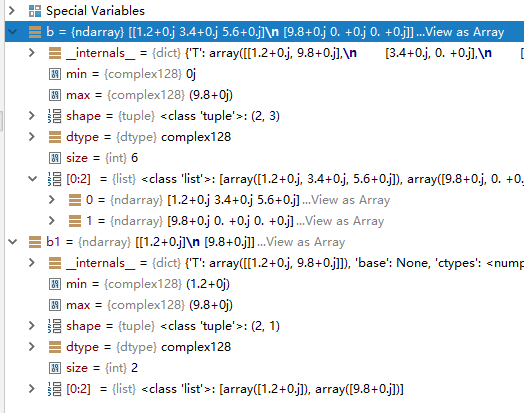
创建元素为复数的多维数组
import numpy as np

#b = np.array([[1.2, 3.4, 5.6],[9.8]],dtype=complex) #WRONG

b = np.array([[1.2, 3.4, 5.6],[9.8,0,0]],dtype=complex)

b1 = np.array([[1.2],[9.8]],dtype=complex)
To create sequences of numbers, NumPy provides a function analogous to range that returns arrays instead of lists.
When arange is used with floating point arguments, it is generally not possible to predict the number of elements obtained, due to the finite floating point precision. For this reason, it is usually better to use the function linspace that receives as an argument the number of elements that we want, instead of the step.
创建数字序列
>>> a=np.arange(4)

>>> a

array([0, 1, 2, 3])

>>> np.sin(a)

array([0.        , 0.84147098, 0.90929743, 0.14112001])

>>> a<1.1

array([ True,  True, False, False])

>>>
浮点序列的去步长创建
Python 3.6.4 (v3.6.4:d48eceb, Dec 19 2017, 06:54:40) [MSC v.1900 64 bit (AMD64)] on win32

Type "help", "copyright", "credits" or "license" for more information.

>>> np.zeros((3,4))

Traceback (most recent call last):

  File "<stdin>", line 1, in <module>

NameError: name 'np' is not defined

>>> import numpy as np

>>> np.zeros((3,4))

array([[0., 0., 0., 0.],

       [0., 0., 0., 0.],

       [0., 0., 0., 0.]])

>>> np.ones((2,3,4),dtype=np.int16)

array([[[1, 1, 1, 1],

        [1, 1, 1, 1],

        [1, 1, 1, 1]],

       [[1, 1, 1, 1],

        [1, 1, 1, 1],

        [1, 1, 1, 1]]], dtype=int16)

>>> np.empty((2,3))

array([[1.35617218e+248, 9.77817447e+199, 6.01334515e-154],

       [4.71049380e-309, 4.17201348e-309, 2.64227521e-308]])

>>> np.arange(0,2,0.3)

array([0. , 0.3, 0.6, 0.9, 1.2, 1.5, 1.8])

>>> from numpy import pi

>>> np.linspace(

... 0,2,9)

array([0.  , 0.25, 0.5 , 0.75, 1.  , 1.25, 1.5 , 1.75, 2.  ])

>>> x=np.linspace(0,2*pi,100)

>>> x

array([0.        , 0.06346652, 0.12693304, 0.19039955, 0.25386607,

       0.31733259, 0.38079911, 0.44426563, 0.50773215, 0.57119866,

       0.63466518, 0.6981317 , 0.76159822, 0.82506474, 0.88853126,

       0.95199777, 1.01546429, 1.07893081, 1.14239733, 1.20586385,

       1.26933037, 1.33279688, 1.3962634 , 1.45972992, 1.52319644,

       1.58666296, 1.65012947, 1.71359599, 1.77706251, 1.84052903,

       1.90399555, 1.96746207, 2.03092858, 2.0943951 , 2.15786162,

       2.22132814, 2.28479466, 2.34826118, 2.41172769, 2.47519421,

       2.53866073, 2.60212725, 2.66559377, 2.72906028, 2.7925268 ,

       2.85599332, 2.91945984, 2.98292636, 3.04639288, 3.10985939,

       3.17332591, 3.23679243, 3.30025895, 3.36372547, 3.42719199,

       3.4906585 , 3.55412502, 3.61759154, 3.68105806, 3.74452458,

       3.8079911 , 3.87145761, 3.93492413, 3.99839065, 4.06185717,

       4.12532369, 4.1887902 , 4.25225672, 4.31572324, 4.37918976,

       4.44265628, 4.5061228 , 4.56958931, 4.63305583, 4.69652235,

       4.75998887, 4.82345539, 4.88692191, 4.95038842, 5.01385494,

       5.07732146, 5.14078798, 5.2042545 , 5.26772102, 5.33118753,

       5.39465405, 5.45812057, 5.52158709, 5.58505361, 5.64852012,

       5.71198664, 5.77545316, 5.83891968, 5.9023862 , 5.96585272,

       6.02931923, 6.09278575, 6.15625227, 6.21971879, 6.28318531])

>>> f=np.sin(x)

>>> f

array([ 0.00000000e+00,  6.34239197e-02,  1.26592454e-01,  1.89251244e-01,

        2.51147987e-01,  3.12033446e-01,  3.71662456e-01,  4.29794912e-01,

        4.86196736e-01,  5.40640817e-01,  5.92907929e-01,  6.42787610e-01,

        6.90079011e-01,  7.34591709e-01,  7.76146464e-01,  8.14575952e-01,

        8.49725430e-01,  8.81453363e-01,  9.09631995e-01,  9.34147860e-01,

        9.54902241e-01,  9.71811568e-01,  9.84807753e-01,  9.93838464e-01,

        9.98867339e-01,  9.99874128e-01,  9.96854776e-01,  9.89821442e-01,

        9.78802446e-01,  9.63842159e-01,  9.45000819e-01,  9.22354294e-01,

        8.95993774e-01,  8.66025404e-01,  8.32569855e-01,  7.95761841e-01,

        7.55749574e-01,  7.12694171e-01,  6.66769001e-01,  6.18158986e-01,

        5.67059864e-01,  5.13677392e-01,  4.58226522e-01,  4.00930535e-01,

        3.42020143e-01,  2.81732557e-01,  2.20310533e-01,  1.58001396e-01,

        9.50560433e-02,  3.17279335e-02, -3.17279335e-02, -9.50560433e-02,

       -1.58001396e-01, -2.20310533e-01, -2.81732557e-01, -3.42020143e-01,

       -4.00930535e-01, -4.58226522e-01, -5.13677392e-01, -5.67059864e-01,

       -6.18158986e-01, -6.66769001e-01, -7.12694171e-01, -7.55749574e-01,

       -7.95761841e-01, -8.32569855e-01, -8.66025404e-01, -8.95993774e-01,

       -9.22354294e-01, -9.45000819e-01, -9.63842159e-01, -9.78802446e-01,

       -9.89821442e-01, -9.96854776e-01, -9.99874128e-01, -9.98867339e-01,

       -9.93838464e-01, -9.84807753e-01, -9.71811568e-01, -9.54902241e-01,

       -9.34147860e-01, -9.09631995e-01, -8.81453363e-01, -8.49725430e-01,

       -8.14575952e-01, -7.76146464e-01, -7.34591709e-01, -6.90079011e-01,

       -6.42787610e-01, -5.92907929e-01, -5.40640817e-01, -4.86196736e-01,

       -4.29794912e-01, -3.71662456e-01, -3.12033446e-01, -2.51147987e-01,

       -1.89251244e-01, -1.26592454e-01, -6.34239197e-02, -2.44929360e-16])

>>>
>>> np.arange(20)

array([ 0,  1,  2,  3,  4,  5,  6,  7,  8,  9, 10, 11, 12, 13, 14, 15, 16,

       17, 18, 19])

>>> np.arange(20).reshape(3,3)

Traceback (most recent call last):

  File "<stdin>", line 1, in <module>

ValueError: cannot reshape array of size 20 into shape (3,3)

>>> np.arange(20).reshape(4,5)

array([[ 0,  1,  2,  3,  4],

       [ 5,  6,  7,  8,  9],

       [10, 11, 12, 13, 14],

       [15, 16, 17, 18, 19]])

>>> np.arange(20,dtype=complex).reshape(4,5)

array([[ 0.+0.j,  1.+0.j,  2.+0.j,  3.+0.j,  4.+0.j],

       [ 5.+0.j,  6.+0.j,  7.+0.j,  8.+0.j,  9.+0.j],

       [10.+0.j, 11.+0.j, 12.+0.j, 13.+0.j, 14.+0.j],

       [15.+0.j, 16.+0.j, 17.+0.j, 18.+0.j, 19.+0.j]])
随机数
多维数组
最值
>>> a=np.random.random((2,3,2))

>>> a

array([[[0.4952443 , 0.03868411],

        [0.23719136, 0.47319592],

        [0.13173682, 0.56206977]],

       [[0.30565678, 0.71079902],

        [0.55682919, 0.94712502],

        [0.39514817, 0.70681757]]])

>>> a=np.random.random((2,3,2,4))

>>> a

array([[[[9.65760057e-01, 6.57195611e-01, 2.67917815e-01,

          9.71095886e-01],

         [7.79415790e-01, 6.29213181e-01, 4.37307657e-01,

          6.91690106e-01]],

        [[5.63586996e-01, 3.13093487e-01, 8.82884883e-01,

          3.79185783e-01],

         [3.60795040e-01, 4.72685920e-01, 3.52133701e-01,

          5.89396362e-01]],

        [[4.59782565e-03, 1.43327245e-01, 1.52963034e-01,

          5.39158898e-01],

         [1.37943834e-01, 1.35882241e-01, 8.21947135e-01,

          9.28854722e-01]]],

       [[[7.99463114e-01, 6.52470536e-01, 9.35675572e-01,

          1.15901164e-01],

         [1.60236343e-01, 9.36706450e-01, 8.12445485e-02,

          3.36562337e-02]],

        [[4.74037185e-01, 2.09687455e-01, 2.08130342e-01,

          4.21247051e-01],

         [8.04334117e-01, 7.45109842e-01, 4.16685162e-01,

          4.82011324e-04]],

        [[6.39621130e-01, 2.65933295e-01, 8.07562070e-01,

          3.19143971e-01],

         [2.32588557e-01, 2.17901015e-01, 2.19143862e-02,

          4.70376144e-01]]]])

>>> a.min()

0.0004820113235320944

>>> a.max()

0.9710958860211073

>>>
有序二元组
(行,列)
(行,(行,列))
(行,(行,(行,列)))
Glossary — NumPy v1.13 Manual https://docs.scipy.org/doc/numpy-1.13.0/glossary.html
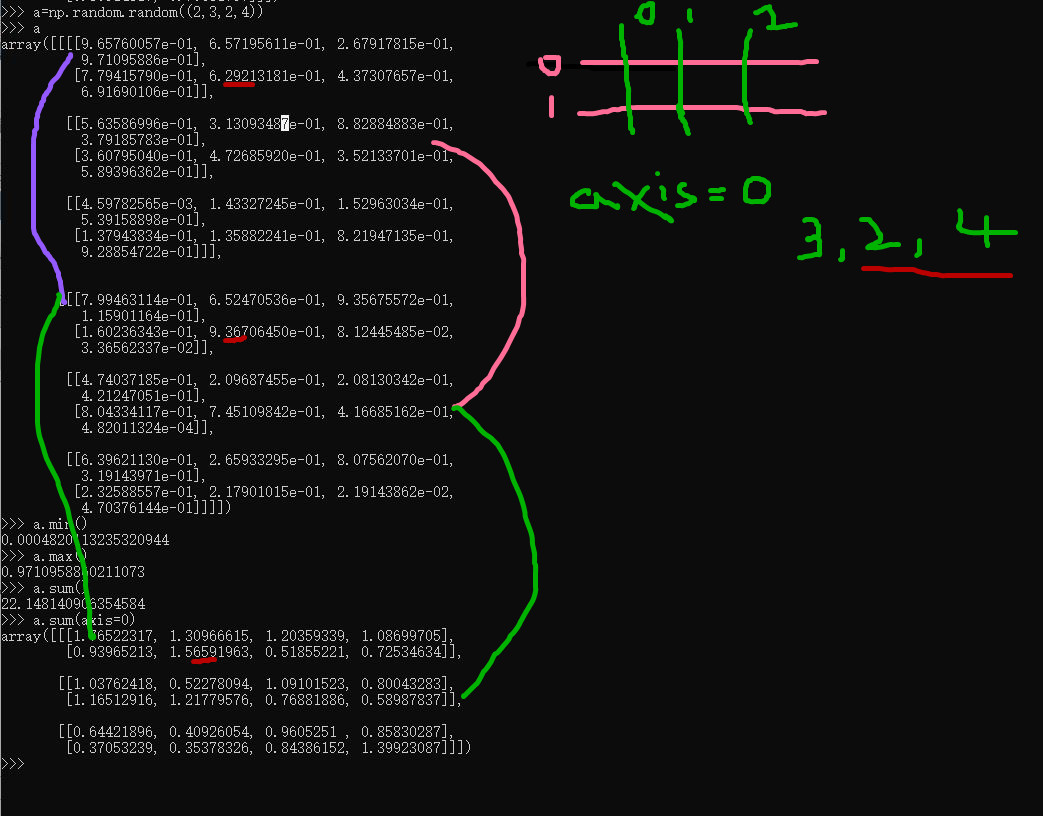
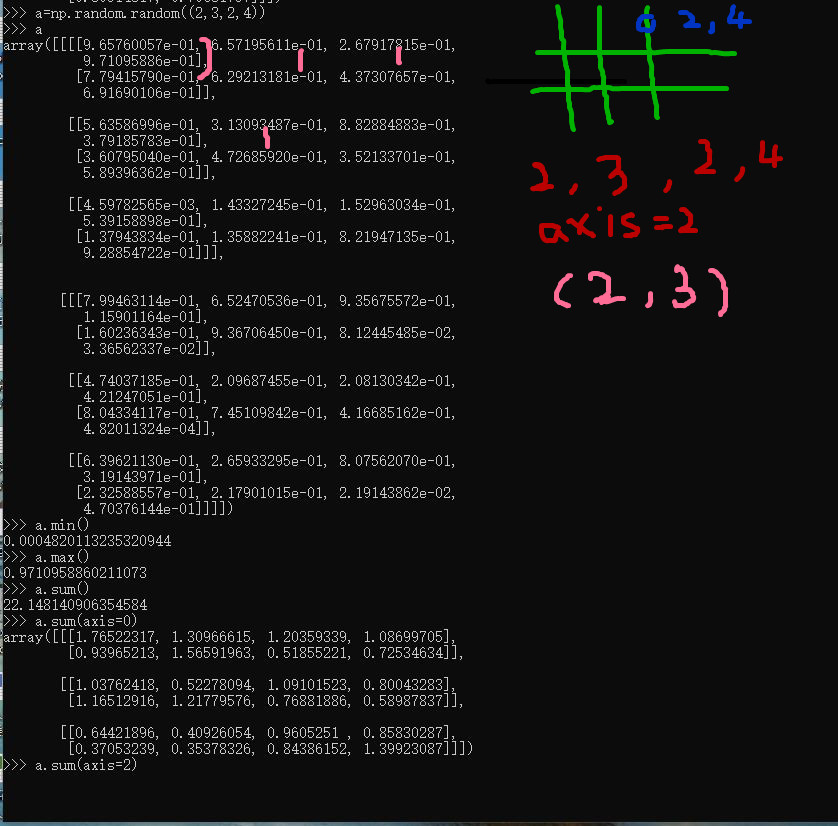
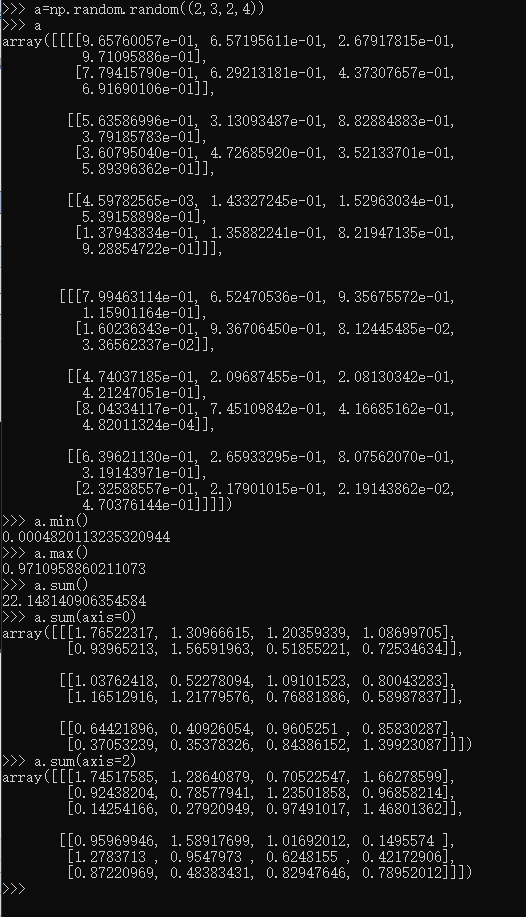
理解轴
https://zh.wikipedia.org/wiki/NumPy
NumPy参考CPython(一个使用字节码的解释器),而在这个Python实现解释器上所写的数学算法代码通常远比编译过的相同代码要来得慢。为了解决这个难题,NumPy引入了多维数组以及可以直接有效率地操作多维数组的函数与运算符。因此在NumPy上只要能被表示为针对数组或矩阵运算的算法,其运行效率几乎都可以与编译过的等效C语言代码一样快。[1]
NumPy提供了与MATLAB相似的功能与操作方式,因为两者皆为解释型语言,并且都可以让用户在针对数组或矩阵运算时提供较标量运算更快的性能。两者相较之下,MATLAB提供了大量的扩展工具箱(例如Simulink);而NumPy则是根基于Python这个更现代、完整并且开放源代码的编程语言之上。此外NumPy也可以结合其它的Python扩展库。例如SciPy,这个库提供了更多与MATLAB相似的功能;以及Matplotlib,这是一个与MATLAB内置绘图功能类似的库。而从本质上来说,NumPy与MATLAB同样是利用BLAS与LAPACK来提供高效率的线性代数运算。
https://baike.baidu.com/item/NumPy/5678437

NumPy provides an N-dimensional array type, the ndarray, which describes a collection of “items” of the same type.
NumPy提供了一个N维数组类型ndarray,它描述了相同类型的“items”的集合。
ndarray到底跟原生python列表的区别:
从图中我们可以看出ndarray在存储数据的时候,数据与数据的地址都是连续的,这样就给使得批量操作数组元素时速度更快。
这是因为ndarray中的所有元素的类型都是相同的,而Python列表中的元素类型是任意的,所以ndarray在存储元素时内存可以连续,而python原生list就只能通过寻址方式找到下一个元素,这虽然也导致了在通用性能方面Numpy的ndarray不及Python原生list,但在科学计算中,Numpy的ndarray就可以省掉很多循环语句,代码使用方面比Python原生list简单的多。
numpy内置了并行运算功能,当系统有多个核心时,做某种计算时,numpy会自动做并行计算。
Numpy底层使用C语言编写,数组中直接存储对象,而不是存储对象指针,所以其运算效率远高于纯Python代码。
科学计算 NumPy 与C语言对比 N-dimensional array ndarray 元素元素操作 计算正太分布分位数的更多相关文章
- Python科学计算—numpy模块总结(1)
作为一个本科学数学专业,目前研究非线性物理领域的研究僧.用什么软件进行纯科学计算好,Fortran永远是第一位的:matlab虽然很强大,可以很容易的处理大量的大矩阵,但是求解我们的模型(有时可能是几 ...
- Python的工具包[0] -> numpy科学计算 -> numpy 库及使用总结
NumPy 目录 关于 numpy numpy 库 numpy 基本操作 numpy 复制操作 numpy 计算 numpy 常用函数 1 关于numpy / About numpy NumPy系统是 ...
- Python数据科学手册-Numpy数组的计算,通用函数
Python的默认实现(CPython)处理某些操作非常慢,因为动态性和解释性, CPython 在每次循环必须左数据类型的检查和函数的调度..在编译是进行这样的操作.就会加快执行速度. 通用函数介绍 ...
- [python]-数据科学库Numpy学习
一.Numpy简介: Python中用列表(list)保存一组值,可以用来当作数组使用,不过由于列表的元素可以是任何对象,因此列表中所保存的是对象的指针.这样为了保存一个简单的[1,2,3],需要有3 ...
- MATLAB与C语言对比实例:随机数生成
MATLAB与C语言对比实例:随机数生成 作者:凯鲁嘎吉 - 博客园 http://www.cnblogs.com/kailugaji/ 一.整型随机数生成函数 1.C语言程序 int intrand ...
- 深度 | AI芯片之智能边缘计算的崛起——实时语言翻译、图像识别、AI视频监控、无人车这些都需要终端具有较强的计算能力,从而AI芯片发展起来是必然,同时5G网络也是必然
from:https://36kr.com/p/5103044.html 到2020年,大多数先进的ML袖珍电脑(你仍称之为手机)将有能力执行一整套任务.个人助理将变的更加智能,它是打造这种功能的切入 ...
- [Coursera][计算导论与C语言基础][Week 10]对于“数组应用练习”课后习题的思考题的一些想法
(首先,关于Honor Code,我咨询过了Help Center,分享课后练习的思考题的想法是可以的(注意不是代码),但要标明引用,引用格式来源于https://guides.lib.monash. ...
- 易语言效率与C++究竟差多少(质数和计算)
文本首发bIlibili,cnblogs为作者补发,如在其他平台看见本文,均为经允许的盗窃 易语言作为款主打 中文 易用 编程的开发软件.但是很多人都在批评易语言的效率. 我们今天通过 质数和计算 来 ...
- Python数据科学手册-Numpy入门
通过Python有效导入.存储和操作内存数据的技巧 数据来源:文档.图像.声音.数值等等,将所有的数据简单的看做数字数组 非常有助于 理解和处理数据 不管数据是何种形式,第一步都是 将这些数据转换成 ...
随机推荐
- [gj]三国攻势图
三国攻势图 参考: 估计你对三国故事有点兴趣,我给你看看图说三国(大概的):
- C#元祖Tuple的事例
数组合并了同样类型的对象.而元祖合并了不同类型的对象.元祖起源于函数编程语言(F#) NET Framework定义了8个泛型Tuple(自NET4.0)和一个静态的Tuple类,他们作用元祖的工厂, ...
- 哪个线程执行 CompletableFuture’s tasks 和 callbacks?
CompletableFuture尽管在2014年的三月随着Java8被提出来,但它现在仍然是一种相对较新潮的概念.但也许这个类不为人所熟知是好事,因为它很容易被滥用,特别是涉及到使用线程和线程池的时 ...
- erlang supervisor simple_one_for_one实例
simple_one_for_one vs one_for_one: 相同点: 这种Restart Strategy和one_for_one基本相同(即当一个child process挂掉后,仅仅重启 ...
- COOKIE和session的机制详解
会话(Session)跟踪是Web程序中常用的技术,用来跟踪用户的整个会话.常用的会话跟踪技术是Cookie与Session.Cookie通过在客户端记录信息确定用户身份,Session通过在服务器端 ...
- dedecms使用
使用到了dedecms内容管理系统,遇到两个问题: 1.点击登录后,没有登录进去也没有任何提示,一片空白 解决办法:我是把网站从云主机拷贝下来的,但是忘了云主机上的数据库密码和自己本地的数据库密码不一 ...
- The Definitive Guide To Django 2 学习笔记(五) 第四章 模板 (一)基本模板系统
引入模板系统的原因,view中引入硬编码并非明智的选择,设计上的任何改变都会需要改动代码.python代码和HTML代码应该分开,这是多数Web站点的共识,分开会提高效率. 基本模板系统 Django ...
- 6:7 题一起MySQL数据库分库备份
企业Shell面试题6:MySQL数据库分表备份 请实现对MySQL数据库进行分表备份,用脚本实现. 解答: [root@db01 scripts]# cat fenbiao.sh #!/bin/ba ...
- java 获取服务器时间同步本地计算机时间
http://hi.baidu.com/captives/item/25c8b80170a9b0ccf45ba6f8 ————————————————————————————————————————— ...
- Cross compile perl
Alex Suykov had do some work for this purpose, and my compile script is based on her patch. Steps St ...