
科学计算 NumPy 与C语言对比 N-dimensional array ndarray 元素元素操作 计算正太分布分位数
http://www.numpy.org/
NumPy is the fundamental package for scientific computing with Python. It contains among other things:
- a powerful N-dimensional array object
- sophisticated (broadcasting) functions
- tools for integrating C/C++ and Fortran code
- useful linear algebra, Fourier transform, and random number capabilities
https://scipy.org/
https://www.oschina.net/p/paradox?fromerr=SpBZmWnx

Numpy and Scipy Documentation — Numpy and Scipy documentation https://docs.scipy.org/doc/
NumPy User Guide https://docs.scipy.org/doc/numpy-1.14.2/numpy-user-1.14.2.pdf

c = []
for i in range(len(a)):
    c.append(a[i]*b[i])

This produces the correct answer, but if a and b each contain millions of numbers, we will pay the price for the
inefficiencies of looping in Python. We could accomplish the same task much more quickly in C by writing (for clarity
we neglect variable declarations and initializations, memory allocation, etc.)

for (i = 0; i < rows; i++): {
    c[i] = a[i]*b[i];
}

This saves all the overhead involved in interpreting the Python code and manipulating Python objects, but at the
expense of the benefits gained from coding in Python. Furthermore, the coding work required increases with the
dimensionality of our data. In the case of a 2-D array, for example, the C code (abridged as before) expands to

for (i = 0; i < rows; i++): {
    for (j = 0; j < columns; j++): {
        c[i][j] = a[i][j]*b[i][j];
    }
}

NumPy gives us the best of both worlds: element-by-element operations are the “default mode” when an ndarray is
involved, but the element-by-element operation is speedily executed by pre-compiled C code. In NumPy
c = a * b
does what the earlier examples do, at near-C speeds, but with the code simplicity we expect from something based on
Python. Indeed, the NumPy idiom is even simpler! This last example illustrates two of NumPy’s features which are
the basis of much of its power: vectorization and broadcasting.

Broadcasting is the term used to describe the implicit element-by-element behavior of operations; generally speaking,
in NumPy all operations, not just arithmetic operations, but logical, bit-wise, functional, etc., behave in this implicit
element-by-element fashion, i.e., they broadcast. Moreover, in the example above, a and b could be multidimensional
arrays of the same shape, or a scalar and an array, or even two arrays of with different shapes, provided that the smaller
array is “expandable” to the shape of the larger in such a way that the resulting broadcast is unambiguous. For detailed
“rules” of broadcasting see numpy.doc.broadcasting.

NumPy fully supports an object-oriented approach, starting, once again, with ndarray. For example, ndarray is a
class, possessing numerous methods and attributes. Many of its methods mirror functions in the outer-most NumPy
namespace, giving the programmer complete freedom to code in whichever paradigm she prefers and/or which seems
most appropriate to the task at hand.

NumPy’s main object is the homogeneous multidimensional array.

NumPy provides an N-dimensional array type, the ndarray, which describes a collection of “items” of the same type. The items can be indexed using for example N integers.

主对象 同构多维数组

字节计算
ndarray.ndim the number of axes (dimensions) of the array.

ndarray.shape the dimensions of the array. This is a tuple of integers indicating the size of the array in each dimension.

For a matrix with n rows and m columns, shape will be (n,m). The length of the shape tuple is

therefore the number of axes, ndim.

ndarray.size the total number of elements of the array. This is equal to the product of the elements of shape.

ndarray.dtype an object describing the type of the elements in the array. One can create or specify dtype’s using

standard Python types. Additionally NumPy provides types of its own. numpy.int32, numpy.int16, and

numpy.float64 are some examples.

ndarray.itemsize the size in bytes of each element of the array. For example, an array of elements of type float64

has itemsize 8 (=64/8), while one of type complex32 has itemsize 4 (=32/8). It is equivalent to

ndarray.dtype.itemsize.

ndarray.data the buffer containing the actual elements of the array. Normally, we won’t need to use this attribute

because we will access the elements in an array using indexing facilities.
>>> import numpy as np

>>> a = np.arange(15).reshape(3, 5)

>>> a

array([[ 0, 1, 2, 3, 4],

[ 5, 6, 7, 8, 9],

[10, 11, 12, 13, 14]])

>>> a.shape

(3, 5)

>>> a.ndim

2

>>> a.dtype.name

'int64'

>>> a.itemsize

8

>>> a.size

15
Array Creation
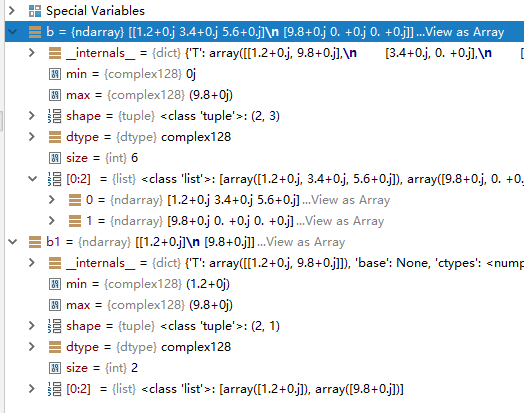
创建元素为复数的多维数组
import numpy as np

#b = np.array([[1.2, 3.4, 5.6],[9.8]],dtype=complex) #WRONG

b = np.array([[1.2, 3.4, 5.6],[9.8,0,0]],dtype=complex)

b1 = np.array([[1.2],[9.8]],dtype=complex)
To create sequences of numbers, NumPy provides a function analogous to range that returns arrays instead of lists.
When arange is used with floating point arguments, it is generally not possible to predict the number of elements obtained, due to the finite floating point precision. For this reason, it is usually better to use the function linspace that receives as an argument the number of elements that we want, instead of the step.
创建数字序列
>>> a=np.arange(4)

>>> a

array([0, 1, 2, 3])

>>> np.sin(a)

array([0.        , 0.84147098, 0.90929743, 0.14112001])

>>> a<1.1

array([ True,  True, False, False])

>>>
浮点序列的去步长创建
Python 3.6.4 (v3.6.4:d48eceb, Dec 19 2017, 06:54:40) [MSC v.1900 64 bit (AMD64)] on win32

Type "help", "copyright", "credits" or "license" for more information.

>>> np.zeros((3,4))

Traceback (most recent call last):

  File "<stdin>", line 1, in <module>

NameError: name 'np' is not defined

>>> import numpy as np

>>> np.zeros((3,4))

array([[0., 0., 0., 0.],

       [0., 0., 0., 0.],

       [0., 0., 0., 0.]])

>>> np.ones((2,3,4),dtype=np.int16)

array([[[1, 1, 1, 1],

        [1, 1, 1, 1],

        [1, 1, 1, 1]],

       [[1, 1, 1, 1],

        [1, 1, 1, 1],

        [1, 1, 1, 1]]], dtype=int16)

>>> np.empty((2,3))

array([[1.35617218e+248, 9.77817447e+199, 6.01334515e-154],

       [4.71049380e-309, 4.17201348e-309, 2.64227521e-308]])

>>> np.arange(0,2,0.3)

array([0. , 0.3, 0.6, 0.9, 1.2, 1.5, 1.8])

>>> from numpy import pi

>>> np.linspace(

... 0,2,9)

array([0.  , 0.25, 0.5 , 0.75, 1.  , 1.25, 1.5 , 1.75, 2.  ])

>>> x=np.linspace(0,2*pi,100)

>>> x

array([0.        , 0.06346652, 0.12693304, 0.19039955, 0.25386607,

       0.31733259, 0.38079911, 0.44426563, 0.50773215, 0.57119866,

       0.63466518, 0.6981317 , 0.76159822, 0.82506474, 0.88853126,

       0.95199777, 1.01546429, 1.07893081, 1.14239733, 1.20586385,

       1.26933037, 1.33279688, 1.3962634 , 1.45972992, 1.52319644,

       1.58666296, 1.65012947, 1.71359599, 1.77706251, 1.84052903,

       1.90399555, 1.96746207, 2.03092858, 2.0943951 , 2.15786162,

       2.22132814, 2.28479466, 2.34826118, 2.41172769, 2.47519421,

       2.53866073, 2.60212725, 2.66559377, 2.72906028, 2.7925268 ,

       2.85599332, 2.91945984, 2.98292636, 3.04639288, 3.10985939,

       3.17332591, 3.23679243, 3.30025895, 3.36372547, 3.42719199,

       3.4906585 , 3.55412502, 3.61759154, 3.68105806, 3.74452458,

       3.8079911 , 3.87145761, 3.93492413, 3.99839065, 4.06185717,

       4.12532369, 4.1887902 , 4.25225672, 4.31572324, 4.37918976,

       4.44265628, 4.5061228 , 4.56958931, 4.63305583, 4.69652235,

       4.75998887, 4.82345539, 4.88692191, 4.95038842, 5.01385494,

       5.07732146, 5.14078798, 5.2042545 , 5.26772102, 5.33118753,

       5.39465405, 5.45812057, 5.52158709, 5.58505361, 5.64852012,

       5.71198664, 5.77545316, 5.83891968, 5.9023862 , 5.96585272,

       6.02931923, 6.09278575, 6.15625227, 6.21971879, 6.28318531])

>>> f=np.sin(x)

>>> f

array([ 0.00000000e+00,  6.34239197e-02,  1.26592454e-01,  1.89251244e-01,

        2.51147987e-01,  3.12033446e-01,  3.71662456e-01,  4.29794912e-01,

        4.86196736e-01,  5.40640817e-01,  5.92907929e-01,  6.42787610e-01,

        6.90079011e-01,  7.34591709e-01,  7.76146464e-01,  8.14575952e-01,

        8.49725430e-01,  8.81453363e-01,  9.09631995e-01,  9.34147860e-01,

        9.54902241e-01,  9.71811568e-01,  9.84807753e-01,  9.93838464e-01,

        9.98867339e-01,  9.99874128e-01,  9.96854776e-01,  9.89821442e-01,

        9.78802446e-01,  9.63842159e-01,  9.45000819e-01,  9.22354294e-01,

        8.95993774e-01,  8.66025404e-01,  8.32569855e-01,  7.95761841e-01,

        7.55749574e-01,  7.12694171e-01,  6.66769001e-01,  6.18158986e-01,

        5.67059864e-01,  5.13677392e-01,  4.58226522e-01,  4.00930535e-01,

        3.42020143e-01,  2.81732557e-01,  2.20310533e-01,  1.58001396e-01,

        9.50560433e-02,  3.17279335e-02, -3.17279335e-02, -9.50560433e-02,

       -1.58001396e-01, -2.20310533e-01, -2.81732557e-01, -3.42020143e-01,

       -4.00930535e-01, -4.58226522e-01, -5.13677392e-01, -5.67059864e-01,

       -6.18158986e-01, -6.66769001e-01, -7.12694171e-01, -7.55749574e-01,

       -7.95761841e-01, -8.32569855e-01, -8.66025404e-01, -8.95993774e-01,

       -9.22354294e-01, -9.45000819e-01, -9.63842159e-01, -9.78802446e-01,

       -9.89821442e-01, -9.96854776e-01, -9.99874128e-01, -9.98867339e-01,

       -9.93838464e-01, -9.84807753e-01, -9.71811568e-01, -9.54902241e-01,

       -9.34147860e-01, -9.09631995e-01, -8.81453363e-01, -8.49725430e-01,

       -8.14575952e-01, -7.76146464e-01, -7.34591709e-01, -6.90079011e-01,

       -6.42787610e-01, -5.92907929e-01, -5.40640817e-01, -4.86196736e-01,

       -4.29794912e-01, -3.71662456e-01, -3.12033446e-01, -2.51147987e-01,

       -1.89251244e-01, -1.26592454e-01, -6.34239197e-02, -2.44929360e-16])

>>>
>>> np.arange(20)

array([ 0,  1,  2,  3,  4,  5,  6,  7,  8,  9, 10, 11, 12, 13, 14, 15, 16,

       17, 18, 19])

>>> np.arange(20).reshape(3,3)

Traceback (most recent call last):

  File "<stdin>", line 1, in <module>

ValueError: cannot reshape array of size 20 into shape (3,3)

>>> np.arange(20).reshape(4,5)

array([[ 0,  1,  2,  3,  4],

       [ 5,  6,  7,  8,  9],

       [10, 11, 12, 13, 14],

       [15, 16, 17, 18, 19]])

>>> np.arange(20,dtype=complex).reshape(4,5)

array([[ 0.+0.j,  1.+0.j,  2.+0.j,  3.+0.j,  4.+0.j],

       [ 5.+0.j,  6.+0.j,  7.+0.j,  8.+0.j,  9.+0.j],

       [10.+0.j, 11.+0.j, 12.+0.j, 13.+0.j, 14.+0.j],

       [15.+0.j, 16.+0.j, 17.+0.j, 18.+0.j, 19.+0.j]])
随机数
多维数组
最值
>>> a=np.random.random((2,3,2))

>>> a

array([[[0.4952443 , 0.03868411],

        [0.23719136, 0.47319592],

        [0.13173682, 0.56206977]],

       [[0.30565678, 0.71079902],

        [0.55682919, 0.94712502],

        [0.39514817, 0.70681757]]])

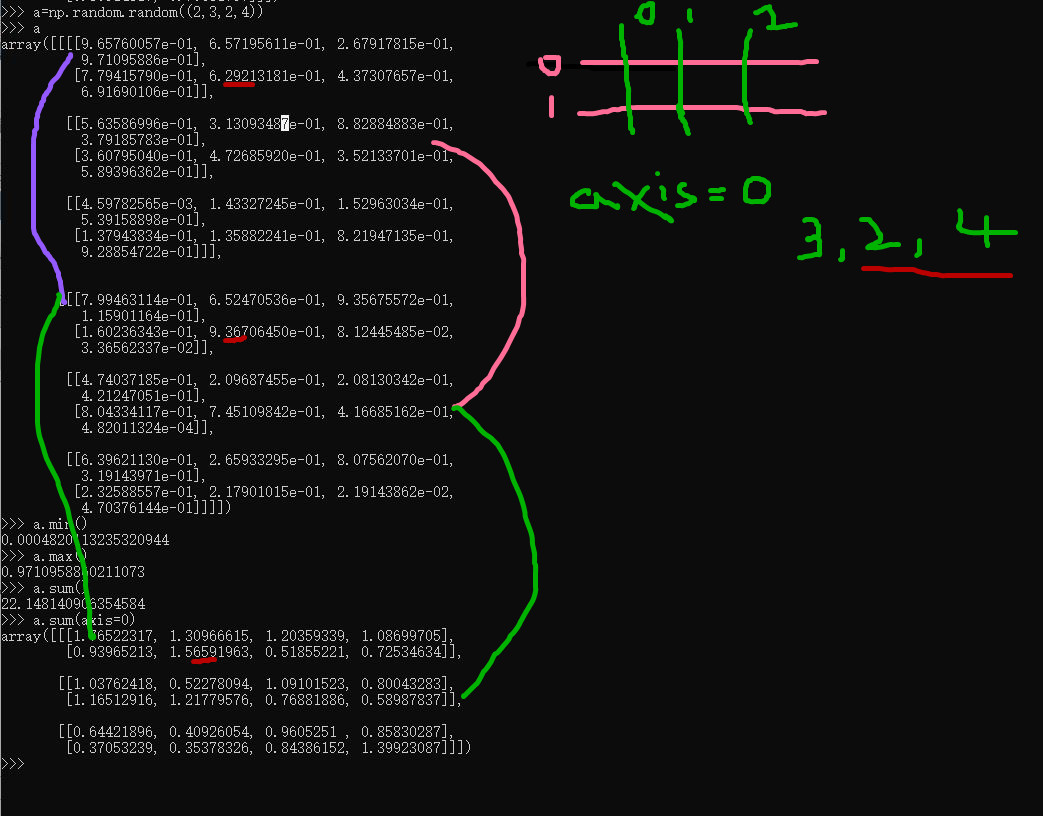
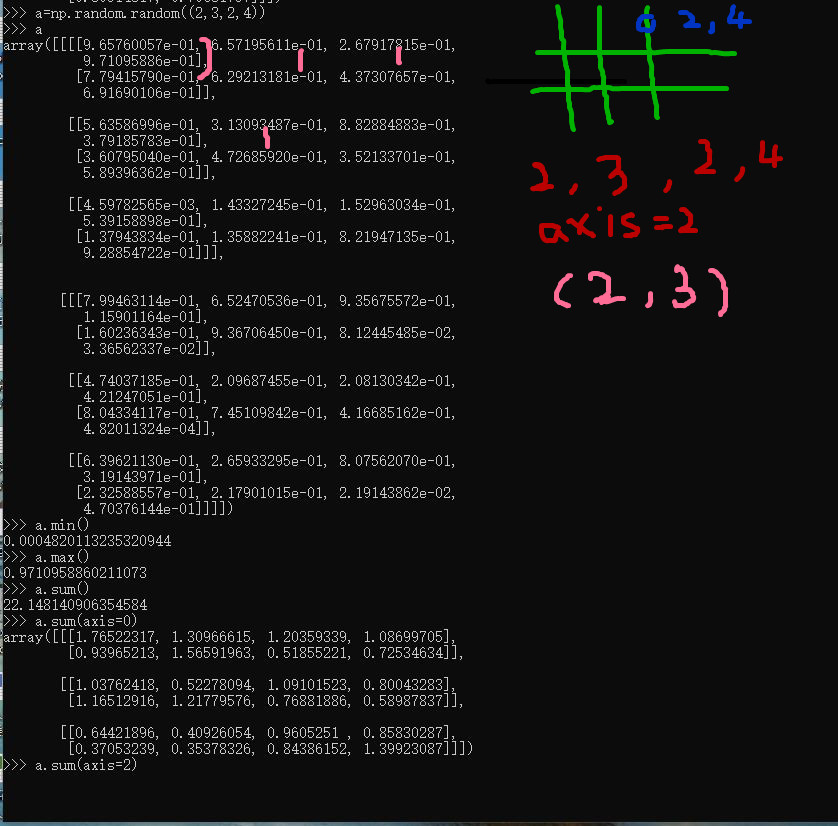
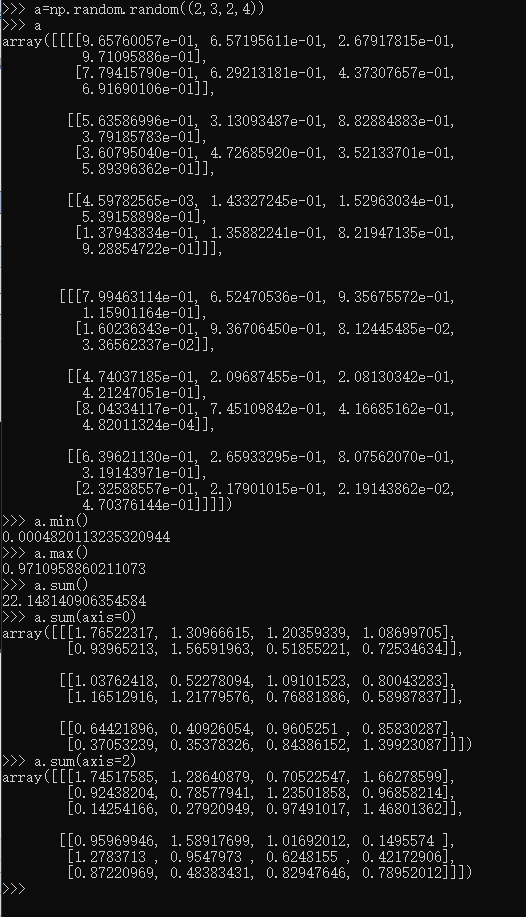
>>> a=np.random.random((2,3,2,4))

>>> a

array([[[[9.65760057e-01, 6.57195611e-01, 2.67917815e-01,

          9.71095886e-01],

         [7.79415790e-01, 6.29213181e-01, 4.37307657e-01,

          6.91690106e-01]],

        [[5.63586996e-01, 3.13093487e-01, 8.82884883e-01,

          3.79185783e-01],

         [3.60795040e-01, 4.72685920e-01, 3.52133701e-01,

          5.89396362e-01]],

        [[4.59782565e-03, 1.43327245e-01, 1.52963034e-01,

          5.39158898e-01],

         [1.37943834e-01, 1.35882241e-01, 8.21947135e-01,

          9.28854722e-01]]],

       [[[7.99463114e-01, 6.52470536e-01, 9.35675572e-01,

          1.15901164e-01],

         [1.60236343e-01, 9.36706450e-01, 8.12445485e-02,

          3.36562337e-02]],

        [[4.74037185e-01, 2.09687455e-01, 2.08130342e-01,

          4.21247051e-01],

         [8.04334117e-01, 7.45109842e-01, 4.16685162e-01,

          4.82011324e-04]],

        [[6.39621130e-01, 2.65933295e-01, 8.07562070e-01,

          3.19143971e-01],

         [2.32588557e-01, 2.17901015e-01, 2.19143862e-02,

          4.70376144e-01]]]])

>>> a.min()

0.0004820113235320944

>>> a.max()

0.9710958860211073

>>>
有序二元组
(行,列)
(行,(行,列))
(行,(行,(行,列)))
Glossary — NumPy v1.13 Manual https://docs.scipy.org/doc/numpy-1.13.0/glossary.html
理解轴
https://zh.wikipedia.org/wiki/NumPy
NumPy参考CPython(一个使用字节码的解释器),而在这个Python实现解释器上所写的数学算法代码通常远比编译过的相同代码要来得慢。为了解决这个难题,NumPy引入了多维数组以及可以直接有效率地操作多维数组的函数与运算符。因此在NumPy上只要能被表示为针对数组或矩阵运算的算法,其运行效率几乎都可以与编译过的等效C语言代码一样快。[1]
NumPy提供了与MATLAB相似的功能与操作方式,因为两者皆为解释型语言,并且都可以让用户在针对数组或矩阵运算时提供较标量运算更快的性能。两者相较之下,MATLAB提供了大量的扩展工具箱(例如Simulink);而NumPy则是根基于Python这个更现代、完整并且开放源代码的编程语言之上。此外NumPy也可以结合其它的Python扩展库。例如SciPy,这个库提供了更多与MATLAB相似的功能;以及Matplotlib,这是一个与MATLAB内置绘图功能类似的库。而从本质上来说,NumPy与MATLAB同样是利用BLAS与LAPACK来提供高效率的线性代数运算。
https://baike.baidu.com/item/NumPy/5678437

NumPy provides an N-dimensional array type, the ndarray, which describes a collection of “items” of the same type.
NumPy提供了一个N维数组类型ndarray,它描述了相同类型的“items”的集合。
ndarray到底跟原生python列表的区别:
从图中我们可以看出ndarray在存储数据的时候,数据与数据的地址都是连续的,这样就给使得批量操作数组元素时速度更快。
这是因为ndarray中的所有元素的类型都是相同的,而Python列表中的元素类型是任意的,所以ndarray在存储元素时内存可以连续,而python原生list就只能通过寻址方式找到下一个元素,这虽然也导致了在通用性能方面Numpy的ndarray不及Python原生list,但在科学计算中,Numpy的ndarray就可以省掉很多循环语句,代码使用方面比Python原生list简单的多。
numpy内置了并行运算功能,当系统有多个核心时,做某种计算时,numpy会自动做并行计算。
Numpy底层使用C语言编写,数组中直接存储对象,而不是存储对象指针,所以其运算效率远高于纯Python代码。
科学计算 NumPy 与C语言对比 N-dimensional array ndarray 元素元素操作 计算正太分布分位数的更多相关文章
- Python科学计算—numpy模块总结(1)
作为一个本科学数学专业,目前研究非线性物理领域的研究僧.用什么软件进行纯科学计算好,Fortran永远是第一位的:matlab虽然很强大,可以很容易的处理大量的大矩阵,但是求解我们的模型(有时可能是几 ...
- Python的工具包[0] -> numpy科学计算 -> numpy 库及使用总结
NumPy 目录 关于 numpy numpy 库 numpy 基本操作 numpy 复制操作 numpy 计算 numpy 常用函数 1 关于numpy / About numpy NumPy系统是 ...
- Python数据科学手册-Numpy数组的计算,通用函数
Python的默认实现(CPython)处理某些操作非常慢,因为动态性和解释性, CPython 在每次循环必须左数据类型的检查和函数的调度..在编译是进行这样的操作.就会加快执行速度. 通用函数介绍 ...
- [python]-数据科学库Numpy学习
一.Numpy简介: Python中用列表(list)保存一组值,可以用来当作数组使用,不过由于列表的元素可以是任何对象,因此列表中所保存的是对象的指针.这样为了保存一个简单的[1,2,3],需要有3 ...
- MATLAB与C语言对比实例:随机数生成
MATLAB与C语言对比实例:随机数生成 作者:凯鲁嘎吉 - 博客园 http://www.cnblogs.com/kailugaji/ 一.整型随机数生成函数 1.C语言程序 int intrand ...
- 深度 | AI芯片之智能边缘计算的崛起——实时语言翻译、图像识别、AI视频监控、无人车这些都需要终端具有较强的计算能力,从而AI芯片发展起来是必然,同时5G网络也是必然
from:https://36kr.com/p/5103044.html 到2020年,大多数先进的ML袖珍电脑(你仍称之为手机)将有能力执行一整套任务.个人助理将变的更加智能,它是打造这种功能的切入 ...
- [Coursera][计算导论与C语言基础][Week 10]对于“数组应用练习”课后习题的思考题的一些想法
(首先,关于Honor Code,我咨询过了Help Center,分享课后练习的思考题的想法是可以的(注意不是代码),但要标明引用,引用格式来源于https://guides.lib.monash. ...
- 易语言效率与C++究竟差多少(质数和计算)
文本首发bIlibili,cnblogs为作者补发,如在其他平台看见本文,均为经允许的盗窃 易语言作为款主打 中文 易用 编程的开发软件.但是很多人都在批评易语言的效率. 我们今天通过 质数和计算 来 ...
- Python数据科学手册-Numpy入门
通过Python有效导入.存储和操作内存数据的技巧 数据来源:文档.图像.声音.数值等等,将所有的数据简单的看做数字数组 非常有助于 理解和处理数据 不管数据是何种形式,第一步都是 将这些数据转换成 ...
随机推荐
- Eclipse添加中文语言包与下载
从Eclipse官网下载最新版本的Eclipse都是英文版的,不自带语言包.现在Eclipse有一个语言包项目,叫Eclipse Babel Project.如果需要语言包,可以联机从这儿下载. Ba ...
- 点滴积累【C#】---C#实现上传照片到物理路径,并且将地址保存到数据库,
效果: 思路: 首先,获取图片物理地址,然后进行判断将图片保存到文件夹下,再将图片的信息保存到数据库. 数据库: create table image1 ( ID ,) primary key, Im ...
- Django项目国际化
Django项目国际化 实验环境: py3.4.3 + django1.8.2 + Windows 项目设置 >django-admin startproject I18nDjango > ...
- 绝不能错过的10款最新OpenStack网络运维 & 监控工具
摘要 今天我们要推荐给大家的是关于奥斯汀OpenStack Summit的OpenStack网络方面功能与工具相关的技术演讲. 希望可以帮助国内的开发者.架构师和用户更好地了解OpenStack在SD ...
- 李洪强iOS开发之iOS学习方法收集
李洪强iOS开发之iOS学习方法收集 在这里收集一些iOS学习方法,会不断更新 项目 简述 日期 一年多iOS开发总结 作者总结了自己一年多的iOS学习经验,对于iOS初学者来说很多地方是可以借鉴的 ...
- Powershell分支条件
Where-Object 进行条件判断很方便,如果在判断后执行很多代码可以使用IF-ELSEIF-ELSE语句.语句模板: If(条件满足){如果条件满足就执行代码}Else{如果条件不满足}条件判断 ...
- 1.2.3 Task and Back Stack - 任务和回退堆
一个应用通常包含多个Activities.每个activity的设计应该围绕着某种指定类型的action,如果这样做了,用户就可以执行该action,也可以用它来开启另外的activity.例如,邮件 ...
- uinty实现玩家尾随鼠标位置平滑旋转角度
首先我们要在场景中加入一个quad平面作为地板, 然后指定Layer为Floor,然后移除mesh renderer组件 然后加入脚本 脚本主要思想是从屏幕中心投出一条射线到地板, 然后获取相应坐标, ...
- redis数据类型List的安全队列和不安全队列
在学习RPOPLPUSH命令的时候,官方文档中有提到安全队列和不安全的队列,一开始没有看懂,现在理解了做个笔记. 一般情况下,我们可以借助List来实现消息队列,比如一个客户端通过命令LPUSH(BL ...
- 技巧C#
1. 在CallBack之后保持滚动条的位置: 在Asp.Net1.1中,CallBack之后保持滚动条的位置是一件非常痛苦的事情,特别是页中有一个Grid并且想要编辑特定的行.为了不停留在想 ...