
框架布局FrameLayout
框架布局FrameLayout
一、简介

二、代码实例
结果图:
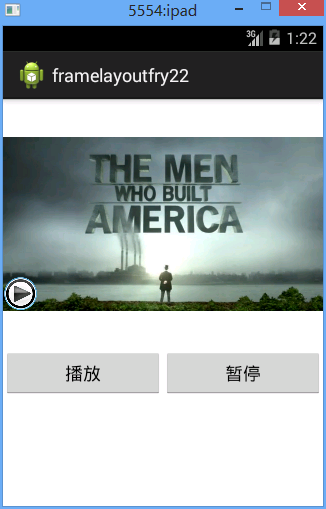
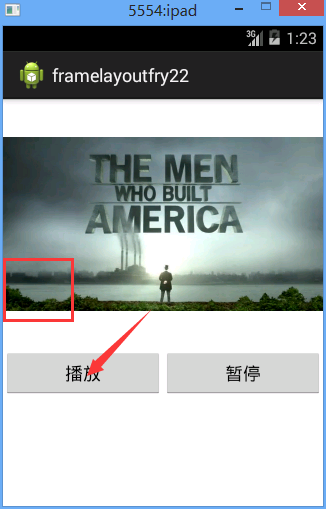
代码:
需要注意的代码:
imageView_play.setVisibility(View.INVISIBLE);
<FrameLayout
framelayoutfry2.MainActivity
 package framelayoutfry2;

 import com.example.framelayoutfry2.R;

 import android.app.Activity;

 import android.content.Intent;

 import android.os.Bundle;

 import android.view.View;

 import android.view.View.OnClickListener;

 import android.widget.Button;

 import android.widget.ImageView;

 public class MainActivity extends Activity implements OnClickListener{

     private Button btn_play;//创建一个button对象

     private Button btn_pause;//创建一个button对象

     private ImageView imageView_play;

      protected void onCreate(Bundle savedInstanceState) {

             super.onCreate(savedInstanceState);//父类操作

             setContentView(R.layout.activity_main);//引入名为activity_main的界面

             imageView_play=(ImageView) findViewById(R.id.imageView_play);

             btn_play=(Button) findViewById(R.id.btn_play);

             btn_pause=(Button) findViewById(R.id.btn_pause);

             btn_play.setOnClickListener(this);

             btn_pause.setOnClickListener(this);

         }

     @Override

     public void onClick(View v) {

         // TODO Auto-generated method stub

         switch (v.getId()) {

         case R.id.btn_play:

             imageView_play.setVisibility(View.INVISIBLE);

             break;

         case R.id.btn_pause:

             imageView_play.setVisibility(View.VISIBLE);

             break;

         default:

             break;

         }

     }

 }
/Test_FrameLayout/res/layout/activity_main.xml
 <?xml version="1.0" encoding="utf-8"?>

 <LinearLayout xmlns:android="http://schemas.android.com/apk/res/android"

     android:layout_width="match_parent"

     android:layout_height="match_parent"

     android:orientation="vertical" >

 7     <FrameLayout

 8         android:layout_width="match_parent"

 9         android:layout_height="wrap_content"

10

11         >

12         <ImageView

13             android:layout_width="match_parent"

14             android:layout_height="250dp"

15             android:src="@drawable/frame_bg"

16             />

17

18         <ImageView

19             android:id="@+id/imageView_play"

20             android:layout_width="35dp"

21             android:layout_height="35dp"

22             android:src="@drawable/play"

23             android:layout_gravity="bottom"

24             android:layout_marginBottom="38dp"

25             />

26

27     </FrameLayout>

     <LinearLayout

         android:layout_width="match_parent"

         android:layout_height="wrap_content"

         android:orientation="horizontal"

         >

         <Button

             android:id="@+id/btn_play"

             android:layout_width="wrap_content"

             android:layout_height="wrap_content"

             android:text="播放"

             android:layout_weight="1"

             />

         <Button

             android:id="@+id/btn_pause"

             android:layout_width="wrap_content"

             android:layout_height="wrap_content"

             android:text="暂停"

             android:layout_weight="1"

             />

     </LinearLayout>

 </LinearLayout>
框架布局FrameLayout的更多相关文章
- .Net程序猿乐Android发展---(10)框架布局FrameLayout
帧布局FrameLayout中全部的控件都在界面的左上側,后绘制的空间会覆盖之前的控件.布局内控件以层叠方式显示,用在游戏开发方面可能多些. 1.层叠展示 以下这个样例 ...
- Android 框架布局 FrameLayout
<?xml version="1.0" encoding="utf-8"?> <FrameLayout xmlns:android=" ...
- android FragmentActivity+FragmentTabHost+Fragment框架布局
这周比较闲,计划系统的学习一下android开发,我本是一名IOS程序员,对手机开发还是有自己的一套思路的, 固这套思路用到我当前学android上了,先选择从Main页面的tabbar部分代码入手, ...
- Android用户界面设计:框架布局(转)
摘要:框架布局是Android开发者组织视图控件最简单和最有效的布局之一.通过本文,你将学到所有关于框架布局的知识,它们主要用来在屏幕上组织特别的或重叠的视图控件.使用得当的话,很多有趣的Androi ...
- Android笔记(九) Android中的布局——框架布局
框架布局没有任何定位方式,所有的控件都会摆放在布局的左上角. 代码示例: framelayout.xml <?xml version="1.0" encoding=" ...
- Android中帧布局-FrameLayout和网格布局-GridLayout
帧布局-FrameLayout 一.概念 帧布局中,容器为每个加入其中的空间创建一个空白的区域(成为一帧).每个空间占据一帧,这些帧会按gravity属性自动对齐. 帧布局的效果是将其中的所有空间叠加 ...
- Android 自学之帧布局 FrameLayout
帧布局(FrameLayout)直接继承了ViewGroup组件: 帧布局容器为每一个加入其中的组件都创建了一个空白的区域,这个区域我们称之为一帧,所有每个组件都占据一帧,这些都会根据gravity属 ...
- Flutter实战视频-移动电商-53.购物车_商品列表UI框架布局
53.购物车_商品列表UI框架布局 cart_page.dart 清空原来写的持久化的代码; 添加对应的引用,stless生成一个静态的类.建议始终静态的类,防止重复渲染 纠正个错误,上图的CartP ...
- Layui栅格系统与后台框架布局
一.栅格布局规则: 1. 采用 layui-row 来定义行,如:<div class="layui-row"></div> 2. 采用类似 layui-c ...
随机推荐
- ORA-08002: sequence TESTTABLE1_ID_SEQ.CURRVAL is not yet defined in this session (未完全解决)
说明: 断开连接后 重新连接执行序列号当前值查找 会报错. 解决方法一:先查询序列号下一个值 SELECT testTable1_ID_SEQ.nextval from dual;
- mysql 使用命令执行外部sql文件
语句 source e:\\phpPro\\fileName.sql 注意,不需要再后面加 分号 !!!!!
- a标签的href和onclick
1.链接的onclick事件被先执行,href的事件后执行 2.就今天遇到的问题说一下,通过a标签的onclick事件实现点击后定位到指定的div,或者是执行其他函数(比如弹出artdialog等), ...
- unix_timestamp 和 from_unixtime 时间戳函数 区别
1.unix_timestamp 将时间转化为时间戳.(date 类型数据转换成 timestamp 形式整数) 没传时间参数则取当前时间的时间戳 mysql> select unix_time ...
- 面向对象 - 封装/property - 总结
面向对象 - 封装: 封装:在类定义阶段,以__开头的属性名发生了变形 eg: __x --> _A__x / __foo --> _A__foo 1.特点: 1.在类外部无法直接访问 _ ...
- 一.MySQL入门基础
1.关于cmd界面无法启动mysql: 1)必须要使用管理员身份运行cmd程序 2)如果下载MySQL5.7版本的,在windows服务上Mysql的名字默认是MySQL57,因此在cmd运行 net ...
- pandas 修改列名
原始文件 下面是Excel打开以及pd.read_csv() 打开: 里面只是干巴巴的数据,没有列名,so,需要给其设置列名. Method1 不让第一行数据默认当作列名(默认第一行数据是列名了). ...
- sql server dba之路
转自:https://blog.csdn.net/dba_huangzj/article/details/7841441 在专职DBA工作一年过一个月以后,开通了CSDN的博客专栏,在第一篇文章中,我 ...
- 爬虫任务二:爬取(用到htmlunit和jsoup)通过百度搜索引擎关键字搜取到的新闻标题和url,并保存在本地文件中(主体借鉴了网上的资料)
采用maven工程,免着到处找依赖jar包 <project xmlns="http://maven.apache.org/POM/4.0.0" xmlns:xsi=&quo ...
- Library Cache优化与SQL游标
Library Cache主要用于存放SQL游标,而SQL游标最大化共享是Library Cache优化的重要途径,可以使SQL运行开销最低.性能最优. 1 SQL语句与父游标及子游标 在PL/SQL ...