
ASP.NET Core 2.0中如何更改Http请求的maxAllowedContentLength最大值
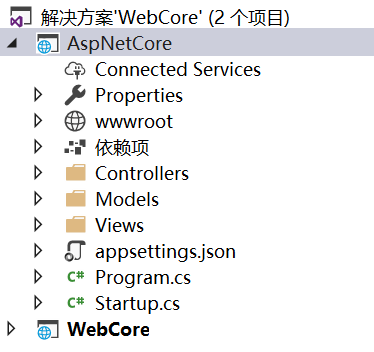
Web.config中的maxAllowedContentLength这个属性可以用来设置Http的Post类型请求可以提交的最大数据量,超过这个数据量的Http请求ASP.NET Core会拒绝并报错,由于ASP.NET Core的项目文件中取消了Web.config文件,所以我们无法直接在visual studio的解决方案目录中再来设置maxAllowedContentLength的属性值。
但是在发布ASP.NET Core站点后,我们会发现发布目录下有一个Web.config文件:
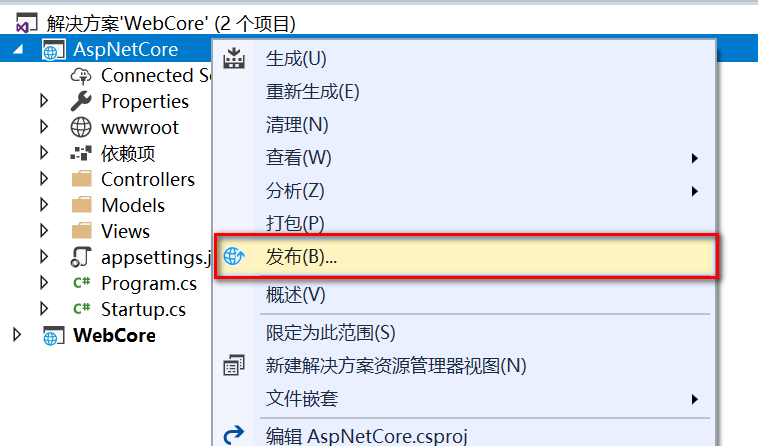
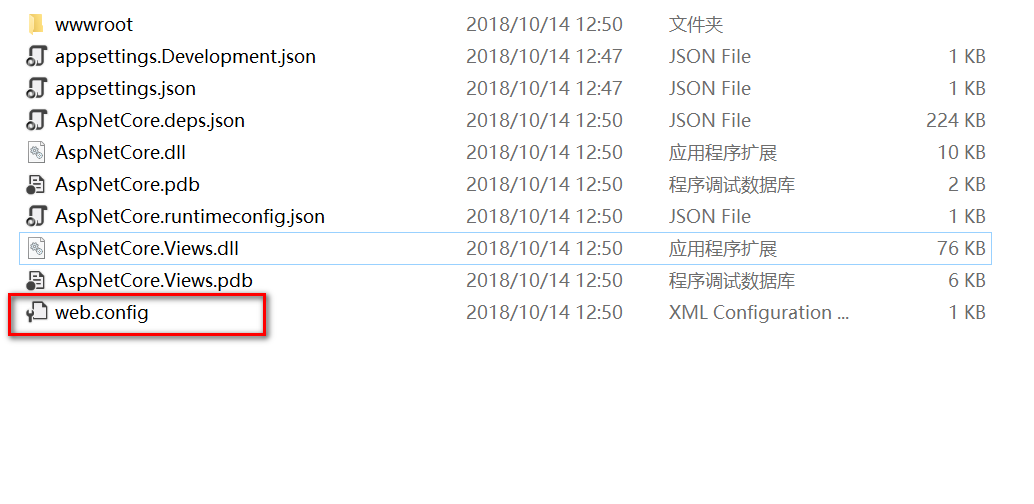
我们可以在发布后的这个Web.config文件中设置maxAllowedContentLength属性值:
<?xml version="1.0" encoding="utf-8"?>

<configuration>

  <system.webServer>

    <security>

      <requestFiltering>

        <!-- 1 GB -->

        <requestLimits maxAllowedContentLength="1073741824" />

      </requestFiltering>

    </security>

  </system.webServer>

</configuration>
在ASP.NET Core中maxAllowedContentLength的默认值是30000000,也就是大约28.6MB,我们可以将其最大更改为2147483648,也就是2G。
URL参数太长的配置
当URL参数太长时,IIS也会对Http请求进行拦截并返回404错误,所以如果你的ASP.NET Core项目会用到非常长的URL参数,那么还要在Web.config文件中设置maxQueryString属性值:
<?xml version="1.0" encoding="utf-8"?>

<configuration>

  <system.webServer>

    <security>

      <requestFiltering>

        <requestLimits maxQueryString="302768" maxAllowedContentLength="1073741824" />

      </requestFiltering>

    </security>

  </system.webServer>

</configuration>
然后还要在项目Program类中使用UseKestrel方法来设置MaxRequestLineSize属性,如下所示:
public class Program

{

    public static void Main(string[] args)

    {

        CreateWebHostBuilder(args).Build().Run();

    }

    public static IWebHostBuilder CreateWebHostBuilder(string[] args) =>

        WebHost.CreateDefaultBuilder(args)

            .UseKestrel(options =>

            {

                options.Limits.MaxRequestBufferSize = ;

                options.Limits.MaxRequestLineSize = ;

            })

            .UseStartup<Startup>();

}
可以看到,上面的代码中我们还设置了MaxRequestBufferSize属性,这是因为MaxRequestBufferSize属性的值不能小于MaxRequestLineSize属性的值,如果只将MaxRequestLineSize属性设置为一个很大的数字,那么会导致MaxRequestBufferSize属性小于MaxRequestLineSize属性,这样代码会报错。
提交表单(Form)的Http请求
对于提交表单(Form)的Http请求,如果提交的数据很大(例如有文件上传),还要记得在Startup类的ConfigureServices方法中配置下面的设置:
public void ConfigureServices(IServiceCollection services)

{

  services.Configure<FormOptions>(x =>

  {

      x.ValueLengthLimit = int.MaxValue;

      x.MultipartBodyLengthLimit = int.MaxValue;

      x.MultipartHeadersLengthLimit = int.MaxValue;

  });

  services.AddMvc();

}
另一个参考办法
The other answers solve the IIS restriction. However, as of ASP.NET Core 2.0, Kestrel server also imposes its own default limits.
Github of KestrelServerLimits.cs
Announcement of request body size limit and solution (quoted below)
MVC Instructions
If you want to change the max request body size limit for a specific MVC action or controller, you can use the RequestSizeLimit attribute. The following would allow MyAction to accept request bodies up to 100,000,000 bytes.
[HttpPost]

[RequestSizeLimit(100_000_000)]

public IActionResult MyAction([FromBody] MyViewModel data)

{
[DisableRequestSizeLimit] can be used to make request size unlimited. This effectively restores pre-2.0.0 behavior for just the attributed action or controller.
Generic Middleware Instructions
If the request is not being handled by an MVC action, the limit can still be modified on a per request basis using the IHttpMaxRequestBodySizeFeature. For example:
app.Run(async context =>

{

    context.Features.Get<IHttpMaxRequestBodySizeFeature>().MaxRequestBodySize = 100_000_000;
MaxRequestBodySize is a nullable long. Setting it to null disables the limit like MVC's [DisableRequestSizeLimit].
You can only configure the limit on a request if the application hasn’t started reading yet; otherwise an exception is thrown. There’s an IsReadOnly property that tells you if the MaxRequestBodySize property is in read-only state, meaning it’s too late to configure the limit.
Global Config Instructions
If you want to modify the max request body size globally, this can be done by modifying a MaxRequestBodySize property in the callback of either UseKestrel or UseHttpSys. MaxRequestBodySize is a nullable long in both cases. For example:
public class Program

{

    public static void Main(string[] args)

    {

        BuildWebHost(args).Run();

    }

    public static IWebHost BuildWebHost(string[] args) =>

        WebHost.CreateDefaultBuilder(args)

            .UseStartup<Startup>()

            .UseKestrel(options =>

            {

                options.Limits.MaxRequestBodySize = null;

            })

            .Build();

}
or
public class Program

{

    public static void Main(string[] args)

    {

        BuildWebHost(args).Run();

    }

    public static IWebHost BuildWebHost(string[] args) =>

        WebHost.CreateDefaultBuilder(args)

            .UseStartup<Startup>()

            .UseHttpSys(options =>

            {

                options.MaxRequestBodySize = null;

            })

            .Build();

}
上面两种方法设置MaxRequestBodySize属性为null,表示服务器不限制Http请求提交的最大数据量,其默认值为30000000(字节),也就是大约28.6MB。
参考文章:Increase upload file size in Asp.Net core
ASP.NET Core 2.0中如何更改Http请求的maxAllowedContentLength最大值的更多相关文章
- ASP.NET Core 1.0 中的依赖项管理
var appInsights=window.appInsights||function(config){ function r(config){t[config]=function(){var i= ...
- ASP.NET Core 3.0中使用动态控制器路由
原文:Dynamic controller routing in ASP.NET Core 3.0 作者:Filip W 译文:https://www.cnblogs.com/lwqlun/p/114 ...
- 探索 ASP.Net Core 3.0系列三:ASP.Net Core 3.0中的Service provider validation
前言:在本文中,我将描述ASP.NET Core 3.0中新的“validate on build”功能. 这可以用来检测您的DI service provider是否配置错误. 具体而言,该功能可检 ...
- 探索ASP.Net Core 3.0系列二:聊聊ASP.Net Core 3.0 中的Startup.cs
原文:探索ASP.Net Core 3.0系列二:聊聊ASP.Net Core 3.0 中的Startup.cs 前言:.NET Core 3.0 SDK包含比以前版本更多的现成模板. 在本文中,我将 ...
- 避免在ASP.NET Core 3.0中为启动类注入服务
本篇是如何升级到ASP.NET Core 3.0系列文章的第二篇. Part 1 - 将.NET Standard 2.0类库转换为.NET Core 3.0类库 Part 2 - IHostingE ...
- 在ASP.NET Core 1.0中如何发送邮件
(此文章同时发表在本人微信公众号"dotNET每日精华文章",欢迎右边二维码来关注.) 题记:目前.NET Core 1.0中并没有提供SMTP相关的类库,那么要如何从ASP.NE ...
- ASP.NET Core 1.0 中使用 Swagger 生成文档
github:https://github.com/domaindrivendev/Ahoy 之前文章有介绍在ASP.NET WebAPI 中使用Swagger生成文档,ASP.NET Core 1. ...
- 用ASP.NET Core 1.0中实现邮件发送功能
准备将一些项目迁移到 asp.net core 先从封装类库入手,在遇到邮件发送类时发现在 asp.net core 1.0中并示提供SMTP相关类库,于是网上一搜发现了MailKit 好东西一定要试 ...
- 在ASP.NET Core 2.0中使用CookieAuthentication
在ASP.NET Core中关于Security有两个容易混淆的概念一个是Authentication(认证),一个是Authorization(授权).而前者是确定用户是谁的过程,后者是围绕着他们允 ...
随机推荐
- java-IO小记
说来惭愧,工作一年多了,对io仍然不是很了解.不仅是io,还有网络,还有多线程.shame!!! 接下来的日子里,先搞多线程,再搞io,再搞网络,半年内一定要完成! 好了,今天终于搞懂了outputS ...
- php扩展库
php调用C/C++动态链接库 字数997 阅读28 评论0 喜欢0 本人最近在找实习,移动开发方向.有意者可直接与本人联系.谢谢! 一.简介 一般而言,php速度已经比较快,但是,对于一些较高级开发 ...
- mongoDB (mongoose、增删改查、聚合、索引、连接、备份与恢复、监控等等)
MongoDB - 简介 官网:https://www.mongodb.com/ MongoDB 是一个基于分布式文件存储的数据库,由 C++ 语言编写,旨在为 WEB 应用提供可扩展的高性能数据存储 ...
- C#中的Sealed和J#中的Final比较(转载)
Sealed与Final修饰符其实并不是一个语言平台的产物,他们有着各自所属的语言环境,但这两个关键字都是.Net平台中不可或缺的,那么二者用法几何,随本文一探究竟. 一.Sealed sealed ...
- silverlight generic.xaml 包含中文 编译错误的问题
发现我在一个dll工程里面新建一个xaml文件起名成generic.xaml 如果这个xaml里面存在中文则会编译错误,发现这样建立的xaml使用的是gb2312编码 果断文件-另存为-编码另存为 u ...
- Android学习——Service(二)
今天来介绍Service的第二种使用方式,Bind方式 Bind方式启动服务 Bind方式和Start方式启动很类似,都是通过Intent来启动,不同的是,Bind方式需要传入三个参数,如下: Int ...
- Android学习——自定义控件(一)
由于之前在实习生面试的时候,被面试官问到有关自定义控件的问题,但没有回答上来,于是回来后便学习了关于自定义控件的相关知识. 自定义控件介绍 自定义控件,按我的理解,大体上分为两种.一种是自己绘图或者加 ...
- 查看源代码HTML
HTML 提示 - 如何查看源代码 如果您想找到其中的奥秘,只需要单击右键,然后选择“查看源文件”(IE)或“查看页面源代码”(Firefox),其他浏览器的做法也是类似的.这么做会打开一个包含页面 ...
- 把IDEA中新建的项目提交到Github仓库中
对于一个没有进行任何版本控制设置的idea工程,使其支持Github,设置步骤如下 到Git官网下载Git的安装包,安装好以后,Git的安装目录下的文件结构应该如下图所示 在IDEA开发工具中配置Gi ...
- SQL Server ->> 高可用与灾难恢复(HADR)技术 -- AlwaysOn可用性组(理论篇)
因为篇幅原因,AlwaysOn可用性组被拆成了两部分:理论部分和实战部分.而实战部分又被拆成了准备工作和AlwaysOn可用性组搭建. 三篇文章各自的链接: SQL Server ->> ...