
Java - NIO基础
1. 概述
现在使用NIO的场景越来越多,很多技术框架都使用NIO技术,比如Tomcat,Jetty,Netty等。
传统IO基于字节流和字符流进行操作,而NIO基于Channel和Buffer进行操作,数据总是从Channel读取到Buffer中,或者从Buffer写入到Channel。Selector用于监听多个通道的事件。因此,单个线程可以监听多个数据通道。
Java NIO由以下几个核心部分组成:
- Channel(通道)
- Buffer(缓冲区)
- Selector(选择器)
Channel,Buffer和Selector构成了核心的API,其他组件,如Pipe和FileLock只不过是与3个核心组件使用的工具类。
下面提供一个IO与NIO的文件操作:
public static void io() {

        InputStream in = null;

        try {

            in = new BufferedInputStream(new FileInputStream("d:\\okhttp-3.9.0.jar"));

            byte[] buf = new byte[1024];

            int bytesRead = in.read(buf);

            while (bytesRead != -1) {

                for (int i = 0; i < bytesRead; i++) {

                    System.out.println((char) buf[i]);

                }

                bytesRead = in.read(buf);

            }

        } catch (IOException e) {

        } finally {

            try {

                if (in != null)

                    in.close();

            } catch (IOException e) {

            }

        }

    }

    public static void nio() {

        RandomAccessFile aFile = null;

        try {

            aFile = new RandomAccessFile("d:\\okhttp-3.9.0.jar", "rw");

            FileChannel fileChannel = aFile.getChannel();

            ByteBuffer buf = ByteBuffer.allocate(1024);

            int bytesRead = fileChannel.read(buf);

            System.out.println(bytesRead);

            while (bytesRead != -1) {

                buf.flip();

                while (buf.hasRemaining())

                    System.out.println((char) buf.get());

                buf.compact();

                bytesRead = fileChannel.read(buf);

            }

        } catch (IOException e) {

        } finally {

            try {

                if (aFile != null)

                    aFile.close();

            } catch (IOException e) {

            }

        }

    }
1.1 Channel和Buffer
基本上,所有的IO在NIO都从一个Channel开始,数据可以从Channel读到Buffer中,也可以从Buffer写到Channel中。
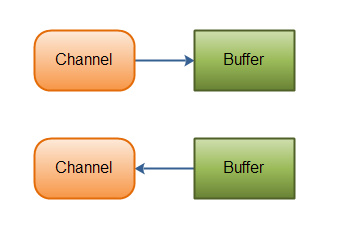
Channel和Buffer有很多实现,NIO中的一些主要Channel实现:
- FileChannel:从文件中读写数据;
- DatagramChannel:能通过UDP读写网络中的数据;
- SocketChannel:通过TCP读写网络中的数据;
- ServerSocketChannel:可以监听新的TCP连接,对新连接都会创建一个SocketChannel。
Buffer的关键实现:
- ByteBuffer
- CharBuffer
- DoubleBuffer
- FloatBuffer
- IntBuffer
- LongBuffer
- ShortBuffer
这些Buffer覆盖了IO发送的基本数据类型:byte,short,int,long,float,double和char。
NIO还有一个MappedByteBuffer,用于标示内存映射文件。
1.2 Selector
Selector允许单线程处理多个Channel。如果你额应用打开了多个连接(Channel),但每个连接的流量都很低,使用Selector就会很方便。

要使用Selector,得向Selector注册Channel,然后调用Selector的select()方法。这个方法会一直阻塞到某个注册的通道有事件就绪,一旦这个方法返回,线程就可以处理这些事件,事件的例子有如新连接,数据接收等。
2. Buffer
Buffer用于和Channel进行交互:数据从Channel读入Buffer,从Buffer写入到Channel中。
Buffer本质上是一块可以写入数据,然后可以从中读取数据的内存。这块内存被包装成NIO Buffer对象,并提供一组方法,用来方便的访问该块内存。
2.1 Buffer的基本用法
使用Buffer读写数据一般遵循以下4个步骤:
- 写入数据到Buffer;
- 调用flip方法;
- 从Buffer中读取数据;
- 调用clear或compact方法
当想Buffer写入数据时,Buffer会记录下谢了多少数据,一旦要读取数据,需要通过flip方法将Buffer从写模式切换到读模式。在读模式下,可以读取之前写入到Buffer的所有数据。
一旦读完了所有的数据,就需要清空缓冲区,让它可以再次被写入,有两种方法能清空缓冲区:调用clear和compact方法。clear方法会清空整个缓冲区。compact方法只会清除已经读过的数据。任何未读的数据都被移到缓冲区的起始处,新写入的数据将放到缓冲区未读数据的后面。
2.2 capacity,position和limit
为了理解Buffer的工作原理,需要熟悉它的三个属性:
- capacity:作为一块内存,Buffer有一个固定的大小值capacity,最多写入capacity个byte,long,char等类型。一旦Buffer满,需要将其清空(通过读数据或清除数据)才能继续写数据;
- position:当写数据到Buffer中,position表示当前的位置。初始的position值为0,当一个byte,long等数据写到Buffer后,position会向前移动到下一个可插入数据的Buffer单元。position最大可为capacity -1。当读取数据时,也是从某个特定位置读,当将Buffer从写模式切换到读模式,position会被重置为0。当从Buffer的position处读取数据时,position向前移动到下一个可读的位置;
- limit:在写模式下,Buffer的limit表示你最多能往Buffer里写多少数据,写模式下,limit等于Buffer的capacity;当切换Buffer到读模式时,limit表示你最多能读到多少数据。因此,当切换Buffer到读模式时,limit会被设置成写模式的position值。换句话说,你能读到之前写入的所有数据(limit被设置成已写数据的数量,这个值在写模式下就是position)。
position和limit的含义取决于Buffer处于读模式还是写模式。不管Buffer处在什么模式,capacity的含义总是一样的。

2.3 Buffer的分配和读写
2.3.1 分配
要想获得一个Buffer对象首先要进行分配,每一个Buffer类都有一个allocate方法:
ByteBuffer buff = ByteBuffer.allocate(48);
分配一个可存储1024字符的CharBuffer:
CharBuffer buf = CharBuffer.allocate(1024);
2.3.2 写
写数据到Buffer有两种方法:
- 从Channel写到Buffer:int byteRead = channel.read(buff);
- 通过Buffer的put()方法写到Buffer里,其中put方法有很多版本,允许以不同方式把数据写入到Buffer中:buf.put(127);
flip()方法
将Buffer从写模式切换到读模式,调用flip方法会将position设置为0,并将limit设置为之前position的值。
换句话说,position现在用于标记读的位置,limit标示之前写进了多少byte,char等。
2.3.3 读
从Buffer中读取数据有两种方式:
- 从Buffer读取数据到Channel:int byteWrite = channel.write(buf);
- 使用get方法从Buffer中读取数据:byte abyte = buf.get();
get方法有很多版本,允许以不同的方法从Buffer中读取数据。
2.4 API
2.4.1 flip
将Buffer从写模式切换到读模式,调用flip方法会将position设置为0,并将limit设置为之前position的值。
换句话说,position现在用于标记读的位置,limit标示之前写进了多少byte,char等。
2.4.2 rewind
将position设回0,所以可以重读Buffer里面的所有数据。limit保持不变,仍然标示能从Buffer里面读取多少个元素。
2.4.3 clear和compact
一旦读完Buffer中的数据,需要让Buffer准备好再次被写入,可以通过clear和compact方法来完成。
clear:如果调用的是clear方法,position将被设回0,limit被设置成capacity的值。换句话说,Buffer被清空了。Buffer中的数据并未清除,只是这些标记告诉我们可以从哪里开始往Buffer里写数据;如果Buffer中有一些未读的数据,调用clear方法,数据将被遗忘,意味着不再有任何标记告诉你哪些数据被读过,哪些还没有。
compact:如果Buffer中有一些未读的数据,且后续还需要这些数据,但是此时想要先写一些数据,那么使用compact;可以将所有未读的数据拷贝到Buffer起始处,然后将position设到最后一个未读元素正后面。limit属性依然像clear方法一样,设置成capacity。现在Buffer准备好写数据了,但是不会覆盖未读的数据。
2.4.4 mark和reset
通过调用Buffer.mark方法,可以标记Buffer中的一个特定position。之后可以通过调用Buffer.reset方法恢复到这个position。
2.4.5 equals和compareTo
可以使使用equals和compareTo比较两个Buffer。
equals
当满足下列条件时,标示两个Buffer相等,equals只是比较Buffer的一部分,不是每一个在它里面的元素都比较,实际上,它只比较Buffer中的剩余元素。
(1)有相同的类型(byte,char,int等);
(2)Buffer中剩余的byte,char等个个数相等;
(3)Buffer中所有剩余的byte,char等都相同。
注意:剩余元素是从position到limit之间的元素。
comparTo
比较两个Buffer剩余元素(byte,char等),如果满足下列条件,则认为一个Buffer“小于”另一Buffer:
(1)第一个不相等的元素小于另一个Buffer中对应的元素;
(2)所有元素都相等,但第一个Buffer的元素个数比另一个少;
3. Channel
JavaNIO通道类似流,但有些不同:
- 既可以从通道中读取数据,又可以写数据到通道,但流的读写通常是单向的;
- 通道可以异步的读写;
- 通道中的数据总是要先读到一个Buffer,或者总是要从一个Buffer中写入;
实例:通过FileChannel读取文件
import java.io.IOException;

import java.io.RandomAccessFile;

import java.nio.ByteBuffer;

import java.nio.channels.FileChannel;

public class TestFileChannel {

    public static void main(String[] args) throws IOException {

        RandomAccessFile aaf = new RandomAccessFile("D:\\App.java", "rw");

        FileChannel fChannel = aaf.getChannel(); // 创建FileChannel

        ByteBuffer buff = ByteBuffer.allocate(48); // 创建Buffer对象

        int readBytes = fChannel.read(buff); // 读取文件

        while (readBytes != -1) { // 如果读到文件末尾,则返回-1

            System.out.println(readBytes);

            buff.flip(); // 将Buffer从写模式切换到读模式

            while (buff.hasRemaining()) {

                System.out.println((char)buff.get());

            }

            buff.clear();

            readBytes = fChannel.read(buff); // 循环读取文件

        }

        aaf.close();

    }

}
3.1 FileChannel
FileChannel是一个连接到文件的通道,可以通过文件通道读写文件。FileChannel无法设置为非阻塞模式,它总是运行在阻塞模式下。
3.1.1 文件操作
(1)打开FileChannel
在使用FileChannel之前,必须先打开它,但是我们无法直接打开一个FileChannel,需要通过使用一个InputStream,OutputStream或RandomAccessFile打开FileChannel来获取一个FileChannel实例。
RandomAccessFile aFile = new RandomAccessFile("data/nio-data.txt", "rw");

FileChannel inChannel = aFile.getChannel();
(2)读取数据
调用read方法从FileChannel中读取数据:
ByteBuffer buf = ByteBuffer.allocate(48);

int bytesRead = inChannel.read(buf);
首先,分配一个Buffer,从FileChannel中读取的数据将被读到Buffer中。
然后,调用read方法,该方法将数据从FileChannel读取到Buffer中,read方法返回的int值标示有多少字节被读到了Buffer中。如果返回-1,标示到了文件末尾。
(3)写入数据
使用write方法向FileChannel写数据,该方法的参数是一个Buffer:
String newData = "New String to write to file..." + System.currentTimeMillis();

ByteBuffer buf = ByteBuffer.allocate(48);

buf.clear();

buf.put(newData.getBytes());

buf.flip();

while(buf.hasRemaining()) {

	channel.write(buf);

}
注意:write是在while循环中调用的,因为无法保证write方法一次能向FileChannel写入多少字节,因此需要重复调用write方法,直到Buffer中已经没有尚未写入通道的字节。
(4)关闭
用完FileChannel必须关闭:
FileChannel.close
3.1.2 其他API
(1)position方法
有时候可能需要在FileChannel的某个特定位置进行数据的读写操作,可以通过调用position方法获取FileChannel的当前位置。也可以通过调用position(long pos)方法设置FileChannel的当前位置。
long pos = channel.position();

channel.position(pos +123);
- 如果将位置设置在文件结束符之后,然后试图从文件通道中读取数据,读方法将返回-1(文件结束标志)
- 如果将位置设置在文件结束符之后,然后向通道中写数据,文件将撑大到当前位置并写入数据。这可能导致“文件空洞”,磁盘上物理文件中写入的数据间有空隙。
(2)size方法
将返回所关联文件的大小。
(3)truncate方法
截取一个文件,截取文件时,文件将指定长度后面的部分删除。
FileChannel.truncate(1024);
(4)force方法
将通道里尚未写入磁盘的数据轻质写到磁盘上,出于性能方面的考虑,操作系统会将数据缓存在内存中,所以无法保证写入到FileChannel里的数据一定会即时写到磁盘上。要保证这一点,需要调用force方法。
force方法有一个boolean类型的参数:指明是否同时将文件元数据(权限信息等)写到磁盘上。
(5)transferFrom/transferTo
在JavaNIO中,如果两个通道中有一个是FileChannel,那你可以直接将数据从一个channel传输到另一个channel。
FileChannel的transferForm方法可以将数据从源通道传输到FileChannel中。
RandomAccessFile fromFile = new RandomAccessFile("fromFile.txt", "rw");

FileChannel      fromChannel = fromFile.getChannel();

RandomAccessFile toFile = new RandomAccessFile("toFile.txt", "rw");

FileChannel      toChannel = toFile.getChannel();

long position = 0;

long count = fromChannel.size();

toChannel.transferFrom(position, count, fromChannel);
注意:在SocketChannel的实现中,SocketChannel只会传输此刻准备好的数据。因此,SocketChannel可能不会将请求的所有数据全部传输到FileChannel中。
transferTo方法将数据从FileChannel传输到其他的Channel中。
RandomAccessFile fromFile = new RandomAccessFile("fromFile.txt", "rw");

FileChannel      fromChannel = fromFile.getChannel();

RandomAccessFile toFile = new RandomAccessFile("toFile.txt", "rw");

FileChannel      toChannel = toFile.getChannel();

long position = 0;

long count = fromChannel.size();

fromChannel.transferTo(position, count, toChannel);
3.2 SocketChannel
JavaNIO的SocketChannel是一个连接到TCP网络套接字的通道,可以通过以下2种方式创建SocketChannel:
- 打开一个SocketChannel并连接到互联网上的某台服务器;
- 一个新连接达到ServerSocketChannel时,会创建一个SocketChannel;
3.2.1 打开SocketChannel
SocketChannel socketChannel = SocketChannel.open();

socketChannel.connect(new InetSocketAddress("http://jenkov.com", 80));
3.2.2 关闭SocketChannel
当用完SocketChannel之后调用close关闭:
socketChannel.close();
3.2.3 从SocketChannel读取数据
要从SocketChannel中读取数据,调用read方法
ByteBuffer buf = ByteBuffer.allocate(48);

int bytesRead = socketChannel.read(buf);
首先,分配一个Buffer,从SocketChannel读取到的数据将会放到这个Buffer中。
然后,调用SocketChannel.read,该方法将数据从SocketChannel读到Buffer中。read方法返回的int值表示读了多少字节进Buffer里面。如果返回-1,表示已经读到了流的末尾(连接关闭了)。
3.2.4 写入SocketChannel
写数据到SocketChannel用的是write方法,该方法以一个Buffer为参数。
String newData = "New String to write to file..." + System.currentTimeMillis();

ByteBuffer buf = ByteBuffer.allocate(48);

buf.clear();

buf.put(newData.getBytes());

buf.flip();

while(buf.hasRemaining()) {

    channel.write(buf);

}
注意:SocketChannel.write方法的调用是在一个while循环中,write方法无法保证能写多少字节到SocketChannel。所以,重复调用write直到Buffer没有要写的字节为止。
3.2.5 非阻塞模式
可以设置SocketChannel为非阻塞模式(non-blocking mode),设置周,就可以在异步模式下调用connect,read和write。
connect:如果SocketChannel在非阻塞模式下,此时调用connect,该方法可能在连接建立之前就返回了。为了确定连接是否建立,可以调用finishConnect方法。
socketChannel.configureBlocking(false);

socketChannel.connect(new InetSocketAddress("http://jenkov.com", 80));

while(! socketChannel.finishConnect() ){

    //wait, or do something else...

}
write:非阻塞模式下,write方法在尚未写出任何内容时可能就返回了,所以需要在循环中调用write。
read:非阻塞模式下,read方法在尚未读到任何数据时可能就返回了。所以需要关注它的int返回值,它会告诉你读取了多少字节。
非阻塞模式与Selector:非阻塞模式与选择器搭配会工作的更好,通过将一个或多个SocketChannel注册到Selector,可以询问选择器哪个通道已经准备好了读取,写入等。
3.3 ServerSocketChannel
JavaNIO中的ServerSocketChannel是一个可以监听新进来的TCP连接的通道,就像标准IO的ServerSocket。
ServerSocketChannel serverSocketChannel = ServerSocketChannel.open();

serverSocketChannel.socket().bind(new InetSocketAddress(9999));

while(true){

    SocketChannel socketChannel =

            serverSocketChannel.accept();

    //do something with socketChannel...

}
3.3.1 打开ServerSocketChannel
通过调用ServerSocketChannel.open方法来打开。
ServerSocketChannel serverSocketChannel = ServerSocketChannel.open();
3.3.2 关闭ServerSocketChannel
serverSocketChannel.close();
3.3.3 监听连接
通过ServerSocketChannel.accept方法监听新的连接,当accept方法返回的时候,它返回一个包含新进来的连接的SocketChannel。因此,accept方法会一直阻塞到新连接到达。
通常不会仅仅监听一个连接,在while循环中调用accept方法,如下面:
while(true){

    SocketChannel socketChannel =

            serverSocketChannel.accept();

    //do something with socketChannel...

}
3.3.4 非阻塞模式
ServerSocketChannel可以设置成非阻塞模式,在非阻塞模式下,accept方法会立刻返回,如果还没有新进来的连接,返回的将是null,因此,需要检查返回的SocketChannel是否是null。
ServerSocketChannel serverSocketChannel = ServerSocketChannel.open();

serverSocketChannel.socket().bind(new InetSocketAddress(9999));

serverSocketChannel.configureBlocking(false);

while(true){

    SocketChannel socketChannel =

            serverSocketChannel.accept();

    if(socketChannel != null){

        //do something with socketChannel...

    }

}
3.4 DatagramChannel
JavaNIO中的DatagramChannel是一个收发UDP包的通道。
因为UDP是无连接的网络协议,所以不像其他通道那样读取和写入。它发送和接收的是数据包。
3.4.1 打开DatagramChannel
DatagramChannel channel = DatagramChannel.open();

channel.socket().bind(new InetSocketAddress(9999));
3.4.2 接收数据
同receive方法从DatagramChannel接收数据,如:
ByteBuffer buf = ByteBuffer.allocate(48);

buf.clear();

channel.receive(buf);
receive方法会将接收到的数据包内容复制到指定的Buffer,如果Buffer容不下收到的数据,多出的数据将被丢弃。
3.4.3 发送数据
通过send方法从DatagramChannel发送数据:
String newData = "New String to write to file..." + System.currentTimeMillis();

ByteBuffer buf = ByteBuffer.allocate(48);

buf.clear();

buf.put(newData.getBytes());

buf.flip();

int bytesSent = channel.send(buf, new InetSocketAddress("jenkov.com", 80));
这个例子发送一串字符串到jenkov.com服务器的UDP端口80。因为服务端并没有监控这个端口,所以什么也不会发送。也不会通知你发出的数据包师傅已收到,因为UDP在数据传送方面没有任何保证。
3.4.4 连接到特定的地址
可以将DatagramChannel连接到网络中的特定地址,由于UDP是无连接的,连接到特定地址并不会像TCP通道那样创建一个真正的连接。而是锁住DatagramChannel,让其只能从特定地址收发数据。
channel.connect(new InetSocketAddress("jenkov.com", 80));
当连接后,也可以使用read和write方法,就像在用传统的通道一样,只是在数据传送方面没有任何保证。
int bytesRead = channel.read(buf);

int bytesWritten = channel.write(but);
3.5 Pipe
JavaNIO管道是2个线程之间的单向数据连接。Pipe有一个source通道和一个sink通道。数据会被写到sink通道,从source通道读取。
pipe的原理:

3.5.1 创建管道
Pipe pipe = Pipe.open();
3.5.2 写数据
要向管道写数据,需要访问sink通道:
Pipe.SinkChannel sinkChannel = pipe.sink();

String newData = "New String to write to file..." + System.currentTimeMillis();

ByteBuffer buf = ByteBuffer.allocate(48);

buf.clear();

buf.put(newData.getBytes());

buf.flip();

while(buf.hasRemaining()) {

    sinkChannel.write(buf);

}
通过调用SinkChannel的write方法,将数据写入SinkChannel。
3.5.3 读数据
从读取管道的数据,需要访问source通道:
Pipe.SourceChannel sourceChannel = pipe.source();

ByteBuffer buf = ByteBuffer.allocate(48);

int bytesRead = sourceChannel.read(buf);
调用souce通道的read方法来读取数据。
3.x Scatter、Gather
JavaNIO支持scather/gather,用于描述从Channel中读取或写入到Channel的操作。
scather(分散)从Channel中读取是指在读操作时将读取的数据写入多个Buffer中。因此,Channel将从Channel中读取的数据分散到多个Buffer中。
ByteBuffer header = ByteBuffer.allocate(128);

ByteBuffer body   = ByteBuffer.allocate(1024);

ByteBuffer[] bufferArray = { header, body };

channel.read(bufferArray);
注意Buffer首先被插入到数组,然后再讲数据作为channel.read的输入参数。read方法按照Buffer在数组中的顺序将从channel中读取的数据写入到Buffer,当一个Buffer写满后,Channel紧接着向另一个Buffer中写。
scatter在移动到下一个Buffer前,必须填满当前的Buffer,这意味着它不适用于动态消息。
gather(聚集)写入Channel是指在写操作时将多个Buffer的数据写入同一个Channel,因此,Channel将多个Buffer中的数据聚集后发送到Channel。
ByteBuffer header = ByteBuffer.allocate(128);

ByteBuffer body   = ByteBuffer.allocate(1024);

//write data into buffers

ByteBuffer[] bufferArray = { header, body };

channel.write(bufferArray);
buffers数组是write方法的入参,write方法会按照buffer在数组中的顺序,将数据写入到channel,注意只有position和limit之间的数据才会被写入。
与scatter相反,gather能较好的处理动态消息。
4. Selector
Selector选择器是JavaNIO中能够检测一到多个NIO通道,并能够知晓通道是否为诸如读写事件做好准备的组件。这样,一个单独的线程可以管理多个channel,从而管理多个网络连接。
4.1 why Selector?
仅用单个线程来处理多个Channels的好处是,只需要更少的线程来处理通道。事实上,可以只用一个线程处理所有的通道。对于操作系统来说,线程之间上下文切换的开销很大,而且每个线程都要占用系统的一些资源。因此,使用的线程越少越好。
4.2 Selector操作
4.2.1 Selector的创建
通过调用Selector.open()方法创建一个Selector,如下:
Selector selector = Selector.open();
4.2.2 向Selector注册通道
为了将Channel和Selector配合使用,必须将Channel注册到Selector上,通过SelectableChannel.register()方法来实现,如下:
channel.configureBlocking(false);

SelectionKey key = channel.register(selector, Selectionkey.OP_READ);
与Selector一起使用时,Channel必须处于非阻塞模式下。这意味着不能讲FileChannel与Selector一起使用,因为FileChannel不能切换到非阻塞模式,而套接字通道可以。
注意register()方法的第二个参数,这是一个interest集合,意思是在通多Selector监听Channel时对什么事件感兴趣,可以监听4中不同类型的事件。
- Connect
- Accept
- Read
- Write
通道触发一个事件的意思是该事件已经就绪。所以,某个Channel成功连接到另一个服务器称为“连接就绪”;一个ServerSocketChannel准备好接收新进入的连接称为“接收就绪”;一个有数据可读的通道可以说是“读就绪”;等待写数据的通道可以说是“写就绪”。
这4中事件可用SelectionKey的4个常量来表示:
- SelectionKey.OP_CONNECT
- SelectionKey.OP_ACCEPT
- SelectionKey.OP_READ
- SelectionKey.OP_WRITE
如果对不止一种事件感兴趣,可以用“位或”操作符将常量连接起来,比如:
int interestSet = SelectionKey.OP_READ | SelectionKey.OP_WRITE;
当向Selector注册Channel时,register方法会返回一个SelectionKey对象,这个对象包含了一些你感兴趣的属性:
- interest集合:interest集合是你所选择的感兴趣的事件集合,可以通过SelectionKey读写interest集合。
- ready集合:ready集合是通道已经准备就绪的操作的集合,在一次选择之后,你会先访问这个ready set。
- Channel:SelectionKey.channel()
- Selector:SelectionKey.selector()
- 附加的对象(可选):可以将一个对象或者更多信息附着到SelectionKey上,这样就能方便的识别某个给定的通道。例如,可以附加与通道一起使用的Buffer,或是包含聚集数据的某个对象。
selectionKey.attach(theObject);

Object attachedObj = selectionKey.attachment();
还可以在用register方法向Selector注册Channel的时候附加对象,如:
SelectionKey key = channel.register(selector, SelectionKey.OP_READ, theObject);
4.2.3 通过Selector选择通道
一旦向Selector注册了一或多个通道,就可以调用几个重载的select方法,这些方法返回你感兴趣的事件(如:连接,接受,读或写)已经准备就绪的那些通道。换句话说,如果你对“读就绪”的通道感兴趣,select方法会返回读事件已经就绪的那些通道。
下面是select方法:
int select() // 阻塞到至少一个通道在你注册的时间上就绪了

int select(long timeout) // 和select一样,除了最长会阻塞timeout毫秒

int selectNow() // 不会阻塞,不管什么通道就绪都立刻返回。如果自从前一次选择操作后,没有通道变成可选的,则此方法直接返回零
select方法返回的int值标示有多少通道已经就绪,即自上次调用select方法后有多少通道变成就绪状态。
如果调用select方法,因为有一个通道变成就绪状态,返回了1,若再次调用select方法如果另一个通道就绪了,它会再次返回1。
一旦调用了select方法,并且返回值表示有一个或更多个通道就绪了,然后可以通过调用selector的selectedKeys方法,访问“已选择键集”(selected key set)中的就绪通道。如下:
Set selectedKeys = selector.selectedKeys();
可以遍历这个已选择的键集合来访问就绪的通道,如下:
Set selectedKeys = selector.selectedKeys();

Iterator keyIterator = selectedKeys.iterator();

while(keyIterator.hasNext()) {

    SelectionKey key = keyIterator.next();

    if(key.isAcceptable()) {

        // a connection was accepted by a ServerSocketChannel.

    } else if (key.isConnectable()) {

        // a connection was established with a remote server.

    } else if (key.isReadable()) {

        // a channel is ready for reading

    } else if (key.isWritable()) {

        // a channel is ready for writing

    }

    keyIterator.remove();

}
这个循环遍历已选择键集中的每个键,并检测各个键所对应的通道的就绪事件。
注意每次迭代末尾的key.remove调用。Selector不会字节从已选择键集中移除SelectionKey实例。必须在处理完通道时自己移除。下次改通道变成就绪时,Selector会再次将其放入已选择键集中。
SelectionKey.channel方法返回的通道需要转型成你要处理的类型,如:ServerSocketChannel或SocketChannel。
某个线程调用select方法后阻塞了,即使没有通道已经就绪,也有办法让其从select方法返回。只要让其他线程在第一个线程调用select方法的那个对象上调用Selector.wakeup方法即可。阻塞在select方法上的线程会立刻返回。
如果在其他线程调用了wakeup方法,但当前没有线程阻塞在select方法上,下个调用select方法的线程会立刻醒来。
用完Selector后调用其close方法会关闭该Selector,且使注册到该Selector上的所有selectionKey实例无效,通道本身并不会关闭。
完整demo:
Selector selector = Selector.open();

channel.configureBlocking(false);

SelectionKey key = channel.register(selector, SelectionKey.OP_READ);

while(true) {

  int readyChannels = selector.select();

  if(readyChannels == 0) continue;

  Set selectedKeys = selector.selectedKeys();

  Iterator keyIterator = selectedKeys.iterator();

  while(keyIterator.hasNext()) {

    SelectionKey key = keyIterator.next();

    if(key.isAcceptable()) {

        // a connection was accepted by a ServerSocketChannel.

    } else if (key.isConnectable()) {

        // a connection was established with a remote server.

    } else if (key.isReadable()) {

        // a channel is ready for reading

    } else if (key.isWritable()) {

        // a channel is ready for writing

    }

    keyIterator.remove();

  }

}
5. 实例
服务器实例:
import java.io.IOException;

import java.net.InetSocketAddress;

import java.nio.ByteBuffer;

import java.nio.channels.SelectionKey;

import java.nio.channels.Selector;

import java.nio.channels.ServerSocketChannel;

import java.nio.channels.SocketChannel;

import java.util.Iterator;

public class NioServerChannel {

    private static final int BUF_SIZE = 1024;

    private static final int PORT = 8080;

    private static final int TIMEOUT = 3000;

    public static void handleAccept(SelectionKey key) throws IOException {

        System.out.println("accept");

        ServerSocketChannel ssc = (ServerSocketChannel) key.channel();

        // ServerSocketChannel可以设置成非阻塞模式,在非阻塞模式下,accept方法会立刻返回,如果还没有新进来的连接

        // 返回的将会是null,因此需要检查返回的SocketChannel是否是null。

        SocketChannel sc = ssc.accept();

        if (sc != null) {

            sc.configureBlocking(false);

            sc.register(key.selector(), SelectionKey.OP_READ, ByteBuffer.allocate(BUF_SIZE));

        }

    }

    public static void handleRead(SelectionKey key) throws IOException {

        System.out.println("read");

        SocketChannel sc = (SocketChannel) key.channel();

        ByteBuffer buf = (ByteBuffer) key.attachment();

        long byteRead = sc.read(buf);

        while (byteRead > 0) {

            buf.flip();

            while (buf.hasRemaining())

                System.out.print((char) buf.get());

            System.out.println();

            buf.clear();

            byteRead = sc.read(buf);

        }

        if (byteRead == -1) {

            sc.close();

        }

    }

    public static void handleWrite(SelectionKey key) throws IOException {

        System.out.println("write");

        ByteBuffer buf = (ByteBuffer) key.attachment();

        buf.flip();

        SocketChannel sc = (SocketChannel) key.channel();

        while (buf.hasRemaining())

            sc.write(buf);

        buf.compact();

    }

    public static void main(String[] args) {

        Selector selector = null;

        ServerSocketChannel ssc = null;

        try {

            selector = Selector.open();

            ssc = ServerSocketChannel.open();

            ssc.socket().bind(new InetSocketAddress(PORT));

            ssc.configureBlocking(false);

            // 为了将Channel和Selector配合使用,必须将Channel注册到Selector上

            // 通过SelectableChannel.register()方法来实现。

            // 与Selector一起使用时,Channel必须处于非阻塞模式下,这意味着不能讲FileChannel与Selector一起使用,因为FileChannel不能切换到非阻塞模式,而套接字通道可以

            ssc.register(selector, SelectionKey.OP_ACCEPT);

            while (true) {

                if (selector.select(TIMEOUT) == 0) {

                    System.out.println("==");

                    continue;

                }

                Iterator<SelectionKey> it = selector.selectedKeys().iterator();

                while (it.hasNext()) {

                    SelectionKey key = it.next();

                    if (key.isAcceptable()) {

                        handleAccept(key);

                    }

                    if (key.isReadable()) {

                        handleRead(key);

                    }

                    if (key.isWritable() && key.isValid()) {

                        handleWrite(key);

                    }

                    if (key.isConnectable()) {

                        System.out.println("isConeectable = true");

                    }

                    it.remove();

                }

            }

        } catch (Exception e) {

            System.out.println(e);

        } finally {

            try {

                if (selector != null)

                    selector.close();

                if (ssc != null)

                    ssc.close();

            } catch (Exception e) {

                System.out.println(e);

            }

        }

    }

}
客户端实例:
import java.io.IOException;

import java.net.InetSocketAddress;

import java.nio.ByteBuffer;

import java.nio.channels.SocketChannel;

import java.util.concurrent.TimeUnit;

public class NioClientChannel {

    public static void main(String[] args) {

        ByteBuffer buffer = ByteBuffer.allocate(1024);

        SocketChannel socketChannel = null;

        try {

            socketChannel = SocketChannel.open();

            socketChannel.configureBlocking(false);

            socketChannel.connect(new InetSocketAddress("127.0.0.1", 8080));

            if (socketChannel.finishConnect()) {

                int i = 0;

                while (true) {

                    TimeUnit.SECONDS.sleep(1);

                    String info = "I'm " + i++ + "-th information from client";

                    buffer.clear();

                    buffer.put(info.getBytes());

                    buffer.flip();

                    while (buffer.hasRemaining()) {

                        System.out.println(buffer);

                        socketChannel.write(buffer);

                    }

                }

            }

        } catch (IOException | InterruptedException e) {

            System.out.println(e);

        } finally {

            try {

                if (socketChannel != null)

                    socketChannel.close();

            } catch (Exception e) {

                System.out.println(e);

            }

        }

    }

}
6. 参考资料
http://www.importnew.com/19816.html
http://ifeve.com/overview/
Java - NIO基础的更多相关文章
- Java NIO 基础
Java在JDK1.4中引入了 java.nio 类库,为Java进军后端Server和中间件开发打开了方便之门. 一般而言,这里的 nio 代表的是 New I/O,但是从实质上来说,我们可以将其理 ...
- Mina入门:Java NIO基础概念
JDK1.4引入了Java NIO API(Java New IO),Java NIO得到了广泛应用.NIO允许程序进行非阻塞IO操作.java.nio.* 包括以下NIO基本结构: Buffer - ...
- Java NIO 基础知识
前言 前言部分是科普,读者可自行选择是否阅读这部分内容. 为什么我们需要关心 NIO?我想很多业务猿都会有这个疑问. 我在工作的前两年对这个问题也很不解,因为那个时候我认为自己已经非常熟悉 IO 操作 ...
- JAVA NIO 基础学习
package com.hrd.netty.demo.jnio; import java.io.BufferedReader; import java.io.IOException; import j ...
- Java NIO(2):缓冲区基础
缓冲区(Buffer)对象是面向块的I/O的基础,也是NIO的核心对象之一.在NIO中每一次I/O操作都离不开Buffer,每一次的读和写都是针对Buffer操作的.Buffer在实现上本质是一个数组 ...
- Java NIO 网络编程基础
Java NIO提供了一套网络api,可以用来处理连接数很多的情况.他的基本思想就是用一个线程来处理多个channel. 123456789101112131415161718192021222324 ...
- Java中的NIO基础知识
上一篇介绍了五种NIO模型,本篇将介绍Java中的NIO类库,为学习netty做好铺垫 Java NIO 由3个核心组成,分别是Channels,Buffers,Selectors.本文主要介绍着三个 ...
- Java NIO中的通道Channel(一)通道基础
什么是通道Channel 这个说实话挺难定义的,有点抽象,不过我们可以根据它的用途来理解: 通道主要用于传输数据,从缓冲区的一侧传到另一侧的实体(如文件.套接字...),反之亦然: 通道是访问IO服务 ...
- Java NIO中的缓冲区Buffer(一)缓冲区基础
什么是缓冲区(Buffer) 定义 简单地说就是一块存储区域,哈哈哈,可能太简单了,或者可以换种说法,从代码的角度来讲(可以查看JDK中Buffer.ByteBuffer.DoubleBuffer等的 ...
随机推荐
- express结合jade模板渲染HTML
在线html转jade工具>> 注意:以下是在Windwo环境下 运行: npm install jade 然后你的目录node_modules下将增加jade文件夹 app.js var ...
- linux图机界面机制
1.X WindowX Window 是由麻省理工学院(MIT)推出的窗口系统,简称X,它旨在建立不依赖于特定硬件系统的图形和文字显示窗口系统的标准.1987 年9 月,MIT 推出了X 系统的11 ...
- JS中eval函数的使用
/*************************************************注册用户证件号 复选框 combox循环赋值**************************** ...
- django admin后台接入tinymce并且支持图片上传
首先:下载tinymce 地址是https://www.tinymce.com/ 点击download 下载社区版本即可 接着:把压缩包内tinymce目录内的所有文件和文件夹复制到Django项目中 ...
- linux实操常用命令总结
1. linux目录操作命令 ------目录的增.删.改.查------ cd, pwd, ls, mkdir, mv, ls(du, df, tree) 切换目录,跟window的使用类似 cd ...
- hosts文件配置及主要作用
hosts文件位于" C:\Windows\System32\drivers\etc "目录下,用于转换名字与IP地址的转换. 在浏览器中通过域名访问网站,首先查看hosts文件中 ...
- 虚拟机、linux系统安装
下载VMWare解压后依据提示正触安装VMWare到硬盘中 (1) 建立虚拟机 A.用鼠标左建双击桌面中的"VMwareworkstation"图标.执行虚拟机 B.建立一台虚拟机 ...
- 《深入理解Java虚拟机》笔记6
class文件由无符号数和表两种类型数据构成.表其实相当于一种结构体,内部又嵌套无符号数或者表. 用u1,u2,u4,u8分别代表一个字节,两个字节,四个字节,八个字节的无符号数. 如图中所示,cla ...
- Spark Streaming资源动态分配和动态控制消费速率
本篇从二个方面讲解: 高级特性: 1.Spark Streaming资源动态分配 2.Spark Streaming动态控制消费速率 原理剖析,动态控制消费速率其后面存在一套理论,资源动态分配也有一套 ...
- RocketMQ概念整理
DefaultMessageStore 消息的存储和提取. 相对重要的两个方法: 消息存储 PutMessageResult putMessage(MessageExtBrokerInner msg) ...