
cocoaPods 的使用
打开 终端
1. 移除系统自带的 因为该rub已经被和谐了 使用ruby.taobao.org
MCJ:~ MCJ$ sudo gem sources -l
*** CURRENT SOURCES ***
https://rubygems.org/
MCJ:~ MCJ$ sudo gem sources --remove https://rubygems.org/
https://rubygems.org/ removed from sources
MCJ:~ MCJ$ sudo gem sources -a https://ruby.taobao.org/
https://ruby.taobao.org/ added to sources
2. 安装 cocoapods(接着刚才的写 sudo gem install cocoapods 系统会自动帮你下载cocoapods)
MCJ:~ MCJ$ sudo gem install cocoapods
Fetching: i18n-0.7.0.gem (100%)
Successfully installed i18n-0.7.0
Fetching: thread_safe-0.3.5.gem (100%)
Successfully installed thread_safe-0.3.5
Fetching: tzinfo-1.2.2.gem (100%)
Successfully installed tzinfo-1.2.2
Fetching: minitest-5.8.3.gem (100%)
Successfully installed minitest-5.8.3
Fetching: activesupport-4.2.5.gem (100%)
Successfully installed activesupport-4.2.5
Fetching: nap-1.0.0.gem (100%)
Successfully installed nap-1.0.0
Fetching: fuzzy_match-2.0.4.gem (100%)
Successfully installed fuzzy_match-2.0.4
Fetching: cocoapods-core-0.39.0.gem (100%)
Successfully installed cocoapods-core-0.39.0
Fetching: claide-0.9.1.gem (100%)
Successfully installed claide-0.9.1
Fetching: colored-1.2.gem (100%)
Successfully installed colored-1.2
Fetching: xcodeproj-0.28.2.gem (100%)
Successfully installed xcodeproj-0.28.2
Fetching: cocoapods-downloader-0.9.3.gem (100%)
Successfully installed cocoapods-downloader-0.9.3
Fetching: cocoapods-plugins-0.4.2.gem (100%)
Successfully installed cocoapods-plugins-0.4.2
Fetching: cocoapods-search-0.1.0.gem (100%)
Successfully installed cocoapods-search-0.1.0
Fetching: cocoapods-stats-0.6.2.gem (100%)
Successfully installed cocoapods-stats-0.6.2
Fetching: cocoapods-try-0.5.1.gem (100%)
Successfully installed cocoapods-try-0.5.1
Fetching: netrc-0.7.8.gem (100%)
Successfully installed netrc-0.7.8
Fetching: cocoapods-trunk-0.6.4.gem (100%)
Successfully installed cocoapods-trunk-0.6.4
Fetching: molinillo-0.4.0.gem (100%)
Successfully installed molinillo-0.4.0
Fetching: escape-0.0.4.gem (100%)
Successfully installed escape-0.0.4
Fetching: cocoapods-0.39.0.gem (100%)
Successfully installed cocoapods-0.39.0
Parsing documentation for i18n-0.7.0
Installing ri documentation for i18n-0.7.0
Parsing documentation for thread_safe-0.3.5
Installing ri documentation for thread_safe-0.3.5
Parsing documentation for tzinfo-1.2.2
Installing ri documentation for tzinfo-1.2.2
Parsing documentation for minitest-5.8.3
Installing ri documentation for minitest-5.8.3
Parsing documentation for activesupport-4.2.5
unable to convert "\x84" from ASCII-8BIT to UTF-8 for lib/active_support/values/unicode_tables.dat, skipping
Installing ri documentation for activesupport-4.2.5
Parsing documentation for nap-1.0.0
Installing ri documentation for nap-1.0.0
Parsing documentation for fuzzy_match-2.0.4
Installing ri documentation for fuzzy_match-2.0.4
Parsing documentation for cocoapods-core-0.39.0
Installing ri documentation for cocoapods-core-0.39.0
Parsing documentation for claide-0.9.1
Installing ri documentation for claide-0.9.1
Parsing documentation for colored-1.2
Installing ri documentation for colored-1.2
Parsing documentation for xcodeproj-0.28.2
Installing ri documentation for xcodeproj-0.28.2
Parsing documentation for cocoapods-downloader-0.9.3
Installing ri documentation for cocoapods-downloader-0.9.3
Parsing documentation for cocoapods-plugins-0.4.2
Installing ri documentation for cocoapods-plugins-0.4.2
Parsing documentation for cocoapods-search-0.1.0
Installing ri documentation for cocoapods-search-0.1.0
Parsing documentation for cocoapods-stats-0.6.2
Installing ri documentation for cocoapods-stats-0.6.2
Parsing documentation for cocoapods-try-0.5.1
Installing ri documentation for cocoapods-try-0.5.1
Parsing documentation for netrc-0.7.8
Installing ri documentation for netrc-0.7.8
Parsing documentation for cocoapods-trunk-0.6.4
Installing ri documentation for cocoapods-trunk-0.6.4
Parsing documentation for molinillo-0.4.0
Installing ri documentation for molinillo-0.4.0
Parsing documentation for escape-0.0.4
Installing ri documentation for escape-0.0.4
Parsing documentation for cocoapods-0.39.0
Installing ri documentation for cocoapods-0.39.0
21 gems installed
3. 在我们项目文件的主文件路径创建一个Podfile文件
MCJ:~ MCJ$ cd /Users/qianfeng/Desktop/Test/CocoaPodsDemo
MCJ:CocoaPodsDemo MCJ$ touch Podfile
4. 打开我们创建的Podfile 文件写入我们想下载的第三库的名称和版本
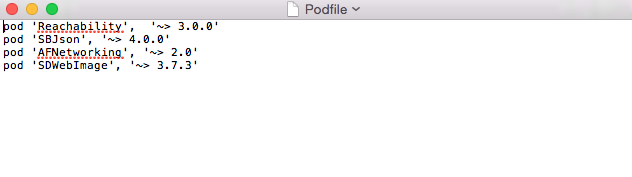
5. 执行下载第三方库(这个需要一定时间 需要看网速)
MCJ:CocoaPodsDemo MCJ$ pod install --verbose --no-repo-update
Updating local specs repositories
Analyzing dependencies
Downloading dependencies
Using AFNetworking (2.6.3)
Using Reachability (3.0.0)
Using SBJson (4.0.2)
Generating Pods project
Integrating client project
Sending stats
Pod installation complete! There are 3 dependencies from the Podfile and 3 total
pods installed.
这样就是下载成功 如果你想看看你Podfile文件的内容可以使用
MCJ:CocoaPodsDemo MCJ$ cat Podfile
pod 'Reachability', '~> 3.0.0'
pod 'SBJson', '~> 4.0.0'
pod 'AFNetworking', '~> 2.0'
6. 下载成功之后来到项目的文件 以后直接双击CocoaPodsDemo.xcworkspace 打开项目就可以编写的代码
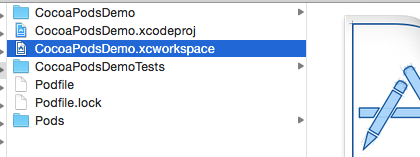
打开项目的效果
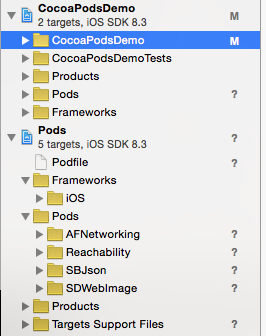
7. 在项目里想使用哪个第三方直接导入头文件就行了
8. 如果想在cocoapods 添加新的第三方库
如果知道名字和版本只需要把 名称和版本添加到Podfile文件更新一下pod 就行了
MCJ:CocoaPodsDemo MCJ$ pod install
如果不知道 可以搜索 把搜索到得添加到Podfile文件 更新一下pod 就行了
MCJ:CocoaPodsDemo MCJ$ pod search SDWebimage
cocoaPods 的使用的更多相关文章
- iOS -- CocoaPods
CocoaPods 是什么? CocoaPods 是一个负责管理 iOS 项目中第三方开源库的工具.CocoaPods 的项目源码在 GitHub( https://github.com/CocoaP ...
- 最新的 cocoaPods 安装方法
经过努力终于发现了最新的 解决cocoaPods安装的办法: taobao Gems 源已停止维护,现由 ruby-china 提供镜像服务 第一步:安装rvm, 不管需不需要升级ruby,rvm可以 ...
- CocoaPods的安装、使用、以及遇到的问题
CocoaPods是什么? 当你开发iOS应用时,会经常使用到很多第三方开源类库,比如JSONKit,AFNetWorking等等.可能某个类库又用到其他类库,所以要使用它,必须得另外下载其他类库,而 ...
- CocoaPods被卡住:Updating local specs repositories
使用CocoaPods被卡住:Updating local specs repositories 使用 pod install --verbose --no-repo-update
- 将自己打代码添加到cocoapods
1,Github 上创建新站点 2, 从gitHub上 clone 一份,将源码拷贝到该目录下提交3,开源库发布之后,需要打上tag git tag 0.0.1 git push --tags git ...
- CocoaPods 1.1.0上传遇到swift问题
更新时间: 2016-11-25 1.出现如下信息: Conn keep-alive Updating spec repo `master` - Data URL: https://raw.githu ...
- Cocoapods无法使用/安装失败/失效解决方法
p.p1 { margin: 0.0px 0.0px 0.0px 0.0px; font: 14.0px "Helvetica Neue"; color: #666666 } sp ...
- 安装cocoapods遇到两大坑-Ruby版本升级和Podfile的配置
今天安装cocoapods #移除原有ruby源 $ gem sources --remove https://rubygems.org/ #使用可用的淘宝网 $ gem sources -a htt ...
- 安装cocoapods以及更新cocoapods
安装 1.设置ruby的软件源 这是因为ruby的软件源rubygems.org因为使用亚马逊的云服务,被我天朝屏蔽了,需要更新一下ruby的源,过程如下: gem sources -l #(查看当前 ...
- CocoaPods 的简单快速安装方法
CocoaPods 的简单快速安装方法(Setting up CocoaPods master repo 卡着不动,是因为淘宝镜像已经不能用了. 一.git clone方法安装cocoapods 镜像 ...
随机推荐
- 用机器名访问和用Localhost访问时在IE中的区别(备忘)
meta中未指定文档模式的时候, localhost访问文档模式默认是Edge 机器名访问时文档模式默认是IE7 <head>中添加 <meta http-equiv="X ...
- Function构造函数
使用Function构造函数, 也能够创建函数, 和使用关键字function定义函数有几点区别: 使用function关键字这样定义函数: var f = function(x,y) {return ...
- 为网站文字前面添加图标 在线调用 Font Awesome 字体icon小图标 美化网站
一.如何开始 1.将下面的代码复制粘贴到HTML页面面的 <head> 下面 <link rel="stylesheet" href="https:// ...
- Flyme适配源码更新命令,轻松完成打包
第一次已经同步了所有源码(花了很长时间),第一次已经连接手机进行了插桩和解reject,那么第二次还需要这么麻烦吗?答案是:NO ! 1.官方源码,执行如下命令可以实现: repo sync -c 2 ...
- Thinking in java学习笔记之迭代器
Map<String,String> map = new HashMap<String,String>(); List list = new ArrayList(); list ...
- Apache 80无法启动
netstat -abno后查看,经过查找为pid=4的system进程,因为是系统进程,也无法结束它,经查SQL Server ReportingServices (SQLEXPRESS) 服务占用 ...
- AutoVFL(适配)
1.添加约束(系统) a.一个约束(上下左右) +(instancetype)constraintWithItem:(id)view1 attribute:(NSLayoutAttribute)att ...
- STM32库函数编程、Keli/MDK、stm32f103zet6
catalogue . Cortex-M3地址空间 . 基于标准外设库的软件开发 . 基于固件库实现串口输出(发送)程序 . 红外接收实验 . 深入分析流水灯例程 . GPIO再举例之按键实验 . 串 ...
- linux下重启apache
基本的操作方法: 本文假设你的apahce安装目录为/usr/local/apache2,这些方法适合任何情况 apahce启动命令: 推荐/usr/local/apache2/bin/apachec ...
- Linux 下EXT2文件系统 —— 如何将蚂蚁和大象优雅的装进冰箱里
这一阵子真是偷懒,无时无刻不和自己身体中的懒癌做斗争.最终我还是被打败了,星期天两天几乎都是荒废过去的,在空闲的时候实际上我内心也是有点焦虑的,不知道去怎么度过这时间.学习吧又不想学习,看电视娱乐吧也 ...