
使用scrapy_redis,实时增量更新东方头条网全站新闻
存储使用mysql,增量更新东方头条全站新闻的标题 新闻简介 发布时间 新闻的每一页的内容 以及新闻内的所有图片。东方头条网没有反爬虫,新闻除了首页,其余板块的都是请求一个js。抓包就可以看到。
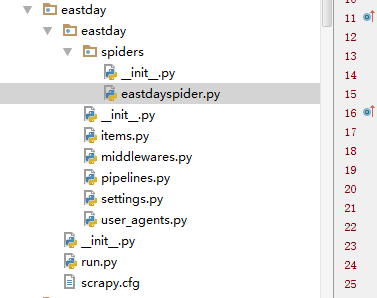
项目文件结构。
这是settings.py
 # -*- coding: utf-8 -*-

 # Scrapy settings for eastday project

 #

 # For simplicity, this file contains only settings considered important or

 # commonly used. You can find more settings consulting the documentation:

 #

 #     http://doc.scrapy.org/en/latest/topics/settings.html

 #     http://scrapy.readthedocs.org/en/latest/topics/downloader-middleware.html

 #     http://scrapy.readthedocs.org/en/latest/topics/spider-middleware.html

 BOT_NAME = 'eastday'

 SPIDER_MODULES = ['eastday.spiders']

 NEWSPIDER_MODULE = 'eastday.spiders'

 DUPEFILTER_CLASS = "scrapy_redis.dupefilter.RFPDupeFilter"

 SCHEDULER = "scrapy_redis.scheduler.Scheduler"

 REDIS_START_URLS_AS_SET=True   #shezhi strat_urls键是集合,默认是false是列表

 SCHEDULER_PERSIST = True

 DEPTH_PRIORITY=0

 RETRY_TIMES = 20

 IMAGES_STORE = 'd:/'

 IMAGES_EXPIRES = 90

 REDIS_HOST = 'localhost'

 REDIS_PORT = 6379

 # Crawl responsibly by identifying yourself (and your website) on the user-agent

 #USER_AGENT = 'eastday (+http://www.yourdomain.com)'

 # Obey robots.txt rules

 ROBOTSTXT_OBEY = False

 # Configure maximum concurrent requests performed by Scrapy (default: 16)

 CONCURRENT_REQUESTS = 10

 # Configure a delay for requests for the same website (default: 0)

 # See http://scrapy.readthedocs.org/en/latest/topics/settings.html#download-delay

 # See also autothrottle settings and docs

 DOWNLOAD_DELAY = 0

 # The download delay setting will honor only one of:

 #CONCURRENT_REQUESTS_PER_DOMAIN = 16

 #CONCURRENT_REQUESTS_PER_IP = 16

 # Disable cookies (enabled by default)

 #COOKIES_ENABLED = False

 # Disable Telnet Console (enabled by default)

 #TELNETCONSOLE_ENABLED = False

 # Override the default request headers:

 #DEFAULT_REQUEST_HEADERS = {

 #   'Accept': 'text/html,application/xhtml+xml,application/xml;q=0.9,*/*;q=0.8',

 #   'Accept-Language': 'en',

 #}

 # Enable or disable spider middlewares

 # See http://scrapy.readthedocs.org/en/latest/topics/spider-middleware.html

 #SPIDER_MIDDLEWARES = {

 #    'eastday.middlewares.EastdaySpiderMiddleware': 543,

 #}

 # Enable or disable downloader middlewares

 # See http://scrapy.readthedocs.org/en/latest/topics/downloader-middleware.html

 DOWNLOADER_MIDDLEWARES = {

     "eastday.middlewares.UserAgentMiddleware": 401,

     #"eastday.middlewares.CookiesMiddleware": 402,

 }

 # Enable or disable extensions

 # See http://scrapy.readthedocs.org/en/latest/topics/extensions.html

 #EXTENSIONS = {

 #    'scrapy.extensions.telnet.TelnetConsole': None,

 #}

 # Configure item pipelines

 # See http://scrapy.readthedocs.org/en/latest/topics/item-pipeline.html

 ITEM_PIPELINES = {

     #'eastday.pipelines.EastdayPipeline': 300,

     'eastday.pipelines.MysqlDBPipeline':400,

    'eastday.pipelines.DownloadImagesPipeline':200,

     #'scrapy_redis.pipelines.RedisPipeline': 400,

 }

 # Enable and configure the AutoThrottle extension (disabled by default)

 # See http://doc.scrapy.org/en/latest/topics/autothrottle.html

 #AUTOTHROTTLE_ENABLED = True

 # The initial download delay

 #AUTOTHROTTLE_START_DELAY = 5

 # The maximum download delay to be set in case of high latencies

 #AUTOTHROTTLE_MAX_DELAY = 60

 # The average number of requests Scrapy should be sending in parallel to

 # each remote server

 #AUTOTHROTTLE_TARGET_CONCURRENCY = 1.0

 # Enable showing throttling stats for every response received:

 #AUTOTHROTTLE_DEBUG = False

 # Enable and configure HTTP caching (disabled by default)

 # See http://scrapy.readthedocs.org/en/latest/topics/downloader-middleware.html#httpcache-middleware-settings

 #HTTPCACHE_ENABLED = True

 #HTTPCACHE_EXPIRATION_SECS = 0

 #HTTPCACHE_DIR = 'httpcache'

 #HTTPCACHE_IGNORE_HTTP_CODES = []

 #HTTPCACHE_STORAGE = 'scrapy.extensions.httpcache.FilesystemCacheStorage'
setting.py
这是items.py
 # -*- coding: utf-8 -*-

 # Define here the models for your scraped items

 #

 # See documentation in:

 # http://doc.scrapy.org/en/latest/topics/items.html

 import scrapy

 class EastdayItem(scrapy.Item):

     # define the fields for your item here like:

     # name = scrapy.Field()

     title=scrapy.Field()

     url=scrapy.Field()

     tag=scrapy.Field()

     article=scrapy.Field()

     img_urls=scrapy.Field()

     crawled_time=scrapy.Field()

     pubdate=scrapy.Field()

     origin=scrapy.Field()

     brief = scrapy.Field()

     miniimg = scrapy.Field()

     pass

 '''

 class GuoneiItem(scrapy.Item):

     # define the fields for your item here like:

     # name = scrapy.Field()

     title=scrapy.Field()

     url=scrapy.Field()

     tag=scrapy.Field()

     article=scrapy.Field()

     img_urls=scrapy.Field()

     crawled_time=scrapy.Field()

     brief=scrapy.Field()

     miniimg=scrapy.Field()

     pass

 '''
items.py
文件太多啦,不一一贴了,源码文件已打包已上传到博客园,但没找到分享文件链接的地方,如果要源码的可以评论中留言。
这是mysql的存储结果:

东方头条内容也是采集其他网站报刊的,内容还是很丰富,把东方头条的爬下来快可以做一个咨询内容的app了。
文章图片采用的是新闻中图片的连接的源文件名,方便前端开发在页面中展现正确的图片。用来做针对用户的数据挖掘的精准兴趣推荐。

使用scrapy_redis,实时增量更新东方头条网全站新闻的更多相关文章
- [置顶]使用scrapy_redis,自动实时增量更新东方头条网全站新闻
存储使用mysql,增量更新东方头条全站新闻的标题 新闻简介 发布时间 新闻的每一页的内容 以及新闻内的所有图片.项目文件结构. 这是run.py的内容 1 #coding=utf-8 2 from ...
- sql 数据库实时增量更新
---一下sql可以添加到作业中每秒执行一次 数据过多会消耗性能 --数据表如下,其中字段pid mid time price_type是一个组合主键--pid mid time price pr ...
- 一步一步跟我学习lucene(19)---lucene增量更新和NRT(near-real-time)Query近实时查询
这两天加班,不能兼顾博客的更新.请大家见谅. 有时候我们创建完索引之后,数据源可能有更新的内容.而我们又想像数据库那样能直接体如今查询中.这里就是我们所说的增量索引.对于这种需求我们怎么来实现呢?lu ...
- [Solr] (源) Solr与MongoDB集成,实时增量索引
一. 概述 大量的数据存储在MongoDB上,需要快速搜索出目标内容,于是搭建Solr服务. 另外一点,用Solr索引数据后,可以把数据用在不同的项目当中,直接向Solr服务发送请求,返回xml.js ...
- Solr与MongoDB集成,实时增量索引
Solr与MongoDB集成,实时增量索引 一. 概述 大量的数据存储在MongoDB上,需要快速搜索出目标内容,于是搭建Solr服务. 另外一点,用Solr索引数据后,可以把数据用在不同的项目当中, ...
- MySQL数据实时增量同步到Kafka - Flume
转载自:https://www.cnblogs.com/yucy/p/7845105.html MySQL数据实时增量同步到Kafka - Flume 写在前面的话 需求,将MySQL里的数据实时 ...
- android studio增量更新
一.概述 1.1 概念 增量更新即是通过比较 本机安装版本 和 想要安装版本 间的差异,产生一个差异安装包,不需要从官网下载并安装全量安装包,更不需要将本机已安装的版本下载,而仅仅只是安装此差异安装包 ...
- Kettle中通过触发器方式实现数据 增量更新
在使用Kettle进行数据同步的时候, 共有 1.使用时间戳进行数据增量更新 2.使用数据库日志进行数据增量更新 3.使用触发器+快照表 进行数据增量更新 今天要介绍的是第3中方法. 实验的思路是这样 ...
- Android 增量更新
title: Android NDK之增量更新 1.增量更新使用到的库bsdiff和bzip2 bsdiff库是一个开源的二进制差分工具,通过对比Apk的二进制,从而进行差分包的生成. bsdiff库 ...
随机推荐
- hdoj 1166 敌兵布阵 线段数和树状数组
敌兵布阵 Time Limit: 2000/1000 MS (Java/Others) Memory Limit: 65536/32768 K (Java/Others)Total Submis ...
- vue路由配置,vue子路由配置
上一篇关于vue环境配置已经写好了!按照操作就行了! 现在一个项目已经部署完成,接下来我们从路由开始! 还记得在初始化项目的时候,有提示是否需要安装vue-router,对没错,vue中路由全靠它! ...
- Python以不可见字符作为列分割符
# -*- coding: utf-8 -*- import sys import time CTRL_A='\x01' CTRL_B='\x02' thedate = '' thetime = '' ...
- JAVA-JSP表达式
相关资料: <21天学通Java Web开发> 结果总结: 1.<%= %>JSP表达式中的代码会首先执行,然后转换成字符串显示到网页上.2.JSP表达式标签不必也不能使用分号 ...
- 2013年五大主流浏览器 HTML5 和 CSS3 兼容性大比拼【转】
摘要: 这篇文章给大家带来<五大主流浏览器 HTML5 和 CSS3 兼容性大比拼>,让我们一起来看看2013年的浏览器现状.浏览器厂商之间的竞争促使各大浏览器对 HTML5 和 CSS3 ...
- webrtcchatde源代码下载
这个是源代码地址: http://download.csdn.net/detail/duerbin3/5433617 这个demo是国内牛人赵书剑开发的视频聊天室,基于webrtc.io实现. 该项目 ...
- Intellij IDEA创建Maven Web项目<转>
1前言 在创建项目中,IDEA提供了很多项目模板,比如Spring MVC模板,可以直接创建一个基于Maven的Spring MVC的demo,各种配置都已经设定好了,直接编译部署就可以使用. 最开始 ...
- javascript总述
一.JavaScript核心 一个完整的JavaScript应该由下列三个不同的部分组成. 1.核心(ECMAScript) 2.文档对象模型(DOM,Document Object Model) 3 ...
- jquery树形表格实现方法
效果图 准备步骤: 具体使用的Dome可以在这个位置下载 http://download.csdn.net/detail/jine515073/7986227 1.引入jquery.treeTable ...
- Hive SQL的编译过程
文章转自:http://tech.meituan.com/hive-sql-to-mapreduce.html Hive是基于Hadoop的一个数据仓库系统,在各大公司都有广泛的应用.美团数据仓库也是 ...