
基于SSH框架下登录验证码模块的实现
1、前端页面代码:
主要以jQuery的ajax异步请求实现。
...
<script type="text/javascript" src="${pageContext.request.contextPath }/js/jquery-1.11.3.min.js"></script>
<script type="text/javascript">
$(function () {
//验证码图片刷新
$("#vcode").click(function () {
$(this).prop("src","${pageContext.request.contextPath }/user_createVerificationCode?"+new Date()); });
//验证码校验
$("#txtcode").blur(function () {
var url = "${pageContext.request.contextPath }/user_checkVerificationCode"
var code = $(this).val();
$.get(url,{"code":code},function (result) {
if(result != ""){
$("#tip").html(result);
//验证码错误,登录按钮失效
$("#btn").prop("disabled","disabled");
}else{
$("#tip").html("");
$("#btn").removeAttr("disabled");
}
});
});
})
</script>
...
<tr>
<td style="HEIGHT: 28px">验证码:</td>
<td style="HEIGHT: 28px"><input id=txtcode style="WIDTH: 130px" name=txtcode required></td>
<td style="HEIGHT: 18px"><img id="vcode" src="${pageContext.request.contextPath }/user_createVerificationCode" /></td>
<td style="HEIGHT: 28px"> <span id="tip" style="color: red"></span></td>
<tr>
<td></td>
<td>
<input id="btn" value="登录">
</td>
</tr>
...
2、struts.xml
<package name="user" extends="struts-default" namespace="/">

    <action name="user_*" class="userAction" method="{1}"></action>

</package>
3、applicationContext.xml
<bean id="userAction" class="com.pri.web.action.UserAction" scope="prototype">

        <property name="validateCode" ref="validateCode"/>

</bean>

<!-- 生成验证图片需要为多例,默认情况为单例 -->

<bean id="validateCode" class="cn.dsna.util.images.ValidateCode" scope="prototype">

     <constructor-arg index="0">

         <value>80</value>

     </constructor-arg>

     <constructor-arg index="1">

         <value>20</value>

     </constructor-arg>

     <constructor-arg index="2">

         <value>4</value>

     </constructor-arg>

     <constructor-arg index="3">

         <value>10</value>

     </constructor-arg>

</bean>
4、Action.java
public class UserAction extends ActionSupport implements ModelDriven<User>{private String code;

    public String getCode() { return code;}

    public void setCode(String code) {this.code = code;}

    private ValidateCode validateCode;

    public void setValidateCode(ValidateCode validateCode) {

        this.validateCode = validateCode;

    }
   public String createVerificationCode(){

        String vcode = validateCode.getCode ();

        HttpSession session = ServletActionContext.getRequest().getSession();

        session.setAttribute("vcode",vcode);

        try {

            validateCode.write (ServletActionContext.getResponse().getOutputStream ());//将服务器生成的验证码,以流的形式写给客户端(变成图片)

        } catch (IOException e) {

            e.printStackTrace();

        }

        return NONE;

    }

    public String checkVerificationCode() throws IOException {

        HttpSession session = ServletActionContext.getRequest().getSession();

        String vcode = (String) session.getAttribute("vcode");

        if (!code.equalsIgnoreCase(vcode)){

            HttpServletResponse response = ServletActionContext.getResponse();

            response.setContentType("text/html;charset=utf-8");

            response.getWriter().println("验证码输入有误!");

        }else{
       HttpServletResponse response = ServletActionContext.getResponse();
      response.setContentType("text/html;charset=utf-8");
      response.getWriter().print("");
     }
    return NONE;
  }
}
5、ValidateCode.java
package cn.dsna.util.images;

import java.awt.Color;

import java.awt.Font;

import java.awt.Graphics2D;

import java.awt.image.BufferedImage;

import java.io.FileOutputStream;

import java.io.IOException;

import java.io.OutputStream;

import java.util.Random;

import javax.imageio.ImageIO;

public class ValidateCode {

    private int width = 160;

    private int height = 40;

    private int codeCount = 5;

    private int lineCount = 150;

    private String code = null;

    private BufferedImage buffImg = null;

    private char[] codeSequence = new char[]{'A', 'B', 'C', 'D', 'E', 'F', 'G', 'H', 'I', 'J', 'K', 'L', 'M', 'N', 'P', 'Q', 'R', 'S', 'T', 'U', 'V', 'W', 'X', 'Y', 'Z', '1', '2', '3', '4', '5', '6', '7', '8', '9'};

    public ValidateCode() {

        this.createCode();

    }

    public ValidateCode(int width, int height) {

        this.width = width;

        this.height = height;

        this.createCode();

    }

    public ValidateCode(int width, int height, int codeCount, int lineCount) {

        this.width = width;

        this.height = height;

        this.codeCount = codeCount;

        this.lineCount = lineCount;

        this.createCode();

    }

    public void createCode() {

        int x = false;

        int fontHeight = false;

        int codeY = false;

        int red = false;

        int green = false;

        int blue = false;

        int x = this.width / (this.codeCount + 2);

        int fontHeight = this.height - 2;

        int codeY = this.height - 4;

        this.buffImg = new BufferedImage(this.width, this.height, 1);

        Graphics2D g = this.buffImg.createGraphics();

        Random random = new Random();

        g.setColor(Color.WHITE);

        g.fillRect(0, 0, this.width, this.height);

        ImgFontByte imgFont = new ImgFontByte();

        Font font = imgFont.getFont(fontHeight);

        g.setFont(font);

        int i;

        int red;

        int green;

        int blue;

        for(int i = 0; i < this.lineCount; ++i) {

            i = random.nextInt(this.width);

            int ys = random.nextInt(this.height);

            int xe = i + random.nextInt(this.width / 8);

            int ye = ys + random.nextInt(this.height / 8);

            red = random.nextInt(255);

            green = random.nextInt(255);

            blue = random.nextInt(255);

            g.setColor(new Color(red, green, blue));

            g.drawLine(i, ys, xe, ye);

        }

        StringBuffer randomCode = new StringBuffer();

        for(i = 0; i < this.codeCount; ++i) {

            String strRand = String.valueOf(this.codeSequence[random.nextInt(this.codeSequence.length)]);

            red = random.nextInt(255);

            green = random.nextInt(255);

            blue = random.nextInt(255);

            g.setColor(new Color(red, green, blue));

            g.drawString(strRand, (i + 1) * x, codeY);

            randomCode.append(strRand);

        }

        this.code = randomCode.toString();

    }

    public void write(String path) throws IOException {

        OutputStream sos = new FileOutputStream(path);

        this.write((OutputStream)sos);

    }

    public void write(OutputStream sos) throws IOException {

        ImageIO.write(this.buffImg, "png", sos);

        sos.close();

    }

    public BufferedImage getBuffImg() {

        return this.buffImg;

    }

    public String getCode() {

        return this.code;

    }

}
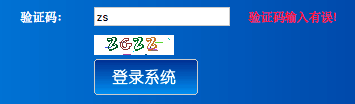
效果显示:
基于SSH框架下登录验证码模块的实现的更多相关文章
- 基于SSH框架的学生公寓管理系统的质量属性
系统名称:学生公寓管理系统 首先介绍一下学生公寓管理系统,在学生公寓管理方面,针对学生有关住宿信息问题进行管理,学生公寓管理系统主要包含了1)学生信息记录:包括学号.姓名.性别.院系.班级:2)住宿信 ...
- 基于SSH框架开发的《高校大学生选课系统》的质量属性的实现
基于SSH框架开发的<高校大学生选课系统>的质量属性的实现 对于可用性采取的是错误预防战术,即阻止错误演变为故障:在本系统主要体现在以下两个方面:(1)对于学生登录模块,由于初次登陆,学生 ...
- 基于ssh框架的在线考试系统开发的质量属性
我做的系统是基于ssh框架的在线考试系统.在线考试系统有以下几点特性:(1)系统响应时间需要非常快,可以迅速的出题,答题.(2)系统的负载量也需要非常大,可以支持多人在线考试(3)还有系统的安全性也需 ...
- java自定义注解知识实例及SSH框架下,拦截器中无法获得java注解属性值的问题
一.java自定义注解相关知识 注解这东西是java语言本身就带有的功能特点,于struts,hibernate,spring这三个框架无关.使用得当特别方便.基于注解的xml文件配置方式也受到人们的 ...
- 基于SSH框架的在线考勤系统开发的质量属性
我要开发的是一个基于SSH框架的在线考勤系统. 质量属性是指影响质量的相关因素,下面我将分别从6个系统质量属性(可用性,易用性,可修改性,性能,安全性,可测试性)来分析我的系统,以及如何实现这些质量属 ...
- 如何实现基于ssh框架的投票系统的的质量属性
如何实现基于ssh框架的投票系统的的质量属性: 项目 :网上考试系统 我做的是网上考试系统,因为标准化的考试越来越重要,而通过计算机进行标准化判卷,系统会自动判卷出成绩,组织考试的人不用组织人员打印试 ...
- 基于SSH框架的学生选课质量属性分析
系统:学生选课系统 框架:SSH(Struts2+Spring+Hibernate) 我做的是基于SSH框架的学生选课系统.学生选课系统的特性:①系统响应时间短,能够快速调出课程数据供学生选课提交.② ...
- 基于SSH框架的人力资源管理系统设计与实现
- - ->关注博主公众号[C you again],获取更多IT资源(IT技术文章,毕业设计.课程设计系统源码,经典游戏源码,HTML网页模板,PPT.简历模板,!!还可以投稿赚钱!!,点击查 ...
- 基于Struts2框架实现登录案例 之 程序国际化
国际化牵涉的知识非常多,这里只能简单的介绍,程序国际化的一般做法是:在jsp页面时, 不是直接输出信息,而是输出一个key值,该key值在不同语言环境下找到对应资源文件下的 对应信息,因此首先要创建满 ...
随机推荐
- Metasploit域渗透测试全程实录(终结篇)
本文作者:i春秋签约作家——shuteer 前言 内网渗透测试资料基本上都是很多大牛的文章告诉我们思路如何,但是对于我等小菜一直是云里雾里.于是使用什么样的工具才内网才能畅通无阻,成了大家一直以来的渴 ...
- Jquery选择器 选择一个不存在的元素 为什么不会返回 false
不管找没找到,$()函数都会返回一个jquery对象,这个jquery对象有个length属性,表示找到多少个匹配的DOM元素,为0就是没找到.
- Github 升级到 Rails 5.2.1 了
简评:之前用的可是 3.2,早就该升级了啊. Github 的 Rails 升级花了大约一年半的时间,这是有原因的,首先,Rails 本身的升级并不总是平滑的,有些版本有重大改变(breaking c ...
- the type initializer for 'system.drawingcore.gdiplus' threw an exception
Centos 7 yum install libgdiplus-devel reboot之后生效 apt install libgdiplus cp /usr/lib/libgdiplus.so ~/ ...
- Python文件中执行脚本注释和编码声明
在 Python 脚本的第一行经常见到这样的注释: #!/usr/bin/env python3 或者 #!/usr/bin/python3 含义 在脚本中, 第一行以 #! 开头的代码, 在计算机行 ...
- [Alpha]Scrum Meeting#8
github 本次会议项目由PM召开,时间为4月10日晚上10点30分 时长15分钟 任务表格 人员 昨日工作 下一步工作 木鬼 撰写每日例会报告 撰写每日例会报告 SiMrua 优化模型速度(iss ...
- P3348 [ZJOI2016]大森林(Link-cut-tree)
传送门 题解 题面大意: \(0.\)区间加节点 \(1.\)区间换根 \(2.\)单点询问距离 如果没有\(1\)操作,因为区间加节点都是加在下面,所以我们可以直接把\(n\)棵树压成一棵树,直接询 ...
- 部署一个flask服务记录
最近使用flask写了一些简单的服务. 服务部署到服务器上进行使用,这个过程会有一些问题,需要进行记录一下. 说明运行的环境情况.使用的是python3.6的虚拟环境,系统是centos7,其他的有u ...
- shiro学习笔记_0400_自定义realm实现身份认证
自定义Realm实现身份认证 先来看下Realm的类继承关系: Realm接口有三个方法,最重要的是第三个方法: a) String getName():返回此realm的名字 b) boolean ...
- JVM-类加载过程(Java类的生命周期)
什么是类加载 类的加载指的是将类的.class文件中的二进制数据读入到内存中,将其放在运行时数据区的方法区内,然后在堆区创建一个java.lang.Class对象,用来封装类在方法区内的数据结构.类的 ...