
自动化工具 Python 调 Jmeter 执行参数化 jmx 脚本
烦透了jmeter输入如下鬼命令:
Jmeter -n -t {tmpjmxfile} -l {csvfilename} -e -o {htmlreportpath}
尤其是{htmlreportpath}这个文件夹路径,没有这个文件夹又不会自动创建,有的话又必须为空。经常要给文件夹、文件命名,而且命名又没什么规范,乱七八糟的。
于是想着,即便是用python帮我创建文件夹,帮我生成命令,也是好的。
精益求精,做着做着,就会想着,干脆把命令也给执行了,于是就有这样的产出。
使用场景:
1.需要不断的运行性能测试脚本,摸底,取数。 如线程数、循环次数。
2.需要等待较长时间的

执行此脚本的条件是,在一个目录下,只能有一个jmx后缀文件。当然可以有参数化文件,拷贝execjmeter.py和runafter.py文件到该目录下。简单例子如下:
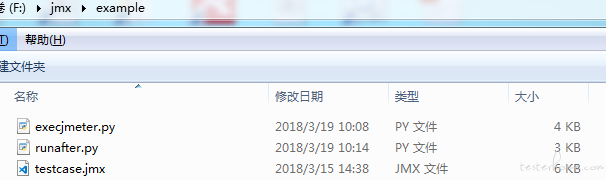
话不多说,直接来段代码,代码仍需不断改进:
python版本=3.6.1,这段代码命名为execjmeter.py
#coding=utf-8
import os
from os.path import join
import re
import subprocess
import time
from string import Template currpath = os.path.dirname(os.path.realpath(__file__)) JMETER_Home = r'''"D:\Program Files\apache-jmeter\bin\jmeter.bat"''' origin_jmxfile = replaced_jmxfile = '' def before_check():
global origin_jmxfile
count_jmxfile = 0
for root, dirs, files in os.walk(currpath):
for name in files:
if '-P.jmx' in name:
os.remove(join(root, name))
if '-P.jmx' not in name and '.jmx' in name and 'XL' not in name:
count_jmxfile = count_jmxfile + 1
origin_jmxfile = join(root, name)
if count_jmxfile != 1 and origin_jmxfile:
print('为了更智能地执行jmx文件,请确保有且仅有一个有效的jmx文件!')
return False
else:
return True def create_para_jmxfile():
global origin_jmxfile, replaced_jmxfile
jmx_str = ''
with open(origin_jmxfile, "r", encoding="utf-8") as file:
jmx_str = file.read()
patten = '<stringProp name="LoopController.loops">(.*?)</stringProp>'
replace_str = '<stringProp name="LoopController.loops">$loops</stringProp>'
jmx_str = re.sub(patten, replace_str, jmx_str)
patten = '<stringProp name="ThreadGroup.num_threads">(.*?)</stringProp>'
replace_str = '<stringProp name="ThreadGroup.num_threads">$num_threads</stringProp>'
jmx_str = re.sub(patten, replace_str, jmx_str)
replaced_jmxfile = origin_jmxfile.replace('.jmx', '-P.jmx')
with open(replaced_jmxfile, "w+", encoding="utf-8") as file:
file.writelines(jmx_str) def getDateTime():
'''
获取当前日期时间,格式'20150708085159'
'''
return time.strftime(r'%Y%m%d%H%M%S', time.localtime(time.time())) def execcmd(command):
print(f"command={command}") output = subprocess.Popen(
command,
stdout=subprocess.PIPE,
stderr=subprocess.PIPE,
shell=True,
universal_newlines=True) stderrinfo, stdoutinfo = output.communicate()
print(f"stderrinfo={stderrinfo}")
print(f"stdoutinfo={stdoutinfo}")
print(f"returncode={output.returncode}") def execjmxs(Num_Threads, Loops):
tmpstr = ''
with open(replaced_jmxfile, "r", encoding="utf-8") as file:
tmpstr = Template(file.read()).safe_substitute(
num_threads=Num_Threads, loops=Loops)
now = getDateTime()
tmpjmxfile = currpath + f'\{now}-T{Num_Threads}XL{Loops}.jmx'
with open(tmpjmxfile, "w+", encoding="utf-8") as file: file.writelines(tmpstr)
csvfilename = currpath + f"\{now}-result.csv"
htmlreportpath = currpath + f"\{now}-htmlreport"
if not os.path.exists(htmlreportpath):
os.makedirs(htmlreportpath)
execjmxouthtml = f"cmd.exe /c {JMETER_Home} -n -t {tmpjmxfile} -l {csvfilename} -e -o {htmlreportpath}"
execcmd(execjmxouthtml) if before_check():
create_para_jmxfile()
jobs = [dict(Num_Threads=(x+1), Loops=1) for x in range(10)]
[execjmxs(x["Num_Threads"], x["Loops"]) for x in jobs]
执行代码后,将会生成有规律的文件。文件列表如下:
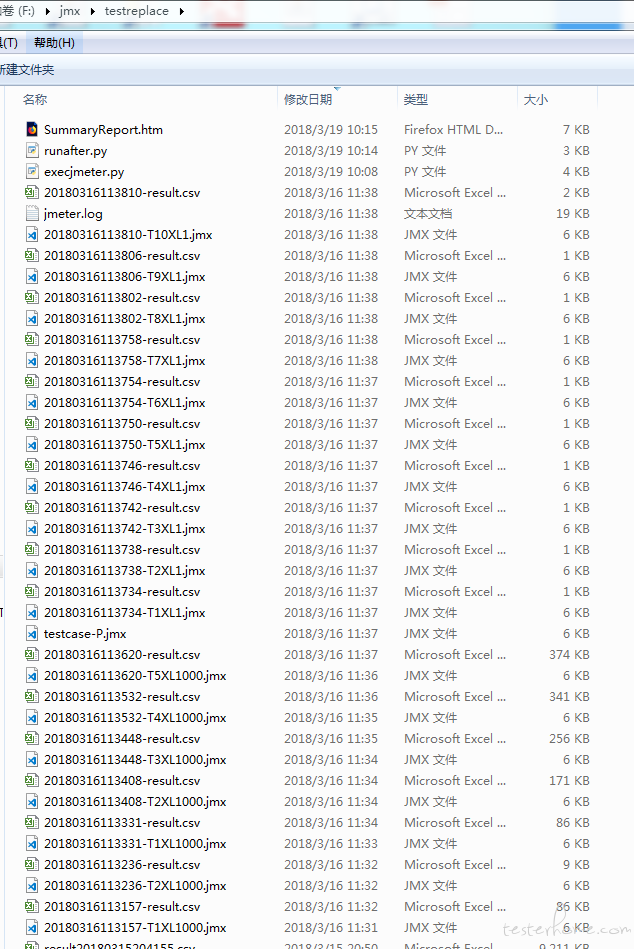
由于持续的多次执行,将会产生很多文件。文件太多,会让人感觉很错乱,看起来累人。比如说每次执行的T线程数XL循环数场景后,都会产生很多文件。文件多了,查看html报表需要进入逐个目录打开index.html文件查看。于是又想到再做一个html>表格页面。方便一览查看。便再做了一个py脚本,命名为runafter.py 。当然这还不是最好的,忘记了最初的想要的结果是什么了吗?
import os

from os.path import join

currpath = os.path.dirname(os.path.realpath(__file__))

run_time_list = []

scene_name_list = []

jmxfile_name_list = []

csvfile_list = []

htmlreport_list = []

for root, dirs, files in os.walk(currpath):

    for name in files:

        if '.jmx' in name and '-' in name and 'XL' in name:

            name_split_list = name.split('-')

            run_time_list.append(name_split_list[0])

            scene_name_list.append(name_split_list[-1].replace('.jmx', ''))

            jmxfile_path = join(root, name).replace('\\', '/')

            jmxfile_link = f'<a href="file:///{jmxfile_path}" target="_blank">{name}</a>'

            jmxfile_name_list.append(jmxfile_link)

            csvfile_name = name_split_list[0]+'-result.csv'

            csvfile_path = join(root, csvfile_name).replace('\\', '/')

            csvfile_link = f'<a href="file:///{csvfile_path}" target="_blank">{csvfile_name}</a>'

            csvfile_list.append(csvfile_link)

            htmlfile_tail = '\\' + name_split_list[0] + '-htmlreport\\index.html'

            htmlfile_path = currpath + htmlfile_tail

            htmlfile_path = htmlfile_path.replace('\\', '/')

            htmlfile_link = f'<a href="file:///{htmlfile_path}" target="_blank">查看</a>'

            htmlreport_list.append(htmlfile_link)

result = [run_time_list, scene_name_list, jmxfile_name_list, csvfile_list,

          htmlreport_list]

title = ['执行时间', '场景名', 'jmx文件', '响应结果', '报告详情']

th_str = '<tr>'

for x in title:

    th_str = th_str + '<th>' + x + '</th>'

else:

    th_str = th_str + '</tr>'

td_str = ''

for index, item in enumerate(run_time_list):

    td_str = td_str + '<tr>'

    for x in result:

        td_str = td_str + '<td>' + x[index] + '</td>'

    td_str = td_str + '</tr>'

table_str = f'<table border="1">{th_str}{td_str}</table>'

html_str = f'<!DOCTYPE html><html lang="en"><body><center>{table_str}</center></body></html>'

with open('SummaryReport.htm', 'w', encoding='utf-8') as file:

    file.writelines(html_str)
执行完该脚本后,会生成一个SummaryReport.htm的html表格页面。效果如下:
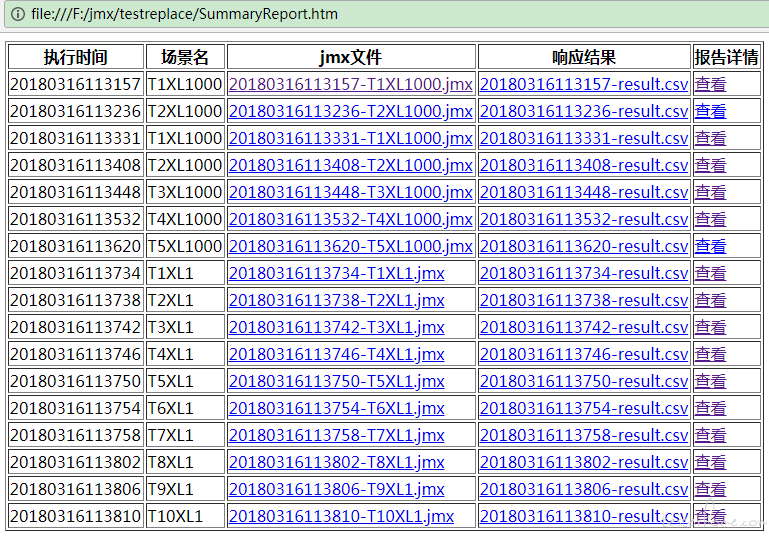
期间,碰到的坑如下,如命令行执行 Jmeter -n -t {tmpjmxfile} -l {csvfilename} -e -o {htmlreportpath} 命令,由于本渣的 JMETER_Home =D:\Program Files\apache-jmeter\bin,就因为这个就碰到两个坑
一、路径包含空格,识别不了可执行的程序命令
解决办法:命令要用“”引号包起来
二、执行命令识别不了Jmeter,即便将JMETER_Home加入path,或者用cd 命令进入JMETER_Home也无效。
解决办法:控制台用cmd命令执行。如"cmd.exe /c {JMETER_Home} -n -t {tmpjmxfile} -l {csvfilename} -e -o {htmlreportpath}"
自动化工具 Python 调 Jmeter 执行参数化 jmx 脚本的更多相关文章
- python中command执行shell命令脚本方法
在Python中有一个模块commands也很容易做到以上的效果.看一下三个函数:1). commands.getstatusoutput(cmd)用os.popen()执行命令cmd, 然后返回两个 ...
- Python实现批量执行华为交换机脚本
#!/usr/bin/python3 # -*- coding:utf-8 -*- import paramiko import time ssh = paramiko.SSHClient() key ...
- jenkins jmeter持续集成批处理jmx脚本
这篇文章介绍jenkis jmeter的持续集成,利用jenkins定时任务去批处理执行jmeter的jmx脚本文件,并且生成测试报告 1:jmeter的安装这里我就不在赘述了,如有问题可参考我的jm ...
- Python ssh 远程执行shell命令
工具 python paramiko 远程执行命令 import paramiko ssh = paramiko.SSHClient() key = paramiko.AutoAddPolicy() ...
- Python 任务自动化工具:nox 的配置与 API
英文 | Configuration & API 出处 | nox 官方文档 译者 | 豌豆花下猫@Python猫 Github地址:https://github.com/chinesehua ...
- jmeter 执行python脚本的方法 。(亲测ok)
jmeter 执行python脚本 jmeter 可以通过Jython 执:行python代码 1.下载Jython jar包:http://www.jython.org/downloads.ht ...
- Python 任务自动化工具 tox 教程
在我刚翻译完的 Python 打包系列文章中,作者提到了一个神奇的测试工具 tox,而且他本人就是 tox 的维护者之一.趁着话题的相关性,本文将对它做简单的介绍,说不定大家在开发项目时能够用得上. ...
- 强大的 Python 任务自动化工具!invoke 十分钟入门指南
接着前面的<tox 教程>,以及刚翻译好的<nox文档>,我们继续聊聊 Python 任务自动化的话题. nox 的作者在去年的 Pycon US 上,做了一场题为<Br ...
- 简单的抓取淘宝关键字信息、图片的Python爬虫|Python3中级玩家:淘宝天猫商品搜索爬虫自动化工具(第一篇)
Python3中级玩家:淘宝天猫商品搜索爬虫自动化工具(第一篇) 淘宝改字段,Bugfix,查看https://github.com/hunterhug/taobaoscrapy.git 由于Gith ...
随机推荐
- Ubuntu软件包管理器
Ubuntu软件包管理 Ubuntu下对软件管理工具有:apt,dpkg,tasksel,aptitude等,我们常用的就是前三个工具.下面就介绍这三个工具的用法. dpkg 在Linux发展之初,安 ...
- Mysql优化原则_小表驱动大表IN和EXISTS的合理利用
//假设一个for循环 ; $i < ; $i++) { ; $i < ; $j++) { } } ; $i < ; $i++) { ; $i < ; $j++) { } } ...
- Python3.x:使用PyMysql连接Mysql数据库
Python3.x:使用PyMysql连接Mysql数据库 Python3.x完全不向前兼容,导致Python2.x中可以正常使用的库,到了Python3就用不了: 比如说mysqldb,目前MySQ ...
- 20145211MSF基础应用实验
20145211MSF基础应用实验 一.实验博客 ms08_067攻击实验 http://www.cnblogs.com/entropy/p/6690301.html ms12_004漏洞攻击 htt ...
- pycharm 模板添加作者时间信息
在pycharm使用过程中,对于每次新建文件的shebang行和关于代码编写者的一些个人信息快捷填写,使用模板的方式比较方便. 方法如下: 1.打开pycharm,选择File-Settings 2. ...
- 解决com.mongodb.MongoException$CursorNotFound: cursor 0 not found on server
背景 经常需要执行脚本调用Java程序读取mongodb中数据,本来是转为后台进程.偶尔看看日志的简单任务.今天发现程序抛出异常“com.mongodb.MongoException$CursorNo ...
- sqlite中的时间
插入时间的sql语句 ','-61') 时间格式'2014-11-17T19:37:32' 年月日和时分秒之间多了一个字母T,保存到数据库的时候,会自动给时间加8个小时. 保存的结果为2014-11- ...
- Coursera SDN M1.1 SDN History: Central Control
source Structure 1.讨论SDN的时间线,从1980s至今. 2.认识到SDN背后的原则和idea. 3.识别SDN起源的架构主题. NOTE Four Chapter in SDN ...
- HDU 1503 Advanced Fruits(LCS+记录路径)
http://acm.hdu.edu.cn/showproblem.php?pid=1503 题意: 给出两个串,现在要确定一个尽量短的串,使得该串的子串包含了题目所给的两个串. 思路: 这道题目就是 ...
- XML_CPP_ZC_libXml2
1.错误信息: /* * Use the following function to reset the two global variables * xmlGenericError and xmlG ...