
GraphQuery - Powerful html/xml query language
GraphQuery 



GraphQuery is a query language and execution engine tied to any backend service. It is back-end language independent.
Project Address: GraphQuery
Related Projects:
- GraphQuery-PlayGround : Learn and test GraphQuery in an interactive walkthrough
- Document : Detailed documentation of GraphQuery
- GraphQuery-http : Cross language solution for GraphQuery
Catalog
Overview
GraphQuery is an easy to use query language, it has built-in Xpath/CSS/Regex/JSONpath selectors and enough built-in text processing functions.
The most amazing thing is that you can use the minimalist GraphQuery syntax to get any data structure you want.
Language-independent
Use GraphQuery to let you unify text parsing logic on any backend language.
You won't need to find implementations of Xpath/CSS/Regex/JSONpath selectors between different languages and get familiar with their syntax or explore their compatibility.
Multiple selector syntax support
You can use GraphQuery to parse any text and use your skilled selector. GraphQuery currently supports the following selectors:
Jsonpathfor parsing JSON stringsXpathandCSSfor parsing XML/HTMLRegular expressionsfor parsing any text.
You can use these selectors in any combination in GraphQuery. The rich built-in selector provides great flexibility for your parsing.
Complete function
Graphquery has some built-in text processing functions like trim, template, replace. If you think these functions don't meet your needs, you can register new custom functions in the pipeline.
Clear data structure & Concise grammar
With GraphQuery, you won't need to look for parsing libraries when parsing text, nor do you need to write complex nesting and traversal. Simple and clear GraphQuery syntax gives you a clear picture of the data structure.
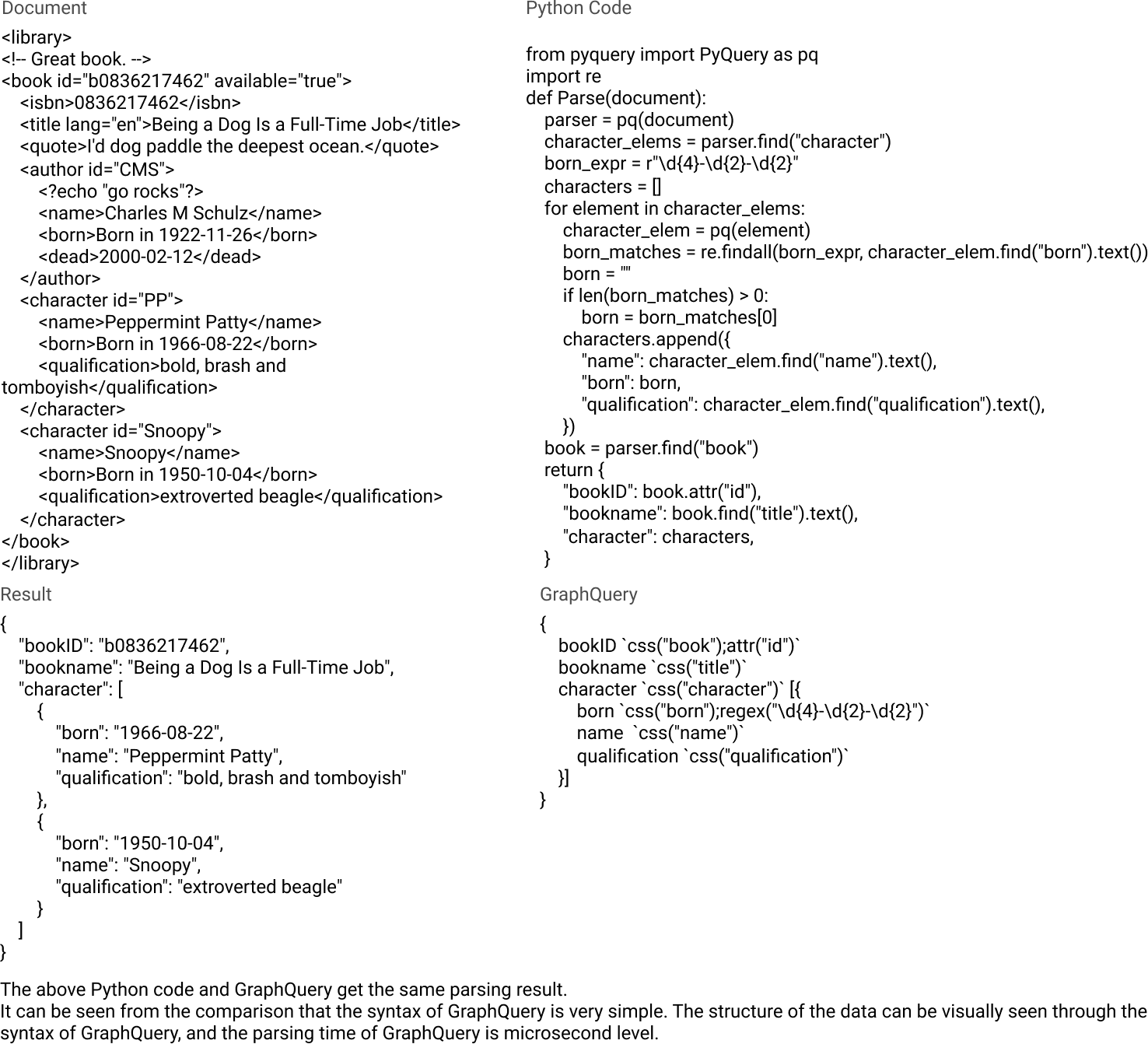
As you can see from the comparison chart above, the syntax of GraphQuery is so simple that even if you are in touch with it for the first time, you can still understand its meaning and get started quickly.
At the same time, GraphQuery is also very easy to integrate into your backend data system (any backend language), let's continue to look down.
Getting Started
GraphQuery consists of query language and pipelines. To guide you through each of these components, we've written an example designed to illustrate the various pieces of GraphQuery. This example is not comprehensive, but it is designed to quickly introduce the core concepts of GraphQuery. The premise of the example is that we want to use GraphQuery to query for information about library books.
1. First example
<library>

<!-- Great book. -->

<book id="b0836217462" available="true">

    <isbn>0836217462</isbn>

    <title lang="en">Being a Dog Is a Full-Time Job</title>

    <quote>I'd dog paddle the deepest ocean.</quote>

    <author id="CMS">

        <?echo "go rocks"?>

        <name>Charles M Schulz</name>

        <born>1922-11-26</born>

        <dead>2000-02-12</dead>

    </author>

    <character id="PP">

        <name>Peppermint Patty</name>

        <born>1966-08-22</born>

        <qualification>bold, brash and tomboyish</qualification>

    </character>

    <character id="Snoopy">

        <name>Snoopy</name>

        <born>1950-10-04</born>

        <qualification>extroverted beagle</qualification>

    </character>

</book>

</library>
Faced with such a text structure, we naturally think of extracting the following data structure from the text :
{

    bookID

    title

    isbn

    quote

    language

    author{

        name

        born

        dead

    }

    character [{

        name

        born

        qualification

    }]

}
This is perfect, when you know the data structure you want to extract, you have actually succeeded 80%, the above is the data structure we want, we call it DDL (Data Definition Language) for the time being. let's see how GraphQuery does it:
{

    bookID `css("book");attr("id")`

    title `css("title")`

    isbn `xpath("//isbn")`

    quote `css("quote")`

    language `css("title");attr("lang")`

    author `css("author")` {

        name `css("name")`

        born `css("born")`

        dead `css("dead")`

    }

    character `xpath("//character")` [{

        name `css("name")`

        born `css("born")`

        qualification `xpath("qualification")`

    }]

}
As you can see, the syntax of GraphQuery adds some strings wrapped in ` to the DDL. These strings wrapped by ` are called Pipeline. We will introduce Pipeline later.
Let's first take a look at what data GraphQuery engine returns to us.
{

    "bookID": "b0836217462",

    "title": "Being a Dog Is a Full-Time Job",

    "isbn": "0836217462",

    "quote": "I'd dog paddle the deepest ocean.",

    "language": "en",

    "author": {

        "born": "1922-11-26",

        "dead": "2000-02-12",

        "name": "Charles M Schulz"

    },

    "character": [

        {

            "born": "1966-08-22",

            "name": "Peppermint Patty",

            "qualification": "bold, brash and tomboyish"

        },

        {

            "born": "1950-10-04",

            "name": "Snoopy",

            "qualification": "extroverted beagle"

        }

    ],

}
Wow, it's wonderful. Just like what we want.
We call the above example Example1, now let's have a brief look at what pipeline is.
2. Pipeline
A pipeline is a collection of functions that use the parent element text as an entry parameter to execute the functions in the collection in sequence.
For example, the language field in our previous example is defined as follows:
language `css("title");attr("lang")`
The language is the field name, css("title"); attr("lang") is the pipeline. In this pipeline, GraphQuery first uses the CSS selector to find the title node from the document, and the title node will be obtained. Pass the obtained node into the attr() function and get its lang attribute. The whole process is as follows:
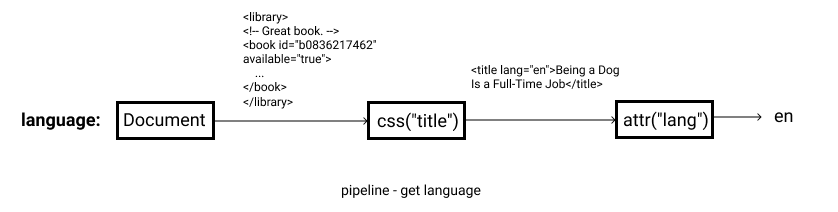
In Example1, we not only use the css and attr functions, but also xpath(). It is easy to associate, Xpath() is to select elements with the Xpath selector.
The following is a list of the pipeline functions built into the current version of graphquery:
| pipeline | prototype | example | introduce |
|---|---|---|---|
| css | css(CSSSelector) | css("title") | Use CSS selector to select elements |
| json | json(JSONSelector) | json("title") | Use json path to select elements |
| xpath | xpath(XpathSelector) | xpath("//title") | Use Xpath selector to select elements |
| regex | regex(RegexSelector) | regex("(.*?)") | Use Regex selector to select elements |
| trim | trim() | trim() | Clear spaces and line breaks before and after the string |
| template | template(TemplateStr) | template("[{$}]") | Add characters before and after variables |
| attr | attr(AttributeName) | attr("lang") | Extract the property of the current node |
| eq | eq(Index) | eq("0") | Take the nth element in the current node collection |
| string | string() | string() | Extract the current node native string |
| text | text() | text() | Extract the text of the current node |
| link | link(KeyName) | link("title") | Returns the current text of the specified key |
| replace | replace(A, B) | replace("a", "b") | Replace all A in the current node to B |
More detailed introduction to pipeline and function, please go to docs.
Install
GraphQuery is currently only native to Golang, but for other languages, it can be invoked as a service.
1. Golang:
go get github.com/storyicon/graphquery
Create a new go file :
package main

import (

	"encoding/json"

	"log"

	"github.com/storyicon/graphquery"

)

func main() {

	document := `

        <html>

            <body>

                <a href="01.html">Page 1</a>

                <a href="02.html">Page 2</a>

                <a href="03.html">Page 3</a>

            </body>

        </html>

    `

	expr := "{ anchor `css(\"a\")` [ content `text()` ] }"

	response := graphquery.ParseFromString(document, expr)

	bytes, _ := json.Marshal(response.Data)

	log.Println(string(bytes))

}
Run the go file, the output is as follows :
{"anchor":["Page 1","Page 2","Page 3"]}
2. Other language
We use the HTTP protocol to provide a cross-language solution for developers to query GraphQuery using any back-end language you want to use to access the specified port after starting the service.
GraphQuery-http : Cross language solution for GraphQuery
You can also use RPC for communication, but currently you may need to do this yourself, because the RPC project on GraphQuery is still under development.
At the same time, We welcome the contributors to write native support code for other languages in GraphQuery.
GraphQuery - Powerful html/xml query language的更多相关文章
- HQL: The Hibernate Query Language
Chapter 14. HQL: The Hibernate Query Language 14.1. Case Sensitivity 14.2. The from clause 14.3. Ass ...
- hql(Hibernate Query Language)
1.Criteria查询对查询条件进行了面向对象封装,符合编程人员的思维方式,不过HQL(Hibernate Query Language)查询提供了更加丰富的和灵活的查询特性,因此Hibernate ...
- SQL Structured Query Language(结构化查询语言) 数据库
SQL是Structured Query Language(结构化查询语言)的缩写. SQL是专为数据库而建立的操作命令集,是一种功能齐全的数据库语言. 在使用它时,只需要发出“做什么”的命令,“怎么 ...
- Hibernate Query Language查询:
Hibernate Query Language查询: Criteria查询对查询条件进行了面向对象封装,符合编程人员的思维方式,不过HQL(Hibernate Query Language)查询提供 ...
- 数据库原理及应用-用户接口及SQL查询语言(Query Language)
2018-02-07 20:41:39 一.DBMS的用户接口 查询语言 访问DBMS的访问工具(GUI) API 相关类库 二.SQL语言 SQL语言可以细分为四种: 1.Data Definiti ...
- JDBC(Java Database Connectivity,Java数据库连接)API是一个标准SQL(Structured Query Language
JDBC(Java Database Connectivity,Java数据库连接)API是一个标准SQL(Structured Query Language,结构化查询语言)数据库访问接口,它使数据 ...
- 数据库系统概述(Data Model、DBMS、DBS、RDBS、Structured Query Language)
数据Data 描述事物的符号记录成为数据. 数据是数据库中存储的基本对象. 除了基本的数字之外.像图书的名称.价格.作者都可以称为数据. 将多种数据记录列成一张表.通过数据表管理数据. 每一行的数 ...
- JVM Object Query Language (OQL) 查询语言
Object Query Language (OQL) OQL is SQL-like query language to query Java heap. OQL allows to filter/ ...
- Kibana Query Language(KQL)
语法: 官方文档 If you’re familiar with Kibana’s old lucene query syntax, you should feel right at home wit ...
随机推荐
- [POI2007]EGZ-Driving Exam
能到达所有路的充要条件是能到达左右两端的路 用vector反向建边对每条路左右分别求个最长不上升子序列 预处理出每条路向左向右分别需要多建多少路才能到达最左端和最右端 然后跑个\(\Theta(n)\ ...
- drupal7区块内容对象
区块内容对象
- 004bean作用域
1.Singleton(单例) 2.Prototype(原型)---->每次注入.通过Spring应用上下文获取,都会重新创建 @Scope(ConfigurableBeanFactory ...
- MathQuill.js
MathQuill.js通过html.css.javascript实现数学公式 <p>Type math here: <span id="math-field"& ...
- (C#) 多线程访问int, bool 等值类型变量
参考: https://stackoverflow.com/questions/154551/volatile-vs-interlocked-vs-lock/154803
- sqlserver变量的生周期
在声明一个变量后,一旦遇到分号或者go,生命周期就结 DECLARE @num1 int --go ; --go print @num1; --print @num1:
- WebDriverException: Message: A session is either terminated or not started
错误提示: …… [debug] [XCUITest] Connection to WDA timed out[debug] [iProxy] recv failed: Operation not p ...
- BZOJ 1192 鬼谷子的钱袋 找规律
题目链接: https://www.lydsy.com/JudgeOnline/problem.php?id=1192 题目大意: 鬼谷子非常聪明,正因为这样,他非常繁忙,经常有各诸侯车的特派员前来向 ...
- Java虚拟机9:垃圾收集(GC)-4(垃圾收集器)
1.前言 垃圾收集器是前一章垃圾收集算法理论知识的具体实现了,不同虚拟机所提供的垃圾收集器可能会有很大差别,另外我们必须提前说明一个道理:没有最好的垃圾收集器,更加没有万能的收集器,只能选择对具体应用 ...
- 1412. [ZJOI2009]狼和羊的故事【最小割】
Description “狼爱上羊啊爱的疯狂,谁让他们真爱了一场:狼爱上羊啊并不荒唐,他们说有爱就有方向......” Orez听到这首歌,心想:狼和羊如此和谐,为什么不尝试羊狼合养呢?说干就干! O ...