
swagger框架
1.1 介绍
Swagger是一个简单又强大的能为你的Restful风格的Api生成文档工具。在项目中集成这个工具,根据我们自己的配置信息能够自动为我们生成一个api文档展示页,可以在浏览器中直接访问查看项目中的接口信息,同时也可以测试每个api接口。Swagger生成的api文档是实时更新的,你写的api接口有任何的改动都会在文档中及时的表现出来。
1.2 项目环境
Spring提供了一个与Swagger的集成工具包springfox,让我们的Spring项目能够更好的与Swagger融合。详情可访问springfox托管在Github上的demo内容。地址:http://springfox.github.io/springfox/
1.3 Swagger配置步骤
1) 第一步,在项目的公共模块pom.xml文件下,引用相关的外部依赖包。如下:
<!-- Swagger2 api文档生成工具依赖包 -->
<dependency>
<groupId>io.springfox</groupId>
<artifactId>springfox-swagger2</artifactId>
<version>2.6.1</version>
</dependency>
<dependency>
<groupId>io.springfox</groupId>
<artifactId>springfox-swagger-ui</artifactId>
<version>2.6.1</version>
</dependency>
<dependency>
<groupId>com.fasterxml.jackson.core</groupId>
<artifactId>jackson-annotations</artifactId>
<version>2.8.5</version>
</dependency>
<dependency>
<groupId>com.fasterxml.jackson.core</groupId>
<artifactId>jackson-databind</artifactId>
<version>2.8.5</version>
</dependency>
<dependency>
<groupId>com.fasterxml.jackson.core</groupId>
<artifactId>jackson-core</artifactId>
<version>2.8.5</version>
</dependency>
<dependency>
<groupId>org.slf4j</groupId>
<artifactId>log4j-over-slf4j</artifactId>
</dependency>
<!-- end -->
2) 第二步,自定义配置类实现。
Swagger会根据这个配置类的具体实现来生成我们相应的api文档。通过@ComponentScan注解可以指定扫描的包下的RESTful API接口。regex("/api/v1/.*") 可以根据不同ContentPath 版本接口进行分类。可创建多个Docket实例。
@Configuration
@EnableWebMvc
@EnableSwagger2
@ComponentScan(basePackages ={"com.coracle.jomoo.rest"})
public class SwaggerConfig {
@Bean
public Docket
api() {
return new Docket(DocumentationType.SWAGGER_2)
.groupName("api")
.genericModelSubstitutes(DeferredResult.class)
.useDefaultResponseMessages(false)
.forCodeGeneration(false)
.pathMapping("/")
.select()
.paths(or(regex("/api/v1/.*")))
.build()
.apiInfo(apiInfo());
}
private ApiInfoapiInfo() {
ApiInfoapiInfo = new ApiInfo("JOMOO INTERFACE API",
"JoMoo Interface's REST API, for system
administrator",
"1.0",
"NO terms of service",
"luowei@coracle.com",
"The Apache License, Version 2.0",
"http://www.apache.org/licenses/LICENSE-2.0.html"
);
return apiInfo;
}
}
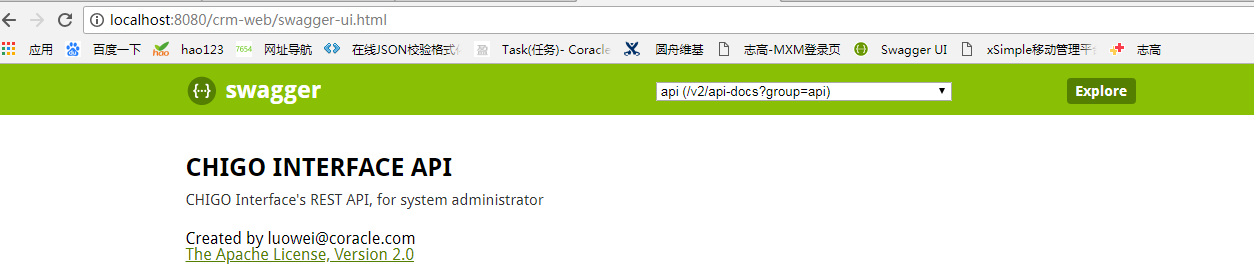
3. 通过访问http://localhost:8080/mxm/swagger-ui.html生成在线接口测试地址。
3) 第三步,API接口注解
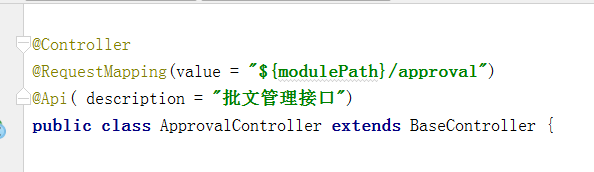
a.类注解
b.方法注解
@ApiOperation(value = "批文列表查询接口",
        notes = "批文列表查询接口",
        position = 0)
@ApiResponses(value = {@ApiResponse(code = 100, message = "批文列表查询接口异常"),
        @ApiResponse(code = 200, message = "批文列表查询接口成功")})
@ResponseBody
@RequestMapping(value = "/list", method = RequestMethod.POST)
public CommonDTO<List<TDocLandInfos>> approvalList(@RequestBody TDocLandInfosParam tDocLandInfosParam, HttpServletRequest request, HttpServletResponse response) throws Exception{
    Page page = new Page(request,response);
    try {
        return listDTO;
    }catch (Exception e){
    }
    return listDTO;
}}
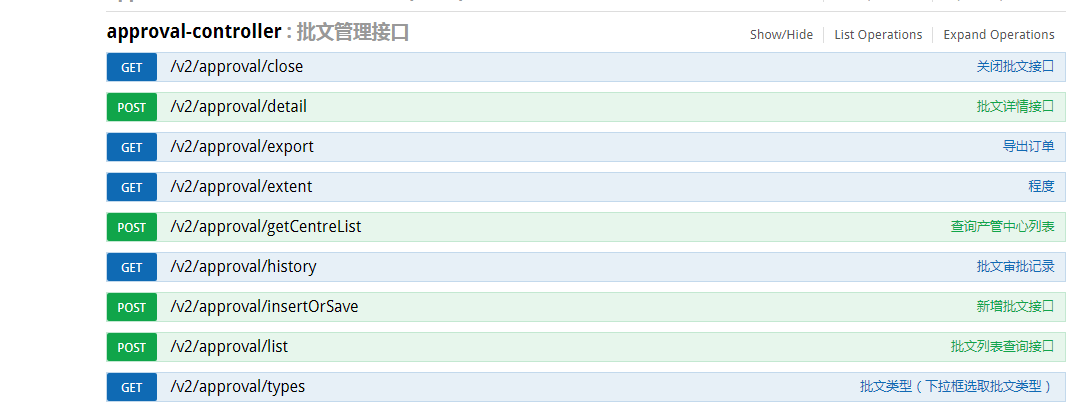
springfox默认会将所有的接口都给你生成文档,不管你有没有使用注解@ApiOperation这个注解注释接口方法,并且如果你没有为你的接口指定访问方式,他也会为这个接口生成所有访问方式的文档, 下面会有结构展示图.
c.参数注解
@ApiModel(value = "productlistparam")
@JsonSerialize(include = JsonSerialize.Inclusion.NON_NULL)
public class ProductListParamextends CommonParam{
@ApiModelProperty(value
= " 产品分类ID", required = false )
private Long categoryId;
@ApiModelProperty(value = "产品分类关键字", required = false )
private String keyword;
@ApiModelProperty(value = "产品分类维度", required = false )
private List<String>keys;
@ApiModelProperty(value = "发布时间段", required = false )
private Integer type;
//get/set.....
}
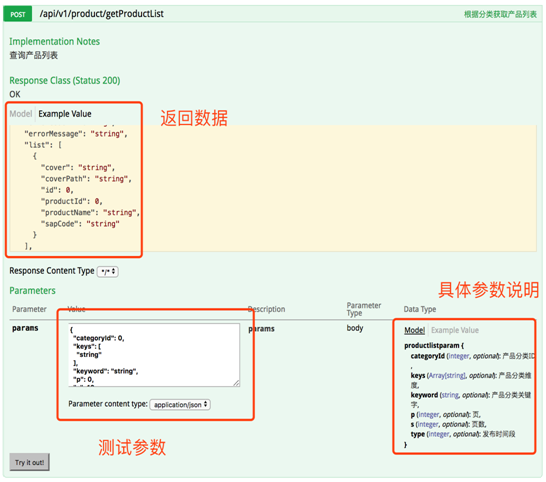
定义好接收参数的实体类,通过@ApiModelProperty注解对每个参数描述,并根据实际参数是否为必填项,最终生成文档。如下图:
swagger框架的更多相关文章
- Swagger框架学习分享
Swagger框架学习分享 转至元数据结尾 Created and last modified by 刘新宇 大约1分钟曾经 pageId=162045803#page-metadata-start& ...
- Spring Boot从入门到精通(十一)集成Swagger框架,实现自动生成接口文档
Swagger是一个规范和完整的框架,用于生成.描述.调用和可视化 RESTful 风格的 Web 服务.Swagger 是一组开源项目,其中主要要项目如下: Swagger-tools:提供各种与S ...
- SpringBoot整合Swagger框架 ,并设置接口请求头token默认值
引入maven依赖 <!-- swagger2--> <dependency> <groupId>io.springfox</groupId> &l ...
- Swagger+Spring MVC框架学习分享
[html] view plain copy 最近参与公司接口编写,Android和IOS端都要调用这些接口,需要对接调试,如果没有一个接口文档,管理接口,别人用了接口,也不知道接口怎么用,接口上有什 ...
- 开源的API文档工具框架——Swagger简介
初次接触Swagger是在2017年5月,当时公司正好要对整套系统架构进行重新设计,有同事推荐用这个技术框架来规范后台接口的API文档.当时因为架构重构,涉及改造的技术点太多,一时也就没太多精力,把S ...
- ASP.NET Core 1.0 中使用 Swagger 生成文档
github:https://github.com/domaindrivendev/Ahoy 之前文章有介绍在ASP.NET WebAPI 中使用Swagger生成文档,ASP.NET Core 1. ...
- Spring MVC集成Swagger
什么是Swagger? 大部分 Web 应用程序都支持 RESTful API,但不同于 SOAP API——REST API 依赖于 HTTP 方法,缺少与 Web 服务描述语言(Web Servi ...
- 从壹开始前后端分离【 .NET Core2.0 +Vue2.0 】框架之六 || API项目整体搭建 6.1 仓储模式
前言 1.@LearningCoding 小伙伴关于用Sqlsugar在mysql数据库上的研究成果: sqlsugarcore支持mysql等数据库,在DbContext里面只需要设置dbtype为 ...
- SpringBoot集成Swagger接口管理工具
手写Api文档的几个痛点: 文档需要更新的时候,需要再次发送一份给前端,也就是文档更新交流不及时. 接口返回结果不明确 不能直接在线测试接口,通常需要使用工具,比如postman 接口文档太多,不好管 ...
随机推荐
- Linux运维学习笔记-网络安全等级保护
网络安全等级保护简介与作用: 验证信息系统是否满足相应安全保护等级的一个过程. 对不同信息系统分等级进行保护.
- 量化投资策略:常见的几种Python回测框架(库)
量化投资策略:常见的几种Python回测框架(库) 原文地址:http://blog.csdn.net/lawme/article/details/51454237 本文章为转载文章.这段时间在研究量 ...
- Jmeter-线程组执行顺序控制
线程组按顺序来执行,大概思路, 1.需要控制线程组内的操作在满足某一条件才执行,那么就需要使用if或者while: 2.要使用if或者while都需要一个变量,而这个变量要在两个或多个线程组内使用,那 ...
- Loj 2005 相关分析
Loj 2005 相关分析 大力把式子拆开. \[ \begin{aligned} a &= \frac {\sum_{i=L}^{R} (x_i-\bar{x})(y_i-\bar{y})} ...
- Python :random 随机数生成
Python中的random模块用于生成随机数.下面介绍一下random模块中最常用的几个函数. random.random random.random() 用于生成一个0到1的随机符点数: 0 &l ...
- memsql filesystem pipeline 试用
一些功能类似drill ,比如s3,file ... 创建file pipeline 准备file mkdir -p /opt/db/ touch books.txt 内容如下: The Catche ...
- macOS -- Mac系统如何通过终端使用mysql
打开终端,输入下面的命令 mysql -u root -p 如果提示输入密码,并且能直接进入,那就太棒了,下面的就不用看了,直接使用就好了 如果没有这么幸运,提示 command not found ...
- Pacemaker+Corosync搭建PostgreSQL集群
https://my.oschina.net/aven92/blog/518928 · PostgreSQL中国社区: http://postgres.cn/index.php/home · Post ...
- 基于ffmpeg静态库的应用开发
最近几天在试着做基本ffmpeg静态库的开发,只有main中包含了avdevice_register_all 或avfilter_register_all,编译就通不过,undefined refre ...
- Ubuntu各种indicator汇总
1. indicator-multiload: 可视化图形显示 sudo apt-get install indicator-multiload 2. indicator-sysmonitor: 以 ...