
Hadoop Hive与Hbase整合+thrift
1. 简介
Hive是基于Hadoop的一个数据仓库工具,可以将结构化的数据文件映射为一张数据库表,并提供完整的sql查询功能,可以将sql语句转换为MapReduce任务进行运行。 其优点是学习成本低,可以通过类SQL语句快速实现简单的MapReduce统计,不必开发专门的MapReduce应用,十分适合数据仓库的统计分析。
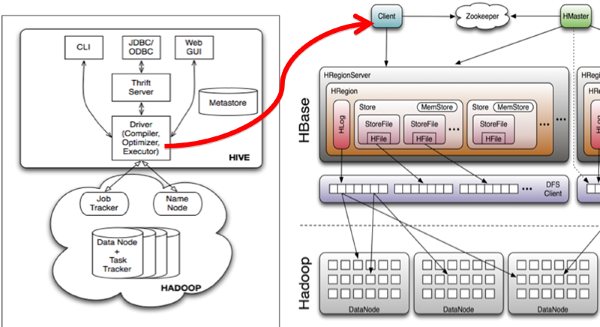
Hive与HBase的整合功能的实现是利用两者本身对外的API接口互相进行通信,相互通信主要是依靠hive_hbase-handler.jar工具类, 大致意思如图所示:
2. Hive项目介绍

Hive配置文件介绍
•hive-site.xml hive的配置文件
•hive-env.sh hive的运行环境文件
•hive-default.xml.template 默认模板
•hive-env.sh.template hive-env.sh默认配置
•hive-exec-log4j.properties.template exec默认配置
• hive-log4j.properties.template log默认配置
hive-site.xml
< property>
<name>javax.jdo.option.ConnectionURL</name> <value>jdbc:MySQL://localhost:3306/hive?createData baseIfNotExist=true</value>
<description>JDBC connect string for a JDBC metastore</description>
</property>
<property>
<name>javax.jdo.option.ConnectionDriverName</name>
<value>com.mysql.jdbc.Driver</value>
<description>Driver class name for a JDBC metastore</description>
</property>
<property>
<name>javax.jdo.option.ConnectionUserName</name>
<value>root</value>
<description>username to use against metastore database</description>
</property>
<property>
<name>javax.jdo.option.ConnectionPassword</name>
<value>test</value>
<description>password to use against metastore database</description>
</property>
hive-env.sh
•配置Hive的配置文件路径
•export HIVE_CONF_DIR= your path
•配置Hadoop的安装路径
•HADOOP_HOME=your hadoop home
我们按数据元的存储方式不同安装。
3. 使用Derby数据库安装
1 .Hadoop和Hbase都已经成功安装了
Hadoop集群配置:http://blog.csdn.net/hguisu/article/details/723739
hbase安装配置:http://blog.csdn.net/hguisu/article/details/7244413
2. 下载hive
hive目前最新的版本是0.12,我们先从http://mirror.bit.edu.cn/apache/hive/hive-0.12.0/ 上下载hive-0.12.0.tar.gz,但是请注意,此版本基于是基于hadoop1.3和hbase0.94的(如果安装hadoop2.X ,我们需要修改相应的内容)
3. 安装:
tar zxvf hive-0.12.0.tar.gz
cd hive-0.12.0
4. 替换jar包,与hbase0.96和hadoop2.2版本一致。
拷贝protobuf.**.jar和zookeeper-3.4.5.jar到hive/lib下。
5. 配置hive
<?xml version="1.0"?>
<?xml-stylesheet type="text/xsl" href="configuration.xsl"?>
<configuration>

<!-- Hive Execution Parameters -->

<property>
  <name>hive.exec.reducers.bytes.per.reducer</name>
  <value>1000000000</value>
  <description>size per reducer.The default is 1G, i.e if the input size is 10G, it will use 10 reducers.</description>
</property>

<property>
  <name>hive.exec.reducers.max</name>
  <value>999</value>
  <description>max number of reducers will be used. If the one
        specified in the configuration parameter mapred.reduce.tasks is
        negative, hive will use this one as the max number of reducers when
        automatically determine number of reducers.</description>
</property>

<property>
  <name>hive.exec.scratchdir</name>
  <value>/hive/scratchdir</value>
  <description>Scratch space for Hive jobs</description>
</property>

<property>
  <name>hive.exec.local.scratchdir</name>
  <value>/tmp/${user.name}</value>
  <description>Local scratch space for Hive jobs</description>
</property>
<property>
  <name>javax.jdo.option.ConnectionURL</name>
  <value>jdbc:derby:;databaseName=metastore_db;create=true</value>
  <description>JDBC connect string for a JDBC metastore</description>
</property>

<property>
  <name>javax.jdo.option.ConnectionDriverName</name>
  <value>org.apache.derby.jdbc.EmbeddedDriver</value>
  <description>Driver class name for a JDBC metastore</description>
</property>

<property>
  <name>javax.jdo.PersistenceManagerFactoryClass</name>
  <value>org.datanucleus.api.jdo.JDOPersistenceManagerFactory</value>
  <description>class implementing the jdo persistence</description>
</property>

<property>
  <name>javax.jdo.option.DetachAllOnCommit</name>
  <value>true</value>
  <description>detaches all objects from session so that they can be used after transaction is committed</description>
</property>

<property>
  <name>javax.jdo.option.ConnectionUserName</name>
  <value>APP</value>
  <description>username to use against metastore database</description>
</property>

<property>
  <name>javax.jdo.option.ConnectionPassword</name>
  <value>mine</value>
  <description>password to use against metastore database</description>
</property>

<property>
  <name>hive.metastore.warehouse.dir</name>
  <value>/hive/warehousedir</value>
  <description>location of default database for the warehouse</description>
</property>

<property>
 <name>hive.aux.jars.path</name>
  <value>
  file:///home/hadoop/hive-0.12.0/lib/hive-ant-0.13.0-SNAPSHOT.jar,
  file:///home/hadoop/hive-0.12.0/lib/protobuf-java-2.4.1.jar,
  file:///home/hadoop/hive-0.12.0/lib/hbase-client-0.96.0-hadoop2.jar,
  file:///home/hadoop/hive-0.12.0/lib/hbase-common-0.96.0-hadoop2.jar,
  file:///home/hadoop/hive-0.12.0/lib/zookeeper-3.4.5.jar,
  file:///home/hadoop/hive-0.12.0/lib/guava-11.0.2.jar
  </value>
</property>
$ $HADOOP_HOME/bin/hadoop fs -mkdir /tmp
$ $HADOOP_HOME/bin/hadoop fs -mkdir /hive/warehousedir
$ $HADOOP_HOME/bin/hadoop fs -chmod g+w /tmp
$ $HADOOP_HOME/bin/hadoop fs -chmod g+w/hive/warehousedir
我同样发现设置HIVE_HOME是很重要的,但并非必须。
$ export HIVE_HOME=<hive-install-dir>
在Shell中使用Hive命令行(cli)模式:
$ $HIVE_HOME/bin/hive
5. 启动hive
1).单节点启动
#bin/hive -hiveconf hbase.master=master:490001
2) 集群启动:
#bin/hive -hiveconf hbase.zookeeper.quorum=node1,node2,node3
如何hive-site.xml文件中没有配置hive.aux.jars.path,则可以按照如下方式启动。
bin/hive --auxpath /usr/local/hive/lib/hive-hbase-handler-0.96.0.jar, /usr/local/hive/lib/hbase-0.96.jar, /usr/local/hive/lib/zookeeper-3.3.2.jar -hiveconf hbase.zookeeper.quorum=node1,node2,node3
启动直接#bin/hive 也可以。
6 测试hive
OK
Time taken: 1.842 seconds
hive> show tables;
OK
pokes
Time taken: 0.182 seconds, Fetched: 1 row(s)
hive> LOAD DATA LOCAL INPATH './examples/files/kv1.txt' OVERWRITE INTO pokse
注:使用derby存储方式时,运行hive会在当前目录生成一个derby文件和一个metastore_db目录。这种存储方式的弊端是在同一个目录下同时只能有一个hive客户端能使用数据库,否则报错。
4. 使用MYSQL数据库的方式安装
安装MySQL
• Ubuntu 采用apt-get安装
• sudo apt-get install mysql-server
• 建立数据库hive
• create database hivemeta
• 创建hive用户,并授权
• grant all on hive.* to hive@'%' identified by 'hive';
• flush privileges;
我们直接修改hive-site.xml就可以啦。
<?xml-stylesheet type="text/xsl" href="configuration.xsl"?>
<configuration>
<property>
<name>hive.exec.scratchdir</name>
<value>/hive/scratchdir</value>
<description>Scratch space for Hive jobs</description>
</property>
<property>
<name>hive.exec.local.scratchdir</name>
<value>/tmp/${user.name}</value>
<description>Local scratch space for Hive jobs</description>
</property>
<property>
<name>javax.jdo.option.ConnectionURL</name>
<value>jdbc:mysql://192.168.1.214:3306/hiveMeta?createDatabaseIfNotExist=true</value>
<description>JDBC connect string for a JDBC metastore</description>
</property>
<property>
<name>javax.jdo.option.ConnectionDriverName</name>
<value>com.mysql.jdbc.Driver</value>
<description>Driver class name for a JDBC metastore</description>
</property>
<property>
<name>javax.jdo.option.ConnectionUserName</name>
<value>hive</value>
<description>username to use against metastore database</description>
</property>
<property>
<name>javax.jdo.option.ConnectionPassword</name>
<value>hive</value>
<description>password to use against metastore database</description>
</property>
<property>
<name>hive.metastore.warehouse.dir</name>
<value>/hive/warehousedir</value>
<description>location of default database for the warehouse</description>
</property>
<property>
<name>hive.aux.jars.path</name>
<value>
file:///home/hadoop/hive-0.12.0/lib/hive-ant-0.13.0-SNAPSHOT.jar,
file:///home/hadoop/hive-0.12.0/lib/protobuf-java-2.4.1.jar,
file:///home/hadoop/hive-0.12.0/lib/hbase-client-0.96.0-hadoop2.jar,
file:///home/hadoop/hive-0.12.0/lib/hbase-common-0.96.0-hadoop2.jar,
file:///home/hadoop/hive-0.12.0/lib/zookeeper-3.4.5.jar,
file:///home/hadoop/hive-0.12.0/lib/guava-11.0.2.jar
</value>
</property>
本地mysql启动hive :
直接运行#bin/hive 就可以。
远端mysql方式,启动hive:
服务器端(192.168.1.214上机master上):
在服务器端启动一个 MetaStoreServer,客户端利用 Thrift 协议通过 MetaStoreServer 访问元数据库。
return conn;
客户端hive 的hive-site.xml配置文件:
<?xml version="1.0"?>
<?xml-stylesheet type="text/xsl" href="configuration.xsl"?>

<configuration>

<property>
  <name>hive.metastore.warehouse.dir</name>
  <value>/hive/warehousedir</value>
</property>

<property>
  <name>hive.metastore.local</name>
  <value>false</value>
</property>

<property>
  <name>hive.metastore.uris</name>
  <value>thrift://192.168.1.214:9083</value>
</property>

</configuration>
<name>hive.metastore.uris</name>
<value>thrift://192.168.1.214:9083</value>
</property>
进入hive客户端,运行show tables;
<?xml version="1.0"?>
<?xml-stylesheet type="text/xsl" href="configuration.xsl"?>
<configuration>

<property>
  <name>hive.exec.scratchdir</name>
  <value>/hive/scratchdir</value>
  <description>Scratch space for Hive jobs</description>
</property>

<property>
  <name>hive.exec.local.scratchdir</name>
  <value>/tmp/${user.name}</value>
  <description>Local scratch space for Hive jobs</description>
</property>
<property>
  <name>javax.jdo.option.ConnectionURL</name>
  <value>jdbc:mysql://192.168.1.214:3306/hiveMeta?createDatabaseIfNotExist=true</value>
  <description>JDBC connect string for a JDBC metastore</description>
</property>

<property>
  <name>javax.jdo.option.ConnectionDriverName</name>
  <value>com.mysql.jdbc.Driver</value>
  <description>Driver class name for a JDBC metastore</description>
</property>

<property>
  <name>javax.jdo.option.ConnectionUserName</name>
  <value>hive</value>
  <description>username to use against metastore database</description>
</property>

<property>
  <name>javax.jdo.option.ConnectionPassword</name>
  <value>hive</value>
  <description>password to use against metastore database</description>
</property>

<property>
  <name>hive.metastore.warehouse.dir</name>
  <value>/hive/warehousedir</value>
  <description>location of default database for the warehouse</description>
</property>

<property>
 <name>hive.aux.jars.path</name>
  <value>
  file:///home/hadoop/hive-0.12.0/lib/hive-ant-0.13.0-SNAPSHOT.jar,
  file:///home/hadoop/hive-0.12.0/lib/protobuf-java-2.4.1.jar,
  file:///home/hadoop/hive-0.12.0/lib/hbase-client-0.96.0-hadoop2.jar,
  file:///home/hadoop/hive-0.12.0/lib/hbase-common-0.96.0-hadoop2.jar,
  file:///home/hadoop/hive-0.12.0/lib/zookeeper-3.4.5.jar,
  file:///home/hadoop/hive-0.12.0/lib/guava-11.0.2.jar
  </value>

<property>
  <name>hive.metastore.uris</name>
  <value>thrift://192.168.1.214:9083</value>
</property>
</property>
4. 与Hbase整合
之前我们测试创建表的都是创建本地表,非hbase对应表。现在我们整合回到hbase。
1.创建hbase识别的数据库:
CREATE TABLE hbase_table_1(key int, value string)
STORED BY 'org.apache.hadoop.hive.hbase.HBaseStorageHandler'
WITH SERDEPROPERTIES ("hbase.columns.mapping" = ":key,cf1:val")
TBLPROPERTIES ("hbase.table.name" = "xyz");
hbase.table.name 定义在hbase的table名称
hbase.columns.mapping 定义在hbase的列族
在hbase 下也能看到,两边新增数据都能实时看到。
可以登录Hbase去查看数据了
#bin/hbase shell
hbase(main):001:0> describe 'xyz'
hbase(main):002:0> scan 'xyz'
hbase(main):003:0> put 'xyz','100','cf1:val','www.360buy.com'
这时在Hive中可以看到刚才在Hbase中插入的数据了。
2.使用sql导入数据
使用sql导入hbase_table_1:
hive> INSERT OVERWRITE TABLE hbase_table_1 SELECT * FROM pokes WHERE foo=86;
3 hive访问已经存在的hbase
使用CREATE EXTERNAL TABLE:
CREATE EXTERNAL TABLE hbase_table_2(key int, value string)
STORED BY 'org.apache.hadoop.hive.hbase.HBaseStorageHandler'
WITH SERDEPROPERTIES ("hbase.columns.mapping" = "cf1:val")
TBLPROPERTIES("hbase.table.name" = "some_existing_table");
内容参考:http://wiki.apache.org/hadoop/Hive/HBaseIntegration
5. 问题
bin/hive 执行show tables 报错:
Unable to instantiate org.apache.hadoop.hive.metastore.HiveMetaStoreClient
如果是使用Derby数据库的安装方式,查看
<property>
<name>hive.metastore.warehouse.dir</name>
<value>/hive/warehousedir</value>
<description>location of default database for the warehouse</description>
</property>
配置是否正确,
或者
<property>
<name>javax.jdo.option.ConnectionURL</name>
<value>jdbc:derby:;databaseName=metastore_db;create=true</value>
<description>JDBC connect string for a JDBC metastore</description>
</property>
是否有权限访问。
如果配置了mysql的Metastore方式,检查的权限:
bin/hive -hiveconf hive.root.logger=DEBUG,console
然后show tables 就会看到ava.sql.SQLException: Access denied for user 'hive'@'××××8' (using password: YES) 之类从错误消息。
执行
CREATE TABLE hbase_table_1(key int, value string)
STORED BY 'org.apache.hadoop.hive.hbase.HBaseStorageHandler'
WITH SERDEPROPERTIES ("hbase.columns.mapping" = ":key,cf1:val")
TBLPROPERTIES ("hbase.table.name" = "xyz");
报错:
FAILED: Execution Error, return code 1 from org.apache.hadoop.hive.ql.exec.DDLTask. MetaException(message:org.apache.hadoop.hbase.MasterNotRunningException: Retried 10 times
出现这个错误的原因是引入的hbase包和hive自带的hive包冲突,删除hive/lib下的 hbase-0.94.×××.jar, OK了。
同时也要移走hive-0.12**.jar 包。
执行
hive>select uid from user limit 100;
Java.io.IOException: Cannot initialize Cluster. Please check your configuration for mapreduce.framework.name and the correspond server addresses.
解决:修改$HIVE_HOME/conf/hive-env.sh文件,加入
export HADOOP_HOME=hadoop的安装目录
5. 通过thrift访问hive(使用php做客户端)
使用php连接hive的条件:
1. 下载thrift
wget http://mirror.bjtu.edu.cn/apache//thrift/0.9.1/thrift-0.9.1.tar.gz
2. 解压
tar -xzf thrift-0.9.1.tar.gz
3 .编译安装:
如果是源码编译的,首先要使用./boostrap.sh创建文件./configure ,我们这下载的tar包,自带有configure文件了。((可以查阅README文件))
If you are building from the first time out of the source repository, you will
need to generate the configure scripts. (This is not necessary if you
downloaded a tarball.) From the top directory, do:
./bootstrap.sh
./configure
1 需要安装thrift 安装步骤
# ./configure --without-ruby
不要使用ruby,
make ; make install
如果没有安装libevent libevent-devel的应该先安装这两个依赖库yum -y install libevent libevent-devel
其实Thrift就是使用来生成客户端和服务器端代码的。在这里没用到。
安装好后启动hive thrift
# ./hive --service hiveserver >/dev/null 2>/dev/null &
查看hiveserver默认端口是否打开10000 如果打开表示成功,在官网wiki有介绍文章:https://cwiki.apache.org/confluence/display/Hive/HiveServer
Thrift Hive Server
HiveServer is an optional service that allows a remote client to submit requests to Hive, using a variety of programming languages, and retrieve results. HiveServer is built on Apache ThriftTM(http://thrift.apache.org/), therefore it is sometimes called the Thrift server although this can lead to confusion because a newer service named HiveServer2 is also built on Thrift.
Thrift's interface definition language (IDL) file for HiveServer is hive_service.thrift, which is installed in $HIVE_HOME/service/if/.
WARNING!
Icon
HiveServer cannot handle concurrent requests from more than one client. This is actually a limitation imposed by the Thrift interface that HiveServer exports, and can't be resolved by modifying the HiveServer code.
HiveServer2 is a rewrite of HiveServer that addresses these problems, starting with Hive 0.11.0. See HIVE-2935.
Once Hive has been built using steps in Getting Started, the Thrift server can be started by running the following:
$ build/dist/bin/hive --service hiveserver --helpusage: hiveserver -h,--help Print help information --hiveconf <property=value> Use value for given property --maxWorkerThreads <arg> maximum number of worker threads, default:2147483647 --minWorkerThreads <arg> minimum number of worker threads, default:100 -p <port> Hive Server port number, default:10000 -v,--verbose Verbose mode$ bin/hive --service hiveserver |
下载php客户端包:
其实hive-0.12包中自带的php lib,经测试,该包报php语法错误。命名空间的名称竟然是空的。
我上传php客户端包:http://download.csdn.net/detail/hguisu/6913673(源下载http://download.csdn.net/detail/jiedushi/3409880)
php连接hive客户端代码
<?php
// php连接hive thrift依赖包路径
ini_set('display_errors', 1);
error_reporting(E_ALL);
$GLOBALS['THRIFT_ROOT'] = dirname(__FILE__). "/";
// load the required files for connecting to Hive
require_once $GLOBALS['THRIFT_ROOT'] . 'packages/hive_service/ThriftHive.php';
require_once $GLOBALS['THRIFT_ROOT'] . 'transport/TSocket.php';
require_once $GLOBALS['THRIFT_ROOT'] . 'protocol/TBinaryProtocol.php';
// Set up the transport/protocol/client
$transport = new TSocket('192.168.1.214', 10000);
$protocol = new TBinaryProtocol($transport);

//$protocol = new TBinaryProtocolAccelerated($transport);

$client = new ThriftHiveClient($protocol);
$transport->open();

// run queries, metadata calls etc

$client->execute('show tables');
var_dump($client->fetchAll());
$transport->close();

?>
打开浏览器浏览http://localhost/Thrift/test.php就可以看到查询结果了
Hadoop Hive与Hbase整合+thrift的更多相关文章
- Hive(五):hive与hbase整合
配置 hive 与 hbase 整合的目的是利用 HQL 语法实现对 hbase 数据库的增删改查操作,基本原理就是利用两者本身对外的API接口互相进行通信,两者通信主要是依靠hive_hbase-h ...
- 大数据工具篇之Hive与HBase整合完整教程
大数据工具篇之Hive与HBase整合完整教程 一.引言 最近的一次培训,用户特意提到Hadoop环境下HDFS中存储的文件如何才能导入到HBase,关于这部分基于HBase Java API的写入方 ...
- Hive与Hbase整合
Hive与Hbase整合 1.文档 Hive HBase Integration 2.拷贝jar文件 2.1.把Hbase的lib目录下面的jar文件全部拷贝到Hive的lib目录下面 cd /hom ...
- Hive和Hbase整合
Hive只支持insert和delete操作,并不支持update操作,所以无法实施更新hive里的数据,而HBASE正好弥补了这一点,所以在某些场景下需要将hive和hbase整合起来一起使用. 整 ...
- Hive和HBase整合用户指南
本文讲解的Hive和HBase整合意思是使用Hive读取Hbase中的数据.我们可以使用HQL语句在HBase表上进行查询.插入操作:甚至是进行Join和Union等复杂查询.此功能是从Hive 0. ...
- Hadoop Hive与Hbase关系 整合
用hbase做数据库,但因为hbase没有类sql查询方式,所以操作和计算数据很不方便,于是整合hive,让hive支撑在hbase数据库层面 的 hql查询.hive也即 做数据仓库 1. 基于Ha ...
- hive与hbase整合过程
实现目标 Hive可以实时查询Hbase中的数据. hive中的表插入数据会同步更新到hbase对应的表中. 可以将hbase中不同的表中的列通过 left 或 inner join 方式映射到hiv ...
- Hive篇---Hive与Hbase整合
一.前述 Hive会经常和Hbase结合使用,把Hbase作为Hive的存储路径,所以Hive整合Hbase尤其重要. 二.具体步骤 hive和hbase同步https://cwiki.apache ...
- hive存储处理器(StorageHandlers)以及hive与hbase整合
此篇文章基于hive官方英文文档翻译,有些不好理解的地方加入了我个人的理解,官方的英文地址为: 1.https://cwiki.apache.org/confluence/display/Hive/S ...
随机推荐
- JAVA词汇大全
JAVA词汇大全 A B C D E F H I J L M O P R S T U V W A Abstract Window Toolkit(AWT)抽象窗体工具集 一个用本地图形组件实现的 ...
- 【iOS知识学习】_如何判断手机是否为静音模式
目前我涉及的app要获取系统是否为静音模式,到网上搜了一下,千篇一律的都是一样的,而且都是iOS5.0以前才适应的知识,这个大家去搜一下就会很容易发现,找了很久终于找到一个5.0以后适用的,那位大神的 ...
- nbtstat 查询IP地址对应的计算机名称
使用命令nbtstat -a ipaddress即可,例如:nbtstat -a 192.168.1.2.
- mvc 防止客服端多次提交
但凡web开发中都会有户多次点击了提交按钮导致多次提交的情况,一般的集中做法 1.通过js在用户点击的时候将按钮disabled掉,但是这样并不是很可靠(我就可以跳过这个,用一个for循环 我直接自己 ...
- BZOJ 1218: [HNOI2003]激光炸弹( 前缀和 + 枚举 )
虽然source写着dp , 而且很明显dp可以搞...但是数据不大 , 前缀和 + 枚举也水的过去..... -------------------------------------------- ...
- jbpmAPI-8
8.1. Process Instance State jBPM允许某些信息的持久性存储.本章描述了这些不同类型的持久性,以及如何配置它们.存储的信息的一个例子是运行时状态的过程.存储过程运行时状态是 ...
- CSS Select 标签取选中文本值
$("#userDep").find("option:selected").text()
- QT不让windows休眠的方法
对于一些Windows应用程序,必须要保证os不能休眠才能有效工作,如迅雷下载软件,如果os进入休眠,则会导致网络不正常,从而导致不能下载东西.那木有没有1种机制,当打开软件的时候,就自动将os设为不 ...
- MSSQL 如何删除字段的所有约束和索引
原文MSSQL 如何删除字段的所有约束和索引 代码如下: ---------------------------------------------------------- -- mp_DropC ...
- mysql读写分离
严格意义上讲,MySQL 读.写分离确实存在上述情况,这是由Master-Slave 异步复制存在延迟所导致的,且Master binlog的写入为多线程,而Slave同步的sql_thread为单线 ...