
(原)ubuntu16重装显卡驱动后,torch中的问题
转载请注明出处:
http://www.cnblogs.com/darkknightzh/p/6030232.html
参考网址:
https://github.com/torch/cutorch/issues/210
https://github.com/torch/cutorch/issues/425
https://developer.nvidia.com/cuda-downloads
http://tieba.baidu.com/p/4210823766
https://github.com/torch/cutorch
https://github.com/torch/cutorch
https://github.com/torch/cutorch/issues/480
https://github.com/soumith/cudnn.torch/issues/279
说明:最好直接安装lua5.2,而后torch,cutorch,cunn等都安装新版本的,否则可能有冲突。
前几天重新安装了最新的显卡驱动,结果今天使用torch的require ‘cutorch’时,报错(类似下面的信息):
cannot load torch/install/lib/lua/5.1/libcutorch.so
https://github.com/torch/cutorch/issues/210说要重新安装cutorch,使用luarocks install cutorch后,又提示Specify CUDA_TOOLKIT_ROOT_DIR,如下:

网上一搜,https://github.com/torch/cutorch/issues/425说是没有安装cuda。。。
1. 由于之前重装显卡驱动时,已经将cuda删除了。因而此时需要重新安装cuda。索性安装cuda8.0。官网https://developer.nvidia.com/cuda-downloads下载ubuntu16.04的版本。之后按照官网说明,在终端中输入:
sudo dpkg -i cuda-repo-ubuntu1604---local_8.0.44-1_amd64.deb

sudo apt-get update

sudo apt-get install cuda
2. 此时直接在终端中输入nvcc --version时,还是会提示找不到nvcc。http://tieba.baidu.com/p/4210823766中9楼指出,需要添加环境变量。在终端中输入gedit .bashrc,最后添加(最后一个不确定是否需要添加):
export PATH=/usr/local/cuda-8.0/bin:$PATH

export LD_LIBRARY_PATH=/usr/local/cuda-8.0/lib64:$LD_LIBRARY_PATH

export CUDA_TOOLKIT_ROOT_DIR=/usr/local/cuda-8.0:$CUDA_TOOLKIT_ROOT_DIR
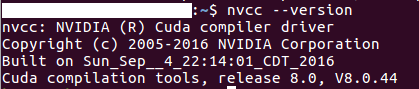
重启后,输入nvcc --version,成功:
3. 下载cutorch,网址:https://github.com/torch/cutorch
4. 终端定位到该文件夹内,而后输入:
luarocks install rocks/cutorch-1.0-.rockspec
等待安装完成。
说明:rocks文件夹内有cutorch-1.0-0.rockspec和cutorch-scm-1.rockspec两个文件。如果使用如下命令:
luarocks install rocks/cutorch-scm-1.rockspec
会提示:
1 error detected in the compilation of "/tmp/tmpxft_00000c32_00000000-7_THCTensorMath.cpp1.ii".

CMake Error at THC_generated_THCTensorMath.cu.o.cmake:267 (message):

  Error generating file

  /tmp/luarocks_cutorch-scm-1-1850/cutorch/build/lib/THC/CMakeFiles/THC.dir//./THC_generated_THCTensorMath.cu.o

lib/THC/CMakeFiles/THC.dir/build.make:105: recipe for target 'lib/THC/CMakeFiles/THC.dir/THC_generated_THCTensorMath.cu.o' failed

make[2]: *** [lib/THC/CMakeFiles/THC.dir/THC_generated_THCTensorMath.cu.o] Error 1

make[2]: *** 正在等待未完成的任务....

/tmp/luarocks_cutorch-scm-1-1850/cutorch/lib/THC/THCTensorMathReduce.cuh(471): error: identifier "TH_INDEX_BASE" is undefined

/tmp/luarocks_cutorch-scm-1-1850/cutorch/lib/THC/THCTensorMathReduce.cuh(552): error: identifier "TH_INDEX_BASE" is undefined

2 errors detected in the compilation of "/tmp/tmpxft_00000c45_00000000-5_THCTensorMath2.cpp4.ii".

CMake Error at THC_generated_THCTensorMath2.cu.o.cmake:267 (message):

  Error generating file

  /tmp/luarocks_cutorch-scm-1-1850/cutorch/build/lib/THC/CMakeFiles/THC.dir//./THC_generated_THCTensorMath2.cu.o

lib/THC/CMakeFiles/THC.dir/build.make:112: recipe for target 'lib/THC/CMakeFiles/THC.dir/THC_generated_THCTensorMath2.cu.o' failed

make[2]: *** [lib/THC/CMakeFiles/THC.dir/THC_generated_THCTensorMath2.cu.o] Error 1

/tmp/luarocks_cutorch-scm-1-1850/cutorch/lib/THC/THCTensorMathReduce.cuh(471): error: identifier "TH_INDEX_BASE" is undefined

/tmp/luarocks_cutorch-scm-1-1850/cutorch/lib/THC/THCTensorMathReduce.cuh(552): error: identifier "TH_INDEX_BASE" is undefined

2 errors detected in the compilation of "/tmp/tmpxft_00000cd5_00000000-5_THCTensorMathScan.cpp4.ii".

CMake Error at THC_generated_THCTensorMathScan.cu.o.cmake:267 (message):

  Error generating file

  /tmp/luarocks_cutorch-scm-1-1850/cutorch/build/lib/THC/CMakeFiles/THC.dir//./THC_generated_THCTensorMathScan.cu.o

lib/THC/CMakeFiles/THC.dir/build.make:147: recipe for target 'lib/THC/CMakeFiles/THC.dir/THC_generated_THCTensorMathScan.cu.o' failed

make[2]: *** [lib/THC/CMakeFiles/THC.dir/THC_generated_THCTensorMathScan.cu.o] Error 1

/tmp/luarocks_cutorch-scm-1-1850/cutorch/lib/THC/THCTensorMathReduce.cuh(471): error: identifier "TH_INDEX_BASE" is undefined

/tmp/luarocks_cutorch-scm-1-1850/cutorch/lib/THC/THCTensorMathReduce.cuh(552): error: identifier "TH_INDEX_BASE" is undefined

2 errors detected in the compilation of "/tmp/tmpxft_00000cc9_00000000-5_THCTensorMathReduce.cpp4.ii".

CMake Error at THC_generated_THCTensorMathReduce.cu.o.cmake:267 (message):

  Error generating file

  /tmp/luarocks_cutorch-scm-1-1850/cutorch/build/lib/THC/CMakeFiles/THC.dir//./THC_generated_THCTensorMathReduce.cu.o

lib/THC/CMakeFiles/THC.dir/build.make:140: recipe for target 'lib/THC/CMakeFiles/THC.dir/THC_generated_THCTensorMathReduce.cu.o' failed

make[2]: *** [lib/THC/CMakeFiles/THC.dir/THC_generated_THCTensorMathReduce.cu.o] Error 1

CMakeFiles/Makefile2:172: recipe for target 'lib/THC/CMakeFiles/THC.dir/all' failed

make[1]: *** [lib/THC/CMakeFiles/THC.dir/all] Error 2

Makefile:127: recipe for target 'all' failed

make: *** [all] Error 2

Error: Build error: Failed building.
https://github.com/torch/cutorch/issues/480指出,需要更新torch,nn,cunn等。懒得更新了,因而就使用老版本的了。
5. 此时再require ‘cutorch’便不会出错。
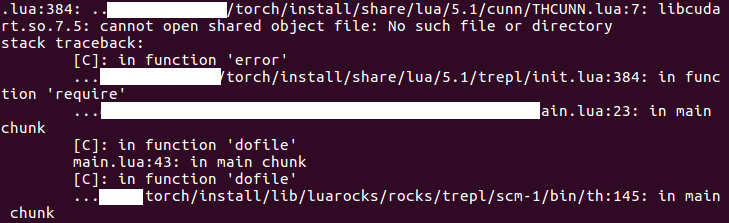
6. 此时若要使用cunn,还是会报错:
在官网下载cunn:https://github.com/torch/cunn,并安装cunn-1.0-0.rockspec:
luarocks install cunn-1.0-.rockspec
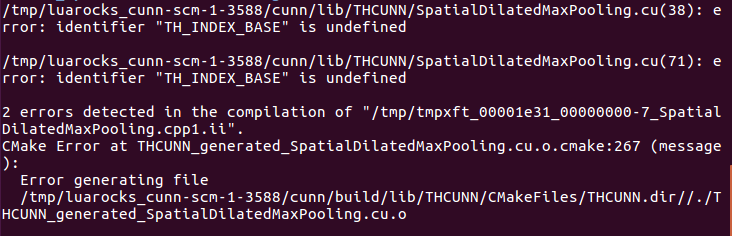
此处若安装新的cunn-scm-1.rockspec,也会报错:
安装完之后,require ‘cunn’成功。
7. 之后require ‘cudnn’再次遇到问题。重装之后,require时,会提示:
attempt to call field 'hasFastHalfInstructions' (a nil value)
https://github.com/soumith/cudnn.torch/issues/279指出,需要更新lua到5.2。
暂时不使用cndnn了,不更新了。重新配置起来太麻烦了。。。
(原)ubuntu16重装显卡驱动后,torch中的问题的更多相关文章
- Ubuntu 16.04 安装显卡驱动后循环登录和无法设置分辨率的一种解决方案
1. 安装环境 电脑:MSI GP63 显卡:GeForce GTX 1070 系统:Ubuntu 16.04 驱动版本:NVIDIA 384.130 2. 循环登录 如果按照这篇文章 Ubuntu ...
- 轻松解决fedora21装完NVIDIA显卡驱动后无法进入gnome问题
本来打算昨天写的,最近感冒了,打点滴,耽搁了! 我用的是联想14寸笔记本,装好了fedora21后,想装个NVIDIA显卡驱动试试,结果和很多人一样无法进入gnome界面,搞了三四个小时终于搞定.下面 ...
- Ubuntu 14.04 LTS 安装 NVIDIA 显卡驱动后的屏幕亮度调节问题
安装 Ubuntu,对于 NVIDIA 显卡,默认情况下会使用第三方开源驱动,并且一般情况下,第三方开源驱动和系统兼容性更好.由于 NVIDIA 显卡驱动不是开放的,所以对 Linux 系统的原生支持 ...
- ati显卡驱动后,性能不咋地
ubuntu装了ati的闭源驱动后,拖动窗口,会有明显的断裂感,不够平滑
- Ubuntu升级显卡驱动后开机无动画的解决办法
我的联想Ideapad z460,Nvidia GEFORCE 310M的显卡,安装闭源的驱动非常的蛋疼,ubuntu下面有附加驱动管理,在里面直接就能安装,也可以到官网下载.run的安装包,比较的折 ...
- 【记录一个问题】笔记本ThinkPad X1-Extreme安装ubuntu 18后,更新nvidia显卡驱动后出现显示问题,无法再登录
如题 更新的过程如下: sudo ubuntu-drivers autoinstall sudo reboot 后续准备在recovery模式中尝试删除驱动.
- Ubuntu16安装NVIDIA驱动后重复登录 简单粗暴
第一步 卸载所有NVIDIA的东西 第二步 开机,应该能进入默认驱动的桌面了,在设置里关闭开机密码,开机自动登录 第三步 安装英伟达驱动
- nvidia显卡驱动卸载和卸载后的问题
因为装了nvidia显卡驱动后开机一直处于循环登录界面.password输入正确也是进不去.然后就决定卸载nvidia显卡驱动.安装之后出现还是循环登陆. 是openGL的问题 有至少两种解决方 ...
- ubuntu16.04 下 NVIDIA GTX1050ti 显卡驱动 PPA安装
本文参考资料链接: http://blog.csdn.net/10km/article/details/61191230 前几天在京东商城上花了6999元买了台笔记本(惠普(HP)暗影精灵II代Pro ...
随机推荐
- hibernate像MySQL数据库里面存值是中文乱码的解决合辑
解决办法一: 1.把数据库表每一行改成gb2312_chinese(使用PHPMyAdmin) 2.导入时候还是不行,因此查网上的资料说hibernate持久化层在传输过程中未设置编码格式,这样在 ...
- c# 基础复习1
1. 类和对象 1.1 类和对象的概念 类:对象的类型,它不同于 int 等基本数据类型,因为类具有行为:也可以说是具有相 同特征和行为的一组对象的集合. 对象:对象是一个个你能看得见,摸得着的实体, ...
- Lua 学习笔记(一)
Lua学习笔记 1.lua的优势 a.可扩张性 b.简单 c.高效率 d.和平台无关 2.注释 a.单行注释 -- b.多行注释 --[[ --]] 3.类型和 ...
- CFLAGS/CPPFLAGS/CXXFLAGS in Makefile介绍
先来看一张关于Makefile中的常见预定义变量. CFLAGS 表示用于 C 编译器的选项,CXXFLAGS 表示用于 C++ 编译器的选项.这两个变量实际上涵盖了编译和汇编两个步骤.大多数程序和库 ...
- C语言基础学习基本数据类型-变量和常量
变量和常量 什么是变量和常量?有些数据在程序运行前就预先设定,并在运行过程中不发生变化,称之为常量:有些数据在程序运行中可能发生变化或被赋值,称之为变量. 使用变量前必须先声明一个变量.变量定义的语法 ...
- c语言,全局变量,局部变量,外部函数,内部函数,stasic和extern的复习总结
@import url(http://i.cnblogs.com/Load.ashx?type=style&file=SyntaxHighlighter.css);@import url(/c ...
- 关于offsetWidth innerWidth的使用
最近因为有使用到offsetWidth 和innerWidth,刚开始以为这两个属性在jq何js之中是可以通用的,谁知道在js中使用innerWidth时,发现如果对页面元素使用它时,发现出来的是un ...
- Matlab基本数据类型
本文转载自:http://hi.baidu.com/xmf6227/blog/item/97ca2ddf98f1b61f495403cb.html Matlab中有15种基本数据类型,主要是整型.浮点 ...
- 解压和生成 system.img&data.img ( yaffs2格式)
做为一名Android手机用户, 拿到system.img和data.img不是件难事 有这两个image可以做什么呢? ^_^可以做很多事,比如删除一些不想用的系统应用(/system/app目录下 ...
- logstash tomcat catalina.out zabbix 插件不会引起崩溃
input { file { type => "zj_api" path => ["/data01/applog_backup/zjzc_log/zj-api ...