
使用Angular构建单页面应用(SPA)
什么是SPA?看下图就是SPA:
下面说正经的,个人理解SPA就是整个应用只有一个页面,所有的交互都在一个页面完成,不需要在页面之间跳转。
单页面的好处是更快的响应速度,更流畅的用户体验,甚至和桌面应用或者原生App一样流畅。
有很多JS框架可以用来构建SPA,Ember.js、vue.js、React、Angular等等,甚至即使你用的是jQuery开发,也有相应的框架可以用来开发SPA,比如:page.js。
本文介绍如何用Angular构建SPA,其他的依葫芦画瓢就是了,原理都差不多。

(一)Demo效果图
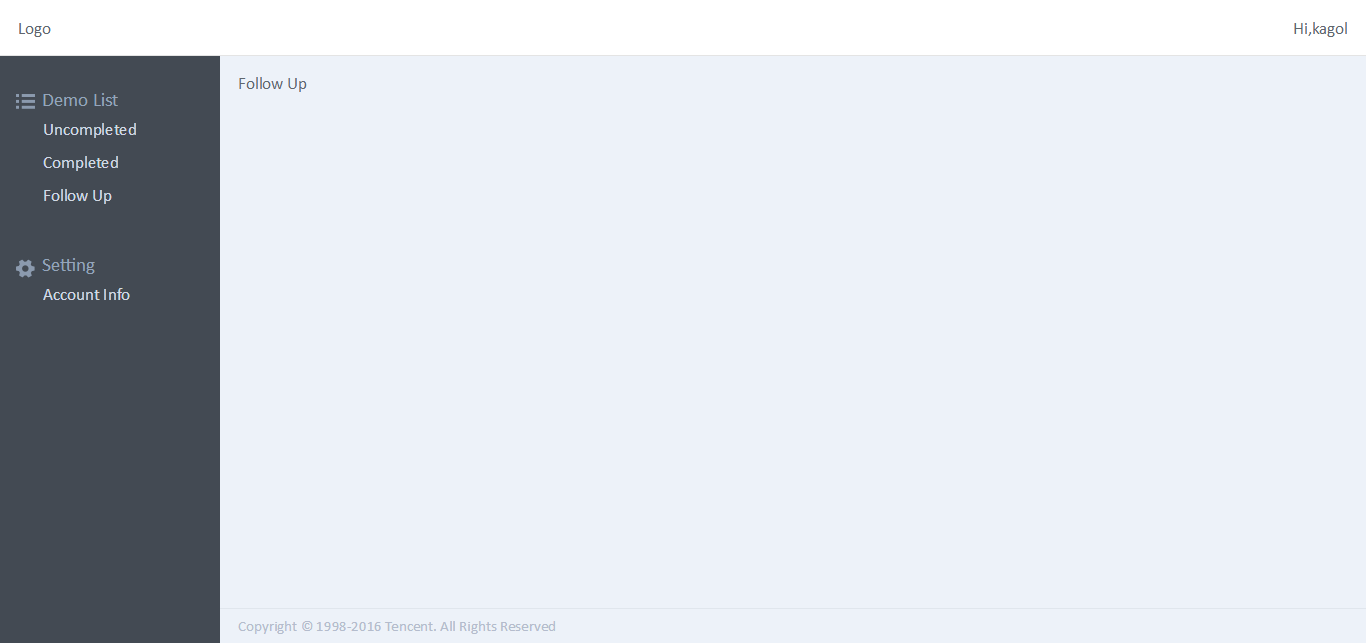
(二)代码结构
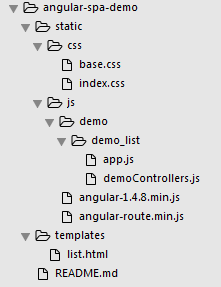
这个Demo使用Angular和Angular Route技术实现,相应地引入了angular和angular-route两个库,先看下代码结构,有个直观的印象:
(三)具体实现
1.创建不可变的布局list.html
 <!DOCTYPE html>

 <html ng-app="demoApp">

 <head>

     <meta charset="utf-8">

     <title>Angular SPA Demo</title>

     <link rel="stylesheet" href="../static/css/base.css">

     <link rel="stylesheet" href="../static/css/index.css">

 </head>

 <body>

     <header class="header" ng-controller="LogoutCtrl">

         <div class="left">Logo</div>

         <div class="right">Hi,kagol</div>

     </header>

     <section class="content" ng-controller="demoListCtrl">

         <aside class="wrap_nav">

             <ul class="nav">

                 <li>

                     <div class="title relative"><i class="icon_fl"></i><span class="span_fl">Demo List</span></div>

                     <ul>

                         <li><a href="#/demo/list/unassign">Uncompleted</a></li>

                         <li><a href="#/demo/completed/processed">Completed</a></li>

                         <li><a href="#/demo/followup">Follow Up</a></li>

                     </ul>

                 </li>

                 <li>

                     <div class="title relative"><i class="icon_set"></i><span class="span_set">Setting</span></div>

                     <ul>

                         <li><a href="#/account">Account Info</a></li>

                     </ul>

                 </li>

             </ul>

         </aside>

         <section class="main" ng-style="mainStyle">

             <div class="inner_content" ng-view></div>

         </section>

     </section>

     <footer class="footer">

         <div class="copyright">Copyright © 1998-2016 Tencent. All Rights Reserved</div>

     </footer>

     <script src="../static/js/angular-1.4.8.min.js"></script>

     <script src="../static/js/angular-route.min.js"></script>

     <script src="../static/js/demo/demo_list/demoControllers.js"></script>

     <script src="../static/js/demo/demo_list/app.js"></script>

 </body>

 </html>
ng-view里面的内容是视图的内容,是可变的,其余部分是布局,不可变,这里需要注意的是一个页面只能有一个ng-view。
2.创建可变的视图
 <!-- Uncompleted - To be Assigned -->

 <script type="text/ng-template" id="list_unassign.html">

     <div>To be Assigned</div>

 </script>

 <script type="text/ng-template" id="followup.html">

     <div>Follow Up</div>

 </script>

 <!-- 收藏 -->

 <script type="text/ng-template" id="completed_processed.html">

     <div>Completed</div>

 </script>

 <!-- Completed demo List -->

 <script type="text/ng-template" id="account.html">

     <div>Account</div>

 </script>

 <!-- 帐号管理(修改密码) -->
ng-template指令表示这是一个ng模板,id是该模板的标识,写路由规则的时候会用到。模板里可以任意发挥,编写自己需要的html内容。
3.引入视图
将视图代码放在包含ng-view指令的标签前面即可。
4.创建路由规则app.js
 var demoApp = angular.module('demoApp', [

     'ngRoute',

     'demoControllers'

 ]);

 demoApp.config(function($routeProvider) {

     $routeProvider.when('/', {

           templateUrl: 'list_unassign.html',

           controller: 'demoListUnassignCtrl'

       }).when('/demo/list/unassign', {

           templateUrl: 'list_unassign.html',

           controller: 'demoListUnassignCtrl'

       }).when('/demo/completed/processed', {

           templateUrl: 'completed_processed.html',

           controller: 'CompletedProcessedCtrl'

       }).when('/demo/followup', {

           templateUrl: 'followup.html',

           controller: 'FollowupCtrl'

       }).when('/account', {

           templateUrl: 'account.html',

           controller: 'AccountCtrl'

       }).otherwise({

           redirectTo: '/'

       });

 });
要使用Angular的路由服务,需要先引入ngRoute模块,然后使用$routeProvider服务配置路由。
5.创建Angular控制器demoControllers.js
 var demoControllers = angular.module('demoControllers', []);

 // Logout

 demoControllers.controller('LogoutCtrl', function($scope){

     console.log('this is logout');

 });

 // Account Info

 demoControllers.controller('AccountCtrl', function($scope, $routeParams){

     console.log('this is account');

 });

 // Follow Up

 demoControllers.controller('FollowupCtrl', function($scope, $http, $routeParams){

     console.log('this is followup');

 });

 // Completed - My Processed

 demoControllers.controller('CompletedProcessedCtrl', function($scope, $http, $routeParams){

     console.log('this is completed');

 });

 // Uncompleted - To be Assigned

 demoControllers.controller('demoListUnassignCtrl', function($scope, $http){

     console.log('this is uncompleted');

 });

 demoControllers.controller('demoListCtrl', function($scope, $http){

     console.log('this is demolist');

 });
控制器里可以任意发挥,编写自己需要的代码。
(四)进一步思考
这个Demo里左侧导航点击之后并没有高亮,大家可以想想怎么实现。
使用Angular构建单页面应用(SPA)的更多相关文章
- PushState+Ajax实现简单的单页面应用SPA
http://www.helloweba.com/view-blog-386.html 单页面应用(Single Page Application)简称SPA,使用SPA构建的应用优点有用户体验好.速 ...
- (转)前端:将网站打造成单页面应用SPA
前端:将网站打造成单页面应用SPA(一) Coffce 680 6月19日 发布 推荐 6 推荐 收藏 85 收藏,3.1k 浏览 前言 不知你有没有发现,像Github.百度.微博等这些大站,已经不 ...
- 前端:将网站打造成单页面应用SPA
前端:将网站打造成单页面应用SPA 前言 不知你有没有发现,像Github.百度.微博等这些大站,已经不再使用普通的a标签做跳转了.他们大多使用Ajax请求替代了a标签的默认跳转,然后使用HTML ...
- 单页面应用SPA架构
个人认为单页面应用的优势相当明显: 前后端职责分离,架构清晰:前端进行交互逻辑,后端负责数据处理. 前后端单独开发.单独测试. 良好的交互体验,前端进行的是局部渲染.避免了不必要的跳转和重复渲染. 当 ...
- 借助 Vue 来构建单页面应用
原文: https://github.com/MeCKodo/vue-tutorial 主题 Vue.js (1/2)Vue构建单页应用最佳实战 前言 我们将会选择使用一些vue周边的库 1.使用no ...
- MVC route 和 Angular router 单页面的一些方式
直接看代码和注释吧 ASP.NET MVC router public class RouteConfig { public static void RegisterRoutes(RouteColle ...
- 单页面应用SPA和多页面应用MPA
单页面应用(SinglePage Web Application,SPA) 只有一张Web页面的应用,是一种从Web服务器加载的富客户端,单页面跳转仅刷新局部资源 ,公共资源(js.css等)仅需加载 ...
- spring boot使用vue+vue-router构建单页面应用
spring boot http://docs.spring.io/spring-boot/docs/current-SNAPSHOT/reference/htmlsingle/ vue https: ...
- 新手vue构建单页面应用实例
本人写的小程序,功能还在完善中,欢迎扫一扫提出宝贵意见! 步骤: 1.使用vue-cli创建项目2.使用vue-router实现单页路由3.用vuex管理我们的数据流4.使用vue-resource请 ...
随机推荐
- python 数据聚合与分组
前面讲完了字符处理,但对数据进行整体性的聚合运算以及分组操作也是数据分析的重要内容. 通过数据的聚合与分组,我们能更容易的发现隐藏在数据中的规律. 数据分组 数据的分组核心思想是:拆分-组织-合并 首 ...
- 双数组trie树的基本构造及简单优化
一 基本构造 Trie树是搜索树的一种,来自英文单词"Retrieval"的简写,可以建立有效的数据检索组织结构,是中文匹配分词算法中词典的一种常见实现.它本质上是一个确定的有限状 ...
- mysql中You can't specify target table for update in FROM clause
使用mysql在删除表中重复记录 delete from user where username in (select user name form(select username from user ...
- break位于内循环。作用于外循环
outer:for(int i = 0; i < 4; ++i) { inner:for(int j = 0; j < 4; ++j) { S ...
- Java 基础知识(一)
Java基础知识篇: 一.关键字解释 1. final:修饰非抽象类,非抽象方法和属性, 以及修饰方法参数,代表“无法改变的”.出于对设计或者效率的考虑使用该关键字. final类无法被继承,fina ...
- 关于FileSystemXmlApplicationContext和ClassPathXmlApplicationContext路径问题
在码代码的时候发现使用这两个方法写路径的时候总是存在问题,所以百度了一下解决了这个问题. 关于FileSystemXmlApplicationContext这个路径有2总写法 有盘符的代表的是绝对路径 ...
- MyBatis-Generator 逆向工程(生成异常缺少部分的方法)
今日在使用 MyBatis-Generator 逆向工程时遇到了生成 mapper.java , mapper.xml 时缺少部分方法. 正常的 Mapper.java 示例: public in ...
- cocos2d-html5 之重要概念
1,CCDirector:导演: 2,CCCamera: 摄像机:细到每个节点都要用摄像机,例如节点发生放大,缩小,旋转的时候,要继承摄像机,让其重新渲染: 3,CCScene:场景,拍电影时的一段剪 ...
- 朗姆达表达式类似IN查询条件
if (list.Contains("全部")) { model.All = true; } ...
- SSLv3协议、TLSv1.2协议配置不对导致javax.ws.rs.ProcessingException: java.net.SocketException: Connection reset
SSl:Secure Sockets Layer 安全套接层 TLS:Transport Layer Security传输层安全 是为网络通信提供安全及数据完整性的一种安全协议.TLS与SSL在传输层 ...