
Facial Landmark Detection
源地址:http://www.learnopencv.com/facial-landmark-detection/#comment-2471797375
OCTOBER 18, 2015 BY SATYA MALLICK 51 COMMENTS

Facial landmark detection using Dlib (left) and CLM-framework (right).
Who sees the human face correctly: the photographer, the mirror, or the painter? — Pablo Picasso
If Picasso was alive today, he would have definitely added one more professional to that list — a computer vision engineer!
As computer vision engineers and researchers we have been trying to understand the human face since the very early days. The most obvious application of facial analysis is Face Recognition. But to be able to identify a person in an image we first need to find where in the image a face is located. Therefore, face detection — locating a face in an image and returning a bounding rectangle / square that contains the face — was a hot research area. In 2001, Paul Viola and Michael Jones pretty much nailed the problem with their seminal paper titled “Rapid Object Detection using a Boosted Cascade of Simple Features.” In the early days of OpenCV and to some extent even now, the killer application of OpenCV was a good implementation of the Viola and Jones face detector.
Once you have a bounding box around the face, the obvious research problem is to see if you can find the location of different facial features ( e.g. corners of the eyes, eyebrows, and the mouth, the tip of the nose etc ) accurately. Facial feature detection is also referred to as “facial landmark detection”, “facial keypoint detection” and “face alignment” in the literature, and you can use those keywords in Google for finding additional material on the topic.
Applications of Facial Keypoint Detection
There are several interesting applications of keypoint detection in human faces. A few of them are listed below.
Facial feature detection improves face recognition
Facial landmarks can be used to align facial images to a mean face shape, so that after alignment the location of facial landmarks in all images is approximately the same. Intuitively it makes sense that facial recognition algorithms trained with aligned images would perform much better, and this intuition has been confirmed by many research papers.
Head pose estimation
Once you know a few landmark points, you can also estimate the pose of the head. In other words you can figure out how the head is oriented in space, or where the person is looking. E.g. CLM-Framework described in this post also returns the head pose.
Face Morphing
Facial landmarks can be used to align faces that can then be morphed to produce in-between images. An example is shown in Figure 1.
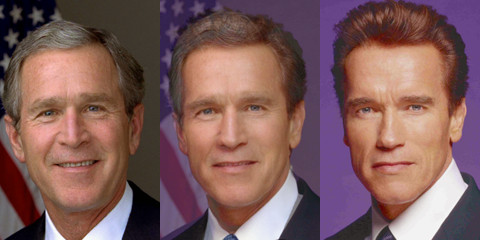
Figure 1. A morph between President Bush and the The Governator!
Virtual Makeover
At my company ( TAAZ.com ) we had written our own facial landmark detector. The detected landmarks were used to the calculate contours of the mouth, eyes etc. to render makeup virtually. An example is shown in Figure 2.
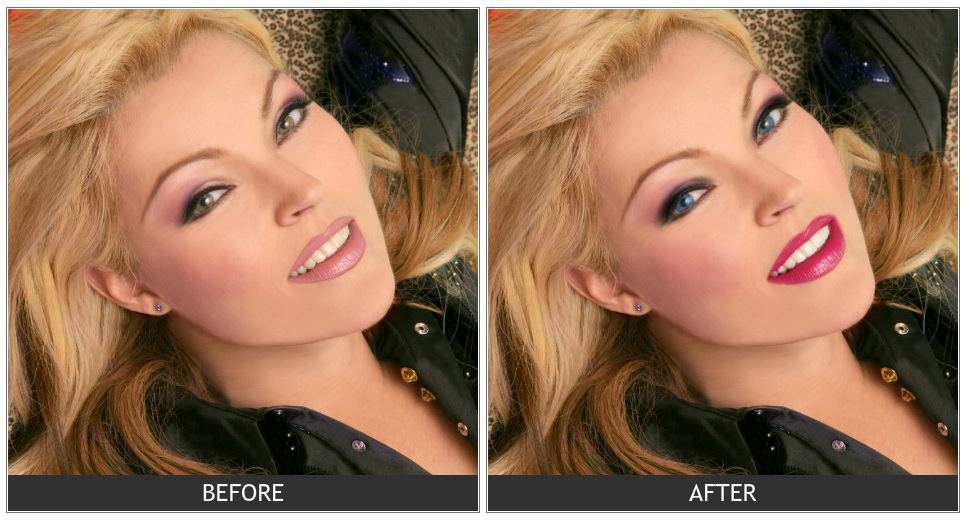
Figure 2. Landmark detection for virtual makeover.
Face Replacement
If you have facial feature points estimated on two faces, you can align one face to the other, and then seamlessly clone one face onto the other. You can also do something goofy like this
https://auduno.github.io/clmtrackr/examples/facesubstitution.html
In a previous post, we showed how to use facial features to predict facial attractiveness.
Clearly, the ability to detect facial features in images and videos open up possibilities of a ton of interesting applications. Let us now get our hands dirty with some tools that will allow us to do this.
Facial Feature Detection & Tracking Libraries
There has been a flurry of activity in this area in the last 5 years. Part of the reason for this activity is the availability of large annotated datasets like LFPW and Helen. I have listed a bunch of papers in the next section. However, I do not recommend implementing these papers from scratch because now we have access to high quality open source implementations of some of these papers.
In the video below, you can see two of the libraries, Dlib and CLM-framework in action.
Dlib ( C++ / Python )
Dlib is a collection of miscellaneous algorithms in Machine Learning, Computer Vision, Image Processing, and Linear Algebra. Most of the library is just header files that you can include in your C++ application. Oh you prefer python ? No problem, it has a python API as well.
I personally like Dlib more than any other facial feature detection & tracking library because the code is very clean, well documented, the license permits use in commercial applications, the algorithm they have chosen to implement is very fast and accurate, and you can easily integrate the library in your C++ project by just including the header files.
How to compile Dlib ?
- Download a copy from github
1
git clone https://github.com/davisking/dlib.git - Build examples ( OSX / Linux )
12345
cd dlib/examplesmkdir buildcd buildcmake ..cmake --build . --config ReleaseThese examples are a great way to start using dlib. Make a copy of an example cpp file, modify it, modify examples/CMakeLists.txt and compile again using the instructions above. Easy!
- Compile dlib python module
12
cd dlib/python_examples./compile_dlib_python_module.bat - Set PYTHONPATH environment variable
12
# Put the following line in .bashrc or .profileexport PYTHONPATH=/path/to/dlib/python_examples:$PYTHONPATH - Test python module
1
python -c "import dlib"
If the above line does not give an error, you are all set.
In case you run into any compilation issues, there are additional instructions at Dlib.net
How to run Dlib’s facial landmark detector ?
After you have built the examples, to run the facial landmark detector using a webcam, do the following.
|
1
2
3
4
5
|
cd examples/build/#Download the face landmark model tar xvjf shape_predictor_68_face_landmarks.dat.bz2./webcam_face_pose_ex |
If you want to run it on a single image, you can try
|
1
|
./face_landmark_detection_ex shape_predictor_68_face_landmarks.dat faces/*.jpg |
CLM-Framework (C++)
CLM-framework, also known as the Cambridge Face Tracker, is a C++ library for facial keypoint detection and head pose estimation. You can see how well it works in the included video. Compiling this library on OSX was bit of a challenge but it was not too bad. The library depends on OpenCV 3 and requires X11.
There are two important ways in which Dlib beats CLM-Framework. First, DLib is much faster than CLM-Framework. Second, Dlib’s license allows you to use it in commercial applications. If I had to pick, I would use Dlib. Interestingly, CLM-Framework depends on Dlib!
How to compile CLM-Framework ?
Compiling CLM-Framework was a bit involved for OSX. For windows and linux there are detailed instructions here. For compiling version 1.3.0 on OSX, I used the instructions for linux but made the following changes.
Most of the dependencies were installed using brew.
In file CMakeLists.txt ( red text was replaced with green text ).
find_package( OpenCV 3.0 REQUIRED )
INCLUDE_DIRECTORIES(${OpenCV_INCLUDE_DIRS})
INCLUDE_DIRECTORIES(/opt/X11/include)
In file exe/SimpleCLM/SimpleCLM.cpp
How to run CLM-Framework’s Facial Feature Detector ?
After compiling CLM-Framework, the executables are in the bin directory. For the webcam demo shown in this post, you can use
|
1
|
bin/SimpleCLM |
Face++ ( FacePlusPlus ) : Web API
One of the best implementations of facial landmark detection is by FacePlusPlus. They won the 300 Faces In-the-Wild Landmark Detection Challenge, 2013. They provide an easy to use API. The problem is that you need to upload an image to their servers and that raises a lot of privacy concerns. But if privacy is not an issue, Face++ is very good option. You can see a demo at
http://www.faceplusplus.com/demo-landmark/
Facial Feature Detection Research
Many different approaches have been used to solve this problem and it is difficult to summarize them in a blog post. I am simply linking to some important papers ( with major bias toward recent work ) for people who want to investigate more.
- Active Appearance Model (AAM)by T. Cootes, G. Edwards and C. J. Taylor. [1998]
- Face Alignment through Subspace Constrained Mean-Shifts by Jason M. Saragih, Simon Lucey and Jeffrey F. Cohn. [2009]
- Localizing Parts of Faces Using a Consensus of Exemplars by Peter N. Belhumeur, David W. Jacobs, David J. Kriegman, Neeraj Kumar [ 2011 ]
- Face Alignment by Explicit Shape Regression by Xudong Cao Yichen Wei Fang Wen Jian Sun [2012]
- Supervised Descent Method and Its Applications to Face Alignment by Xuehan Xiong and Fernando De la Torre [2013]
- Constrained Local Neural Fields for robust facial landmark detection in the wild by Tadas Baltrusaitis, Peter Robinson, and Louis-Philippe Morency. [2013]
- Extensive Facial Landmark Localization with Coarse-to-fine Convolutional Network Cascade by Erjin Zhou, Haoqiang Fan, Zhimin Cao, Yuning Jiang and Qi Yin. [2013]
- Face alignment at 3000 fps via regressing local binary features by S Ren, X Cao, Y Wei, J Sun. [2014]
- Facial Landmark Detection by Deep Multi-task Learning by Zhanpeng Zhang, Ping Luo, Chen Change Loy, and Xiaoou Tang. [2014]
- One Millisecond Face Alignment with an Ensemble of Regression Trees by Vahid Kazemi and Josephine Sullivan. [2014]
Subscribe
If you liked this article, please subscribe to our newsletter and receive a free
Computer Vision Resource guide. In our newsletter we share OpenCV tutorials and examples written in C++/Python, and Computer Vision and Machine Learning algorithms and news.
中文翻译
源地址:http://blog.csdn.net/xiamentingtao/article/details/50908190

原文地址:http://www.learnopencv.com/facial-landmark-detection/#comment-2471797375
作为计算机视觉研究员,我们很早就开始研究人脸。人脸分析领域最广为人知的就是人脸识别(face recognition).但是为了识别一幅图像中的人脸,我们首先必须要找到图像中人脸的位置。因此人脸检测(face detection)-定位一幅图像中的人脸并且返回一个包围人脸的矩形或者正方形(bounding rectangle/square)是一个热门的研究领域。2001年,Paul Viola 和Michael Jones 发表了史诗级论文<< “Rapid Object Detection using a Boosted Cascade of Simple Features.>>.在OpenCV早期甚至某种程度下在现在,OpenCV的致命武器就是对
Viola and Jones face detector的一个比较好的实现。
一旦你找到了人脸附近的包围盒,最显然的研究当然是准确识别人脸不同特征的位置(比如,眼角、瞳孔、嘴巴、鼻子等)。人脸特征检测(face feature detection)也称为 “facial landmark detection”, “facial keypoint detection” and “face alignment”,你可以在Google找到类似的文献。
Facial Keypoint Detection
人脸关键点检测有很多应用。如下做了一些列举:
Facial feature detection improves face recognition
人脸特征点可以被用来将人脸对齐到平均人脸(mean face shape),这样在对齐之后所有图像中的人脸特征点的位置几乎是相同的。直观上来看,用对齐后的图像训练的人脸识别算法更加有效,这个直觉已经被很多论文验证。
Head pose estimation
一旦你知道了一些特征点的位置,你也可以估计头部的姿势。换句话说,你可以解决头部在空间中的定向问题,或者通俗的讲就是人朝那里看的问题。
Face Morphing (人脸变形)
人脸特征点可以对齐人脸,这样可以生成两张人脸的中间图像。如下图: 
Virtual Makeover(虚拟化妆)
在我的公司
我们已经写了自己的人脸特征点检测器。检测出的特征点被用来计算嘴的轮廓,眼睛等用来渲染虚拟化妆。Figure2z展示了这一效果: 
Face Replacement
如何两张人脸的特征点已经估计出来了,你可以将一张人脸对齐到另一张人脸,并且可以无缝换脸。你也可以做像下面一样傻瓜的事。
https://auduno.github.io/clmtrackr/examples/facesubstitution.html
先前的报告中,我们展示了如何使用人脸特征点去预测人脸的吸引力。
很明显,在图片和视频上进行人脸特征点检测为许多有趣的应用提供了很多的可能性。下面我们就将介绍一些有用的特征点检测工具。
Facial Feature Detection & Tracking Libraries
过去五年来,这个领域很火,部分原因是大量可以用来训练的数据如LFPW、Helen被提供。我在下一节列了很多论文。但是我不建议胡乱实现这些论文,因为已经有开源的实现。
下面的视频中,你可以看到两个库Dlib和CLM-framework.
http://7xrqgw.com1.z0.glb.clouddn.com/dlib_clm.mp4
Dlib(C++/Python)
Dlib是机器学习,计算机视觉,图像处理,线性代数中众多算法的集合。库中大多数是头文件,你可以直接直接包含在C++应用中。或者你更喜欢Python?没问题,他也有一个Python接口.
我个人更喜欢Dlib因为代码是简洁的,有大量的注释,也可以被用来商用。他们选择实现的算法是非常快的,并且是准确的,你可以很容易集成这个库到你的C++工程中,而你需要做的仅仅是包含头文件.
如何编译Dlib?
- 从Github上下载:
git clone https://github.com/davisking/dlib.git- 1
- 建立Examples(OSX\Linux)
cd dlib/examples

mkdir build

cd build

cmake ..

cmake --build . --config Release- 1
- 2
- 3
- 4
- 5
这些例子是一个开始使用Dlib的非常好的方法。拷贝一个例子的cpp文件,修改它,修改examples/CMakeLists.txt 并且像上面一样再一次编译它。很容易吧!
3. 编译dlib python 模块
cd dlib/python_examples

./compile_dlib_python_module.bat- 1
- 2
- 设置 PYTHONPATH 环境变量
# Put the following line in .bashrc or .profile

export PYTHONPATH=/path/to/dlib/python_examples:$PYTHONPATH
- 1
- 2
- 3
- 测试python模块
python -c "import dlib"- 1
如果以上都没有问题的话,你就设置好了。
How to run Dlib’s facial landmark detector ?
当你编译好examples后,为了在网络摄像头上运行人脸特征点检测器,可以这样做:
cd examples/build/

#Download the face landmark model

wget http://dlib.net/files/shape_predictor_68_face_landmarks.dat.bz2

tar xvjf shape_predictor_68_face_landmarks.dat.bz2

./webcam_face_pose_ex- 1
- 2
- 3
- 4
- 5
如果你想要在单个图像上运行,你可以这样试试:
./face_landmark_detection_ex shape_predictor_68_face_landmarks.dat faces/*.jpg
- 1
- 2
CLM-Framework (C++)
CLM-framework,也被称为剑桥人脸跟踪器,是一个用来进行人脸特征点检测和头部姿势估计的C++库。你可以看看他在包含的video文件里工作的多么好啊!在OSX上编译这个库有点儿挑战但是也不太难。库依赖于OpenCV3和X11.
有两个重要的事说明Dlib可以挑战CLM-Framework。首先,Dlib比CLM-Framework更快。其次,Dlib的license允许你商用。如果要挑一个的,我会使用Dlib.有趣的是,CLM-Framework依赖于Dlib.
如何编译CLM-Framework?
编译CLM-Framework在OSX上有点儿复杂。对于Windows和linux,这里有一份详细的说明.为了在OSX上编译version 1.3.0,我使用了linux的指示,但是发生了很多改变。
许多依赖项可以使用brew安装.
在文件CMakeLists.txt(如下划掉的被后面的取代)
find_package( OpenCV 3.0 REQUIRED )
find_package( OpenCV 3.0 REQUIRED HINTS /path/to/opencv )
INCLUDE_DIRECTORIES(${OpenCV_INCLUDE_DIRS})
INCLUDE_DIRECTORIES(/opt/X11/include)
在文件exe/SimpleCLM/SimpleCLM.cpp中
writerFace = VideoWriter(tracked_videos_output[f_n], CV_FOURCC(‘D’,’I’,’V’,’X’), 30, captured_image.size(), true);
writerFace = VideoWriter(tracked_videos_output[f_n], CV_FOURCC(‘M’,’P’,’4′,’V’), 15, captured_image.size(), true);
如何运行CLM-Framework人脸检测器?
编译后,可执行文件在bin路径中.对于视频中展现的网络摄像头Demo,你可以这样使用:
bin/SimpleCLM- 1
Face++ ( FacePlusPlus ) : Web API
人脸特征点检测最好的实现之一就是Face++.他们在300 Faces in-the-Wild
Landmark Detection Challenge,2013取得了冠军。他们提供了一个易用的API。问题是你需要上传一张图片到他们的服务器,这个将带来很多隐私上的担忧。但是如果隐私不是问题的话,Face++是一个好的选择。你可以在
http://www.faceplusplus.com/demo-landmark/
看到一个Demo.
Facial Feature Detection Research
许多不同的方法都可以用来解决这个问题。很难再博客中对其归类。我简单地列出了一些重要论文。
1. Active Appearance Model (AAM) by T. Cootes, G. Edwards and C. J. Taylor. [1998]
2. Face Alignment through Subspace Constrained Mean-Shifts by Jason M. Saragih, Simon Lucey and Jeffrey F. Cohn. [2009]
3. Localizing Parts of Faces Using a Consensus of Exemplars by Peter N. Belhumeur, David W. Jacobs, David J. Kriegman, Neeraj Kumar [ 2011 ]
4. Face Alignment by Explicit Shape Regression by Xudong Cao Yichen Wei Fang Wen Jian Sun [2012]
5. Supervised Descent Method and Its Applications to Face Alignment by Xuehan Xiong and Fernando De la Torre [2013]
6. Constrained Local Neural Fields for robust facial landmark detection in the wild by Tadas Baltrusaitis, Peter Robinson, and Louis-Philippe Morency. [2013]
7. Extensive Facial Landmark Localization with Coarse-to-fine Convolutional Network Cascade by Erjin Zhou, Haoqiang Fan, Zhimin Cao, Yuning Jiang and Qi Yin. [2013]
8. Face alignment at 3000 fps via regressing local binary features by S Ren, X Cao, Y Wei, J Sun. [2014]
9. Facial Landmark Detection by Deep Multi-task Learning by Zhanpeng Zhang, Ping Luo, Chen Change Loy, and Xiaoou Tang. [2014]
10.One Millisecond Face Alignment with an Ensemble of Regression Trees by Vahid Kazemi and Josephine Sullivan. [2014]
Facial Landmark Detection的更多相关文章
- Facial landmark detection - 人脸关键点检测
Facial landmark detection (Facial keypoints detection) OpenSourceLibrary: DLib Project Home: http: ...
- OpenCV Facial Landmark Detection 人脸关键点检测
Opencv-Facial-Landmark-Detection 利用OpenCV中的LBF算法进行人脸关键点检测(Facial Landmark Detection) Note: OpenCV3.4 ...
- 【论文阅读】Wing Loss for Robust Facial Landmark Localisation with Convolutional Neural Networks
Wing Loss for Robust Facial Landmark Localisation with Convolutional Neural Networks 参考 1. 人脸关键点: 2. ...
- Facial keypoints detection Kaggle 竞赛系列
3.2# Facial keypoints detection 作者:Stu. Rui QQ: 1026163725 原文链接:http://blog.csdn.net/i_love_home/art ...
- opencv-learnopencv-Facial Landmark Detection
re: 1.facial-landmark-detection; https://www.learnopencv.com/facial-landmark-detection/ 2.landmark h ...
- Dlib Python 检测人脸特征点 Face Landmark Detection
首先安装Dlib,Opencv库 Dlib安装链接:http://www.cnblogs.com/as3asddd/p/7237280.html 环境:Mac Sierra 10.12.1 Pytho ...
- face detection,landmark, recognition with deeplearning
人脸特征点定位 Joint Face Detection and Alignment using Multi-task Cascaded Convolutional Neural Networks c ...
- 论文笔记之:A CNN Cascade for Landmark Guided Semantic Part Segmentation
A CNN Cascade for Landmark Guided Semantic Part Segmentation ECCV 2016 摘要:本文提出了一种 CNN cascade (CNN ...
- Awesome Deep Vision
Awesome Deep Vision A curated list of deep learning resources for computer vision, inspired by awes ...
随机推荐
- 正则表达式引擎的构建——基于编译原理DFA(龙书第三章)——3 计算4个函数
整个引擎代码在github上,地址为:https://github.com/sun2043430/RegularExpression_Engine.git nullable, firstpos, la ...
- Android使用学习之画图(Canvas,Paint)与手势感应及其应用(乒乓球小游戏)
作为一个没有学习Android的菜鸟,近期一直在工作之外努力地学习的Android的使用. 这周看了下Android的画图.主要是Canvas,Paint等,感觉须要实践下.下午正好有空,就想整一个乒 ...
- StreamWrite-StreamRead 读写文本文件
using System; using System.Collections.Generic; using System.Linq; using System.Text; using System.T ...
- Notepad++中如何设置自动换行以及行宽
view-->word wrap; setting->preference-->vertical edge settings; Notepad++中如何设置自动换行以及行宽 http ...
- BZOJ 1486: [HNOI2009]最小圈( 二分答案 + dfs判负圈 )
二分答案m, 然后全部边权减掉m, 假如存在负圈, 那么说明有平均值更小的圈存在. 负圈用dfs判断. ------------------------------------------------ ...
- Eclipse验证码
package MyEclipse; import java.io.*; public class MyEclipseGen { private static final String ...
- 基于visual Studio2013解决C语言竞赛题之1048打印矩阵
题目 解决代码及点评 /* 48. 找规律填写N×N方阵.如N=8时, 其方阵为: */ #include <stdio.h> #include <stdlib.h& ...
- 调整系统的inode数量
inode节点中,记录了文件的类型.大小.权限.所有者.文件连接的数目.创建时间与更新时间等重要的信息,还有一个比较重要的内容就是指向数据块的指针. 一般情况不需要特殊配置,如果存放文件很多,需要配置 ...
- 理解javascript中的for语句
程序实现中经常要用到循环语句,其中for循环是多数语言都有的.在javascript中,for循环有几种不同的使用情况,下面就分别来讲述我的理解. 第一种:(通常情况,循环执行相关操作) var ob ...
- html,JavaScript调用winfrom方法
---恢复内容开始--- 目的: 在动画上面添加点击事件,通过JavaScript调用winfrom方法 1.创建一个页面 using System; using System.Collections ...