
通过配置的方式Autofac(1)
autofac是比较简单易用的IOC容器。下面我们展示如何通过json配置文件,来进行控制反转。
需要用到以下程序集。可以通过nugget分别安装
Microsoft.Extensions.Configuration.dll
Microsoft.Extensions.Configuration.Json
Autofac.Configuration.dll
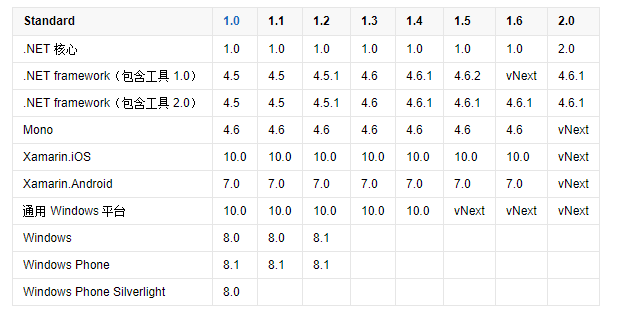
注意,项目目标框架最好设置为.NET Framework 4.6.1及以上。因为Microsoft.Extensions.Configuration.dll,依赖.NETStandard2.0
下表列出了 .NET Standard 的所有版本及其支持的平台
AutofacExt帮助类

using Autofac;

using Autofac.Configuration;

using Microsoft.Extensions.Configuration;

namespace autofacConsole

{

    public static class AutofacExt

    {

        private static IContainer _container;

        public static void InitAutofac()

        {

            // Add the configuration to the ConfigurationBuilder.

            var config = new ConfigurationBuilder();

            config.AddJsonFile("autofac.json");

            // Register the ConfigurationModule with Autofac.

            var module = new ConfigurationModule(config.Build());

            var builder = new ContainerBuilder();

            builder.RegisterModule(module);

            // Set the dependency resolver to be Autofac.

            _container = builder.Build();

        }

        /// <summary>

        /// 从容器中获取对象

        /// </summary>

        /// <typeparam name="T"></typeparam>

        public static T GetFromFac<T>()

        {

            return _container.Resolve<T>();

            //   return (T)DependencyResolver.Current.GetService(typeof(T));

        }

        public static T GetFromFac<T>(string name)

        {

            return _container.ResolveNamed<T>(name);

        }

    }

}
客户端调用
public interface IOutput

    {

        void Write(string content);

    }

public class ConsoleOutput : IOutput

    {

        public void Write(string content)

        {

            Console.WriteLine(content);

        }

    }

class Program

    {

        static void Main(string[] args)

        {

           AutofacExt.InitAutofac();

            var writer =AutofacExt.GetFromFac<IOutput>();

            writer.WriteDate();

            Console.ReadKey();

        }

    }
json配置文件配置
Autofac.json
{

  "defaultAssembly": "autofacConsole",

  "components": [

    {

      "type": "autofacConsole.ConsoleOutput, autofacConsole",

      "services": [

        {

          "type": "autofacConsole.IOutput,autofacConsole"

        }

      ],

      "instanceScope": "single-instance",

      "injectProperties": true

    }

  ]

}
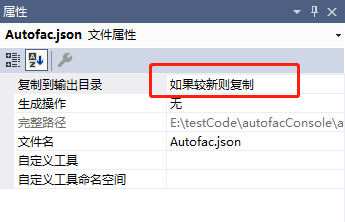
设置为如果较新则复制
参考资料:
https://github.com/autofac/Autofac
https://autofac.readthedocs.io/en/latest/getting-started/index.html
https://autofac.readthedocs.io/en/latest/configuration/xml.html
通过配置的方式Autofac(1)的更多相关文章
- 通过配置的方式Autofac 《第三篇》
一.基本配置 1.通过配置的方式使用Autofac <?xml version="1.0"?> <configuration> <configSect ...
- Spring声明式事务(xml配置事务方式)
Spring声明式事务(xml配置事务方式) >>>>>>>>>>>>>>>>>>>& ...
- STM8S---IO复用配置(STVP方式)
1 说明 STM8S的IO复用用程序代码配置起来比較麻烦.通常是操作flash来操作option byte字节.配置寄存器更加麻烦,能够使用STM 标准外设驱动库来设置. 本文使用一种界面配置的方式来 ...
- net 中web.config单一解决方法 (其他配置引入方式)
近期一个项目需要写许多的配置项,发现在单个web.config里面写的话会很乱也难于查找 所以搜了一下解决了,记录下来 一. webconfig提供了引入其他config的方式 <conne ...
- JAVA配置&注解方式搭建简单的SpringMVC前后台交互系统
前面两篇文章介绍了 基于XML方式搭建SpringMVC前后台交互系统的方法,博文链接如下: http://www.cnblogs.com/hunterCecil/p/8252060.html htt ...
- virtualbox下centos虚拟机安装,并网卡配置桥接方式上网,使得和host可以互Ping通。
见:http://www.cnblogs.com/taoshiqian/p/7615993.html 注意: 1.host 主机什么都不要处理 2.将virtualbox 的对应虚拟机网络设置桥接 3 ...
- Spring实现Ioc的多种方式--控制反转、依赖注入、xml配置的方式实现IoC、对象作用域
Spring实现Ioc的多种方式 一.IoC基础 1.1.概念: 1.IoC 控制反转(Inversion of Control) IoC是一种设计思想. 2.DI 依赖注入 依赖注入是实现IoC的一 ...
- Spring中,使用Java配置的方式进行依赖注入
之前用spring的时候,只知道使用xml的方式,和使用注解的方式,却一直不知道在spring中,还可以使用Java类的方式进行配置.使用Java类的方式,就可以取代xml和注解.使用Java配置是S ...
- tomcat下配置https方式
[本地HTTPS]①.<Connector SSLEnabled="true" clientAuth="false" keystoreFile=" ...
随机推荐
- 安装redis,以及python如何引用redis
下载 cd /usr/local/src/ wget http://download.redis.io/releases/redis-2.8.17.tar.gz 解压 tar -zxvf redis- ...
- C++中int转为char 以及int 转为string和string 转int和空格分隔字符串
1.对于int 转为char 直接上代码: 正确做法: void toChar(int b) { char u; ]; _itoa( b, buffer, ); //正确解法一 u = buffer[ ...
- Hmaster启动后自己挂掉
之前发现master中Hmaster进程自己挂掉,而worker中的HRegionServer进程关闭不掉. 最开始怀疑是hbase的pid文件存在tmp中,被系统自己删掉了,就在hbase文件中新建 ...
- phpMyAdmin 尝试连接到 MySQL 服务器,但服务器拒绝连接。
phpMyAdmin 尝试连接到 MySQL 服务器,但服务器拒绝连接.您应该检查配置文件中的主机.用户名和密码,并确认这些信息与 MySQL 服务器管理员所给出的信息一致. 错误产生原因: 修改了 ...
- 《html表格》
1.html表格 w3c School:http://www.jb51.net/w3school/html/html_tables.htm 2.<colgroup></colgrou ...
- 《JS权威指南学习总结--6.3删除属性》
内容要点: 一.delete运算符可以删除对象的属性.它的操作数应当是一个属性访问表达式.让人感到意外的是,delete只是断开属性和宿主对象的联系,而不会去操作属性中的属性: delete book ...
- INSTALL_FAILED_NO_MATCHING_ABIS
在运行写好的cocos的demo时候,安装出现以下问题: 后来发现是因为自己用cygwin生成的x86的.so文件跟自己的魅族3机器CPU不适配!!! 参考:http://stackoverflow. ...
- 【LeetCode】419. Battleships in a Board
Given an 2D board, count how many different battleships are in it. The battleships are represented w ...
- JavaScript原生对象总纲
一. javascript之Array类 创建js数组两种方式: var arr = []; 或var arr = new Array(); ()里可以指定长度,也可以不指定,指不指定都无所谓,因为 ...
- Leetcode 136 137 260 SingleNumber I II III
Leetccode 136 SingleNumber I Given an array of integers, every element appears twice except for one. ...