
Use SQL to Query Data from CDS and Dynamics 365 CE
from : https://powerobjects.com/2020/05/20/use-sql-to-query-data-from-cds-and-dynamics-365-ce/
Have you ever wanted to use T-SQL to query Dynamics 365 Customer Engagement (CE) or CDS data from a cloud-hosted environment, without having to replicate your data using the Data Export Service (DES) or some other replication solution? Of course you have! With the upcoming 2020 release Wave 1, Microsoft is rolling out this capability to all of us eager CRM data nerds. There are some steps involved to set things up, and we will go over those today.
First, a brief look at the long sought-after endgame here: writing and executing a SQL query against a live CDS environment! There are other ways we could connect to this new endpoint besides a query in SQL Server Management Studio (like via .NET C#), however, SSMS allows for easy validation of the feature setup.
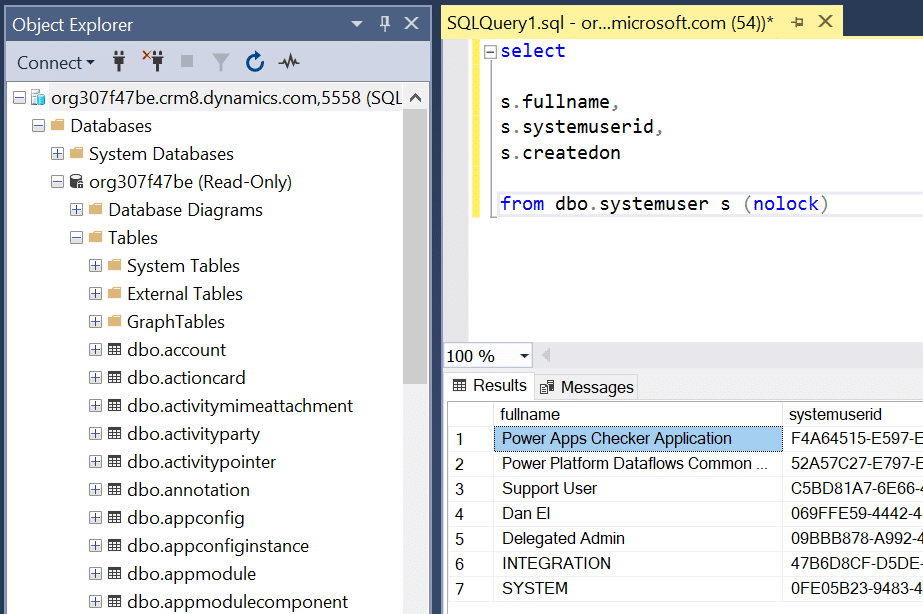
Prerequisites and Caveats
1. Your CDS environment version MUST be 9.1.0.17437 or higher. This is needed to enable the feature on the backend. At time of writing, this feature is still in Preview, so take that into account when considering whether to use this in your production environments. To easily determine the version of your current CDS environment, login to it, click the Settings gear in the upper-right corner, and click About. If you’re unsure why you’re on a specific version, it is often helpful to check the Microsoft Dynamics 365 CE release train documentation for information on when to expect version availability in your region.
2. You will need a way to modify your OrgDBOrgSettings feature flags. This is typically done with the Microsoft OrgDBOrgSettings Tool (select CRM2016-Tools-KB4046795-ENU-amd64.exe for the download), but can be done in various other ways as well, like the excellent OrgDBOrgSettings managed solution from Sean McNellis which has also been updated to support this new feature flag, which is ultimately what was used here.
3. The Microsoft documentation states you’ll need SQL Server Management Studio (SSMS) version 18.4 or greater to be able to connect to the CDS database, and you should ideally go with that recommendation. That said, we’ve been able to connect successfully from SSMS version 17.9.1.
4. This is only for querying data from a CDS database (read-only). You will not be able to use it to do inserts or updates.
5. Security: Note that your read security permissions in CRM carry over to SQL – if you do not have read-access for the Account entity for example, you cannot query it from the CDS SQL endpoint.
Setup in 3 Steps
1. Verify the current version of your CDS environment as mentioned in the prerequisites. Once you have verified that your CDS environment is on version 9.1.0.17437 or later, you can proceed. If you’re not yet on that version or later, turn back now because you will not be able to enable this feature.
- If you don’t have this version or newer available for your CDS environment, check the Microsoft Dynamics 365 CE release train documentation for information on when to expect version availability in your region.
2. Next, you’ll need to enable the Tabular Data Stream (TDS) endpoint for CDS for your environment. This can be done via the OrgDBOrgSettings Tool from Microsoft, the OrgDBOrgSettings managed solution from Sean McNellis, both of which currently support editing this new feature flag (you can find links to these in the prerequisites section). The feature flag we need to enable is called ‘EnableTDSEndpoint’.
- Using the OrgDBOrgSettings Tool: there’s a great write-up from Microsoft on how to do this, however, we would consistently hit this error when trying to run the final step, as have others in the community: ‘Error occurred in OrgDBOrgSettings and the error details are GDS resource provider is unable to get instances for tenantId:…’.

- To get around this error, the OrgDBOrgSettings managed solution was used instead. Simply install the managed solution and open the solution configuration page. You will see a full list of the Org DB settings you can change – look for the one named EnableTDSEndpoint.
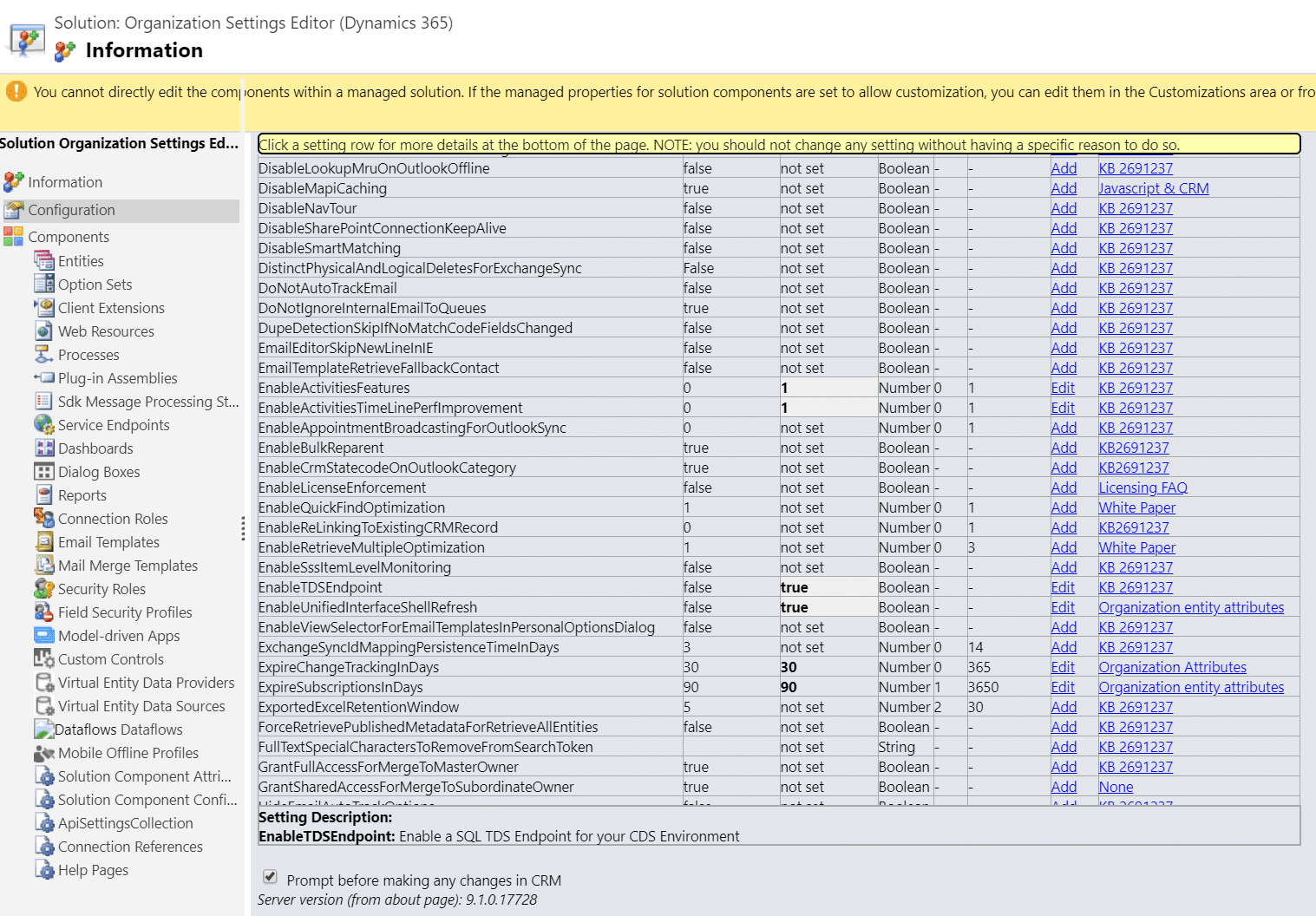
- Click the Add link for the EnableTDSEndpoint row, then click Edit, and set the value to be true and click Update. The result should be a row that looks like this:

3. Now you should be able to connect to your environment from SQL Server Management Studio (SSMS)!
- As stated in the prerequisites, you will need to have SSMS version 18.4 or later to connect to a CDS database.
- To connect, simply place your org URL in the Server Name field, and add ‘,5558’ to the end. So, if your org URL is dancat.crm.dynamics.com, your connection Server Name field should be dancat.crm.dynamics.com,5558.
- Set your Authentication drop-down to be ‘Azure Active Directory – Password’. Currently this is the only way you can connect to a CDS database from SSMS – you will not be able to use Windows Authentication or SQL Authentication. Enter your User name and Password, and click Connect.
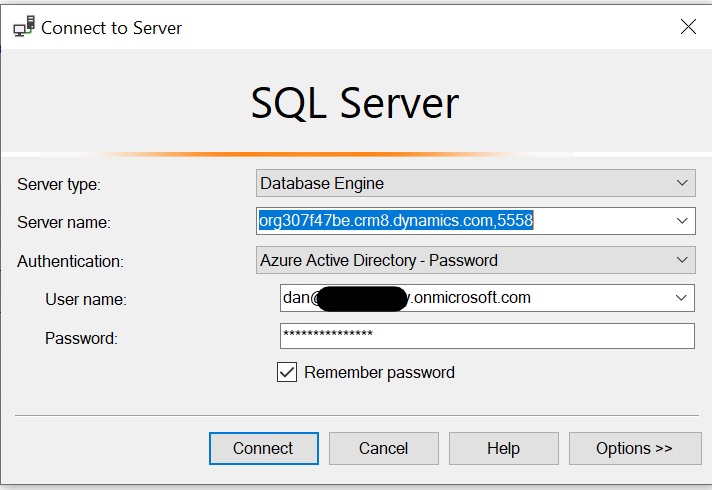
Note: If you get the following error shown below: “Login failed: TDS protocol endpoint is disabled for this organization…”, you need to revisit step 2, as your EnableTDSEndpoint flag is not set correctly.

Querying the CDS Database
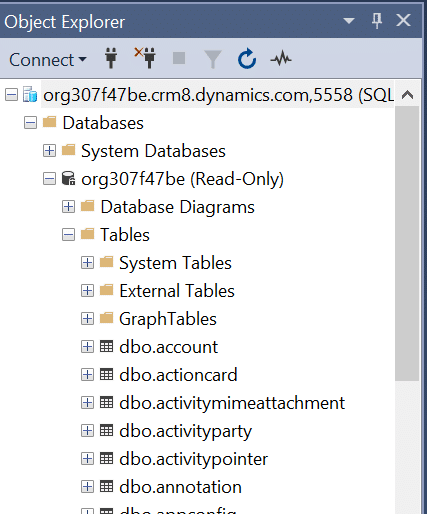
If you’ve done your setup correctly, when you connect to the org via SSMS (step 3 above), you should see the org DB appear on the left in the Object Explorer. For those unfamiliar, you can expand the top-level org URL, then expand the Databases section, wherein you can see your CDS database. If you expand the Tables folder in there, you can see your CDS entity tables, just as if you were connected to an on-premises CRM SQL database!
Per Microsoft, the following operations are supported (but there are more that do function outside this list): SELECT, UNION, JOIN, FILTER, batch operations, and aggregate operations like COUNT() and MIN() or MAX(). The limitation that FetchXML has for a max of 50,000 aggregate rows is gone when we use T-SQL here as well, which is great! As mentioned before, this is a read-only database, so any operation that would need write permissions to the database will not work.
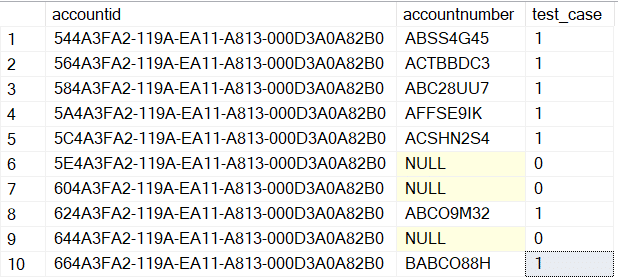
Here’s a simply query, and the expected result:
select

a.accountid,

a.accountnumber,

case when a.accountnumber is not null then 1

when a.accountnumber is null then 0

end as test_case

from dbo.account a (nolock)
Performance
One would expect that T-SQL queries should perform much better and faster than their FetchXML counterparts when it comes to querying from CDS, as we should be circumventing entire process of a FetchXML query being translated to a T-SQL query on the backend.
To test this, we loaded 100,000 rows into the Account table of our CDS environment, with only a few fields of data populated as a simple performance test. To test FetchXML query performance against a large set of records, we used version 1.2019.12.1 of the FetchXML Builder add-on for the XrmToolBox application. For the T-SQL query performance, SSMS version 18.5.
Test 1: Query 3 Attributes for all Accounts
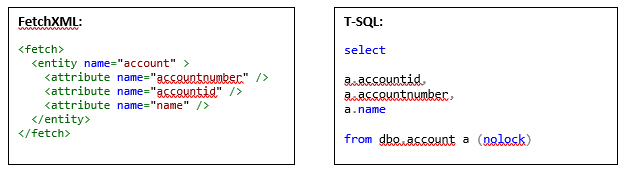
Results (mean of 5 test runs for each query):
FetchXML: 16.97 seconds T-SQL: 5.17 seconds Average Improvement: 11.8 seconds
Test 2: Query 10 Attributes for all Accounts with a Join to Users
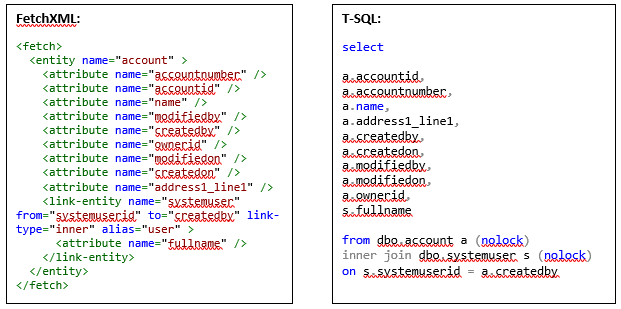
Results (mean of 5 test runs for each query):
FetchXML: 44.62 seconds T-SQL: 83.51 seconds Average Improvement: -38.89 seconds
What do these results mean? Well, first of all, we must remember that this test is being run on a trial org in the India region due to current feature availability. That means the org will not have the same kind of resource allocation that a production environment would, so we would expect more complex queries to perform faster than they are performing here in a real-world situation. Other entity tables would perform differently than the ‘heavier’ Account entity as well. The inflection point where the number of columns began to make the Account T-SQL query slower than the FetchXML query was at 6 columns. Doing a query of all Accounts and all Columns (bad query, good load test) will hit the 2-minute timeout every time in this environment. Your mileage may absolutely vary here, so you’ll want to performance test your own specific use-cases in your environment to confirm which path may be better for now. It is likely that with the GA release of this feature and continued developments, most if not all queries against the CDS SQL endpoint should be faster than FetchXML.
Limitations
This is very new feature (in Preview still at time of writing), so there are currently several limitations you need to consider before using this solution. Here is our list of currently known or discovered limitations with this feature:
- Not every table from the CDS environment is usable with this feature. Tables like audit and plugintracelog are not available for querying here. A pleasant surprise for anyone who has used the Data Export Service to replicate a CDS database to Azure SQL will note that the dbo.activitypointer entity is present in this new CDS DB query feature, even though it is not supported for DES.
- Not every attribute from the CDS environment tables is usable with this feature. Per Microsoft documentation, data types of binary, image, ntext, sql_variant, varbinary, virtual, HierarchyId, managedproperty, file, xml, partylist, and timestamp are not usable within a CDS SQL query at this time. Perhaps the most notable one from that list is ntext. Without support for ntext, you will not see data for Multiple Line of Text fields in your queries. In fact, the system appears to be working a bit oddly as of now – if you were to look at the native Account entity, you can see it has a Description field which would be a SQL data type of ntext. In the expanded Columns list for the dbo.account entity in SSMS, it doesn’t show the Description field… that makes sense, right? Except if you do a SELECT description FROM dbo.account then it returns the column, but with NULL data regardless of what is really in the field.
- Some syntax just doesn’t work yet. Unaliased queries behave oddly in the CDS SQL query feature – if we were to run this query, it works:
select

s.fullname,

s.systemuserid,

s.createdon,

a.accountid

from dbo.systemuser s (nolock)

left join dbo.account a (nolock) on s.systemuserid = a.ownerid
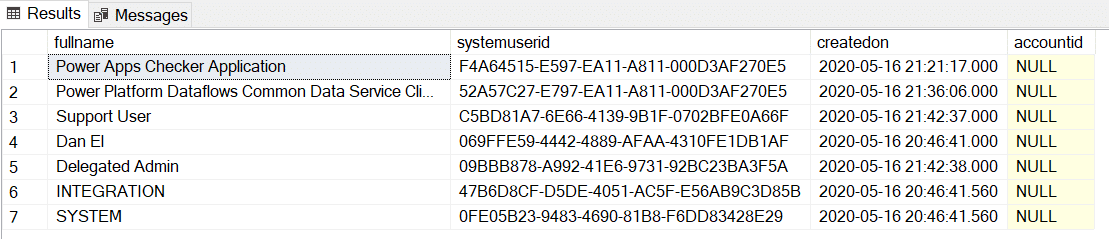
However, if we run this query without aliases, it fails:
select

*

from dbo.systemuser (nolock)

left join dbo.account (nolock) on dbo.systemuser.systemuserid= dbo.account.ownerid

- Common Table Expressions (CTE) are not supported yet. This is a big one, but one we’d expect to see added to the functionality eventually due to how valuable CTEs can be for CRM data.
- Possible Security/Other Implications for Retrieve and RetrieveMultiple usage. From our testing, if you can login to CRM, you can connect to the read-only CDS SQL database. Your security permissions carry over to CDS SQL for the most part, in that if you can’t read entity records in the CRM UI, you won’t be able to read them from the CDS SQL endpoint. There’s a slight gap, however, which shouldn’t affect many implementations, but it is important for some with regard to data security – if you have logic that fires on Retrieve or RetrieveMultiple, that logic WILL NOT FIREwhen the same data is queried from the CDS SQL endpoint as of now.
- For example, if a user has read-access to an entity, but that entity has a synchronous plug-in running on RetrieveMultiple of that entity to blank-out the return payload, a user could get around that with the CDS SQL connection as of now. There are theories on a new message type that a plug-in could tie into in order to have similar interception logic on a T-SQL query for an entity, however, that has not yet been documented or confirmed at this time.
- There may be a way to block CDS SQL endpoint use for specific users via security roles, however, that has not been identified or documented yet.
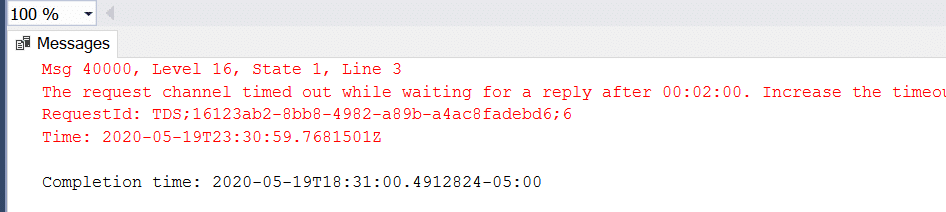
- The 2-minute timeout is still a thing! Under default conditions, the CDS SQL endpoint will not tolerate long-running queries. If a T-SQL query runs longer than 120 seconds, whether due to malformed queries or environment limitations, the query will fail with the error message: “The request channel timed out while waiting for a reply after 00:02:00. Increase the timeout value passed to the call to Request or increase the SendTimeout value on the Binding. The time allotted to this operation may have been a portion of a longer timeout.” Take this into consideration when using the CDS SQL endpoint, and as with other queries, make them as conservatively as you can, remembering that a CRM query that runs for 1 minute normally may take 2 minutes or more under different load conditions.
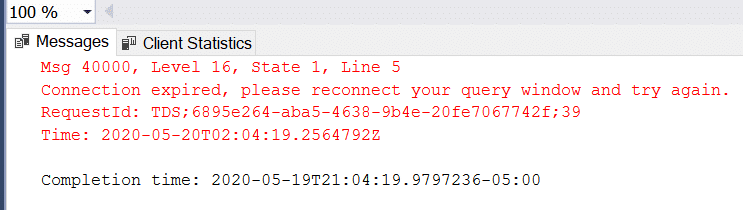
- You’ll be reconnecting in SSMS relatively often. This may be a good security feature ultimately, but SSMS will disconnect you from the CDS SQL endpoint if there’s inactivity for what appears to be 10 minutes. This may be configurable, but that is unknown at this time.
Conclusion
The CDS SQL endpoint is a feature many of us have been waiting for since the inception of CRM being in the cloud back in the days when we referred to the product simply as CRM Online. Now with Dynamics 365 CE/CDS, this feature is most welcome, and while it has certain limitations currently, we expect many of those limitations to be resolved as the product feature matures. As always, don’t hesitate to reach out to us if you have questions – we’re glad to help!
Use SQL to Query Data from CDS and Dynamics 365 CE的更多相关文章
- 利用Azure虚拟机安装Dynamics 365 Customer Engagement之五:安装SQL Server
我是微软Dynamics 365 & Power Platform方面的工程师罗勇,也是2015年7月到2018年6月连续三年Dynamics CRM/Business Solutions方面 ...
- Dynamics 365 Online-Delete Audit History Data
Dynamics 365 CE自带的Audit功能,虽然不会给我们的业务流程带来显著变化,但是这个功能对于我们追溯数据变化的历史,诊断定制触发的执行,以及数据还原等,都是不可或缺的关键先生.尤其是涉及 ...
- iReport 5.6.0 Error: net.sf.jasperreports.engine.JRException: Error executing SQL statement for : data 最优解决方案
问题描述 近期学习iReport(个人使用的是最新版本的 iReport-5.6.0,MySQL是 5.5.56版本),遇到一些问题,在安装完成后,创建了数据库,配置了MySQL数据库连接信息,新建报 ...
- PL/SQL:these query result are not updateable,include the ROWID to get updateab -----for update
these query result are not updateable,include the ROWID to get updateab 原因: 其实,选中一个表后,右键,如果选择“query ...
- SQL optimizer -Query Optimizer Deep Dive
refer: http://sqlblog.com/blogs/paul_white/archive/2012/04/28/query-optimizer-deep-dive-part-1.aspx ...
- sql System.Data.SqlClient.SqlError: 无法覆盖文件 'C:\Program Files\Microsoft SQL Server\MSSQL\data\itsm_Data.MDF'。数据库 'my1' 正在使用该文件的解决方案
对数据库备份进行还原时遇到“sql System.Data.SqlClient.SqlError: 无法覆盖文件 'C:\Program Files\Microsoft SQL Server\MSSQ ...
- SQL*Net more data to client
The server process is sending more data/messages to the client. The previous operation to the client ...
- SQL*Net more data from client
SQL*Net more data from client The server is waiting on the client to send more data to its client sh ...
- 奇葩的SQL*Net more data from client等待,导致批处理巨慢
<pre name="code" class="sql"><pre name="code" class="sql ...
随机推荐
- Code Forces 796C Bank Hacking(贪心)
Code Forces 796C Bank Hacking 题目大意 给一棵树,有\(n\)个点,\(n-1\)条边,现在让你决策出一个点作为起点,去掉这个点,然后这个点连接的所有点权值+=1,然后再 ...
- System.Timers.Timer(定时器)
1.System.Timers命名空间下的Timer类.System.Timers.Timer类:定义一个System.Timers.Timer对象,然后绑定Elapsed事件,通过Start()方法 ...
- Pop!_OS安装与配置(四):GNOME插件篇
Pop!_OS安装与配置(四):GNOME插件篇 #0x0 效果图 #0x1 自动安装(不保证成功性) #0x2 OpenWeather #0x3 Topicons Plus #0x4 System- ...
- JavaWeb基础(day11)
HTML HTML是超文本标记语言.HTML就 是普通的文本文件,只不过在文本中的内容如果被一些 特殊的标签进行包裹就有了特殊的含义,这些被那些标签标记文本,就成了超文本. 网页的组成 网页的组成 H ...
- 汉王JAVA笔试题
汉王JAVA笔试题 1,jsp中动态include与静态include的区别? (1)动态包含总是会检查文件中的变化,适合用于包含动态页面,并且可以带参数. (2)静态包含不会检查所含文件的变化,适用 ...
- Django框架11 /form组件、modelForm组件
Django框架11 /form组件.modelForm组件 目录 Django框架11 /form组件.modelForm组件 1. form组件介绍 2. form常用字段与插件 3. form所 ...
- IDEA搭建SpringMVC简单接口框架(Maven项目)
1, 新建项目,选择Maven,如图一次选择,最后点击Next 2, 输入GroupId和ArtifactId,点击Next 3,根据需要选择自定义maven配置,点击Next.(①可以直接跳过) 4 ...
- bzoj3043IncDec Sequence*
bzoj3043IncDec Sequence 题意: n个数,每次可以将区间l到r里的数+1或-1,问将它们变成同个数的最小操作次数和保证最小操作次数前提下有多少中可能.n≤100000. 题解: ...
- TortoiseGit 解决冲突的两种方法
一.冲突发生原因: 用户A 有新提交 用户B 没有pull, 写新代码 ,pull , 提示有冲突 Solution: 1: stash save(把自己的代码隐藏存起来) -> 重新pul ...
- SQLite数据库多平台应用及常见错误分析
SQLite是一个软件库,实现了自给自足的.无服务器的.零配置的.事务性的SQL数据库引擎.SQLite是世界上最广泛部署的数据库引擎之一.SQLite源代码开放,没有授权限制.正是因为其免费.轻巧. ...