
spring data JPA 使用EntityentiListeners实现数据审计功能设计
当系统中有审计需求时,特别是需要对某些数据进行动态监控时,我们可以使用EntityentiListeners来实现,当然这是基于使用JPA而不是mybatis的情况下。
当前我们的需求场景:
1.需要监控某一个实体的数据变化(add,update,delete)
2.需要记录:id,who,when, action, entity,condition,value分别表示id,操作人,操作时间,动作(add,update,delete),实体名称,状态(before:操作前,after:操作后),值
如何做?
1.如何识别add,update,delete操作?
entityListenners有定义的@PreUpdate:更新前,@PostUpdate:更新后,@PrePersist:保存前,@PostPersist:保存后,@PreRemove:删除前。
我们可以在保存前获取保存的数据,记录为add新增操作数据,我们在删除前获取数据,记录为删除的数据,我们在更新前,获取当前数据为更新后的数据,另外根据id从数据库获取之前的数据作为之前的数据,此时加以对比,若存在差异则为更新。
ps:如何区分update和add?updata时实体中是存在id的,add时不存在。
2.如何获取当前操作人:entityListenner和AOP有点不一样,需要在启动类中加上下列语句:


@Bean

    public MethodInvokingFactoryBean methodInvokingFactoryBean() {

        MethodInvokingFactoryBean methodInvokingFactoryBean = new MethodInvokingFactoryBean();

        methodInvokingFactoryBean.setTargetClass(SecurityContextHolder.class);

        methodInvokingFactoryBean.setTargetMethod("setStrategyName");

        methodInvokingFactoryBean.setArguments(new String[]{SecurityContextHolder.MODE_INHERITABLETHREADLOCAL});

        return methodInvokingFactoryBean;

    }
然后使用spring security工具获取当前人,类似这样(具体根据本系统具体情况定制):
public Optional<String> getCurrentAuditor() {

        Authentication authentication = SecurityContextHolder.getContext().getAuthentication();

        String reString=(String)((JwtAuthenticationToken)authentication).getToken().getClaims().get("preferred_username");

        return Optional.of(reString);

      }
代码实现:
1.添加自己的listener类,实现监控,存日志逻辑
package com.b.pos.quotation.listeners;

import java.time.Instant;

import java.util.Optional;

import java.util.concurrent.ExecutorService;

import java.util.concurrent.Executors;

import javax.persistence.PostPersist;

import javax.persistence.PostUpdate;

import javax.persistence.PrePersist;

import javax.persistence.PreRemove;

import javax.persistence.PreUpdate;

import org.slf4j.Logger;

import org.slf4j.LoggerFactory;

import org.springframework.beans.factory.annotation.Autowired;

import org.springframework.stereotype.Component;

import com.bmw.pos.quotation.domain.InterfaceLog;

import com.bmw.pos.quotation.domain.Quotation;

import com.bmw.pos.quotation.repository.InterfaceLogRepository;

import com.bmw.pos.quotation.security.SecurityUtils;

import com.bmw.pos.quotation.service.QuotationService;

import com.bmw.pos.quotation.util.ProfileUtil;

import com.google.common.base.Throwables;

/**

 * Application status Listener

 */

@Component

public class QuotationStausListener {

    private static final Logger log = LoggerFactory.getLogger(QuotationStausListener.class);

    private static InterfaceLogRepository interfaceLogRepository;

    private static QuotationService quotationService;

    @Autowired

    public synchronized void setInterfaceLogRepository(InterfaceLogRepository interfaceLogRepository) {

        QuotationStausListener.interfaceLogRepository = interfaceLogRepository;

    }

    @Autowired

    public synchronized void setQuotationService(QuotationService quotationService) {

        QuotationStausListener.quotationService = quotationService;

    }

    /**

     * after save success

     *

     * @param object

     */

    @PostPersist

    public void postpersist(Object object) {

    }

    /**

     * after update success

     *

     * @param object

     */

    @PostUpdate

    public void postUpdate(Object object) {

    }

    @PreRemove

    public void beforeRemove(Object object) {

        log.info("@PreRemove");

        Quotation quotation = (Quotation) object;

        cachedThreadPool.execute(new Runnable() {

            @Override

            public void run() {

                saveInterfaceLog(quotation.getId().toString(), quotation.toString(),"Quotation","Delete","Before");

            }

        });

    }

    @PreUpdate

    public void beforeUpdate(Object object) {

        log.info("@PreUpdate");

        try {

            Quotation quotation = (Quotation) object;

            log.info("@PreUpdate--------->Quotation: {}",quotation.toString());

            Quotation oldData = quotationService.findOldData(quotation.getId());

            log.info("oldData.get()------->oldData.get(): {}",oldData.toString());

            if(oldData!=null&&(!quotation.equals(oldData))) {

                cachedThreadPool.execute(new Runnable() {

                    @Override

                    public void run() {

                        saveInterfaceLog(quotation.getId().toString(), oldData.toString(),"Quotation","Update","Before");

                        saveInterfaceLog(quotation.getId().toString(), quotation.toString(),"Quotation","Update","After");

                    }

                });

            }

        } catch (Exception e) {

            log.info(Throwables.getStackTraceAsString(e));

        }

    }

    @PrePersist

    public void beforeSave(Object object) {

        log.info("@PrePersist");

        Quotation quotation = (Quotation) object;

        cachedThreadPool.execute(new Runnable() {

            @Override

            public void run() {

                saveInterfaceLog(quotation.getId().toString(), quotation.toString(),"Quotation","Add","");

            }

        });

    }

    ExecutorService cachedThreadPool = Executors.newCachedThreadPool();

    private String getCurrentUserName() {

        Optional<String> user=SecurityUtils.getCurrentUserLogin();

        return user.isPresent() ? user.get() : null;

    }

    /**

     * save log

     *

     * @param appNo

     * @param requestData

     * @param response

     * @param exceptions

     */

    private void saveInterfaceLog(String quotationNo, String curData,String entityName,String action,String condition) {

        // save log

        InterfaceLog interfaceLog = new InterfaceLog();

        interfaceLog.setIntType(entityName);

        interfaceLog.setReturnParam(curData);

        interfaceLog.setCalledTime(Instant.now());

        String channel = ProfileUtil.getChannelByProfile();

        interfaceLog.setEntityType(channel);

        interfaceLog.setAppGlobalId(quotationNo);

        interfaceLog.setEntityType(action);

        interfaceLog.setEntityCode(condition);

        interfaceLog.setInputParam(getCurrentUserName());

        log.info("InterfaceLog: {}",interfaceLog.toString());

        QuotationStausListener.interfaceLogRepository.saveAndFlush(interfaceLog);

    }

}
2.为实体添加监控注解:@EntityListeners({AuditingEntityListener.class,QuotationStausListener.class})
重写equals方法,使用 eclipse自带generator生成即可
3.创建数据表
----------------------分割线------------------------------
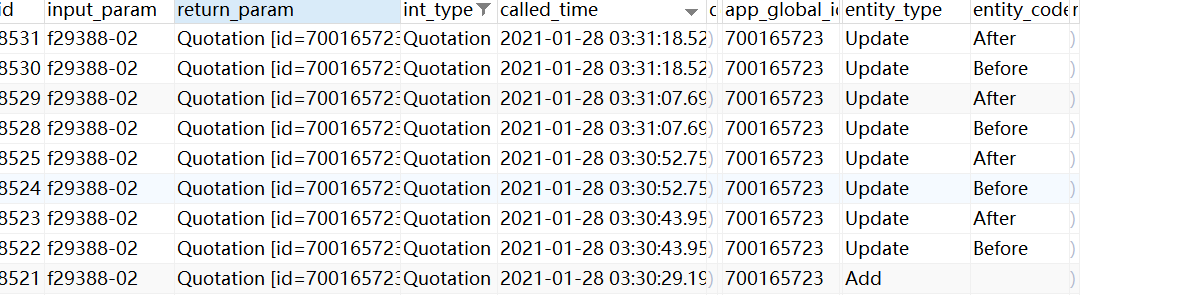
看一下效果:
spring data JPA 使用EntityentiListeners实现数据审计功能设计的更多相关文章
- Spring Data JPA的Audit功能,审计数据库的变更
我最新最全的文章都在南瓜慢说 www.pkslow.com,欢迎大家来喝茶! 1 数据库审计 数据库审计是指当数据库有记录变更时,可以记录数据库的变更时间和变更人等,这样以后出问题回溯问责也比较方便. ...
- 整合Spring Data JPA与Spring MVC: 分页和排序
之前我们学习了如何使用Jpa访问关系型数据库.比较完整Spring MVC和JPA教程请见Spring Data JPA实战入门,Spring MVC实战入门. 通过Jpa大大简化了我们对数据库的开发 ...
- 干货|一文读懂 Spring Data Jpa!
有很多读者留言希望松哥能好好聊聊 Spring Data Jpa!其实这个话题松哥以前零零散散的介绍过,在我的书里也有介绍过,但是在公众号中还没和大伙聊过,因此本文就和大家来仔细聊聊 Spring D ...
- Spring Data JPA(官方文档翻译)
关于本书 介绍 关于这本指南 第一章 前言 第二章 新增及注意点 第三章 项目依赖 第四章 使用Spring Data Repositories 4.1 核心概念 4.2 查询方法 4.3 定义rep ...
- Spring Boot2 系列教程(二十三)理解 Spring Data Jpa
有很多读者留言希望松哥能好好聊聊 Spring Data Jpa! 其实这个话题松哥以前零零散散的介绍过,在我的书里也有介绍过,但是在公众号中还没和大伙聊过,因此本文就和大家来仔细聊聊 Spring ...
- 整合Spring Data JPA与Spring MVC: 分页和排序pageable
https://www.tianmaying.com/tutorial/spring-jpa-page-sort Spring Data Jpa对于分页以及排序的查询也有着完美的支持,接下来,我们来学 ...
- Spring MVC和Spring Data JPA之获取数据表数据放在List集合,显示在JSP页面
涉及到很多xml配置没写:只写具体实现的所有类 1.实体类 对应数据表SYS_SBGL, 主键是SBBM,主键是自动生成的uuid 数据表内容如下(有图有真相): package com.jinhet ...
- springboot集成Spring Data JPA数据查询
1.JPA介绍 JPA(Java Persistence API)是Sun官方提出的Java持久化规范.它为Java开发人员提供了一种对象/关联映射工具来管理Java应用中的关系数据.它的出现主要是为 ...
- 使用Spring Data JPA进行数据分页与排序
一.导读 如果一次性加载成千上万的列表数据,在网页上显示将十分的耗时,用户体验不好.所以处理较大数据查询结果展现的时候,分页查询是必不可少的.分页查询必然伴随着一定的排序规则,否则分页数据的状态很难控 ...
随机推荐
- Solr:Slor初识(概述、Windows版本的安装、添加IK分词器)
1.Solr概述 (1)Solr与数据库相比的优势 搜索速度更快.搜索结果能够按相关度排序.搜索内容格式不固定等 (2)Lucene与Solr的区别 Lucene提供了完整的查询引擎和索引引擎,目的是 ...
- 【electron-playground系列】打包优化之路
作者:梁棒棒 简介 electron打包工具有两个:electron-builder,electron-packager,官方还提到electron-forge,其实它不是一个打包工具,而是一个类似于 ...
- 学习JUC源码(3)——Condition等待队列(源码分析结合图文理解)
前言 在Java多线程中的wait/notify通信模式结尾就已经介绍过,Java线程之间有两种种等待/通知模式,在那篇博文中是利用Object监视器的方法(wait(),notify().notif ...
- Blogs添加横幅滚动条
#1.定义CSS样式 .box { width: 100%; margin: 0 auto; /* border: 0.2px solid gray; */ overflow: hidden; } . ...
- [Python] iupdatable包:Timer 类使用介绍
iudatable包是我对常用函数进行的封装后发布的一个python包,教程汇总目录: [Python] iupdatable包使用说明 安装 iupdatable 包 pip install iup ...
- ProceedingJoinPoint 某些方法记录一下
转载与百度知道,记录一下.遇到在去看API 官方文档//拦截的实体类 Object target = point.getTarget(); //拦截的方法名称 String methodName = ...
- 第二章 进程同步(二)——> 重点
2.4 进程同步 2.4.1 进程同步的基本概念 1. 两种形式的制约关系 (1)间接相互制约关系:互斥问题(往往是互斥设备)---是同步的特例 (2)直接相互制约关系:同步问题 注: 互斥问题 ...
- 什么时候使用Get请求/POST请求?
当请求无副作用时(如进行搜索),便可使用GET方法:当请求有副作用时(如添加数据行),则用POST方法. 一个比较实际的问题是:GET方法可能会产生很长的URL,或许会超过某些浏览器与服务器对URL长 ...
- Angular入门到精通系列教程(6)- Angular的升级
1. 摘要 2. https://update.angular.io/ 3. 总结 环境: Angular CLI: 11.0.6 Angular: 11.0.7 Node: 12.18.3 npm ...
- Command1
命令 [-参数][操作对象] ls -la /etc -l 以长格式显示详细信息 -a 显示目录下全部文件(包括隐藏文件) ls 执行权限:所有用户 功能:显示目录下的文件 ls -ald -d 查看 ...