
Elasticsearch启动报错:future versions of Elasticsearch will require Java 11
1 future versions of Elasticsearch will require Java 11; your Java version from [C

2 :\Program Files\Java\jdk1.8.0_181\jre] does not meet this requirement

3 Warning: with JDK 8 on Windows, Elasticsearch may be unable to derive correct

4 ergonomic settings due to a JDK issue (JDK-8074459). Please use a newer

5 version of Java.

6 Warning: MaxDirectMemorySize may have been miscalculated due to JDK-8074459.

7 Please use a newer version of Java or set MaxDirectMemorySize explicitly.
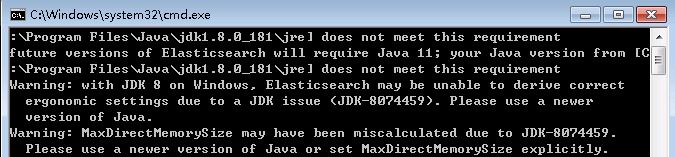
以上为windows下的示例。
这种情况一般是由于启用的高版本的Elasticsearch(版本7.x.x),这种情况,一般不影响Elasticsearch的启动,可以继续使用。
但有洁癖怎么办?
- 装jdk 11
- 按提示显示开启属性MaxDirectMemorySize
ES的bat脚本中写到运行属性的读取:
rem The JVM options parser produces the final JVM options to start

rem Elasticsearch. It does this by incorporating JVM options in the following

rem way:

rem   - first, system JVM options are applied (these are hardcoded options in

rem     the parser)

rem   - second, JVM options are read from jvm.options and

rem     jvm.options.d/*.options

rem   - third, JVM options from ES_JAVA_OPTS are applied

rem   - fourth, ergonomic JVM options are applied
按es读取属性的几种方式,我们可以在这四种方式中增加MaxDirectMemorySize属性。最简单的就是在jvm.options文件中添加属性即可。
在解压目录的config目录中找到jvm.options文件,用文本编辑器打开
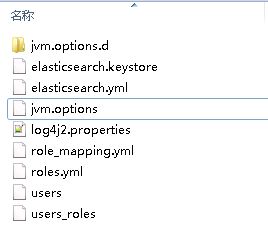
添加MaxDirectMemorySize配置:
-XX:MaxDirectMemorySize=64m
如图:
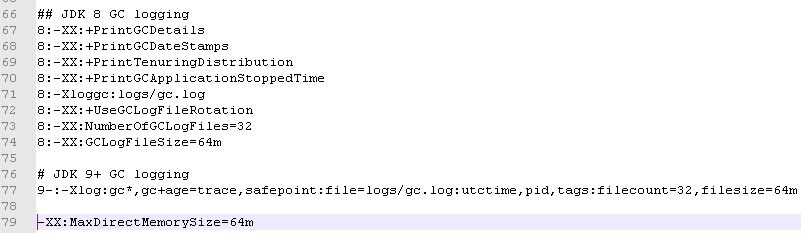
配置后,再次启用elasticsearch,就只会提示建议使用jdk 11了。
另外,zip解压后,其实是自带一个jdk的,那么,如果有相应的jdk使用问题,我们可以在系统的环境变量中将JAVA_HOME变量配置这个es下的jdk。
欢迎关注我的博客:Awu's Blog | 阿呜的边城
欢迎关注我的公众号:阿呜的编程

Elasticsearch启动报错:future versions of Elasticsearch will require Java 11的更多相关文章
- Linux安装ElasticSearch启动报错的解决方法
Linux安装ElasticSearch后,ElasticSearch是不能用root用户启动的,以root用户启动会报错Refer to the log for complete error det ...
- Eclipse启动报错An internal error occurred during: "Initializing Java Tooling"
Eclipse启动报错An internal error occurred during: "Initializing Java Tooling" 解决方案: 删除工作空间work ...
- 【elaseticsearch】elaseticsearch启动报错Caused by: org.elasticsearch.transport.BindTransportException: Failed to bind to [9300-9400]
elaseticsearch启动报错 [es1] uncaught exception in thread [main] org.elasticsearch.bootstrap.StartupExce ...
- tomcat启动报错There is insufficient memory for the Java Runtime Environment to continue
tomcat启动报错后显示以下错误 ## There is insufficient memory for the Java Runtime Environment to continue.# Nat ...
- ElasticSearch启动报错,bootstrap checks failed
修改elasticsearch.yml配置文件,允许外网访问. vim config/elasticsearch.yml# 增加 network.host: 0.0.0.0 启动失败,检查没有通过,报 ...
- Eclipse 启动报错 An internal error occurred during: "Initializing Java Tooling"
如图所示,我的Eclispe版本是Oxygen,启动的时候turnaround弹出这种错误. 多种情况会导致这种报错.通过[重置窗口布局],可解决大部分情况: 解决办法:点击菜单导航栏的Window ...
- springCloud 服务注册启动报错<com.sun.jersey.api.client.ClientHandlerException: java.net.ConnectException: Connection refused: connect>
报错:com.sun.jersey.api.client.ClientHandlerException: java.net.ConnectException: Connection refused: ...
- tomcat启动报错:IOException while loading persisted sessions: java.io.EOFException.
tomcat启动错误代码: 严重: IOException while loading persisted sessions: java.io.EOFException java.io.EOFExce ...
- SpringBoot整合Elasticsearch启动报错处理 nested exception is java.lang.IllegalStateException: availableProcessors is already set to [8], rejecting [8]
Caused by: org.springframework.beans.factory.UnsatisfiedDependencyException: Error creating bean wit ...
随机推荐
- vulnhub靶机Os-hackNos-1
vulnhub靶机Os-hackNos-1 信息搜集 nmap -sP 192.168.114.0/24 找到开放机器192.168.114.140这台机器,再对这台靶机进行端口扫描. 这里对他的端口 ...
- centos 端口测试之nc使用
服务器端口测试是否正常,运维一般使用telnet来检查,但它有局限性,服务器的端口必须存在服务运行. 这时使用nc可以在服务端模拟开启一个端口,再通过nc测试此端口,好用! nc是netcat工具的简 ...
- Apache Shiro 1.3.2入门
简介 Apache Shiro是一个功能强大且灵活的开放源代码安全框架,可以清楚地处理认证,授权,企业会话管理和加密.Apache Shiro的首要目标是易于使用和理解.有时候安全性可能非常复杂和痛苦 ...
- Win7 64X 安装VisualSVNServer 2.6.0过程中出现Custom action InstallWMISchemaExcute failed: Cannot query proxy blanket: No such interface supported (0x80004002)
Win7 64X 安装VisualSVNServer 2.6.0过程中出现错误:Custom action InstallWMISchemaExcute failed: Cannot query pr ...
- python中的filter、map、reduce、apply用法总结
1. filter 功能: filter的功能是过滤掉序列中不符合函数条件的元素,当序列中要删减的元素可以用某些函数描述时,就应该想起filter函数. 调用: filter(function,seq ...
- ByPass Mode(略过模式或旁路模式)
参考: 1. https://baike.baidu.com/item/%E6%97%81%E8%B7%AF%E6%A8%A1%E5%BC%8F/3120563 2. https://zhidao.b ...
- 阿里云服务器安装mongodb并且启动
// 1.下载 我是直接在local里面创一个mongodb文件夹进行下载和解压 curl -O https://fastdl.mongodb.org/linux/mongodb-linux-x86_ ...
- 一、Mysql(1)
数据库简介 人类在进化的过程中,创造了数字.文字.符号等来进行数据的记录,但是承受着认知能力和创造能力的提升,数据量越来越大,对于数据的记录和准确查找,成为了一个重大难题 计算机诞生后,数据开始在计算 ...
- 在自己电脑上查看git远程分支列表比实际云端的远程分支要多一些
问题 最近打开一个很久没有打开过的项目,使用git branch -a查看了一下所以分支,其中有些远程分支没有什么用了 于是准备去gitlab上删除它,结果到gitlab上发现没有这些分支,猜测是自己 ...
- CentOS7.7 系统下 virbr0 虚拟网卡的维护与管理
在 CentOS 7 系统的安装过程中,如果有选择相关虚拟化的的服务安装系统后,启动网卡时会发现有一个以网桥连接的私网地址的 virbr0 网卡,这个是因为在虚拟化中有使用到 libvirtd 服务生 ...