
iOS 聊天界面
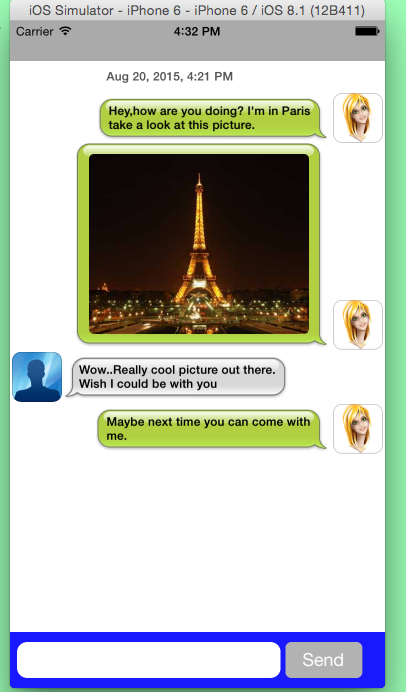
 #import <UIKit/UIKit.h>

 @interface AppDelegate : UIResponder <UIApplicationDelegate>

 @property (strong, nonatomic) UIWindow *window;

 @end
 #import "AppDelegate.h"

 #import "YXYCViewController.h"

 @interface AppDelegate ()

 @end

 @implementation AppDelegate

 - (BOOL)application:(UIApplication *)application didFinishLaunchingWithOptions:(NSDictionary *)launchOptions {

     self.window = [[UIWindow alloc] initWithFrame:[[UIScreen mainScreen] bounds]];

     // Override point for customization after application launch.

     self.window.backgroundColor = [UIColor whiteColor];

     self.window.rootViewController = [[YXYCViewController alloc] init];

     [self.window makeKeyAndVisible];

     return YES;

 }

 @end
 #import <UIKit/UIKit.h>

 @interface YXYCViewController : UIViewController

 @end
 #import "YXYCViewController.h"

 #import "YXYCChatUser.h"

 #import "YXYCChatTableViewDataSource.h"

 #import <QuartzCore/QuartzCore.h>

 #import "YXYCChatTableView.h"

 #import "YXYCChatData.h"

 #define lineHeight 16.0f

 #define scale [UIScreen mainScreen].bounds.size.width/320.0

 @interface YXYCViewController ()<YXYCChatTableViewDataSource,UITextViewDelegate>

 {

     UIView *textInputView;

     UITextField *textField;

     NSMutableArray *Chats;

     UIView *sendView;

     UIButton *sendButton;

     UITextView *msgText;

     BOOL composing;

     float prevLines;

     YXYCChatUser *me;

     YXYCChatUser *you;

     //键盘的高度

     float keyboardHeight;

 }

 @property (strong, nonatomic) YXYCChatTableView *chatTable;

 @end

 @implementation YXYCViewController

 CGRect appFrame;

 - (void)viewDidLoad {

     [super viewDidLoad];

     // 添加监听

     [self addNotification];

     // 设置背景颜色

     self.view.backgroundColor = [UIColor lightGrayColor];

     // 初始化tableView

     [self setupTableView];

     // 初始化view和textView

     [self setupUIViewAndUITextView];

     // 初始化sendButton

     [self setupSendButton];

     // 加载数据

     [self loadData];

 }

 // 初始化YXYCChatTableView

 - (void)setupTableView

 {

     appFrame = [[UIScreen mainScreen] bounds];

     // 创建一个self.chatTable(YXYCChatTableView类型)

     self.chatTable = [[YXYCChatTableView alloc] initWithFrame:CGRectMake(, , [[UIScreen mainScreen] bounds].size.width, [[UIScreen mainScreen] bounds].size.height - ) style:UITableViewStylePlain];

     // 设置self.chatTable的背景颜色

     self.chatTable.backgroundColor = [UIColor whiteColor];

     [self.view addSubview:self.chatTable];

 }

 // 初始化sendView和msgText

 - (void)setupUIViewAndUITextView

 {

     // 初始化sendView

     sendView = [[UIView alloc] initWithFrame:CGRectMake(, appFrame.size.height-, appFrame.size.width, )];

     sendView.backgroundColor = [UIColor blueColor];

     sendView.alpha = 0.9;

     // 初始化msgText

     msgText = [[UITextView alloc] initWithFrame:CGRectMake(, , *scale, )];

     msgText.backgroundColor = [UIColor whiteColor];

     msgText.textColor = [UIColor blackColor];

     msgText.font = [UIFont boldSystemFontOfSize:];

     // 自动调整与父视图的位置 UIViewAutoresizingFlexibleHeight 自动调整自己的高度,保证与superView顶部和底部的距离不变;UIViewAutoresizingFlexibleTopMargin 自动调整与superView顶部的距离,保证与superView底部的距离不变。

     msgText.autoresizingMask = UIViewAutoresizingFlexibleHeight | UIViewAutoresizingFlexibleTopMargin;

     // 设置圆角半径

     msgText.layer.cornerRadius = 10.0f;

     // 设置键盘返回键的类型

     msgText.returnKeyType = UIReturnKeySend;

     msgText.showsHorizontalScrollIndicator = NO;

     msgText.showsVerticalScrollIndicator = NO;

     // 设置UITextView代理

     msgText.delegate = self;

     [sendView addSubview:msgText];

     msgText.contentInset = UIEdgeInsetsMake(, , , );

     [self.view addSubview:sendView];

 }

 // 初始化sendButton

 - (void)setupSendButton

 {

     sendButton = [[UIButton alloc] initWithFrame:CGRectMake(*scale, , , )];

     sendButton.backgroundColor = [UIColor lightGrayColor];

     [sendButton addTarget:self action:@selector(sendMessage) forControlEvents:UIControlEventTouchUpInside];

     // 自动调整与父视图的位置

     sendButton.autoresizingMask = UIViewAutoresizingFlexibleTopMargin;

     sendButton.layer.cornerRadius = 6.0f;

     [sendButton setTitle:@"Send" forState:UIControlStateNormal];

     [sendView addSubview:sendButton];

 }

 // 加载数据

 - (void)loadData

 {

     // 创建两个YXYCChatUser对象

     me = [[YXYCChatUser alloc] initWithUsername:@"Peter" avatarImage:[UIImage imageNamed:@"me.png"]];

     you = [[YXYCChatUser alloc] initWithUsername:@"You" avatarImage:[UIImage imageNamed:@"noavatar.png"]];

     //创建几个YXYCChatData对象

     YXYCChatData *first = [YXYCChatData dataWithText:@"Hey,how are you doing? I'm in Paris take a look at this picture." date:[NSDate dateWithTimeIntervalSinceNow:-] type:ChatTypeMine andUser:me];

     YXYCChatData *second = [YXYCChatData dataWithImage:[UIImage imageNamed:@"eiffeltower.jpg"] date:[NSDate dateWithTimeIntervalSinceNow:-] type:ChatTypeMine andUser:me];

     YXYCChatData *third = [YXYCChatData dataWithText:@"Wow..Really cool picture out there. Wish I could be with you" date:[NSDate dateWithTimeIntervalSinceNow:-] type:ChatTypeSomeone andUser:you];

     YXYCChatData *forth = [YXYCChatData dataWithText:@"Maybe next time you can come with me." date:[NSDate dateWithTimeIntervalSinceNow:+] type:ChatTypeMine andUser:me];

     // 通过YXYCChatData对象来初始化Chats(数组)

     Chats = [[NSMutableArray alloc] initWithObjects:first,second,third,forth, nil];

     // 确认YXYCChatTableViewDataSource的代理

     self.chatTable.chatDataSource = self;

     // 调用reloadData方法(此方法已被重写)

     [self.chatTable reloadData];

 }

 // 页面消失时移除监听

 - (void)viewDidDisappear:(BOOL)animated

 {

     [self removeNotification];

 }

 - (void)sendMessage

 {

     composing = NO;

     YXYCChatData *thisChat = [YXYCChatData dataWithText:msgText.text date:[NSDate date] type:ChatTypeMine andUser:me];

     [Chats addObject:thisChat];

     [self.chatTable reloadData];

     [self showTableView];

     // 注销msgText为第一响应者

     [msgText resignFirstResponder];

     // 清除原来的文本内容

     msgText.text = @"";

     sendView.frame = CGRectMake(, appFrame.size.height - , *scale, );

     // TODO:注意

     NSIndexPath *indexPath = [NSIndexPath indexPathForRow:[Chats count] inSection:];

     // tableView 滚到底部

     [self.chatTable scrollToRowAtIndexPath:indexPath atScrollPosition:UITableViewScrollPositionBottom animated:YES];

 }

 #pragma mark -UITextViewDelegat-

 //如果用户按回车键,则认为结束编辑,并进行发送消息

 - (BOOL)textView:(UITextView *)textView shouldChangeTextInRange:(NSRange)range replacementText:(NSString *)text

 {

     if ([text isEqualToString:@"\n"]) {

         [self sendMessage];

         return NO;

     }

     return YES;

 }

 /**

  *  @return 返回输入文本在UITextView上的高度

  */

 - (CGFloat)textY

 {

     // 设置字体的样式和大小

     UIFont *systemFont = [UIFont boldSystemFontOfSize:];

     int width = 225.0, heigth = 10000.0;

     NSMutableDictionary *atts = [[NSMutableDictionary alloc] init];

     [atts setObject:systemFont forKey:NSFontAttributeName];

     // 根据文字量返回CGRect

     CGRect size = [msgText.text boundingRectWithSize:CGSizeMake(width, heigth) options:NSStringDrawingUsesLineFragmentOrigin attributes:atts context:nil];

     //获取文字的高度

     float textHeight = size.size.height;

     float lines = textHeight / lineHeight;

     if (lines >= ) {

         lines = ;

     }

     if ([msgText.text length] == ) {

         lines = 0.9375f;

     }

     return  - (lines * lineHeight) + lineHeight;

 }

 // 输入文字时,重新计算和布置sendView的frame,并保持在键盘上方

 - (void)textViewDidChange:(UITextView *)textView

 {

     // 设置文字的样式和大小

     UIFont *systemFont = [UIFont boldSystemFontOfSize:];

     int width = 225.0, height = 10000.0;

     NSMutableDictionary *atts = [[NSMutableDictionary alloc] init];

     [atts setObject:systemFont forKey:NSFontAttributeName];

     CGRect size = [msgText.text boundingRectWithSize:CGSizeMake(width, height) options:NSStringDrawingUsesLineFragmentOrigin attributes:atts context:nil];

     float textHeight = size.size.height;

     float lines = textHeight / lineHeight;

     if (lines > ) {

         lines = ;

     }

     composing = YES;

     msgText.contentInset = UIEdgeInsetsMake(, , , );

     sendView.frame = CGRectMake(, appFrame.size.height - keyboardHeight -  - (lines * lineHeight) + lineHeight, appFrame.size.width,  + (lines * lineHeight) - lineHeight);

     if (prevLines != lines) {

         [self shortenTableView];

     }

     prevLines = lines;

 }

 // let's change the frame of the chatTable so we can see the bottom

 - (void)shortenTableView

 {

     [UIView beginAnimations:@"moveView" context:nil];

     [UIView setAnimationDuration:0.1];

     self.chatTable.frame = CGRectMake(, , appFrame.size.width, appFrame.size.height - keyboardHeight-  -  );

     [UIView commitAnimations];

     prevLines = ;

 }

 // show the chatTable as it was

 - (void)showTableView

 {

     [UIView beginAnimations:@"moveView" context:nil];

     [UIView setAnimationDuration:0.1];

     self.chatTable.frame = CGRectMake(, , appFrame.size.width, appFrame.size.height -  - );

     [UIView commitAnimations];

 }

 // when users starts typing change the frame position and shorten the chatTable

 - (void)textViewDidBeginEditing:(UITextView *)textView

 {

     [UIView beginAnimations:@"moveView" context:nil];

     [UIView setAnimationDuration:0.3];

     sendView.frame = CGRectMake(, appFrame.size.height - keyboardHeight - , appFrame.size.width, );

     [UIView commitAnimations];

     [self shortenTableView];

     // 变成第一响应者

     [msgText becomeFirstResponder];

 }

 - (void)addNotification

 {

     //键盘出现通知

     [[NSNotificationCenter defaultCenter] addObserver:self

                                              selector:@selector(handleKeyBoardShow:)

                                                  name:UIKeyboardWillShowNotification object:nil];

 }

 #pragma mark - keyboard delegate

 -(void)handleKeyBoardShow:(NSNotification*)notify

 {

     NSDictionary *info = [notify userInfo];

     // 获取键盘的尺寸

     CGSize keyboardSize = [[info objectForKey:UIKeyboardFrameEndUserInfoKey] CGRectValue].size;

     //获取键盘的高度

     keyboardHeight = keyboardSize.height;

 }

 // 移除监听

 -(void)removeNotification

 {

     [[NSNotificationCenter defaultCenter] removeObserver:self];

 }

 - (BOOL)shouldAutorotateToInterfaceOrientation:(UIInterfaceOrientation)interfaceOrientation

 {

     return (interfaceOrientation != UIInterfaceOrientationPortraitUpsideDown);

 }

 #pragma mark - YXYCChatTableView implementation

 // here are the required implementation from your YXYCChatTableViewDataSource

 - (NSInteger)rowsForChatTable:(YXYCChatTableView *)tableView

 {

     return [Chats count];

 }

 - (YXYCChatData *)chatTableView:(YXYCChatTableView *)tableView dataForRow:(NSInteger)row

 {

     return [Chats objectAtIndex:row];

 }

 - (void)didReceiveMemoryWarning {

     [super didReceiveMemoryWarning];

 }

 @end
 #import <Foundation/Foundation.h>

 @class YXYCChatData;

 @class YXYCChatTableView;

 @protocol YXYCChatTableViewDataSource <NSObject>

 - (NSInteger)rowsForChatTable:(YXYCChatTableView *)tableView;

 - (YXYCChatData *)chatTableView:(YXYCChatTableView *)tableView dataForRow:(NSInteger)row;

 @end
 #import <Foundation/Foundation.h>

 #import <UIKit/UIKit.h>

 @class YXYCChatUser;

 //枚举(聊天类型)

 typedef enum _YXYCChatType

 {

     ChatTypeMine = ,

     ChatTypeSomeone =

 } YXYCChatType;

 @interface YXYCChatData : NSObject

 /**

  *  聊天的对象类型

  */

 @property (readonly, nonatomic) YXYCChatType type;

 /**

  *  日期

  */

 @property (readonly, nonatomic, strong) NSDate *date;

 @property (readonly, nonatomic, strong) UIView *view;

 @property (readonly, nonatomic) UIEdgeInsets insets;

 /**

  *  聊天的用户

  */

 @property (nonatomic, strong) YXYCChatUser *chatUser;

 // 自定义初始化

 + (id)dataWithText:(NSString *)text date:(NSDate *)date type:(YXYCChatType)type andUser:(YXYCChatUser *)_user;

 + (id)dataWithImage:(UIImage *)image date:(NSDate *)date type:(YXYCChatType)type andUser:(YXYCChatUser *)_user;

 + (id)dataWithView:(UIView *)view date:(NSDate *)date type:(YXYCChatType)type andUser:(YXYCChatUser *)_user insets:(UIEdgeInsets)insets;

 @end
 #import "YXYCChatData.h"

 #import <QuartzCore/QuartzCore.h>

 @implementation YXYCChatData

 //设置一些文本和图片的常量

 const UIEdgeInsets textInsetsMine = {, , , };

 const UIEdgeInsets textInsetsSomeone = {, , , };

 const UIEdgeInsets imageInsetsMine = {, , , };

 const UIEdgeInsets imageInsetsSomeone = {, , , };

 #pragma mark initializers

 + (id)dataWithText:(NSString *)text date:(NSDate *)date type:(YXYCChatType)type andUser:(YXYCChatUser *)_user

 {

     return [[YXYCChatData alloc] initWithText:text date:date type:type andUser:_user];

 }

 /**

  *  初始化

  *

  *  @param text  内容

  *  @param date  日期

  *  @param type  聊天对象类型

  *  @param _user 用户

  *

  *  @return YXYCChatData对象

  */

 - (id)initWithText:(NSString *)text date:(NSDate *)date type:(YXYCChatType)type andUser:(YXYCChatUser *)_user

 {

     // 设置字体

     UIFont *font = [UIFont boldSystemFontOfSize:];

     // 文本显示的宽,以及最大的高度

     int width =  , height = 10000.0;

     NSMutableDictionary *atts = [[NSMutableDictionary alloc] init];

     [atts setObject:font forKey:NSFontAttributeName];

     // 根据文本内容返回CGRect

     CGRect size = [text boundingRectWithSize:CGSizeMake(width, height) options:NSStringDrawingUsesLineFragmentOrigin attributes:atts context:nil];

     // 根据返回的尺寸初始化Label

     UILabel *label = [[UILabel alloc] initWithFrame:CGRectMake(, , size.size.width, size.size.height)];

     // 可多行输入

     label.numberOfLines = ;

     // 以单词为单位换行,以单位为单位截断

     label.lineBreakMode = NSLineBreakByWordWrapping;

     // text参数若存在,Label则显示text的内容;否则Label不显示文本内容

     label.text = (text ? text : @"");

     label.font = font;

     label.backgroundColor = [UIColor clearColor];

     UIEdgeInsets insets = (type == ChatTypeMine ? textInsetsMine : textInsetsSomeone);

     return [self initWithView:label date:date type:type andUser:_user insets:insets];

 }

 + (id)dataWithImage:(UIImage *)image date:(NSDate *)date type:(YXYCChatType)type andUser:(YXYCChatUser *)_user

 {

     return [[YXYCChatData alloc] initWithImage:image date:date type:type andUser:_user];

 }

 /**

  *  初始化

  *

  *  @param image 图片

  *  @param date  日期

  *  @param type  聊天对象的类型

  *  @param _user 用户

  *

  *  @return YXYCChatData对象类型

  */

 - (id)initWithImage:(UIImage *)image date:(NSDate *)date type:(YXYCChatType)type andUser:(YXYCChatUser *)_user

 {

     // 获取图片的尺寸

     CGSize size = image.size;

     // 如果图片的宽大于220,size的宽就等于220,size的高度等于原来的高度与原来的宽度的比例乘以220

     if (size.width > ) {

         size.height /= (size.width/);

         size.width = ;

     }

     // 根据size的大小初始化imageView

     UIImageView *imageView = [[UIImageView alloc] initWithFrame:CGRectMake(, , size.width, size.height)];

     imageView.image = image;

     //设置imageView的圆角半径

     imageView.layer.cornerRadius = 5.0;

     imageView.layer.masksToBounds = YES;

     UIEdgeInsets insets = (type == ChatTypeMine ? imageInsetsMine : imageInsetsSomeone);

     return [self initWithView:imageView date:date type:type andUser:_user insets:insets];

 }

 + (id)dataWithView:(UIView *)view date:(NSDate *)date type:(YXYCChatType)type andUser:(YXYCChatUser *)_user insets:(UIEdgeInsets)insets

 {

     return [[YXYCChatData alloc] initWithView:view date:date type:type andUser:(YXYCChatUser *)_user insets:insets];

 }

 /**

  *  初始化

  *

  *  @param view   view

  *  @param date   日期

  *  @param type   聊天对象的类型

  *  @param _user  用户

  *  @param insets

  *

  *  @return YXYCChatData对象类型

  */

 - (id)initWithView:(UIView *)view date:(NSDate *)date type:(YXYCChatType)type andUser:(YXYCChatUser *)_user insets:(UIEdgeInsets)insets

 {

     self = [super init];

     if (self) {

         _chatUser = _user;

         _view = view;

         _date = date;

         _type = type;

         _insets = insets;

     }

     return self;

 }

 @end
 #import <UIKit/UIKit.h>

 @interface YXYCChatHeaderTableViewCell : UITableViewCell

 /**

  *  日期

  */

 @property (nonatomic, strong) NSDate *date;

 + (CGFloat)height;

 @end
 #import "YXYCChatHeaderTableViewCell.h"

 @interface  YXYCChatHeaderTableViewCell()

 @property (nonatomic, retain) UILabel *label;

 @end

 @implementation YXYCChatHeaderTableViewCell

 + (CGFloat)height

 {

     return 30.0;

 }

 /**

  *  设置时间,并把时间显示在YXYCChatHeaderTableViewCell上

  */

 - (void)setDate:(NSDate *)value

 {

     // 初始化dateFormatter

     NSDateFormatter *dateFormatter = [[NSDateFormatter alloc] init];

     // 设置日期显示的方式

     [dateFormatter setDateStyle:NSDateFormatterMediumStyle];

     // 设置时间显示的方式

     [dateFormatter setTimeStyle:NSDateFormatterShortStyle];

     NSString *text = [dateFormatter stringFromDate:value];

     if (self.label) {

         self.label.text = text;

         return;

     }

     self.selectionStyle = UITableViewCellSelectionStyleNone;

     // 初始化UILabel

     self.label = [[UILabel alloc] initWithFrame:CGRectMake(, , self.frame.size.width, [YXYCChatHeaderTableViewCell height])];

     //设置Label的文本内容

     self.label.text = text;

     // 设置Label文本字体的大小

     self.label.font = [UIFont boldSystemFontOfSize:];

     // Label文本居中

     self.label.textAlignment = NSTextAlignmentCenter;

     // 设置Label文字的阴影偏余量

     self.label.shadowOffset = CGSizeMake(, );

     // 设置Label文字阴影的颜色

     self.label.shadowColor = [UIColor whiteColor];

     // 设置Label文件的颜色

     self.label.textColor = [UIColor darkGrayColor];

     // 设置Label的背景颜色

     self.label.backgroundColor = [UIColor clearColor];

     [self addSubview:self.label];

 }

 - (void)awakeFromNib {

     // Initialization code

 }

 - (void)setSelected:(BOOL)selected animated:(BOOL)animated {

     [super setSelected:selected animated:animated];

     // Configure the view for the selected state

 }

 @end
 #import <Foundation/Foundation.h>

 #import <UIKit/UIKit.h>

 @interface YXYCChatUser : NSObject

 /**

  *  用户名字

  */

 @property (nonatomic, strong) NSString *username;

 /**

  *  头像

  */

 @property (nonatomic, strong) UIImage *avatar;

 /**

  *  初始化

  *

  *  @param user  用户

  *  @param image 头像

  *

  *  @return 返回id类型

  */

 - (id)initWithUsername:(NSString *)user avatarImage:(UIImage *)image;

 @end
 #import "YXYCChatUser.h"

 @implementation YXYCChatUser

 @synthesize avatar;

 @synthesize username;

 - (id)initWithUsername:(NSString *)user avatarImage:(UIImage *)image

 {

     self = [super init];

     if (self) {

         self.avatar = [image copy];

         self.username = [user copy];

     }

     return self;

 }

 @end
 #import <UIKit/UIKit.h>

 #import "YXYCChatData.h"

 @interface YXYCChatTableViewCell : UITableViewCell

 /**

  *  日期

  */

 @property (nonatomic, strong) YXYCChatData *data;

 /**

  *  设置日期

  */

 - (void)setData:(YXYCChatData *)data;

 @end
 #import "YXYCChatTableViewCell.h"

 #import "YXYCChatData.h"

 #import <QuartzCore/QuartzCore.h>

 #import "YXYCChatUser.h"

 @interface YXYCChatTableViewCell ()

 @property (nonatomic, retain) UIView *customView;

 @property (nonatomic, retain) UIImageView *bubbleImage;

 /**

  *  头像

  */

 @property (nonatomic, retain) UIImageView *avatarImage;

 //- (void)setupInternalData;

 @end

 @implementation YXYCChatTableViewCell

 @synthesize data = _data;

 - (void)setData:(YXYCChatData *)data

 {

     _data = data;

     [self rebuildUserInterface];

 }

 - (void)rebuildUserInterface

 {

     self.selectionStyle = UITableViewCellSelectionStyleNone;

     // 如果bubbleImage为空,则创建

     if (!self.bubbleImage) {

         self.bubbleImage = [[UIImageView alloc] init];

         [self addSubview:self.bubbleImage];

     }

     YXYCChatType type = self.data.type;

     CGFloat width = self.data.view.frame.size.width;

     CGFloat height = self.data.view.frame.size.height;

     CGFloat x = (type == ChatTypeSomeone) ?  : self.frame.size.width - width - self.data.insets.left - self.data.insets.right;

     CGFloat y = ;

     // 如果用户有头像,则显示头像

     if (self.data.chatUser) {

         YXYCChatUser *thisUser = self.data.chatUser;

         [self.avatarImage removeFromSuperview];

         self.avatarImage = [[UIImageView alloc] initWithImage:(thisUser.avatar ? thisUser.avatar : [UIImage imageNamed:@"noavatar.png"])];

         self.avatarImage.layer.cornerRadius = 9.0;

         self.avatarImage.layer.masksToBounds = YES;

         // 设置avatarImage的边框颜色

         self.avatarImage.layer.borderColor = [UIColor colorWithWhite:0.0 alpha:0.2].CGColor;

         // 设置avatarImage边框的粗细

         self.avatarImage.layer.borderWidth = 1.0;

         // 计算x的位置

         CGFloat avatarX = (type == ChatTypeSomeone) ?  : self.frame.size.width - ;

         CGFloat avatarY = self.frame.size.height - ;

         //设计frame

         self.avatarImage.frame = CGRectMake(avatarX, avatarY, , );

         [self addSubview:self.avatarImage];

         CGFloat delta = self.frame.size.height - (self.data.insets.top + self.data.insets.bottom + self.data.view.frame.size.height);

         if (delta > ) y = delta;

         if (type == ChatTypeSomeone) x += ;

         if (type == ChatTypeMine) x -= ;

     }

     [self.customView removeFromSuperview];

     self.customView = self.data.view;

     self.customView.frame = CGRectMake(x + self.data.insets.left, y + self.data.insets.top, width, height);

     [self.contentView addSubview:self.customView];

     //

     if (type == ChatTypeSomeone) {

         //创建一个内容可拉伸,而边角不拉伸的图片,需要两个参数,第一个是左边不拉伸区域的宽度,第二个参数是上面不拉伸的高度。

         self.bubbleImage.image = [[UIImage imageNamed:@"yoububble.png"] stretchableImageWithLeftCapWidth: topCapHeight:];

     }else{

         self.bubbleImage.image = [[UIImage imageNamed:@"mebubble.png"] stretchableImageWithLeftCapWidth: topCapHeight:];

     }

     self.bubbleImage.frame = CGRectMake(x, y, width + self.data.insets.left + self.data.insets.right, height + self.data.insets.top + self.data.insets.bottom);

 }

 //- (void)setUP:(YXYCChatData *)value

 //{

 //    self.data = value;

 //    [self rebuildUserInterface];

 //}

 - (void)setFrame:(CGRect)frame

 {

     [super setFrame:frame];

     [self rebuildUserInterface];

 }

 - (void)awakeFromNib {

     // Initialization code

 }

 - (void)setSelected:(BOOL)selected animated:(BOOL)animated {

     [super setSelected:selected animated:animated];

     // Configure the view for the selected state

 }

 @end
 #import <UIKit/UIKit.h>

 #import "YXYCChatTableViewDataSource.h"

 #import "YXYCChatTableViewCell.h"

 typedef enum _ChatBubbleTypingType

 {

     ChatBubbleTypingTypeNobody = ,

     ChatBubbleTypingTypeMe = ,

     ChatBubbleTypingTypeSomebody =

 } ChatBubbleTypingType;

 @interface YXYCChatTableView : UITableView

 /**

  *  添加代理

  */

 @property (nonatomic, assign) id<YXYCChatTableViewDataSource> chatDataSource;

 /**

  *  时间间隔

  */

 @property (nonatomic) NSTimeInterval snapInterval;

 @property (nonatomic) ChatBubbleTypingType typingBubble;

 @end
 #import "YXYCChatTableView.h"

 #import "YXYCChatData.h"

 #import "YXYCChatHeaderTableViewCell.h"

 @interface YXYCChatTableView ()<UITableViewDelegate,UITableViewDataSource>

 @property (nonatomic, strong) NSMutableArray *bubbleSection;

 @end

 @implementation YXYCChatTableView

 - (id)init

 {

     self = [super init];

     if (self) [self initializer];

     return self;

 }

 - (void)initializer

 {

     self.backgroundColor = [UIColor clearColor];

     // 隐藏cell与cell之间的分离线

     self.separatorStyle = UITableViewCellSeparatorStyleNone;

     // 设置代理

     self.delegate = self;

     self.dataSource = self;

     self.snapInterval =  *  * ;//一天的时间

     self.typingBubble = ChatBubbleTypingTypeNobody;

 }

 - (id)initWithFrame:(CGRect)frame

 {

     self = [super initWithFrame:frame];

     if (self) [self initializer];

     return self;

 }

 - (id)initWithFrame:(CGRect)frame style:(UITableViewStyle)style

 {

     self = [super initWithFrame:frame style:UITableViewStylePlain];

     if (self) {

         [self initializer];

     }

     return self;

 }

 #pragma mark - 重写tableView的部分方法-

 - (void)reloadData

 {

     self.showsHorizontalScrollIndicator = NO;

     self.showsVerticalScrollIndicator = NO;

     self.bubbleSection = nil;

     int count = ;

     self.bubbleSection = [[NSMutableArray alloc] init];

     if (self.chatDataSource && (count = (int)[self.chatDataSource rowsForChatTable:self]) > ) {

         NSMutableArray *bubbleData = [[NSMutableArray alloc] initWithCapacity:count];

         for (int i = ; i < count; i++) {

             NSObject *object = [self.chatDataSource chatTableView:self dataForRow:i];

             assert([object isKindOfClass:[YXYCChatData class]]);

             [bubbleData addObject:object];

         }

         // 根据时间进行排列

         [bubbleData sortUsingComparator:^NSComparisonResult(id obj1, id obj2) {

             YXYCChatData *bubbleData1 = (YXYCChatData *)obj1;

             YXYCChatData *bubbleData2 = (YXYCChatData *)obj2;

             return [bubbleData1.date compare:bubbleData2.date];

         }];

         // 以GMT时间的偏移秒数来初始化

         NSDate *last = [NSDate dateWithTimeIntervalSince1970:];

         NSMutableArray *currentSection = nil;

         for (int i = ; i < count; i++) {

             YXYCChatData *data = (YXYCChatData *)[bubbleData objectAtIndex:i];

             // 如果时间大于一天的时间就存入self.bubbleSection(用于分区)

             if ([data.date timeIntervalSinceDate:last] > self.snapInterval) {

                 currentSection = [[NSMutableArray alloc] init];

                 [self.bubbleSection addObject:currentSection];

             }

             [currentSection addObject:data];

             last = data.date;

         }

     }

     [super reloadData];

 }

 - (NSInteger)numberOfSectionsInTableView:(UITableView *)tableView

 {

     int result = (int)[self.bubbleSection count];

     if (self.typingBubble != ChatBubbleTypingTypeNobody) {

         result ++;

     }

     return result;

 }

 - (NSInteger)tableView:(UITableView *)tableView numberOfRowsInSection:(NSInteger)section

 {

     if (section >= [self.bubbleSection count]) {

         return ;

     }

     return [[self.bubbleSection objectAtIndex:section] count] + ;

 }

 - (CGFloat)tableView:(UITableView *)tableView heightForRowAtIndexPath:(NSIndexPath *)indexPath

 {

     // Header

     if (indexPath.row == ) {

         return [YXYCChatHeaderTableViewCell height];

     }

     YXYCChatData *data = [[self.bubbleSection objectAtIndex:indexPath.section] objectAtIndex:indexPath.row - ];

     return MAX(data.insets.top + data.view.frame.size.height + data.insets.bottom, );

 }

 - (UITableViewCell *)tableView:(UITableView *)tableView cellForRowAtIndexPath:(NSIndexPath *)indexPath

 {

     //Header based on snapInterval

     if (indexPath.row == ) {

         static NSString *cellId = @"HeaderCell";

         YXYCChatHeaderTableViewCell *cell = [tableView dequeueReusableCellWithIdentifier:cellId];

         YXYCChatData *data = [[self.bubbleSection objectAtIndex:indexPath.section] objectAtIndex:];

         if (cell == nil) {

             cell = [[YXYCChatHeaderTableViewCell alloc] init];

         }

         cell.date = data.date;

         return cell;

     }

     //Standard

     static NSString * cellId = @"ChatCell";

     YXYCChatTableViewCell *cell = [tableView dequeueReusableCellWithIdentifier:cellId];

     YXYCChatData *data = [[self.bubbleSection objectAtIndex:indexPath.section] objectAtIndex:indexPath.row - ];

     if (cell == nil) {

         cell = [[YXYCChatTableViewCell alloc] init];

     }

     cell.data = data;

     return cell;

 }

 @end
iOS 聊天界面的更多相关文章
- iOS打开手机QQ与指定用户聊天界面
开发中遇到一个联系客服qq的需求,找到这么一个实现方法,先记录下来.大概的原理就是,iOS启动第三方应用是采用schema模式的,这有点像url,打开不同的界面使用不同的地址.但这个url怎么得来的还 ...
- [iOS基础控件 - 6.9] 聊天界面Demo
A.需求 做出一个类似于QQ.微信的聊天界面 1.每个cell包含发送时间.发送人(头像).发送信息 2.使用对方头像放在左边,我方头像在右边 3.对方信息使用白色背景对话框,我方信息使用蓝色背景对话 ...
- Android,iOS,浏览器打开手机QQ与指定用户聊天界面
在浏览器中可以通过JS代码打开QQ并弹出聊天界面,一般作为客服QQ使用.而在移动端腾讯貌似没有公布提供类似API,但是却可以使用schema模式来启动手机QQ. 以下为具体代码: 浏览器(包括手机浏览 ...
- 【转】Android,iOS打开手机QQ与指定用户聊天界面
在浏览器中可以通过JS代码打开QQ并弹出聊天界面,一般作为客服QQ使用.而在移动端腾讯貌似没有公布提供类似API,但是却可以使用schema模式来启动手机QQ. 以下为具体代码: Android: S ...
- iOS浏览器不能打开手机QQ客服与指定用户聊天界面
这个问题是我在公司需求的时候遇到的,QQ推广工具网站获取的链接在苹果自带浏览器没法打开到聊天界面,是因为safair在打开到app store的时候把参数给丢了,app store再打开到QQ的时候就 ...
- Android,iOS打开手机QQ与指定用户聊天界面
在浏览器中能够通过JS代码打开QQ并弹出聊天界面.一般作为客服QQ使用. 而在移动端腾讯貌似没有发布提供相似API,可是却能够使用schema模式来启动手机QQ. 下面为详细代码: Android: ...
- iOS开发——UI_swift篇&TableView自定义聊天界面
TableView自定义聊天界面 1,下面是一个放微信聊天界面的消息展示列表,实现的功能有: (1)消息可以是文本消息也可以是图片消息 (2)消息背景为气泡状图片,同时消息气泡可根据内容自适应大小 ...
- QQ聊天界面的布局和设计(IOS篇)-第二季
QQChat Layout - 第二季 本来第二季是快写好了, 也花了点功夫, 结果gitbook出了点问题, 给没掉了.有些细节可能会一带而过, 如有疑问, 相互交流进步~. 在第一季中我们完成了Q ...
- QQ聊天界面的布局和设计(IOS篇)-第一季
我写的源文件整个工程会再第二季中发上来~,存在百度网盘, 感兴趣的童鞋, 可以关注我的博客更新,到时自己去下载~.喵~~~ QQChat Layout - 第一季 一.准备工作 1.将假数据messa ...
随机推荐
- java中base64
// 将 s 进行 BASE64 编码 public static String getBASE64(String s) { if (s == null) return null; return (n ...
- 安装requests 库
这是我见过最恶心的安装了,嘛的,以为公司网络限制.我无法上网 使用 PIP INSTALL REQUESTS .本来就一句话的时 我一直安装不成功.https://www.lfd.uci.edu/~g ...
- python二分查找模块bisect
bisect模块用于二分查找,非常方便. Bisect模块提供的函数有: 1.查找 bisect.bisect_left(a,x, lo=0, hi=len(a)) : 查找在有序列表a中插入x的in ...
- 线程存储(Thread Specific Data)
线程中特有的线程存储, Thread Specific Data .线程存储有什么用了?他是什么意思了? 大家都知道,在多线程程序中,所有线程共享程序中的变量.现在有一全局变量,所有线程都可以使用它, ...
- mount: error mounting /dev/root on /sysroot as ext3: Invalid argument
/************************************************************************ * mount: error mounting /d ...
- 统计数字noip2007
7909:统计数字 总时间限制: 1000ms 内存限制: 65536kB 描述 某次科研调查时得到了n个自然数,每个数均不超过1500000000(1.5*109).已知不相同的数不超过1000 ...
- 输入一个链表,输出该链表中倒数第k个结点
package suanfa; import suanfa.doubleLinkedList.Node; public class solution { public Node find(Node h ...
- linux开发核心理解
目录 授权 致谢 序言 更新纪录 导读 如何写作科技文档 I. 气候 1. GUI? CLI? 2. UNIX 缩写风格 3. 版本号的迷雾 4. Vim 还是 Emacs 5. DocBoo ...
- xftp连接不上阿里云服务器
打开xftp默认是使用FTP协议,要连接到云服务器,需要将协议改为SFTP 连接成功
- Web项目安全相关博客日志大集合(仅供学习及参考)
强制使用HTTPS --- Tomcat篇 ---通过在tomcat/conf/web.xml中进行配置,从而将http自动转为https.(即强制HSTS)http://blog.csdn.net/ ...